

给出图 g 的连通分量.
ConnectedGraphComponents[g,{v1,v2,…}]
给出包括向量 v1、v2、… 中至少一个向量的连通分量.
ConnectedGraphComponents[g,patt]
给出包括匹配模式 patt 的顶点的连通分量.
ConnectedGraphComponents[{vw,…},…]
使用规则 vw 指定图 g.
ConnectedGraphComponents
给出图 g 的连通分量.
ConnectedGraphComponents[g,{v1,v2,…}]
给出包括向量 v1、v2、… 中至少一个向量的连通分量.
ConnectedGraphComponents[g,patt]
给出包括匹配模式 patt 的顶点的连通分量.
ConnectedGraphComponents[{vw,…},…]
使用规则 vw 指定图 g.
更多信息和选项
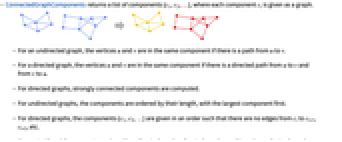
- ConnectedGraphComponents 返回分量 {c1,c2,…} 的列表,其中各个分量 ci 以图的形式给出.
- 对于无向图,如果有一个从 u 到 v 的路径,则顶点 u 和 v 在同一分量中.
- 对于有向图,如果有一个从 u 到 v 和从 v 到 u 的有向路径,则顶点 u 和 v 在同一分量中.
- 对于有向图,计算强连通分量.
- 对于无向图,分量按其长度排序,最大的分量排在首位.
- 对于有向图,分量 {c1,c2,…} 的给出顺序使得从 ci 到 ci+1、ci+2 等没有边.
- ConnectedGraphComponents 适用于无向图、有向图、多重图和混合图.

范例
打开所有单元 关闭所有单元基本范例 (1)
范围 (8)
ConnectedGraphComponents 适用于无向图:
ConnectedGraphComponents[[image]]ConnectedGraphComponents[[image]]ConnectedGraphComponents[[image]]ConnectedGraphComponents[[image]]ConnectedGraphComponents[{3 -> 1, 1 -> 5, 2 -> 4, 2 -> 6, 3 -> 5, 4 -> 6}]ConnectedGraphComponents[[image], {1, 7}]ConnectedGraphComponents[[image], v_ ? EvenQ]ConnectedGraphComponents 适用于大型图:
RandomGraph[{10000, 20000}];ConnectedGraphComponents[%]//Length//Timing应用 (4)
g = DirectedGraph[GridGraph[{10, 30}], "Random", VertexSize -> 0.6, GraphHighlightStyle -> "DehighlightFade"];HighlightGraph[g, Select[ConnectedGraphComponents[g], VertexCount[#] > 1&]]荷花池中的一只青蛙在25个荷叶之间跳跃,一次能跳1.5英尺. 从荷叶密度和 SpatialGraphDistribution 模拟青蛙的跳跃网络:
lilyDensity = MixtureDistribution[{1, 1, 1}, {BinormalDistribution[{0, 0}, {1, 1}, 0], BinormalDistribution[{-1, 4}, {1, 1}, -1 / 2], BinormalDistribution[{4, 4}, {1, 1}, 1 / 3]}];lilyPond = SpatialGraphDistribution[25, 1.5, lilyDensity];g = RandomGraph[lilyPond, VertexShape -> [image], VertexSize -> {"Scaled", 0.1}, EdgeStyle -> Opacity[0], Background -> Hue[0.6, 0.8, 0.4], ImageSize -> 150]VertexCount[First[ConnectedGraphComponents[g]]]Length[ConnectedGraphComponents[g]] - 1A = (| | | | | |
| -- | -- | -- | -- | -- |
| 0 | 0 | a2 | 0 | 0 |
| 0 | 0 | 0 | 0 | a3 |
| a5 | 0 | 0 | 0 | 0 |
| 0 | 0 | 0 | a4 | 0 |
| 0 | a1 | 0 | 0 | 0 |);AdjacencyGraph[Map[Boole[!PossibleZeroQ[#]]&, A, {2}]]VertexList /@ ConnectedGraphComponents[%]p = Flatten[%]A[[InversePermutation[p], p]]//MatrixForm属性和关系 (4)
使用 WeaklyConnectedGraphComponents 可获取有向图的弱连通分量:
g = Graph[{12, 23, 31, 34, 45, 35, 67}]WeaklyConnectedGraphComponents[g]ConnectedGraphComponents[UndirectedGraph[g]]使用 ConnectedGraphQ 以检测图形是否连通:
RandomGraph[{10, 8}]ConnectedGraphQ[%]g = GridGraph[{2, 3}]ConnectedGraphQ[g]ConnectedGraphComponents[g]//Lengthg = RandomGraph[{10, 8}]Length[ConnectedGraphComponents[g]] ≥ VertexCount[g] - EdgeCount[g]相关指南
-
▪
- 图分量与连通性
文本
Wolfram Research (2016),ConnectedGraphComponents,Wolfram 语言函数,https://reference.wolfram.com/language/ref/ConnectedGraphComponents.html.
CMS
Wolfram 语言. 2016. "ConnectedGraphComponents." Wolfram 语言与系统参考资料中心. Wolfram Research. https://reference.wolfram.com/language/ref/ConnectedGraphComponents.html.
APA
Wolfram 语言. (2016). ConnectedGraphComponents. Wolfram 语言与系统参考资料中心. 追溯自 https://reference.wolfram.com/language/ref/ConnectedGraphComponents.html 年
BibTeX
@misc{reference.wolfram_2026_connectedgraphcomponents, author="Wolfram Research", title="{ConnectedGraphComponents}", year="2016", howpublished="\url{https://reference.wolfram.com/language/ref/ConnectedGraphComponents.html}", note=[Accessed: 16-September-2026]}
BibLaTeX
@online{reference.wolfram_2026_connectedgraphcomponents, organization={Wolfram Research}, title={ConnectedGraphComponents}, year={2016}, url={https://reference.wolfram.com/language/ref/ConnectedGraphComponents.html}, note=[Accessed: 16-September-2026]}