ContourShading


ContourShading
等高線プロット用のオプションで,等高線の間の領域に陰影を付けるか付けないかを指定する.
詳細
- 次の設定を用いることができる.
-
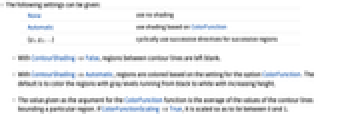
None 陰影付けは行わない Automatic ColorFunctionに基づいた陰影付けを行う {g1,g2,…} 連続する領域に連続する指示子を循環的に用いる - ContourShading->Falseでは,等高線の間の領域は空白になる.
- ContourShading->Automaticでは,オプションColorFunctionの設定に基づいてこの領域を彩色する.通常は,この領域は高くなるに従って黒から白へと移行するグレーレベルで彩色される.
- ColorFunction関数の引数として与えられる値は,等高線によって形成される特定の領域の平均値である.ColorFunctionScaling->Trueでは,0から1の範囲に収まるようにスケールされる.
例題
例 (4)
Wolfram Research (1991), ContourShading, Wolfram言語関数, https://reference.wolfram.com/language/ref/ContourShading.html (2007年に更新).
テキスト
Wolfram Research (1991), ContourShading, Wolfram言語関数, https://reference.wolfram.com/language/ref/ContourShading.html (2007年に更新).
CMS
Wolfram Language. 1991. "ContourShading." Wolfram Language & System Documentation Center. Wolfram Research. Last Modified 2007. https://reference.wolfram.com/language/ref/ContourShading.html.
APA
Wolfram Language. (1991). ContourShading. Wolfram Language & System Documentation Center. Retrieved from https://reference.wolfram.com/language/ref/ContourShading.html