DateTicksFormat


DateTicksFormat
是关于 DateListPlot 的一个选项,指定应该如何格式化日期记号标签.
更多信息
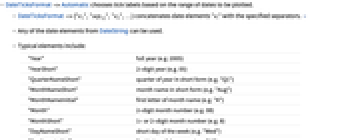
- DateTicksFormat->Automatic 根据所要绘制的日期范围,选择记号标签.
- DateTicksFormat->{"e1","sep12","e2",…} 使用指定的分隔符,连接日期元素 "ei". »
- 可以使用 DateString 中的任意日期元素.
- 一般元素包括:
-
"Year" 完整年份 (例如 2005) "YearShort" 2 位数字年份 (例如 05) "QuarterNameShort" 缩写形式的年份季度 (例如 "Q1") "MonthNameShort" 缩写形式的月份名称 (例如 "Aug") "MonthNameInitial" 月份名称的第一个字母 (例如 "A") "Month" 2 位数字的月份 (例如 08) "MonthShort" 1 位或 2 位数字的月份 (例如 8) "DayNameShort" 一周内一天的缩写形式 (例如 "Wed") "DayNameInitial" 一天名称的第一个字母 (例如 "W") "Day" 一月内 2 位数字表示的天数 (例如 09) "DayShort" 一月内 1 位 或 2 位数字表示的天数 (例如 9 或 29) "Hour12" 基于 12 小时制的时刻 "Hour24" 基于 24 小时制的时刻 "AMPM" AM 或PM "AMPMLowerCase" am 或 pm "Minute" 2 位数字的分钟数 (例如 05) "Second" 2 位数字的秒数
Wolfram Research (2007),DateTicksFormat,Wolfram 语言函数,https://reference.wolfram.com/language/ref/DateTicksFormat.html.
文本
Wolfram Research (2007),DateTicksFormat,Wolfram 语言函数,https://reference.wolfram.com/language/ref/DateTicksFormat.html.
CMS
Wolfram 语言. 2007. "DateTicksFormat." Wolfram 语言与系统参考资料中心. Wolfram Research. https://reference.wolfram.com/language/ref/DateTicksFormat.html.
APA
Wolfram 语言. (2007). DateTicksFormat. Wolfram 语言与系统参考资料中心. 追溯自 https://reference.wolfram.com/language/ref/DateTicksFormat.html 年