

DiffIgnore
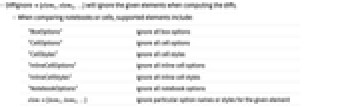
是 Diff 及相关函数的一个选项,指定计算 diff 时忽略哪些元素.
范例
打开所有单元 关闭所有单元基本范例 (3)
比较单元时,除了内容上的变化,Diff 还会查找任何样式和选项修改:
Diff[Cell["2+2", "Input"], Cell["3*5", "InputOnly", FontSize -> 14], Appearance -> "Details"]用 DiffIgnore 忽略所有样式和选项修改:
Diff[Cell["2+2", "Input"], Cell["3*5", "InputOnly", FontSize -> 14], Appearance -> "Details", DiffIgnore -> {"CellStyles", "CellOptions"}]用 DiffIgnore 忽略特定的单元选项:
Diff[
Cell["Hello world", "Text", FontSize -> 16],
Cell["Hello world", "Text", FontColor -> Blue], Appearance -> "Details", DiffIgnore -> "CellOptions" -> {FontColor}]比较笔记本时,Diff 的结果将包含笔记本选项的变化:
Diff[File[...], File[...]]["NotebookOptionDetails"]用 DiffIgnore 忽略特定的笔记本选项:
Diff[File[...], File[...], DiffIgnore -> {"NotebookOptions" -> {WindowSize, WindowMargins}}]["NotebookOptionDetails"]可能存在的问题 (1)
Table[uuid[i] = ExpressionUUID -> CreateUUID[], {i, 3}];
nb1 = Notebook[{
Cell["title", "Title", uuid@1],
Cell["subtitle", "Subtitle", uuid@2]}];
nb2 = Notebook[{
Cell["title", "Title", uuid@1],
Cell["abstact", "Abstract", uuid@3],
Cell["subtitle edited", "Subtitle", uuid@2]}];忽略单元选项 ExpressionUUID 可能会导致不同的对齐结果:
Diff[nb1, nb2]["SideBySide"]Diff[nb1, nb2, DiffIgnore -> {"CellOptions" -> ExpressionUUID}]["SideBySide"]文本
Wolfram Research (2024),DiffIgnore,Wolfram 语言函数,https://reference.wolfram.com/language/ref/DiffIgnore.html.
CMS
Wolfram 语言. 2024. "DiffIgnore." Wolfram 语言与系统参考资料中心. Wolfram Research. https://reference.wolfram.com/language/ref/DiffIgnore.html.
APA
Wolfram 语言. (2024). DiffIgnore. Wolfram 语言与系统参考资料中心. 追溯自 https://reference.wolfram.com/language/ref/DiffIgnore.html 年
BibTeX
@misc{reference.wolfram_2026_diffignore, author="Wolfram Research", title="{DiffIgnore}", year="2024", howpublished="\url{https://reference.wolfram.com/language/ref/DiffIgnore.html}", note=[Accessed: 09-September-2026]}
BibLaTeX
@online{reference.wolfram_2026_diffignore, organization={Wolfram Research}, title={DiffIgnore}, year={2024}, url={https://reference.wolfram.com/language/ref/DiffIgnore.html}, note=[Accessed: 09-September-2026]}