

FlatShading
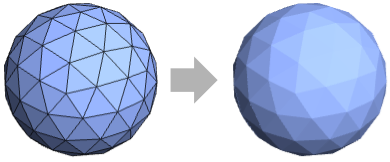
是一个三维图形指令,指定要绘制多边形和其他填充图形对象的表面以反射为平直表面.
FlatShading[d]
对漫射光使用衰减因子 d.
FlatShading[{d,a}]
对环境光使用衰减因子 a.
更多信息
- FlatShading 也称为逐面着色.
- FlatShading 通常用于使多边形的各个面和边易于可见.
- 多边形表面的最终颜色是根据多边形表面法线和标准着色产生的颜色亮度计算得出的.
- FlatShading[{d,a}] 指定三维表面漫射光的衰减因子为 d,环境光的衰减因子为 a.
- FlatShading[] 实际上等价于 FlatShading[1,1].
- 设置 Lighting"Accent" 使用定向光并忠实地再现表面上的颜色.
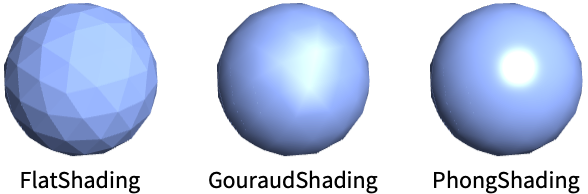
- 基本着色模型 FlatShading、GouraudShading 与 PhongShading 比较:
范例
打开所有单元 关闭所有单元基本范例 (4)
Graphics3D[{FlatShading[], GeodesicPolyhedron[5]}]Graphics3D[{FlatShading[], KnotData["SolomonSeal", "ImageData"]}]Plot3D[Sin[x + y ^ 2], {x, -3, 3}, {y, -2, 2}, PlotStyle -> FlatShading[], Mesh -> None, PlotPoints -> 5]model = ExampleData[{"Geometry3D", "Galleon"}, "GraphicsComplex"];
Graphics3D[{FlatShading[], model}]范围 (12)
基本用法 (5)
Graphics3D[{FlatShading[], #}]& /@ {Sphere[], CapsuleShape[], Cone[]}SphericalPlot3D[1 + 2 Cos[2 θ], {θ, 0, Pi}, {ϕ, 0, 2 Pi}, Axes -> False, PlotStyle -> FlatShading[], Mesh -> None]BarChart3D[Range[5], ChartElements -> [image], ChartStyle -> FlatShading[]]Graphics3D[{FlatShading[], ExampleData[{"Geometry3D", "Beethoven"}, "GraphicsComplex"]}]FlatShading[]规范 (4)
不带参数的 FlatShading 使用与默认系统着色器类似的漫反射和环境光计算:
Graphics3D[{FlatShading[], Sphere[]}]Graphics3D[{FlatShading[#], Sphere[]}]& /@ {0, 0.5, 1.0}Graphics3D[{FlatShading[{#, #}], Sphere[]}]& /@ {0, 0.5, 1.0}Graphics3D[{FlatShading[{#}], Sphere[]}]& /@ {0, 0.5, 1.0}Graphics3D[{FlatShading[{0, #}], Sphere[]}]& /@ {0, 0.5, 1.0}照明 (3)
FlatShading 适用于所有类型的光:
lights = {AmbientLight[LightGray], PointLight[White, ImageScaled[{1, 1, 2}]], DirectionalLight[White, ImageScaled[{1, 1, 2}]], SpotLight[White, {{1, -1, 1}, {0, 0, 0}}, Pi / 4]};
Graphics3D[{FlatShading[], Sphere[]}, Lighting -> {#}]& /@ lightsGraphics3D[{FlatShading[], Sphere[]}, Lighting -> {DirectionalLight[RGBColor[1, 0, 0], ImageScaled[{1, -0.5, 1}]], DirectionalLight[RGBColor[0, 1, 0], ImageScaled[{-1, -0.5, 1}]], DirectionalLight[RGBColor[0, 0, 1], ImageScaled[{0, 1, 1}]], AmbientLight[GrayLevel[0.2]]}]环境百分比仅适用于当指定了 AmbientLight 时:
Graphics3D[{FlatShading[{1, #}], Sphere[]}, Lighting -> AmbientLight[LightGray]]& /@ {0.0, 1.0}应用 (4)
基本应用 (2)
flatshading[p_] := Graphics3D[{FlatShading[], p, Arrow[...]& /@ p[[1]]}]flatshading[Polygon[{{{0, 0, 0}, {2, 0, 0}, {1, 2, 0}}}]]在 Icosahedron 上应用 FlatShading:
flatshading[Polygon[{{{0., 0., 0.9510565162951536}, {0.2628655560595668, 0.8090169943749475,
    0.42532540417601994}, {-0.6881909602355868, 0.5, 0.42532540417601994}},
  {{0., 0., 0.9510565162951536}, {-0.6881909602355868, 0.5, 0.42532540417601994},
   {-0 ...
   {-0.2628655560595668, 0.8090169943749475, -0.42532540417601994}},
  {{-0.2628655560595668, -0.8090169943749475, -0.42532540417601994},
   {-0.6881909602355868, -0.5, 0.42532540417601994}, {-0.85065080835204, 0.,
-0.42532540417601994}}}]]lightAngle[p : Polygon[v_], θ_] :=
Block[{c = Mean[v], n = Normalize[Cross[v[[2]] - v[[1]], v[[3]] - v[[1]]]], l},
l = RotationMatrix[θ, {n, {1, 0, 0}}].n;Graphics3D[{FlatShading[], p, Thick, RGBColor[0., 2/3, 1.], Arrowheads[0.1], Arrow[{c, c + n}], RGBColor[1., 3/4, 0.], Arrow[{c, c + l}]}, Lighting -> DirectionalLight[White, c + l]]]polygon = Polygon[{{0, 0, 0}, {1.6, 0, 0}, {0.8, 1.6, 0}}];
lightAngle[polygon, #]& /@ {0.2, 0.6, 1.0}lightAngle[polygon, 0]lightAngle[polygon, Pi / 2]可视化 (2)
SphericalPlot3D[1 + 2 Cos[2 θ], {θ, 0, Pi}, {ϕ, 0, 2 Pi}, PlotPoints -> 5, Mesh -> None, PlotStyle -> FlatShading[]]ParametricPlot3D[{1.16 ^ v Cos[v] (1 + Cos[u]), -1.16 ^ v Sin[v] (1 + Cos[u]), -2 1.16 ^ v (1 + Sin[u])}, {u, 0, 2 Pi}, {v, -15, 6}, Mesh -> None, PlotRange -> All, PlotStyle -> FlatShading[]]属性和关系 (3)
model = GraphicsComplex[{...}, Polygon[...], VertexNormals -> {...}];
Graphics3D[{#, model}]& /@ {Null, FlatShading[]}
用 FlatShading 指定 FaceForm:
Graphics3D[{FaceForm[#], FlatShading[], Icosahedron[]}]& /@ {Red, Green, Blue}当无可用的 VertexNormals 时,FlatShading 类似于 PhongShading:
Graphics3D[{#, ResourceData["Beethoven"]}, Boxed -> False]& /@ {PhongShading[], FlatShading[]}FlatShading 不包括镜面反射:
Graphics3D[{#, Specularity[White, 1], ResourceData["Beethoven"]}, Boxed -> False]& /@ {PhongShading[], FlatShading[]}可能存在的问题 (2)
FlatShading 适用于由平坦多边形表面组成的图形对象:
Graphics3D[{FlatShading[], Sphere[]}]Graphics3D[{FlatShading[], DiscretizeGraphics[Sphere[]]}]镜面反射不影响 FlatShading:
model = ExampleData[{"Geometry3D", "Cow"}, "GraphicsComplex"];Graphics3D[{FlatShading[], Specularity[White, 10], model}]使用默认系统着色器,不指定 VertexNormals,来包含镜面光照:
Graphics3D[{Specularity[White, 10], EdgeForm[], DeleteCases[model, Rule[VertexNormals, _]]}]文本
Wolfram Research (2022),FlatShading,Wolfram 语言函数,https://reference.wolfram.com/language/ref/FlatShading.html.
CMS
Wolfram 语言. 2022. "FlatShading." Wolfram 语言与系统参考资料中心. Wolfram Research. https://reference.wolfram.com/language/ref/FlatShading.html.
APA
Wolfram 语言. (2022). FlatShading. Wolfram 语言与系统参考资料中心. 追溯自 https://reference.wolfram.com/language/ref/FlatShading.html 年