GouraudShading
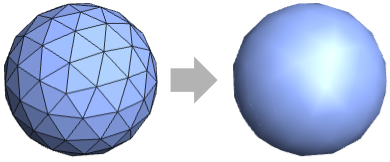
多角形およびその他の塗潰されたグラフィックスオブジェクトを法線ベクトルの平均シェーディングを使って滑らからな面としての反射で描くように指定する三次元グラフィックス指示子である.
散光に減衰因子 d を使う.
GouraudShading[{d,s}]
反射光に減衰因子 s を使う.
GouraudShading[{d,s,a}]
周囲光に減衰因子 a を使う.
詳細
- GouraudShadingは「per‐vertex shading」(頂点ごとのシェーディング)としても知られている.
- GouraudShadingは,通常,多角形の低い表面を滑らかに照明するために使われる.
- 最終的な色は多角形の各頂点とにおける表面法線の平均と標準シェーディングの結果としての色の明るさから計算される.
- GouraudShading[{d,s,a}]は3D曲面上の散光を因子 d で,反射光を因子 s で,周囲光を因子 a で減衰させるように指定する.
- GouraudShading[]は,事実上,GouraudShading[{1,1,1}]に等しい.
- Lighting"Accent"の設定は平行光源を使って表面の色を忠実に再生する.
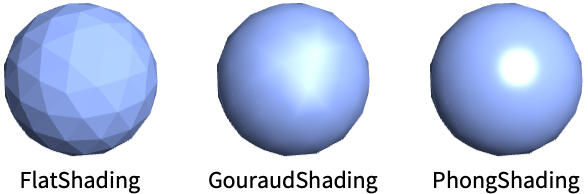
- 基本的なシェーディングモデルのFlatShading,GouraudShading,PhongShadingを比較する.
例題
すべて開く すべて閉じる例 (3)
測地線多面体にGouraudShadingを適用する:
Graphics3D[{GouraudShading[], GeodesicPolyhedron[4]}]プロットにGouraudShadingでスタイル付けする:
Plot3D[Sin[x + y ^ 2], {x, -3, 3}, {y, -2, 2}, PlotStyle -> GouraudShading[], Mesh -> None]3DモデルをGouraudShadingで描画する:
Graphics3D[{GouraudShading[], ResourceData["Galleon"]}]スコープ (14)
基本的な用法 (5)
グラフィックスプリミティブにグーロー(Gouraud)シェーディングを適用する:
Graphics3D[{GouraudShading[], #}]& /@ {Sphere[], CapsuleShape[], Cone[]}SphericalPlot3D[1 + 2 Cos[2 θ], {θ, 0, Pi}, {ϕ, 0, 2 Pi}, Axes -> False, PlotStyle -> GouraudShading[], Mesh -> None]BarChart3D[Range[5], ChartElements -> [image], ChartStyle -> GouraudShading[]]Graphics3D[{GouraudShading[], ResourceData["Beethoven"]}]GouraudShading[]指定 (5)
引数がないGouraudShadingはデフォルトのシステムシェーダーに似た計算を使う:
Graphics3D[{GouraudShading[], Sphere[]}]Graphics3D[{GouraudShading[#], Sphere[]}]& /@ {0, 0.5, 1.0}Graphics3D[{GouraudShading[{#, #, #}], Sphere[]}]& /@ {0, 0.5, 1.0}Graphics3D[{GouraudShading[{#}], Sphere[]}]& /@ {0, 0.5, 1.0}Graphics3D[{GouraudShading[{0, #}], Specularity[White, 5], Sphere[]}]& /@ {0, 0.5, 1.0}Graphics3D[{GouraudShading[{0, 0, #}], Sphere[]}]& /@ {0, 0.5, 1.0}照明 (4)
GouraudShadingはすべてのタイプの光に使うことができる:
lights = {AmbientLight[LightGray], PointLight[White, ImageScaled[{1, 1, 2}]], DirectionalLight[White, ImageScaled[{1, 1, 2}]], SpotLight[White, {{1, -1, 1}, {0, 0, 0}}, Pi / 4]};
Graphics3D[{GouraudShading[], Sphere[]}, Lighting -> {#}]& /@ lightsGraphics3D[{GouraudShading[], Sphere[]}, Lighting -> {DirectionalLight[RGBColor[1, 0, 0], ImageScaled[{1, -0.5, 1}]], DirectionalLight[RGBColor[0, 1, 0], ImageScaled[{-1, -0.5, 1}]], DirectionalLight[RGBColor[0, 0, 1], ImageScaled[{0, 1, 1}]], AmbientLight[GrayLevel[0.2]]}]反射率はSpecularity指示子が指定された場合にのみ適用される:
Graphics3D[{GouraudShading[{1, #, 1}], Specularity[White], Sphere[]}]& /@ {0.0, 1.0}周囲光の割合はAmbientLightが指定された場合にのみ適用される:
Graphics3D[{GouraudShading[{1, 1, #}], Sphere[]}, Lighting -> AmbientLight[LightGray]]& /@ {0.0, 1.0}アプリケーション (2)
基本的なアプリケーション (2)
v = {{0, 0, 0}, {1, 0, 0}, {1 / 2, 1, 0}};
cols = {Red, Green, Blue};
lights = Table[PointLight[cols[[i]], v[[i]] + {0, 0, 0.01}], {i, Length[v]}];
Graphics3D[{GouraudShading[], Triangle[v]}, Lighting -> lights, ViewPoint -> Above]これは計算済みの頂点の照明を周囲光がWhiteのVertexColorsとして渡すことに等しい:
Graphics3D[{EdgeForm[], Triangle[v, VertexColors -> cols]}, Lighting -> AmbientLight[White], ViewPoint -> Above]arrows[_[v_, ___, VertexNormals -> n_]] := Table[Arrow[{v[[i]], v[[i]] + n[[i]]}], {i, Length[v]}]
vnormals[p_] := Graphics3D[{GouraudShading[], p, arrows[p]}, Boxed -> False, Method -> {"ShrinkWrap" -> True}]vnormals[Polygon[{{Sqrt[3]/2, -1/2, 0}, {0, 1, 0}, {-1/2*Sqrt[3], -1/2, 0}},
VertexNormals -> {{0, 0, 1}, {0, 0, 1}, {0, 0, 1}}]]vnormals[Polygon[{{Sqrt[3]/2, -1/2, 0}, {0, 1, 0}, {-1/2*Sqrt[3], -1/2, 0}},
VertexNormals -> {{Sqrt[3/5]/2, -1/2*1/Sqrt[5], 2/Sqrt[5]}, {0, 1/Sqrt[5], 2/Sqrt[5]},
{-1/2*Sqrt[3/5], -1/2*1/Sqrt[5], 2/Sqrt[5]}}]]vnormals[Polyhedron[{{-0.5, 0.5, -0.5}, {0.5, 0.5, -0.5}, {0.5, -0.5, -0.5}, {-0.5, -0.5, -0.5},
{-0.5, 0.5, 0.5}, {0.5, 0.5, 0.5}, {0.5, -0.5, 0.5}, {-0.5, -0.5, 0.5}},
{{1, 2, 3, 4}, {5, 6, 2, 1}, {6, 7, 3, 2}, {7, 8, 4, 3}, {8, 5, 1, 4}, {8, 7, 6, 5 ... 258, 0.5773502691896258, 0.5773502691896258},
{0.5773502691896258, 0.5773502691896258, 0.5773502691896258},
{0.5773502691896258, -0.5773502691896258, 0.5773502691896258},
{-0.5773502691896258, -0.5773502691896258, 0.5773502691896258}}]]vnormals[GraphicsComplex[...]]特性と関係 (3)
GouraudShadingは指定されている場合にはVertexNormalsを使う:
model = GraphicsComplex[{...}, Polygon[...], VertexNormals -> {...}];
Graphics3D[{GouraudShading[], model}]GouraudShadingでFaceFormを指定する:
Graphics3D[{FaceForm[#], GouraudShading[], Icosahedron[]}]& /@ {Red, Green, Blue}GouraudShadingは,スクリーンの大きさと多角形間の陰の分散が小さい場合はPhongShadingを近似する:
Graphics3D[{#, EdgeForm[], Specularity[White, 10], ResourceData["Stanford Bunny"]}, Boxed -> False]& /@ {PhongShading[], GouraudShading[]}考えられる問題 (1)
Plot3D[Cos[x + y] + Sin[y], {x, -3, 3}, {y, -2, 2}, PlotStyle -> GouraudShading[], Mesh -> None, PlotPoints -> 3]Plot3D[Cos[x + y] + Sin[y], {x, -3, 3}, {y, -2, 2}, PlotStyle -> GouraudShading[], Mesh -> None, PlotPoints -> 40]インタラクティブな例題 (1)
光源の位置をインタラクティブにドラッグしながらGouraudShadingを使って三角形を描画する.三角形の色が頂点における光の値を補間して計算される点に注意のこと:
DynamicModule[{pt = {0.5, 0.7}, corners = {{0, 0, 0}, {1, 0, 0}, {1 / 2, Sqrt[3] / 2, 0}}}, LocatorPane[Dynamic[pt], Graphics3D[{Dynamic[PointLight[Gray, Append[pt, 1 / 2], {0, 1, 0}]], GouraudShading[], Triangle[corners], PointSize[0.05], Point[corners, VertexNormals -> ConstantArray[{0, 0, 1}, 3]]}, ViewPoint -> Above, PlotRange -> {{0, 1}, {0, 1}, {-0.2, 0.2}}, Lighting -> None]]]テキスト
Wolfram Research (2022), GouraudShading, Wolfram言語関数, https://reference.wolfram.com/language/ref/GouraudShading.html.
CMS
Wolfram Language. 2022. "GouraudShading." Wolfram Language & System Documentation Center. Wolfram Research. https://reference.wolfram.com/language/ref/GouraudShading.html.
APA
Wolfram Language. (2022). GouraudShading. Wolfram Language & System Documentation Center. Retrieved from https://reference.wolfram.com/language/ref/GouraudShading.html