ImageValue
ImageValue
ImageValue[image,pos]
给出 image 在位置 pos 处的插值.
ImageValue[image,pos,"type"]
给出转换成指定类型后的值.
更多信息和选项
- ImageValue 用于提取 2D 或 3D 图像的插值,通常用来对图像进行采样.
- 像素位置 pos 可以是下列形式之一:
-
{x,y} 或 {x,y,z} 二维或三维空间中的单个位置 {xmin;;xmax,…} 位置范围 {xmin;;xmax;;xstep,…} 有步长的位置范围 {pos1,pos2,…} 位置规范列表 markerimage 记号图像 - ImageValue 假设坐标系为标准图像坐标系.
- 利用 PixelValue 使用整数索引,以提取图像的像素值.
- 缺省情况下,ImageValue[image,pos] 返回的值介于 0 和 1 之间.
- ImageValue[image,pos,"type"] 返回由 "type" 指定的类型的像素值. "type" 的可能的设置包括:
-
Automatic 使用 image 数据类型 "Bit" 整数 0 或 1 "Byte" 整数 0 到 255 "Bit16" 整数 0 到 65535 "Real32" 单精度实数 (32 bit) "Real64" 双精度实数 (64 bit) - 可给出下列选项:
-
DataRange Full 图像坐标的范围 Padding 0 采用的填充方法 Resampling "Linear" 采用的插值方法 - DataRange 的可能设置包括:
-
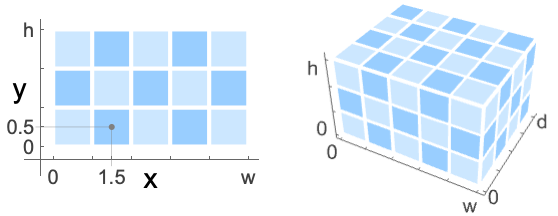
Automatic 二维 {{0,1},{0,h/w}},三维{{0,1},{0,d/w},{0,h/w}} Full 二维 {{0,w},{0,h}},三维(缺省) {{0,1},{0,d},{0,h}} {{left,right},{bottom,top}} 二维图像显式的坐标范围 {{left,right},{front,back},{bottom,top}} 三维图像显式的坐标范围 - 设置 Resampling->"Nearest" 下,若 pos 落在边界上像素之间的位置,返回的是 pos 周围像素值的平均值. »
范例
打开所有单元 关闭所有单元基本范例 (2)
范围 (12)
数据 (4)
ImageValue[Image[(| | |
| -- | -- |
| 0 | .2 |
| .4 | 1 |)], {0.5, 0.5}]ImageValue 通常返回插值:
ImageValue[Image[(| | |
| -- | -- |
| 0 | .2 |
| .4 | 1 |)], {1.0, 0.5}]ImageValue[[image], {0.5, 0.5}]ImageValue[[image], {2.5, 0.5, 2.5}]位置 (5)
ImageValue[[image], {50.3, 33.5}]ImageValue[[image], {{86.5, 53.3}, {11.8, 1.9}, {59.6, 52.1}}]ImageValue[[image], {33.3 ;; 38.6, 50. ;; 55.5}]用 All 提取一个维度内所有的值:
ImageValue[[image], {40.5, All}]ImageValue[[image], [image]]类型 (3)
ImageValue[[image], {50.3, 33.5}]ImageValue[[image], {50.3, 33.5}, "Byte"]用 Automatic 返回原始图像数据类型的值:
ImageValue[[image], {50.3, 33.5}, Automatic]选项 (3)
DataRange (1)
Padding (1)
Resampling (1)
ImageValue[Image[{{0, .1}, {.2, .3}}], {.9, .9}]ImageValue[Image[{{0, .1}, {.2, .3}}], {1.5, 1.5}]ImageValue[Image[{{0, .1}, {.2, .3}}], {.9, .9}, Resampling -> "Cubic"]ImageValue[Image[{{0, .1}, {.2, .3}}], {.9, .9}, Resampling -> "Nearest"]应用 (4)
ImageValue[[image], [image]]//MeanRGBColor@%ImageValue[[image], [image]]ListLinePlot[%]Histogram[ImageValue[[image], [image]], {0, 1, 0.1}]i = [image];corners = ImageCorners[i, 4, 0.001, 3, MaxFeatureDisplacement -> 7]HighlightImage[i, {PointSize[Large], corners}]ImageValue[i, corners]可能存在的问题 (3)
在 Resampling->"Nearest" 和整数坐标下,返回指定的坐标周围的像素的平均值:
ImageValue[[image], {1, 1}, Resampling -> "Nearest"]ImageValue[[image], {1.5, 1.5}]ImageValue[[image], {1.5, 1.5}, "Bit"]img = [image];
coordinates = ImageValuePositions[img, Green, 0.6];AbsoluteTiming[r1 = ImageValue[img, coordinates];]AbsoluteTiming[r2 = Table[ImageValue[img, point], {point, coordinates}];]r1 === r2
Wolfram Research (2010),ImageValue,Wolfram 语言函数,https://reference.wolfram.com/language/ref/ImageValue.html (更新于 2014 年).
文本
Wolfram Research (2010),ImageValue,Wolfram 语言函数,https://reference.wolfram.com/language/ref/ImageValue.html (更新于 2014 年).
CMS
Wolfram 语言. 2010. "ImageValue." Wolfram 语言与系统参考资料中心. Wolfram Research. 最新版本 2014. https://reference.wolfram.com/language/ref/ImageValue.html.
APA
Wolfram 语言. (2010). ImageValue. Wolfram 语言与系统参考资料中心. 追溯自 https://reference.wolfram.com/language/ref/ImageValue.html 年