SpatialPointSelect


SpatialPointSelect
SpatialPointSelect[spdata,crit]
根据 crit 选择 SpatialPointData spdata 的子集.
更多信息
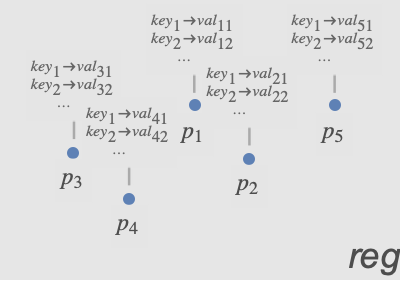
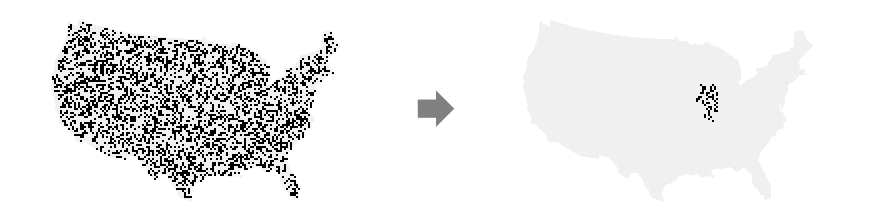
- SpatialPointSelect 通常用于从 SpatialPointData 选取一部分数据,从而获得较小的 SpatialPointData.
- 从概念上讲,SpatialPointSelect 相当于对 {{point1,ann1},{point2,ann2},…} 形式的点和注释应用以获取一个子集.
-
- 标准函数 crit 通常是一个布尔表达式,含有对点和注释的条件,如 (Norm[#Point]<1&& #species"Birch")&,其中,species 是注释键之一.
-
- 可在 crit 中使用以下参数:
-
#Point 关于点的条件 #key 针对与注释 "key" 关联的值的条件
范例
打开所有单元 关闭所有单元基本范例 (2)
spd = SpatialPointData[RandomReal[1, {100, 2}], Rectangle[{0, 0}, {1, 1}]]Show[RegionPlot[spd["ObservationRegion"]], ListPlot[spd["Points"]]]sub = SpatialPointSelect[spd, Element[#Point, Rectangle[{0, 0}, {1 / 2, 1}]]&]Show[RegionPlot[spd["ObservationRegion"]], ListPlot[sub["Points"]]]spd = SpatialPointData[RandomGeoPosition[GeoBoundsRegion[{{-23.43, 23.43}, {-180, 180}}], 100]]sub = SpatialPointSelect[spd, #Point["Latitude"] ≥ 0&]GeoListPlot /@ {spd["Points"], sub["Points"]}范围 (7)
根据点的条件 (5)
spd = SpatialPointData[RandomReal[1, {100, 2}], Rectangle[]];Show[RegionPlot[{spd["ObservationRegion"]}], ListPlot[spd["Points"]]]reg = Disk[{0, 0}, .5];
sub = SpatialPointSelect[spd, Element[#Point, reg]&]Show[RegionPlot[{sub["ObservationRegion"], reg}], ListPlot[sub["Points"]]]spd = SpatialPointData[RandomReal[1, {5000, 2}]]pts1 = ListPlot[spd["Points"], AspectRatio -> 1]crit = Norm[#Point] < 1 / 2&;sub = SpatialPointSelect[spd, crit]Show[pts1, ListPlot[sub["Points"], PlotStyle -> Orange]]spd = SpatialPointData[RandomReal[1, {100, 2}]]cond = First[#Point] > 1 / 3&;sub = SpatialPointSelect[spd, cond]Show[ListPlot[spd["Points"], PlotStyle -> PointSize[0.03]], ListPlot[sub["Points"], PlotStyle -> {Orange, PointSize[0.015]}], AspectRatio -> 1]spd = SpatialPointData[RandomGeoPosition[GeoBoundsRegion[{{0, 90}, {-180, 0}}], 100]];GeoListPlot[spd["Points"]]sub = SpatialPointSelect[spd, GeoDistance[#Point, Entity["City", {"Chicago", "Illinois", "UnitedStates"}]["Position"]] < Quantity[2000, "km"]&]GeoListPlot[sub["Points"]]data = RandomReal[1, {500, 2}];
reg = Rectangle[];spd = SpatialPointData[data, reg]areaOfInterest = Rectangle[{1, .3}, {1.5, .5}];sub = SpatialPointSelect[spd, (0 < RegionDistance[areaOfInterest, #Point] < .2)&]Graphics[{{Opacity[.1], spd["ObservationRegion"]}, {Opacity[.3], areaOfInterest}, {ColorData[97, 1], Point[spd["Points"]]}, {ColorData[97, 2], Point[sub["Points"]]}, Inset[Style["reg", Bold], {0.05, 0.05}], Inset[Style["Area of Interest", Bold], {1.25, 0.4}]}]根据注释 (2)
pts = RandomReal[1, {10, 2}];
reg = Rectangle[{0, 0}, {1, 1}];colors = RandomChoice[ColorData[97, "ColorList"], 10];
diameters = RandomReal[{0, 1 / 3}, 10];spd = SpatialPointData[pts -> {"color" -> colors, "diameter" -> diameters}, reg]spd["Annotations"]选择其“颜色”注释值接近 Red 的点:
sub = SpatialPointSelect[spd, (ColorDistance[#color, Red] < .7)&]sub["Annotations"]pts = RandomReal[1, {10, 2}];
reg = Rectangle[{0, 0}, {1, 1}];colors = RandomChoice[ColorData[97, "ColorList"], 10];
diameters = RandomReal[{0, 1 / 3}, 10];spd = SpatialPointData[pts -> {"color" -> colors, "diameter" -> diameters}, reg]spd["Annotations"]sub = SpatialPointSelect[spd, #diameter ≥ .1&]sub["Annotations"]应用 (1)
data = SpatialPointData[«2»];GeoGraphics[data["ObservationRegion"]]reg = EntityValue[GeoVariant[Entity["Country", "UnitedStates"], "DefaultMapArea"], "Polygon"];{{minLat, maxLat}, {minLon, maxLon}} = GeoBounds[reg]selected = SpatialPointSelect[data, And[minLat <= (#Point["Latitude"]) <= maxLat&, minLon <= (#Point["Longitude"]) <= maxLon&]]SpatialPointSelect 保留了原始观测区域:
selected["ObservationRegion"] == data["ObservationRegion"]breweries = SpatialPointData[selected["Points"], reg]GeoGraphics[{Point[breweries["Points"]], Red, breweries["ObservationRegion"]}]
Wolfram Research (2020),SpatialPointSelect,Wolfram 语言函数,https://reference.wolfram.com/language/ref/SpatialPointSelect.html.
文本
Wolfram Research (2020),SpatialPointSelect,Wolfram 语言函数,https://reference.wolfram.com/language/ref/SpatialPointSelect.html.
CMS
Wolfram 语言. 2020. "SpatialPointSelect." Wolfram 语言与系统参考资料中心. Wolfram Research. https://reference.wolfram.com/language/ref/SpatialPointSelect.html.
APA
Wolfram 语言. (2020). SpatialPointSelect. Wolfram 语言与系统参考资料中心. 追溯自 https://reference.wolfram.com/language/ref/SpatialPointSelect.html 年