---
title: "SpiralEmbedding"
language: "en"
type: "Method"
summary: "SpiralEmbedding (Graph Layout Method) Vertex layout for GraphLayout. Use spiral embedding to lay out vertices of a graph. The spiral embedding is a graph-drawing technique to position vertices of a graph on a 3D spiral projected to 2D. The spiral embedding is typically used to lay out path graphs. Possible settings to control the layout include:"
keywords: 
- spiral embedding
- spiral layout
- graph layout
- graph embedding
canonical_url: "https://reference.wolfram.com/language/ref/method/SpiralEmbedding.html"
source: "Wolfram Language Documentation"
related_functions: 
  - 
    title: "GraphLayout"
    link: "https://reference.wolfram.com/language/ref/GraphLayout.en.md"
  - 
    title: "Graph"
    link: "https://reference.wolfram.com/language/ref/Graph.en.md"
  - 
    title: "PathGraph"
    link: "https://reference.wolfram.com/language/ref/PathGraph.en.md"
  - 
    title: "GraphPlot"
    link: "https://reference.wolfram.com/language/ref/GraphPlot.en.md"
  - 
    title: "GraphPlot3D"
    link: "https://reference.wolfram.com/language/ref/GraphPlot3D.en.md"
  - 
    title: "GraphEmbedding"
    link: "https://reference.wolfram.com/language/ref/GraphEmbedding.en.md"
  - 
    title: "LayeredGraphPlot"
    link: "https://reference.wolfram.com/language/ref/LayeredGraphPlot.en.md"
  - 
    title: "LayeredGraphPlot3D"
    link: "https://reference.wolfram.com/language/ref/LayeredGraphPlot3D.en.md"
  - 
    title: "TreePlot"
    link: "https://reference.wolfram.com/language/ref/TreePlot.en.md"
---
# "SpiralEmbedding" (Graph Layout Method)

* Vertex layout for ``GraphLayout``.

* Use spiral embedding to lay out vertices of a graph.

---

## Details & Suboptions

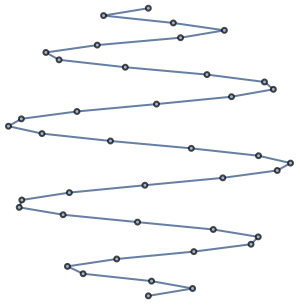
* The spiral embedding is a graph-drawing technique to position vertices of a graph on a 3D spiral projected to 2D.

* The spiral embedding is typically used to lay out path graphs.

[image]

* Possible settings to control the layout include:

|                 |           |                                                         |
| --------------- | --------- | ------------------------------------------------------- |
| "OptimalOrder"  | True      | optimal ordering of vertices to minimize edge crossings |
| "Rotation"      | Automatic | layout rotation                                         |

---

## Examples (3)

### Basic Examples (1)

Place vertices on a discrete spiral:

```wl
In[1]:= PathGraph[Range[30], GraphLayout -> "SpiralEmbedding"]

Out[1]= [image]
```

### Options (2)

#### "OptimalOrder" (1)

With the setting ``"OptimalOrder" -> True``, vertices are reordered so that they lay nicely on a spiral:

```wl
In[1]:=
edges = RandomSample[EdgeList[PathGraph[Range[20]]], 19];
{Graph[edges, GraphLayout -> {"SpiralEmbedding", "OptimalOrder" -> True}], 
	Graph[edges, GraphLayout -> {"SpiralEmbedding", "OptimalOrder" -> False}]}

Out[1]= {[image], [image]}
```

#### "Rotation" (1)

Use ``"Rotation" -> r`` to rotate the layout:

```wl
In[1]:= PathGraph[Range[30], GraphLayout -> {"SpiralEmbedding", "Rotation" -> 45 Degree}]

Out[1]= [image]
```

## See Also

* [`GraphLayout`](https://reference.wolfram.com/language/ref/GraphLayout.en.md)
* [`Graph`](https://reference.wolfram.com/language/ref/Graph.en.md)
* [`PathGraph`](https://reference.wolfram.com/language/ref/PathGraph.en.md)
* [`GraphPlot`](https://reference.wolfram.com/language/ref/GraphPlot.en.md)
* [`GraphPlot3D`](https://reference.wolfram.com/language/ref/GraphPlot3D.en.md)
* [`GraphEmbedding`](https://reference.wolfram.com/language/ref/GraphEmbedding.en.md)
* [`LayeredGraphPlot`](https://reference.wolfram.com/language/ref/LayeredGraphPlot.en.md)
* [`LayeredGraphPlot3D`](https://reference.wolfram.com/language/ref/LayeredGraphPlot3D.en.md)
* [`TreePlot`](https://reference.wolfram.com/language/ref/TreePlot.en.md)

## History

* [Introduced in 2021 (12.3)](https://reference.wolfram.com/language/guide/SummaryOfNewFeaturesIn123.en.md)