


Export
Listing of Formats »Export["dest.ext",expr]
exports data to a file, converting it to the format corresponding to the file extension ext.
Export[dest,expr,"fmt"]
exports data in the specified format "fmt".
Export[dest,exprs,elements]
exports data by treating exprs as elements.
Export[dest,exprs,elements,options]
uses the specified options.
Details
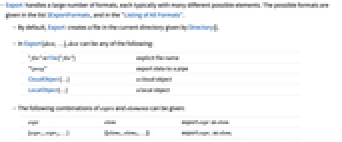
- Export handles a large number of formats, each typically with many different possible elements. The possible formats are given in the list $ExportFormats, and in the "Listing of All Formats".
- By default, Export creates a file in the current directory given by Directory[].
- In Export[dest,…], dest can be any of the following:
-
"file" or File["file"] explicit file name "!prog" export data to a pipe CloudObject[…] a cloud object LocalObject[…] a local object - The following combinations of exprs and elements can be given:
-
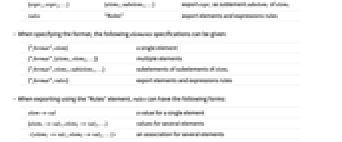
expr elem export expr as elem {expr1,expr2,…} {{elem1,elem2,…}} export expri as elemi {expr1,expr2,…} {elem1,subelem1,…} export expri as sublement subelemi of elem1 rules "Rules" export elements and expressions rules - When specifying the format, the following elements specifications can be given:
-
{"format",elem} a single element {"format",{elem1,elem2,…}} multiple elements {"format",elem1,sublelem1,…} subelements of subelements of elem1 {"format",rules} export elements and expressions rules - When exporting using the "Rules" element, rules can have the following forms:
-
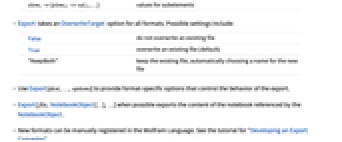
elem->val a value for a single element {elem1->val1,elem2->val2,…} values for several elements elem1->val1,elem2->val2,… an association for several elements elem1->{elem11->val11,…} values for subelements - Export takes an OverwriteTarget option for all formats. Possible settings include:
-
False do not overwrite an existing file True overwrite an existing file (default) "KeepBoth" keep the existing file, automatically choosing a name for the new file - Use Export[dest,…,options] to provide format-specific options that control the behavior of the export.
- Export[file,NotebookObject[…],…] when possible exports the content of the notebook referenced by the NotebookObject.
- New formats can be manually registered in the Wolfram Language. See the tutorial for "Developing an Export Converter".
Examples
open allclose allBasic Examples (4)
Generalizations & Extensions (2)
Properties & Relations (1)
The first format returned by FileNameToFormatList is used by default in Export:
Text
Wolfram Research (1999), Export, Wolfram Language function, https://reference.wolfram.com/language/ref/Export.html (updated 2019).
CMS
Wolfram Language. 1999. "Export." Wolfram Language & System Documentation Center. Wolfram Research. Last Modified 2019. https://reference.wolfram.com/language/ref/Export.html.
APA
Wolfram Language. (1999). Export. Wolfram Language & System Documentation Center. Retrieved from https://reference.wolfram.com/language/ref/Export.html