

Graphics3Dのオプションで,3D場面の一部を結果のビューから取り去るクリッピング平面のリストを指定する.
ClipPlanes
Graphics3Dのオプションで,3D場面の一部を結果のビューから取り去るクリッピング平面のリストを指定する.
詳細
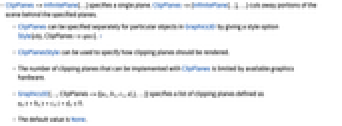
- ClipPlanes->InfinitePlane[…]は単一の平面を指定する.ClipPlanes->{InfinitePlane[…],…}は指定された平面の後ろのシーンの一部を切り取る.
- Graphics3Dでは,スタイルオプションStyle[obj,ClipPlanes->spec]を使うことで,特別なオブジェクトについてClipPlanesを別々に指定することができる. »
- ClipPlanesStyleを使い,クリッピング平面の描画方法を指定することができる.
- ClipPlanesで実装できるクリッピング平面の数は,使用するグラフィックスハードウェアによって制限される.
- Graphics3D[…,ClipPlanes->{{a1,b1,c1,d1},…}]は

で定義されるクリッピング平面のリストを指定する. - デフォルト値はNoneである.
例題
すべて開く すべて閉じる例 (3)
ClipPlanesを使ってクリッピング平面を指定する:
Graphics3D[{Sphere[]}, ClipPlanes -> InfinitePlane[{{0, 0, 0}, {0, 1, 1}, {1, 1, 2}}]]Graphics3D[{Sphere[{0, 0, 0}, 1 / 2], Style[Sphere[], Red, ClipPlanes -> InfinitePlane[{{0, 0, 0}, {0, 1, 1}, {1, 1, 2}}]]}]ClipPlanesStyleを使ってクリッピング平面を表示する:
Graphics3D[{Sphere[]}, ClipPlanes -> {InfinitePlane[{{0, 0, 0}, {0, 1, 1}, {1, 0, 1}}]}, ClipPlanesStyle -> Opacity[0.3]]スコープ (7)
InfinitePlaneを使ってクリッピング平面を指定する:
Graphics3D[{Cone[]}, ClipPlanes -> InfinitePlane[{{0, 0, 0}, {0, 0, 1}, {0, 1, 1}}]]Graphics3D[{Sphere[]}, ClipPlanes -> {InfinitePlane[{{0, 0, 0}, {0, 0, 1}, {0, 1, 1}}], InfinitePlane[{{0, 0, 0}, {0, 0, -1}, {1, 0, -1}}]}]Graphics3D[{Sphere[]}, ClipPlanes -> {1, 1, -2, 0}]Image3D[RandomReal[1, {5, 10, 10}], ClipPlanes -> InfinitePlane[{{0, 0, 0}, {1, 1, 1}, {1, 1, 0}}]]Graphics3D[{Cone[], Style[Sphere[], ClipPlanes -> InfinitePlane[{{1, 0, .5}, {0, 0, 1}, {1, 1, 1}}]]}]ClipPlanesを指示子として指定する:
Graphics3D[{Sphere[{0, 0, 0}], ClipPlanes -> InfinitePlane[{{0, 0, 0}, {0, 1, 0}, {1, 1, 0}}], Sphere[{1, 0, 0}]}]Graphics3D[{Sphere[{0, 0, 0}], Sphere[{1, 1, 0}], Style[{Sphere[{0, 1, 0}], Sphere[{1, 0, 0}]}, ClipPlanes -> InfinitePlane[{{0, 0, 0.8}, {0, 1, 0.8}, {1, 1, 0.8}}]]}]一般化と拡張 (3)
ClipPlanesStyleを使ってクリッピング平面にスタイル付けすることができる:
Graphics3D[{Cone[]}, ClipPlanes -> InfinitePlane[{{0, 0, 0}, {0, 0, 1}, {0, 1, 1}}], ClipPlanesStyle -> Directive[Opacity[0.5], Green]]Graphics3D[{Sphere[]}, ClipPlanes -> {InfinitePlane[{{0, 0, 0}, {0, 1, 0}, {1, 1, 0}}], InfinitePlane[{{0, 0, 0}, {0, 1, 0}, {0, 1, 1}}]}, ClipPlanesStyle -> {Directive[Red, Opacity[0.3]], Directive[Green, Opacity[0.3]]}]Styleを使って適用されたクリッピング平面には別々にスタイル付けすることができる:
Graphics3D[{Style[Sphere[{0, 0, 0}], ClipPlanes -> InfinitePlane[{{0, 0, .5}, {0, 1, .5}, {1, 0, .5}}], ClipPlanesStyle -> Directive[Blue, Opacity[0.3]]], Style[Sphere[{1, 0, 0}], ClipPlanes -> InfinitePlane[{{0, -.5, 0}, {0, -.5, 1}, {1, -.5, 0}}], ClipPlanesStyle -> Directive[Red, Opacity[0.3]]]}]特性と関係 (1)
切り取られたプリミティブの内側には,FaceFormの第2引数でスタイル付けすることができる:
Graphics3D[{FaceForm[Green, Pink], Cone[]}, ClipPlanes -> InfinitePlane[{{0, 0, 0}, {0, 1, 1}, {0, 1, 0}}]]考えられる問題 (1)
おもしろい例題 (2)
Graphics3D[{FaceForm[Red, Blue], Sphere[{0, 0, 0}, 1.85]}, ClipPlanes -> Flatten@Table[InfinitePlane[{x, y, z}, {{x y, -x ^ 2 - z ^ 2, y z}, {-z, 0, x}}], {x, {-1, 1}}, {y, {-1, 1}}, {z, {-1, 1}}], Axes -> True]Graphics3D[{FaceForm[Red, Blue], Sphere[{0, 0, 0}, 1.85]}, ClipPlanes -> Flatten@Table[InfinitePlane[{x, y, z}, {{x y, -x ^ 2 - z ^ 2, y z}, {-z, 0, x}}], {x, {-1, 1}}, {y, {-1, 1}}, {z, {-1, 1}}], Axes -> True, ClipPlanesStyle -> GrayLevel[0.7, 0.3]]ClipPlanesを解剖学的構造に適用する:
With[{z = 400}, AnatomyPlot3D[{Entity["AnatomicalStructure", "LeftUpperLimb"], ClipPlanes -> {InfinitePlane[{{0, -300, z}, {300, -300, z + 200}, {200, 0, z}}]}, Entity["AnatomicalStructure", "SkinOfLeftUpperLimb"]}]]関連するガイド
テキスト
Wolfram Research (2014), ClipPlanes, Wolfram言語関数, https://reference.wolfram.com/language/ref/ClipPlanes.html (2016年に更新).
CMS
Wolfram Language. 2014. "ClipPlanes." Wolfram Language & System Documentation Center. Wolfram Research. Last Modified 2016. https://reference.wolfram.com/language/ref/ClipPlanes.html.
APA
Wolfram Language. (2014). ClipPlanes. Wolfram Language & System Documentation Center. Retrieved from https://reference.wolfram.com/language/ref/ClipPlanes.html
BibTeX
@misc{reference.wolfram_2026_clipplanes, author="Wolfram Research", title="{ClipPlanes}", year="2016", howpublished="\url{https://reference.wolfram.com/language/ref/ClipPlanes.html}", note=[Accessed: 14-September-2026]}
BibLaTeX
@online{reference.wolfram_2026_clipplanes, organization={Wolfram Research}, title={ClipPlanes}, year={2016}, url={https://reference.wolfram.com/language/ref/ClipPlanes.html}, note=[Accessed: 14-September-2026]}