

CompilationTarget
是 Compile 的一个选项,指定编译函数的目标运行时间.
更多信息
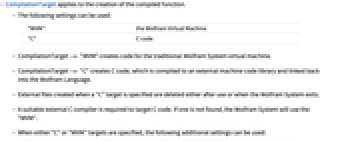
- CompilationTarget 应用于编译函数的创建.
- 可以使用以下设置:
-
"WVM" Wolfram 虚拟机 "C" C 代码 - CompilationTarget -> "WVM" 为传统的 Wolfram 语言虚拟机创建代码.
- CompilationTarget -> "C" 创建 C 代码,它被编译为一个外部机器代码程序库并链接回 Wolfram 语言.
- 当指定 "C" 目标时,创建外部文件,当使用后或退出 Wolfram 系统时,它会被删除.
- 需要合适的外部 C 编译器产生目标 C 代码. 如果没有找到合适的编译器,Wolfram 系统会使用 "WVM".
- 当指定 "C" 或 "WVM" 目标时,可使用以下的额外设置:
-
RuntimeAttributes -> Listable 编译一个具有 Listable 属性的函数 Parallelization -> True 如果可能的话,使用多线程
范例
打开所有单元 关闭所有单元基本范例 (3)
从 Compile 中产生目标 C 代码:
cGen = Compile[{{x}}, x ^ 2 + Sin[x ^ 2], CompilationTarget -> "C"]cGen[ 10]c = Compile[ {{x, _Real}, {n, _Integer}},
Module[ {sum, inc}, sum = 1.0;inc = 1.0;Do[inc = inc * x / i;sum = sum + inc, {i, n}];sum], CompilationTarget -> "C"];
c[1.5, 10000000]//AbsoluteTimingcNormal = Compile[ {{x, _Real}, {n, _Integer}},
Module[ {sum, inc}, sum = 1.0;inc = 1.0;Do[inc = inc * x / i;sum = sum + inc, {i, n}];sum]];
cNormal[1.5, 10000000]//AbsoluteTimingcP1 = Compile[{{x}},
Module[{sum = 1.0, inc = 1.0}, Do[inc = inc * x / i;sum = sum + inc, {i, 10000}];sum],
RuntimeAttributes -> {Listable}, Parallelization -> True, CompilationTarget -> "C"];
arg = Range[-50., 50, 0.02];
cP1[arg];//AbsoluteTiming巧妙范例 (1)
在对 Mandelbrot 集合实时绘图时,若使用 C 和并行的 CompilationTarget 进行计算,可以足够快地对图像进行实时更新:
mandelComp =
Compile[{{c, _Complex}}, Module[{num = 1}, FixedPoint[(num++;# ^ 2 + c)&, 0, 99, SameTest -> (Re[#] ^ 2 + Im[#] ^ 2 ≥ 4&)];num],
CompilationTarget -> "C",
RuntimeAttributes -> {Listable},
Parallelization -> True];doPlotDrag[{x_, y_}] := Panel[DynamicModule[{dragstart = {0, 0}, dragval = {0, 0}, draghold = {x, y}, xrange, yrange, m = -Log[2, 1.5], scale = 1.5}, Column[{Row[{"Zoom ", Slider[Dynamic[m, Function[scale = 2. ^ -#; m = #]], {-1, 10}]}], EventHandler[Dynamic[{xshift, yshift} = (dragstart - dragval + draghold) {1, -1};
{ylo, yhi} = yshift + scale * {-1, 1};
{xlo, xhi} = xshift + scale * {-1, 1};
xrange = {b, xlo, xhi, .01 scale};
yrange = {a, ylo, yhi, .01 * scale};
data = Table[a + I b, Evaluate[yrange], Evaluate[xrange]];
ArrayPlot[mandelComp[data], ImageSize -> 400]], "MouseDown" :> (dragval = dragstart = scale * MousePosition["GraphicsScaled"]), "MouseDragged" :> (dragval = scale * MousePosition["GraphicsScaled"]), "MouseUp" :> (draghold = draghold + dragstart - dragval;
dragstart = dragval = {0, 0})]}]]]现在,您可以调用函数. 注意:在下面的图像中,您需要计算命令,以与图片进行交互:
doPlotDrag[{0, 1}]相关指南
-
▪
- 并行计算
文本
Wolfram Research (2010),CompilationTarget,Wolfram 语言函数,https://reference.wolfram.com/language/ref/CompilationTarget.html.
CMS
Wolfram 语言. 2010. "CompilationTarget." Wolfram 语言与系统参考资料中心. Wolfram Research. https://reference.wolfram.com/language/ref/CompilationTarget.html.
APA
Wolfram 语言. (2010). CompilationTarget. Wolfram 语言与系统参考资料中心. 追溯自 https://reference.wolfram.com/language/ref/CompilationTarget.html 年
BibTeX
@misc{reference.wolfram_2026_compilationtarget, author="Wolfram Research", title="{CompilationTarget}", year="2010", howpublished="\url{https://reference.wolfram.com/language/ref/CompilationTarget.html}", note=[Accessed: 06-September-2026]}
BibLaTeX
@online{reference.wolfram_2026_compilationtarget, organization={Wolfram Research}, title={CompilationTarget}, year={2010}, url={https://reference.wolfram.com/language/ref/CompilationTarget.html}, note=[Accessed: 06-September-2026]}