ContentSize


ContentSize
Manipulate,Labeled,その他の関数のオプションで,使用するコンテンツエリアの大きさを指定する.
詳細
- 使用可能な設定
-
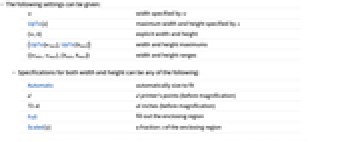
w w で幅を指定 UpTo[s] s で指定される幅と高さの最大値 {w,h} 明示的な幅と高さ {UpTo[wmax],UpTo[hmax]} 幅と高さの最大値 {{wmin,wmax},{hmin,hmax}} 幅と高さの範囲 - 幅と高さの指定には以下のどれを使ってもよい.
-
Automatic フィットするように自動的にサイズを決める d d 印刷用ポイント数(拡大前) 72di di インチ(拡大前) Full 取り囲んでいる領域を満たす Scaled[s] 取り囲んでいる領域との割合が s - ContentSize->Automaticの設定では,ManipulateやLabeled等の関数は与えられたコンテンツに相応しい大きさのコンテンツエリアを使い,同時にコントロールやラベルのスペースを残す.コンテンツエリアの幅が使用可能なノートブックやその他のエリアよりも広くなることはない.
- ContentSize->UpTo[s]はContentSize->{UpTo[s],UpTo[s]}に等しい.
- ContentSize->{UpTo[s],Automatic}は最大幅を指定するが,高さがコンテンツに合わせて伸長することは妨げない.
- ContentSizeがコンテンツに完全にフィットしないコンテンツエリアを指定した場合,関数の中にはサイズ調整エリアと必要な場合はスクロールバーを表示するものがある.
例題
すべて開く すべて閉じる例 (2)
デフォルトで,Manipulateはコンテンツにちょうどよい大きさのスペースを使う:
カスタマイズされたコンテンツエリアを指定し,マニュアルでのサイズ調整を可能にする:
コンテンツエリアが小さすぎる場合,Manipulateは自動的にスクロールバーを付ける:
Wolfram Research (2008), ContentSize, Wolfram言語関数, https://reference.wolfram.com/language/ref/ContentSize.html (2025年に更新).
テキスト
Wolfram Research (2008), ContentSize, Wolfram言語関数, https://reference.wolfram.com/language/ref/ContentSize.html (2025年に更新).
CMS
Wolfram Language. 2008. "ContentSize." Wolfram Language & System Documentation Center. Wolfram Research. Last Modified 2025. https://reference.wolfram.com/language/ref/ContentSize.html.
APA
Wolfram Language. (2008). ContentSize. Wolfram Language & System Documentation Center. Retrieved from https://reference.wolfram.com/language/ref/ContentSize.html