

DivideSides
DivideSides[rel,x]
等式または不等式 rel の各辺を x で割る.
DivideSides[rel1,rel2]
2つの等式または不等式の対応する辺を割る.
DivideSides[rel]
rel の各辺を右辺で割り,右辺を1にする.
詳細とオプション
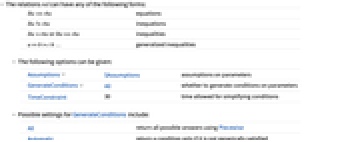
- 関係 rel は以下のいずれでもよい.
-
lhs==rhs 等しい lhs!=rhs 等しくない lhs>rhs または lhs>=rhs 不等式 ab>c≥… 一般化された不等式 - 次は,使用可能なオプションである.
-
Assumptions $Assumptions パラメータについての仮定 GenerateConditions All パラメータについての条件を生成するかどうか TimeConstraint 30 条件を簡約するために使える時間 - 次は,GenerateConditionsの可能な設定である.
-
All Piecewiseを使って可能なすべての答を返す Automatic 条件が一般的に満足されない場合にのみ,その条件を返す True 必要な任意の条件を返す False どの必要な条件も返さない None 条件が必要な場合は未評価で返す
例題
すべて開く すべて閉じる で割る:
で割る:スコープ (6)

Piecewiseを使って表現された関係を  で割る:
で割る:
ConditionalExpression内の等式の両辺を右辺で割る:
オプション (3)
GenerateConditions (2)
デフォルト設定のGenerateConditions->Allでは,必要な場合にはPiecewise式が生成される:
GenerateConditions->Trueは,必要とされる条件とともに有効な結果を返す:
GenerateConditionsFalseは,必要とされる条件なしに有効な結果を返す:
GenerateConditionsNoneは,条件が必要な場合には失敗する:
GenerateConditions->Automaticは,一般的には満足されない条件を返す:
アプリケーション (1)
 を掛ける:
を掛ける: を加える:
を加える: を引く:
を引く: で割って
で割って  についての正の平方根を含む二次方程式の解の公式を得る:
特性と関係 (5)
DivideSidesは,等式を等価の等式に変換する:
Solveは,等式が真となる変数の値を与える:
Reduceを使って等式を var==value の形に書き換えることができる:
SimplifyはDivideSidesの機能を併せ持つ:
Expandを使って等式の各辺の項を簡約する:
DivideSides[eq,x]はMultiplySides[eq,x]の逆である:
テキスト
Wolfram Research (2018), DivideSides, Wolfram言語関数, https://reference.wolfram.com/language/ref/DivideSides.html.
CMS
Wolfram Language. 2018. "DivideSides." Wolfram Language & System Documentation Center. Wolfram Research. https://reference.wolfram.com/language/ref/DivideSides.html.
APA
Wolfram Language. (2018). DivideSides. Wolfram Language & System Documentation Center. Retrieved from https://reference.wolfram.com/language/ref/DivideSides.html