Working with Python Environments

| Discovering Python Environments | Freezing Dependencies |
| Provisioning Python Environments | Wrapping a Python Function |
| Declaring Python Dependencies |
Discovering Python Environments
ExternalEvaluators can be used to explore available environments on your machine:
evaluator = Last[ExternalEvaluators["Python"]]An ExternalEvaluatorObject can be used to execute Python code:
ExternalEvaluate[evaluator, "import sys; sys.version"]Provisioning Python Environments
The Wolfram Language provides a framework to provision (install on demand) Python environments automatically.
Evaluators are automatically created lazily when they are needed. The easiest way to use a provisioned environment is to simply run ExternalEvaluate:
ExternalEvaluate["Python", "import sys; sys.executable"]You can specify what exact Python version you want to use. Evaluators are automatically installed under $UserBaseDirectory:
ExternalEvaluate[{"Python", "Evaluator" -> <|"Runtime" -> "3.11"|>}, "import sys; sys.version"]You can also create virtual environments using an existing Python installation. They are still installed under $UserBaseDirectory, but they are linked to your installation:
evaluator = Last[ExternalEvaluators["Python"]]["Evaluator"]ExternalEvaluate[{"Python", "Evaluator" -> <|"Runtime" -> File[evaluator]|>}, "import sys; dict(version=sys.version, executable=sys.executable)"]Declaring Python Dependencies
Virtual environments can come with dependencies as well. Every environment you create is isolated from anything else, and it will contain the exact dependencies you specified:
ExternalEvaluate[{"Python", "Evaluator" -> <|"Dependencies" -> {"numpy"}|>}, "import numpy; numpy.__version__"]The provisioner will automatically check for newer versions of your dependency, so in order to stabilize them, you can specify the exact needed version:
ExternalEvaluate[{"Python", "Evaluator" -> <|"Dependencies" -> {"numpy==2.2.2"}|>}, "import numpy; numpy.__version__"]Standard requirement files can be used, such as a requirement file from a GitHub repository:
dependencies = URL["https://raw.githubusercontent.com/WolframResearch/WolframClientForPython/refs/heads/master/docs/requirements.txt"];You can use Import to see what is inside the file:
text = Import[dependencies]You can directly use the file, by directly passing the URL object:
ExternalEvaluate[{"Python", "Evaluator" -> <|"Dependencies" -> dependencies|>}, "import pygments; pygments.__version__"]Or you can download the URL and use a File instead:
file = URLDownload[dependencies]ExternalEvaluate[{"Python", "Evaluator" -> <|"Dependencies" -> file|>}, "import pygments; pygments.__version__"]You can add extra dependencies in a list if you want to override or add dependencies to an existing file:
ExternalEvaluate[{"Python", "Evaluator" -> <|"Dependencies" -> {file, "django"}|>}, "import pygments; import django"]Dependencies can be stored as a CloudObject:
cloudurl = CloudExport[text, "Text", Permissions -> "Public"]ExternalEvaluate[{"Python", "Evaluator" -> <|"Dependencies" -> cloudurl|>}, "import pygments; pygments.__version__"]Freezing Dependencies
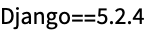
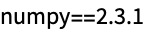
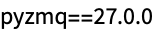
When sharing your code with others, it is a good practice to freeze the environment so that others will install the same packages as you do.
This can be done by using the "pip" freeze command:
exec = ExternalEvaluate[{"Python", "Evaluator" -> <|"Dependencies" -> {"scipy", "django"}|>}, "import sys; sys.executable"]ExternalEvaluate["Shell", exec -> {"-m", "pip", "freeze"}]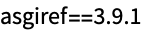
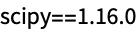
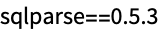
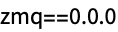
With that, you can create a small utility function to freeze a set of dependencies:
FreezeDependencies = Function[
	With[
	{exec = ExternalEvaluate[{"Python", "Evaluator" -> <|"Dependencies" -> #|>}, "import sys; sys.executable"]
	},
	If[
	FailureQ[exec],
	exec,
	StringSplit[RunProcess[{exec, "-m", "pip", "freeze"}, "StandardOutput"]]
	]
	]
	];

deps  = FreezeDependencies[{"numpy", "django"}]
Now you can safely use the immutable specification to provision an exact Python runtime with dependencies:
ExternalEvaluate[{"Python", "Evaluator" -> <|"Dependencies" -> deps, "Runtime" -> "3.13"|>}, "import django; django.__version__"]Wrapping a Python Function
Now use all that you have learned in order to wrap a Python module.
spec = <|"Dependencies" -> "emoji==2.14.1", "Runtime" -> "3.13"|>;Emojize[s_String] := ExternalEvaluate[{"Python", "Evaluator" -> spec, "SessionProlog" -> "import emoji"}, "emoji.emojize" -> s]Emojize["Python + Wolfram = :red_heart:"]When using the function, it will start and stop the session on every invocation, which can be acceptable for most applications; however, it will have significant overhead:
Emojize["Python + Wolfram = :red_heart:"]//RepeatedTimingIf you want to run a persistent session, you can use the "SessionID" option in ExternalEvaluate in order to reuse an already opened session with the same ID:
FastEmojize[s_String] := Replace[
	StartExternalSession[{"Python", "SessionID" -> "MyUniqueSessionID", "Evaluator" -> spec, "SessionProlog" -> "import emoji"}],
	session_ExternalSessionObject  :> ExternalEvaluate[session, "emoji.emojize" -> s]
]FastEmojize["Python + Wolfram = :red_heart:"]//RepeatedTimingAt this point, after running the function you should have one session opened:
ExternalSessions[]It needs to be manually closed by using DeleteObject:
DeleteObject /@ ExternalSessions[]