Importing and Exporting
Importing and Exporting
| Import["file","Table"] | import a table of data from a file |
| Export["file",list,"Table"] | export list to a file as a table of data |
Export["out.dat", {{5.7, 4.3}, {-1.2, 7.8}}]FilePrint["out.dat"]
Import["out.dat", "Table"]Import["file","Table"] will handle many kinds of tabular data, automatically deducing the details of the format whenever possible. Export["file",list,"Table"] writes out data separated by tabs, with numbers given in C or Fortran‐like form, as in 2.3E5 and so on.
| Import["name.ext"] | import data assuming a format deduced from the file name |
| Export["name.ext",expr] | export data in a format deduced from the file name |
Import and Export can handle not only tabular data, but also data corresponding to graphics, sounds, expressions and even whole documents. Import and Export can often deduce the appropriate format for data simply by looking at the extension of the file name for the file in which the data is being stored. "Exporting Graphics and Sounds" and "Importing and Exporting Files" discuss in more detail how Import and Export work. Note that you can also use Import and Export to manipulate raw files of binary data.
Import["ExampleData/turtle.jpg"]| $ImportFormats | import formats supported on your system |
| $ExportFormats | export formats supported on your system |
| Import["file","List"] | import a one‐dimensional list of data from a file |
| Export["file",list,"List"] | export list to a file as a one‐dimensional list of data |
| Import["file","Table"] | import a two‐dimensional table of data from a file |
| Export["file",list,"Table"] | export list to a file as a two‐dimensional table of data |
| Import["file","CSV"] | import data in comma‐separated format |
| Export["file",list,"CSV"] | export data in comma‐separated format |
Export["out1", {6.7, 8.5, -5.3}, "List"]FilePrint["out1"]
Import["out1", "List"]If you want to use data purely within the Wolfram Language, then the best way to keep it in a file is usually as a complete Wolfram Language expression, with all its structure preserved, as discussed in "Reading and Writing Wolfram Language Files: Files and Streams". But if you want to exchange data with other programs, it is often more convenient to have the data in a simple list or table format.
Export["out2.dat", {{5.6 10 ^ 12, 7.2 10 ^ 12}, {3, 5}}, "Table"]FilePrint["out2.dat"]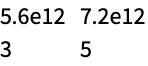
Import["out2.dat", "Table"]If you have a file in which each line consists of a single number, then you can use Import["file","List"] to import the contents of the file as a list of numbers. If each line consists of a sequence of numbers separated by tabs or spaces, then Import["file","Table"] will yield a list of lists of numbers. If the file contains items that are not numbers, then these are returned as Wolfram Language strings.
Export["out3.dat", {{"first", 3.4}, {"second", 7.8}}]FilePrint["out3.dat"]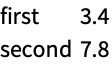
Import["out3.dat", "Table"]With InputForm, you can explicitly see the strings:
InputForm[%]| Import["file","List"] | treat each line as a separate numerical or other data item |
| Import["file","Table"] | treat each element on each line as a separate numerical or other data item |
| Import["file","String"] | treat the whole file as a single character string |
| Import["file","Text"] | treat the whole file as a single string of text |
| Import["file",{"Text","Lines"}] | treat each line as a string of text |
| Import["file",{"Text","Words"}] | treat each separated word as a string of text |
Export["out4.txt", {"The first line.", "The second line."}, {"Text", "Lines"}]FilePrint["out4.txt"]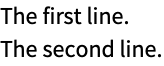
Import["out4.txt", "Text"]//InputFormImport["out4.txt", {"Text", "Lines"}]//InputFormImport["out4.txt", {"Text", "Words"}]//InputFormThe Wolfram Language allows you to export graphics and sounds in a wide variety of formats. If you use the notebook front end for the Wolfram Language, then you can typically just copy and paste graphics and sounds directly into other programs using the standard mechanism available on your computer system.
| Export["name.ext",graphics] | export graphics to a file in a format deduced from the file name |
| Export["file",graphics,"format"] | export graphics in the specified format |
| Export["!command",graphics,"format"] | export graphics to an external command |
| Export["file",{g1,g2,…},…] | export a sequence of graphics for an animation |
| ExportString[graphics,"format"] | generate a string representation of exported graphics |
| "EPS" |
Encapsulated PostScript (
.eps
)
|
| "PDF" |
Adobe Acrobat portable document format (
.pdf
)
|
| "SVG" |
Scalable Vector Graphics (
.svg
)
|
| "PICT" | Macintosh PICT |
| "WMF" |
Windows metafile format (
.wmf
)
|
| "TIFF" |
TIFF (
.tif
,
.tiff
)
|
| "GIF" |
GIF and animated GIF (
.gif
)
|
| "JPEG" |
JPEG (
.jpg
,
.jpeg
)
|
| "PNG" |
PNG format (
.png
)
|
| "BMP" |
Microsoft bitmap format (
.bmp
)
|
| "PCX" |
PCX format (
.pcx
)
|
| "XBM" |
X window system bitmap (
.xbm
)
|
| "PBM" |
portable bitmap format (
.pbm
)
|
| "PPM" |
portable pixmap format (
.ppm
)
|
| "PGM" |
portable graymap format (
.pgm
)
|
| "PNM" |
portable anymap format (
.pnm
)
|
| "DICOM" |
DICOM medical imaging format (
.dcm
,
.dic
)
|
| "AVI" |
Audio Video Interleave format (
.avi
)
|
Typical graphics formats supported by the Wolfram Language. Formats in the first group are resolution independent.
Plot[Sin[x] + Sin[Sqrt[2] x], {x, 0, 10}]Export["sinplot.eps", %]When you export a graphic outside of the Wolfram Language, you usually have to specify the absolute size at which the graphic should be rendered. You can do this using the ImageSize option to Export.
ImageSize->x makes the width of the graphic be x printer's points; ImageSize->72xi thus makes the width xi inches. The default is to produce an image that is four inches wide. ImageSize->{x,y} scales the graphic so that it fits in an x×y region.
| ImageSize | Automatic | absolute image size in printer's points |
| "ImageTopOrientation" | Top | how the image is oriented in the file |
| ImageResolution | Automatic | resolution in dpi for the image |
Options for Export.
Within the Wolfram Language, graphics are manipulated in a way that is completely independent of the resolution of the computer screen or other output device on which the graphics will eventually be rendered.
Many programs and devices accept graphics in resolution‐independent formats such as Encapsulated PostScript (EPS). But some require that the graphics be converted to rasters or bitmaps with a specific resolution. The ImageResolution option for Export allows you to determine what resolution in dots per inch (dpi) should be used. The lower you set this resolution, the lower the quality of the image you will get, but also the less memory the image will take to store. For screen display, typical resolutions are 72 dpi and above; for printers, 300 dpi and above.
| "WAV" |
Microsoft wave format (
.wav
)
|
| "AU" |
μ
law encoding (
.au
)
|
| "SND" |
sound file format (
.snd
)
|
| "AIFF" |
AIFF format (
.aif
,
.aiff
)
|
The Wolfram Language provides functions that allow users to write their own file format converters and integrate them with the Wolfram Language Import and Export framework. You can implement format converters and use Import to import data from arbitrary formats.
The Wolfram System also includes source code that illustrates how to implement and register format converters. These can be found in the folders $InstallationDirectory/SystemFiles/Formats/format, where format is one of the following: BDF, DIF, MTP, SMILES, SurferGrid, TGF, or TLE. The registration code is placed in the files Import.m or Export.m, and the converter implementations reside in the file Converter.m.
The interface between Import and low-level converter functions is specified by RegisterImport (under the ImportExport` context). In essence, RegisterImport tells the Import and Export framework how to call specific functions when importing specific elements of a file format.
A low-level function takes a file or stream as input and returns a list of rules containing the imported data. There are two types of low-level functions: (1) the default importer, which is called by the framework when importing an element not explicitly registered; and (2) the conditional importer, which imports a specific element registered in the second argument of RegisterImport.
A post-importer or post-import function, registered in the third argument of RegisterImport, takes as input the output of the low-level functions.
There are several forms of RegisterImport, summarized below. Throughout this tutorial are progressively advanced examples, showing all uses of RegisterImport in detail.
| ImportExport`RegisterImport["format",defaultFunction] | |
register a single defaultFunction to be used by the Import framework as default importer when importing a file of the type "format" | |
| ImportExport`RegisterImport["format", {"elem1"conditionalFunction1, "elem2"conditionalFunction2, …,defaultFunction}] | register multiple elements (elem1, elem2, …) and respective converter functions (conditionalFunction1, conditionalFunction2, …) to be used by the Import framework; also register defaultFunction to be used when an element requested does not match any registered elements |
| ImportExport`RegisterImport["format", {conditionalFuncs,defaultFunction}, {"elem3"postFunction3, "elem4"postFunction4, …}] | register additional converter functions whose input is the output of one of the low-level functions |
Default Importer
For example, suppose you have a file format containing three header lines followed by four columns of numbers.
FilePrint["ExampleData/ExampleData.txt"]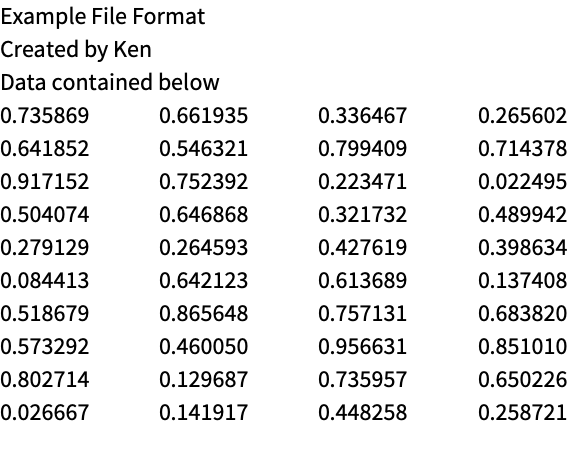
Registration and Implementation of a New Format
One possible design is to import the header information and the numbers, respectively, to the "Header" and "Data" elements. This can also be implemented using RegisterImport.
ImportExport`RegisterImport[
	"MyFormat1",
	MyFormat1`MyFormat1Import
	]
In this particular case, you are telling the Import and Export framework to call the function MyFormat1`MyFormat1Import when importing any element of the format "MyFormat1".
By default, the framework passes the file name to the low-level function, so MyFormat1`MyFormat1Import takes as input the file name and a set of options. This function must return a list of rules in the form of ElementName->ElementValue.
(* the converter function takes file name and options as arguments *)
	MyFormat1`MyFormat1Import[filename_String, options___] :=
	Module[{strm, head, data},
	strm = OpenRead[filename];
	head = ReadList[strm, "String", 3];
	data = Partition[ReadList[strm, "Number"], 4];
	Close[strm];
	(* the converter returns a list of rules,
 in the form of ElementName -> ElementValue *)
	{
	"Header" -> head,
	"Data" -> data
	}
	]
Importing a File of the New Format
Import["ExampleData/ExampleData.txt", { "MyFormat1", "Elements"}]Import["ExampleData/ExampleData.txt", {"MyFormat1", "Header"}]Import["ExampleData/ExampleData.txt", {"MyFormat1", "Data"}]//GridConditional Raw Importers
When a format contains many elements, it may be useful and efficient to import specific elements with specific low-level functions. This can be achieved by giving a list of rules in the form of "elem"->func as the second argument of RegisterImport. The list, however, must end with the name of the default importer, which is called when importing elements that do not match any explicitly defined in the list.
Registration and Implementation of a New Format with Conditional Importers
This registration tells the Import and Export framework how to import files of the format "MyFormat2":
(1) use MyFormat2`MyFormat2DataImport when importing the "Data" element, and
(2) MyFormat2`MyFormat2DefaultImport for all other elements.
(1) use MyFormat2`MyFormat2DataImport when importing the "Data" element, and
(2) MyFormat2`MyFormat2DefaultImport for all other elements.
ImportExport`RegisterImport[
	"MyFormat2",
	{
	(* the first items are rules of the form
ElementName :> FunctionName *)
	"Data"  :>   MyFormat2`MyFormat2DataImport,

	(* this list must end with the default importer *)
	MyFormat2`MyFormat2DefaultImport
	}
	]
The low-level functions again have the same structure, taking a file name and (optionally) a list of options, and returning a set of rules in the form of ElementName->ElementValue.
MyFormat2`MyFormat2DefaultImport[filename_String, options___] :=
	Module[{strm, head},
	strm = OpenRead[filename];
	head = ReadList[strm, "String", 3];
	Close[strm];
	{"Header" -> head}
]MyFormat2`MyFormat2DataImport[filename_String, options___] :=
Module[{strm, data},
strm = OpenRead[filename];
Skip[strm, "String", 3];
data = Partition[ReadList[strm, "Number"], 4];
Close[strm];
(* the converter returns a list of rules,
in the form of ElementName -> ElementValue *)
{"Data" -> data}
]Import Using MyFormat2
The output of the import elements of "MyFormat2" is the same as those of "MyFormat1", but now two different functions are called for the two different elements.
(* this uses the default importer MyFormat2`MyFormat2DefaultImport *)
Import["ExampleData/ExampleData.txt", {"MyFormat2", "Header"}](* this uses the conditional importer MyFormat2`MyFormat2DataImport *)
Import["ExampleData/ExampleData.txt", {"MyFormat2", "Data"}]//GridSpecifying Subelements
By default, the framework imports subelements using Part.
(* this imports the 2nd sub-element of the "Data" element *)
	Import["ExampleData/ExampleData.txt", {"MyFormat2", "Data", 2}]
For files containing several large datasets, it may be efficient to directly import specific datasets. For example, you can directly import a dataset from a file with the "EDF" file format.
(* import the names of data sets contained in the file *)
Import[ "http://exampledata.wolfram.com/osas.edf.gz", "Labels" ](* import only the EKG data set *)
dataEKG = Import[ "http://exampledata.wolfram.com/osas.edf.gz", {"Data", "EKG"} ];ListPlot[Take[dataEKG, 500], Joined -> True]You can specify the import of subelements by registering a low-level function in the form of
{elem,subelem}lowlevelFunc.
{elem,subelem}lowlevelFunc.
ImportExport`RegisterImport[
	"ConditionalImportExample",
	{
	(* register the import of sub-element *)
	{"Data", s_String} :> (ConditionalImportExample`ImportPartialData[s][##]&),
	(***************************************)
	"Data"  :> ConditionalImportExample`ImportAllData,
	ConditionalImportExample`DefaultImporter
}]ConditionalImportExample`ImportPartialData[s_String][filename_, opts___] :=
{"Data" -> {s -> "DataOutput with " <> s}}As before, the output of the other low-level functions must be a list of rules in the form of elem->value.
ConditionalImportExample`ImportAllData[filename_, opts___]  :=
{"Data" -> "DataOutput"}ConditionalImportExample`DefaultImporter[filename_, opts___] :=
{"DefaultElement" -> "DefaultOutput"}Import["ExampleData/ExampleData.txt", {"ConditionalImportExample", "Data", "SpecialDataSet"}]Import["ExampleData/ExampleData.txt", {"ConditionalImportExample", "Data"}]Post-Importers
It may be the case that you have to build elements based on other elements. For example, if the data to be imported is a list of numbers representing a grayscale image, then importing the "Image" element requires first importing the "Data" element. In this section are two examples of this using the "Graphics" and "Image" elements.
The post-importer takes as input the output of the conditional importer when a matching element name exists; otherwise, the post-importer takes as input the output of the default importer.
Unlike conditional and default importers, the post-importer simply returns the value of the element.
Registration and Implementation of a New Format with Post-Importers
To illustrate the differences between a conditional importer and a post-importer, "MyFormat2" is extended with two additional elements: "Graphics" and "Image". The "Graphics" element is imported via a conditional importer. The "Image" element, however, is imported via a post-importer.
The registration below tells the Import and Export framework how to import files of the format "MyFormat3":
(1) for the "Header" or "Graphics" elements, call the corresponding conditional importers,
(2) for the "Image" element, call the default importer first, and use its output as input for MyFormat3`MyFormat3ImageImport, and
(3) for all other elements, call the default importer.
(1) for the "Header" or "Graphics" elements, call the corresponding conditional importers,
(2) for the "Image" element, call the default importer first, and use its output as input for MyFormat3`MyFormat3ImageImport, and
(3) for all other elements, call the default importer.
ImportExport`RegisterImport[
	"MyFormat3",

	{
	(* the first items are rules of the form
ElementName :> FunctionName *)
	"Header"  :>   MyFormat3`MyFormat3HeaderImport,
	"Graphics" :> MyFormat3`MyFormat3GraphicsImport,

	(* this list must end with the default importer *)
	MyFormat3`MyFormat3DefaultImport
	},

	(* the third argument is the list of post-importers *)
	{  "Image" :> MyFormat3`MyFormat3ImageImport  }
]MyFormat3`MyFormat3DefaultImport[filename_String, options___] :=
Module[{strm, data},
strm = OpenRead[filename];
Skip[strm, "String", 3];
data = Partition[ReadList[strm, "Number"], 4];
Close[strm];
"Data" -> data
]MyFormat3`MyFormat3HeaderImport[filename_String, options___] :=
Module[{strm, head},
strm = OpenRead[filename];
head = ReadList[strm, "String", 3];
Close[strm];
"Header" -> head
]Notice that the "Graphics" importer has to explicitly call the default importer and extract the data manually.
MyFormat3`MyFormat3GraphicsImport[filename_String, options___] :=
	Module[{data},
	data = "Data" /. (MyFormat3`MyFormat3DefaultImport[filename, options]);
	"Graphics" -> Image[data]
	]
Since no "Image" element is registered as a conditional importer, the importer of the "Image" element takes as input the output of the default importer.
MyFormat3`MyFormat3ImageImport[rules_, options___] := Image["Data" /. rules]Import Using MyFormat3
From a user perspective, there is no difference between an element implemented using a post-import function or low-level function.
Import["ExampleData/ExampleData.txt", {"MyFormat3", "Graphics"}]Import["ExampleData/ExampleData.txt", {"MyFormat3", "Image"}]Options to RegisterImport
"FunctionChannels" and "BinaryFormat"
In our example above, the low-level functions accept a file name as an argument, and the functions open a stream to the file. The framework can directly pass an InputStream to the low-level functions by specifying "FunctionChannels"->{"Streams"} as an option to RegisterImport.
By specifying the option "BinaryFormat"->True, the framework passes a binary stream to the low-level importer.
The default value of "FunctionChannels" is {"FileNames"}. The default value of "BinaryFormat" is False.
Example
the signature of eFunc is eFunc[strm_InputStream,opts___], and the framework passes a (non-binary) stream to eFunc.
"AvailableElements"
By default, when importing an element not explicitly registered as a conditional importer or a post-importer, the framework evaluates the default importer. If no matching element is found in the default importer, the framework generates an error message and returns $Failed.
By specifying the option "AvailableElements"->{elem1,elem2,…} when attempting to import an element not present in the specified list, the framework will directly return $Failed and generate an error message without calling any low-level importer.
Example
ImportExport`RegisterImport["format",{"elem1":>eFunc1,"elem2":>eFunc2,eDefaultFunc},{},"AvailableElements"->{"elem1","elem2","Data"}]
when you call Import[filename,{"format","foo"}], the framework will return $Failed without evaluating the default importer eDefaultFunc.
Note that it is an error to specify "AvailableElements"->{"elem1","Data"}. In this case, Import[filename,{"format","elem2"}] will return $Failed because "elem2" is not in the list specified by "AvailableElements".
"DefaultElement"
Specifying "DefaultElement"->elem, where elem is the name of an element, the framework imports the elem when no Import element is specified.
"Sources"
The option "Sources"->{path1,path2,…} can be used to specify file paths to .m, .mx, or Wolfram Symbolic Transfer Protocol (WSTP) .exe files that contain definitions of the low-level functions. The framework will automatically use Get or Install appropriately for the source files.
The Wolfram Language provides functions that allow developers to implement file format converters to be integrated with the Wolfram Language Import and Export framework. You can implement format converters and use Export to export data from customized formats.
The interface between Export and low-level converter functions is specified by RegisterExport (under the ImportExport` context). In essence, RegisterExport tells the Import and Export framework how to make various function calls when exporting Wolfram Language expressions to a file format.
The Wolfram Language also includes source code for various converters. These are placed in the folders $InstallationDirectory/SystemFiles/Formats/format, where format is one of the following: BDF, DIF, MTP, SMILES, SurferGrid, TGF, or TLE. The registration code can be found in the files Import.m and/or Export.m, and the converter sources reside in the files Converter.m.
Format Registration
An Export format must first be registered. Note that, unlike registering an Import format, RegisterExport accepts only one function.
Writing a Converter Function
For this example, imagine a file format that encodes an ASCII string by each character's ASCII code, with each code separated by a single space. A converter function for this format can be added to the Import and Export framework using RegisterExport.
ImportExport`RegisterExport["MyExportFormat", MyExportFormat`Exporter ]When you use Export[file.ext,"str","MyExportFormat"], the framework passes both the output file name and the data, str, to the exporter, so an example exporter function can be written as below.
MyExportFormat`Exporter[filename_, data_, opts___] :=
	Module[{char, strm},
	(* TODO: check for valid data here *)
	char = ToCharacterCode[data];
	char = Riffle[char, " "];
	strm = OpenWrite[filename];
	WriteString[strm, Sequence@@char];
	Close[strm]
]Export["sample.txt", "Encode this string!", "MyExportFormat"];
FilePrint["sample.txt"]
Elements and Options for Converter Functions
Unlike Import, which always imports elements, Export can directly export an expression (as in the example above) or a list of rules in the form of elementName->elementValue.
Elements can be designated as options, meaning that they will always be passed to the converter functions along with all other options. Here is a trivial converter to illustrate the handling of elements and options.
ImportExport`RegisterExport["ExportDemo", ExportDemo`func, "Options" -> {"opt1", "opt2"}]ExportDemo`func[filename_, data_, opts___] :=
(Print["data: ", data, " opts: ", Flatten[{opts}] ])Export["file1", 5, "ExportDemo"];
Export["file1", 5, "ExportDemo", "OpName" -> "OpVal"];
Export["file1", {"E1" -> 1, "E2" :> 2}, {"ExportDemo", "Rules"}];
Export["file1", { 1, 2, 3}, {"ExportDemo", {"E1", "E2", "E3"}}];
Export["file1", {"E1" -> 1, "E2" -> 2}, {"ExportDemo", "Rules"}, "opt3" -> 3];
Export["file1", {"E1" -> 1, "E2" -> 2}, {"ExportDemo", "Rules"}, "opt3" -> 3, "opt4" -> 4];
Export["file1", {"E1" -> 1, "opt2" -> 2}, {"ExportDemo", "Rules"}, "opt3" -> 3];
Export["file1", {1, 2}, {"ExportDemo", {"E1", "opt2"}}, "opt3" -> 3, "opt4" -> 4];
Note that by specifying "Options"->{"opt1","opt2"}, the elements "opt1" and "opt2" are automatically passed as options to the exporters.
In addition to the interfaces of Import and Export, the Wolfram Language comes with an autoloading mechanism that simplifies the registration of formats used by the Import and Export framework.
Autoloading versus Manual Loading
Manual Loading
Examples of manually loading converters are given in the tutorials, where the commands to register "MyFormat1" are explicitly evaluated.
ImportExport`RegisterImport[
	"MyFormat1",
	MyFormat1`MyFormat1Import
]MyFormat1`MyFormat1Import[filename_String, options___] :=
Module[{strm, head, data},
strm = OpenRead[filename];
head = ReadList[strm, "String", 3];
data = Partition[ReadList[strm, "Number"], 4];
Close[strm];
{
"Header" -> head,
"Data" -> data
}
]Autoloading
By placing both the format registration and the converter in appropriate locations, the Wolfram Language can automatically load the format registration. Autoloading of Import and Export converters can be achieved by following these steps:
1. If the directory $UserBaseDirectory/SystemFiles/Formats does not exist, create it.
2. Under $UserBaseDirectory/SystemFiles/Formats, create a directory with the name format, where format is the name of the format to be autoloaded.
3. Inside the format directory, place the ImportExport`RegisterImport[] code block into a file named Import.m.
For example, in the directory $UserBaseDirectory/SystemFiles/Formats/MyFormat1, the file Import.m would have the following content.
(* content of Import.m *)
ImportExport`RegisterImport[
"MyFormat1",
MyFormat1`MyFormat1Import
]For example, in the directory $UserBaseDirectory/SystemFiles/Formats/MyFormat1, the file Converter.m would have the following content.
(* content of Converter.m *)
MyFormat1`MyFormat1Import[filename_String, options___] :=
	Module[{strm, head, data},
	strm = OpenRead[filename];
	head = ReadList[strm, "String", 3];
	data = Partition[ReadList[strm, "Number"], 4];
	Close[strm];
	{
	"Header" -> head,
	"Data" -> data
	}
]5. With the files in place, when the Wolfram Language starts, $ImportFormats will contain the entry "MyFormat1", and Import[ file,{"MyFormat1","Header"}] will evaluate appropriately.
In fact, all formats supported by the Wolfram Language are registered using this autoloading mechanism, with the format registration residing in $InstallationDirectory/SystemFiles/Formats.
Furthermore, several formats in the Wolfram Language are made available in source form in the directory $InstallationDirectory/SystemFiles/Formats.
Details of the Registration Mechanism
Directory Name Must Match the Format Name
When using the autoloading mechanism, the folder name must match the format name. Formats can effectively be renamed by using format aliases below.
"Sources" Must Be Explicitly Given If Source Files Are Not in Standard Locations
When using the autoloading mechanism, the Import/Export framework assumes the source file to be located in either $UserBaseDirectory/SystemFiles/Formats/format/Converter.m or $BaseDirectory/SystemFiles/Formats/format/Converter.m. If the source files are located elsewhere, it must be explicitly declared using the "Sources" option. For example, "Sources"->{"MyFormatConverter/Converter.m","MyFormatConverter/Converter2.m" }.
Resolving Conflicts
In case of conflicts (for example, the "MyFormat" directory residing in both $InstallationDirectory/SystemFiles/Formats and $UserBaseDirectory/SystemFiles/Formats), the registration in $UserBaseDirectory has highest priority, followed by $BaseDirectory and $InstallationDirectory.
Defining Format Aliases
It is often useful to define format aliases so that you may refer to a format with several different names. Suppose you would like to use "MyOtherFormat" and "MyDefaultFormat" as aliases of "MyFormat1". You can do this by creating the file $UserBaseDirectory/SystemFiles/Formats/FormatMappings.m with the following contents.
(* content of FormatMappings.m *)
	{
	"MyOtherFormat" -> "MyFormat1",
	"MyDefaultFormat" -> "MyFormat1"
}Import["ExampleData/ExampleData.txt", {"MyOtherFormat", "Data"}]Import["ExampleData/ExampleData.txt", {"MyFormat1", "Data"}]Wolfram System notebooks provide a sophisticated environment for creating technical documents. But particularly if you want to merge your work with existing material in TeX, you may find it convenient to use TeXForm to convert expressions in the Wolfram Language into a form suitable for input to TeX.
| TeXForm[expr] | print expr in TeX input form |
(x + y) ^ 2 / Sqrt[x y]TeXForm[%]| ToExpression["input",TeXForm] | convert TeX input to the Wolfram Language |
This converts a TeX string to the Wolfram Language. Note the double backslashes needed in the string:
ToExpression["\\sqrt{x y}", TeXForm]In addition to being able to convert individual expressions to TeX, the Wolfram System also provides capabilities for translating complete notebooks. These capabilities can usually be accessed from the File ▶ Save As... menu in the notebook front end.
| Export["file.html",nb] | save the notebook nb in HTML form |
Export has many options applying to HTML export that allow you to specify how notebooks should be converted for web browsers with different capabilities.
| MathMLForm[expr] | print expr in MathML form |
| MathMLForm[StandardForm[expr]] | use StandardForm rather than traditional mathematical notation |
| ToExpression["string",MathMLForm] | interpret a string of MathML as Wolfram Language input |
MathMLForm[x ^ 2 / z]If you paste MathML into a Wolfram System notebook, the Wolfram System will automatically try to convert it to Wolfram Language input. You can copy an expression from a notebook as MathML using the Copy As menu in the notebook front end.
| Export["file.xml",expr] | export in XML format |
| Import["file.xml"] | import from XML |
| ImportString["string","XML"] | import data from a string of XML |
Somewhat like Wolfram Language expressions, XML is a general format for representing data. The Wolfram Language automatically converts certain types of expressions to and from specific types of XML. MathML is one example. Another example is SVG for graphics.
If you ask the Wolfram Language to import a generic piece of XML, it will produce a SymbolicXML expression. Each XML element of the form <elem attr='val'>data</elem> is translated to a Wolfram Language SymbolicXML expression of the form XMLElement["elem",{"attr"->"val"},{data}]. Once you have imported a piece of XML as SymbolicXML, you can use the Wolfram Language's powerful symbolic programming capabilities to manipulate the expression you get. You can then use Export to export the result in XML form.
This generates a SymbolicXML expression, with an XMLElement representing the a element in the XML string:
ImportString["<a aa='va'>s</a>", "XML"]ImportString["<a><b bb='1'>ss</b><b bb='2'>ss</b></a>", "XML"]% /. "ss" -> XMLElement["c", {}, {"xx"}]ExportString[%, "XML"]| Import["http://url",…] | import a file from any accessible URL |
| Import["ftp://url",…] | import a file from an FTP server |
Import["http://exampledata.wolfram.com/ocelot.jpg"]