

AnimationVideo[fexpr,{u,umin,umax}]
生成 fexpr 的视频,其中 u 的值从 umin 到 umax 变化.
AnimationVideo[fexpr,{u,umin,umax,du}]
让 u 在步骤 du 中变化.
AnimationVideo[fexpr,{u,{u1,u2,…}}]
让 u 取值 u1, u2, ….
AnimationVideo
AnimationVideo[fexpr,{u,umin,umax}]
生成 fexpr 的视频,其中 u 的值从 umin 到 umax 变化.
AnimationVideo[fexpr,{u,umin,umax,du}]
让 u 在步骤 du 中变化.
AnimationVideo[fexpr,{u,{u1,u2,…}}]
让 u 取值 u1, u2, ….
更多信息和选项
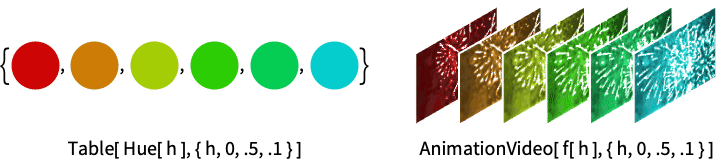
- AnimationVideo 可用算法生成视频对象. 通常用于创建时间变化图的视频、旋转三维对象等.
- 表达式 fexpr 应计算为 Image 或 Graphics 对象.
- 要并行生成帧,请使用 Parallelize[AnimationVideo[…]].
- 默认情况下,AnimationVideo 会将 "Video" 目录中的新视频放置于 $WolframDocumentsDirectory.
- 支持下列选项:
-
BitRate Automatic 使用的近似比特率 CompressionLevel Automatic 使用的压缩水平 DefaultDuration 5. 默认持续时间 FrameRate Automatic 使用的帧率 GeneratedAssetFormat Automatic 结果的文件格式 GeneratedAssetLocation $GeneratedAssetLocation 结果的位置 OverwriteTarget False 是否覆写已存在文件 RasterSize Automatic 用于栅格化表达式的栅格尺寸 VideoEncoding Automatic 使用的视频编码 VideoTransparency False 输出视频是否应该有一个透明度通道 - 若设置明确指定了 FrameRate,则优先于 DefaultDuration 的设置.
范例
打开所有单元 关闭所有单元基本范例 (2)
范围 (3)
v = AnimationVideo[Rasterize[N@i, RasterSize -> {50, 50}], {i, 0, 6}];
VideoFrameList[v, 6]v = AnimationVideo[Rasterize[i, RasterSize -> {50, 50}], {i, 10, 60, 2}];
VideoFrameList[v, 6]v = AnimationVideo[Rasterize[i, RasterSize -> {50, 50}], {i, {35, 13, 60, 48, 25, 46}}];
VideoFrameList[v, All]选项 (4)
DefaultDuration (2)
v = AnimationVideo[Rasterize[N@i, RasterSize -> {50, 50}], {i, 0, 6}];
Duration[v]v = AnimationVideo[Rasterize[N@i, RasterSize -> {50, 50}], {i, 0, 6}, DefaultDuration -> 1];
Duration[v]如果同时指定了步长规范和帧速率,则忽略 DefaultDuration 选项:
v = AnimationVideo[Rasterize[N@i, RasterSize -> {50, 50}], {i, 0, 6, .1}, DefaultDuration -> 1, FrameRate -> 10];
Duration[v]FrameRate (2)
如果指定了一个步骤,将根据生成的帧数和请求的持续时间计算帧速率:
v = AnimationVideo[Rasterize[N@i, RasterSize -> {50, 50}], {i, 0, 6, .1}];
Information[v, "VideoTracks"]v = AnimationVideo[Rasterize[N@i, RasterSize -> {50, 50}], {i, 0, 6}];
Information[v, "VideoTracks"]v = AnimationVideo[Rasterize[N@i, RasterSize -> {50, 50}], {i, 0, 6}, FrameRate -> 10];
Information[v, "VideoTracks"]应用 (9)
基本应用 (4)
AnimationVideo[ConstantImage[Hue[t]], {t, 0, 1}]AnimationVideo[ImageRotate[[image], rot, Full, Masking -> Full, Padding -> "Fixed"], {rot, 0, 2π}]AnimationVideo[ImageTransformation[[image], FractionalPart[s#]&], {s, 1, 5}]Parallelize@AnimationVideo[GeoGraphics[GeoMarker[], GeoRange -> Quantity[i, "Miles"]], {i, .1, 200}]插值动画 (1)
δ := RandomChoice[{1, -1}];
n = 1000;
dur = 20;
colors = RandomColor[n];eqns := {z''[t] == -9.81, z[0] == 10 * RandomReal[{0.5, 1}], z'[0] == 20δ RandomReal[], x'[t] == 5δ RandomReal[], x[0] == 5δ RandomReal[], y'[t] == 3 δ RandomReal[], y[0] == 5δ RandomReal[], WhenEvent[z[t] == 0, z'[t] -> -0.95z'[t]]};trajectories = Table[First@NDSolve[eqns, {x[t], y[t], z[t]}, {t, 0, dur}], n];
newtrajectories = Table[Function[t, Evaluate@tr], {tr, trajectories[[All, All, -1]]}];Parallelize@AnimationVideo[Graphics3D[Table[{colors[[i]], Sphere[newtrajectories[[i]][t], 1]}, {i, n}], PlotRange -> {{-100, 100}, {-50, 50}, {0, 40}}, ImageSize -> 400, Lighting -> "ThreePoint"], {t, 1, dur}, RasterSize -> 480]演变动画 (2)
n = 128;
AnimationVideo[
ImageCrop[
Image[CellularAutomaton[30, {{1}, 0}, Floor[i]]],
{2n - 1, n}, Top
],
{i, 1, n, 1}
]mesh = ExampleData[{"Geometry3D", "Cow"}]radiusCow = (3 / (4 Pi)NIntegrate[1, {x, y, z}∈MeshRegion[mesh[[1, 2, 1]], mesh[[1, 2, 2]]]] ) ^ (1 / 3);fattenArray[array_, coeff_] := Table[(item * ((Norm[item] / radiusCow) ^ -coeff)), {item, array}]Parallelize@AnimationVideo[Show[mesh /. GraphicsComplex[array_, rest___] :> GraphicsComplex[fattenArray[array, coeff], rest]], {coeff, 0, 1}]随时间推移的动画 (1)
文本
Wolfram Research (2021),AnimationVideo,Wolfram 语言函数,https://reference.wolfram.com/language/ref/AnimationVideo.html.
CMS
Wolfram 语言. 2021. "AnimationVideo." Wolfram 语言与系统参考资料中心. Wolfram Research. https://reference.wolfram.com/language/ref/AnimationVideo.html.
APA
Wolfram 语言. (2021). AnimationVideo. Wolfram 语言与系统参考资料中心. 追溯自 https://reference.wolfram.com/language/ref/AnimationVideo.html 年
BibTeX
@misc{reference.wolfram_2026_animationvideo, author="Wolfram Research", title="{AnimationVideo}", year="2021", howpublished="\url{https://reference.wolfram.com/language/ref/AnimationVideo.html}", note=[Accessed: 16-September-2026]}
BibLaTeX
@online{reference.wolfram_2026_animationvideo, organization={Wolfram Research}, title={AnimationVideo}, year={2021}, url={https://reference.wolfram.com/language/ref/AnimationVideo.html}, note=[Accessed: 16-September-2026]}