ArrayResample[array,{n1,n2,…}]
次元{n1,n2,…}を持つように,array のリサンプリングを行う.
ArrayResample[array,dspec]
次元指定 dspec に従って,array のリサンプリングを行う.
ArrayResample[array,dspec,scheme]
リサンプリングの scheme を点ベースかビンベースに指定する.
ArrayResample[array,dspec,scheme,{{xmin,xmax},…}]
指定された部分範囲{{xmin,xmax},…}にあるデータのみのリサンプリングを行う.
ArrayResample
ArrayResample[array,{n1,n2,…}]
次元{n1,n2,…}を持つように,array のリサンプリングを行う.
ArrayResample[array,dspec]
次元指定 dspec に従って,array のリサンプリングを行う.
ArrayResample[array,dspec,scheme]
リサンプリングの scheme を点ベースかビンベースに指定する.
ArrayResample[array,dspec,scheme,{{xmin,xmax},…}]
指定された部分範囲{{xmin,xmax},…}にあるデータのみのリサンプリングを行う.
詳細とオプション
- ArrayResampleを使うと,数多くの補間と近似のモデルに基づいたデータ配列のリサンプリングを行うことができる.
- ArrayResampleは,任意の深さのデータ配列に使える.
- 次元指定 dspec には以下の形が使える.
-
n n 個のサンプル Scaled[s] 因数 s でサンプリング解像度を再スケールする All 次元を保つ Automatic 次元の割合を保つ {dspec1,…,dspeck} 
次元までリサンプリングを行う - 多次元の配列については,表記 n が{n,Automatic,…}に等しく,{n}が{n,All,…}に等しいとみなされる.
- 次元

の配列の次元比は,
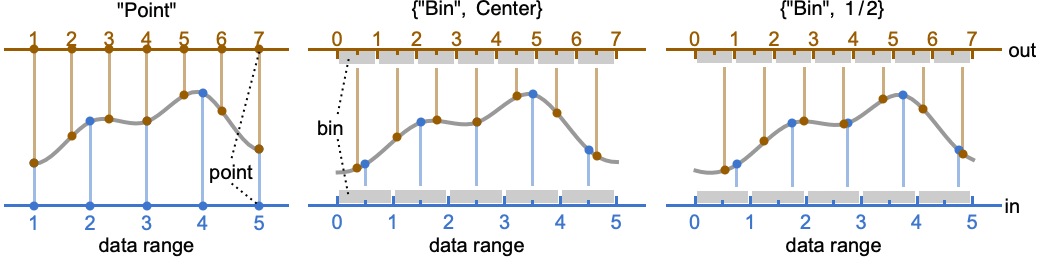
であるとされる. - scheme は,サンプルとリサンプルの位置を決定し,以下の形式を取ることができる.
-
"Point" 点のサンプリング(デフォルト) "Bin" ビンのサンプリング {"Bin",alignment} 指定の alignment でのビンのサンプリング - 長さ n の入力データについて,"Point"のリサンプリングスキームは,データが1から n までの範囲にあると想定し,"Bin"のスキームはデータが0から n の範囲にあり,各ビン内のサンプルの位置を示すように並べられると想定する.
- ビンの整列 alignment は,Left,Center,Right,あるいは
(Left) と 1 (Right)の間の数である. - データ範囲は,DataRangeオプションを使って変更できる.
- デフォルトで,データは,"Point"スキームでは1から
,"Bin"スキームでは0から
までのデータ領域全体についてリサンプルされる.DataRangeオプションを使ってデータ領域の座標を変更する. - DataRangeについて指定された部分領域{{xmin,xmax},…}では,指定された区間のデータ値だけがリサンプルされる. »
- 使用できるオプション
-
Antialiasing False ダウンサンプリングの際にアンチエイリアシングを適用する DataRange Automatic 入力データの範囲 Padding "Fixed" 充填方法 Resampling Automatic リサンプリングの方法 - Paddingの可能な設定については,ArrayPadのページを参照のこと.
例題
すべて開く すべて閉じる例 (2)
スコープ (8)
基本的な用法 (4)
ArrayResample[{1, 2, 3}, 4]ArrayResample[{1.0000000000000000000, 2.0000000000000000000, 3.0000000000000000000, 4.0000000000000000000}, 6]ArrayResample[{a, b, c}, 5]input = Range[100];ArrayResample[input, 20, "Point", {55, 63}]出力次元 (1)
サンプリングスキーム (3)
デフォルトで,"Point"のサンプリングスキームが使われる:
ArrayResample[{1, 2, 3}, 7, "Point"]ArrayResample[{1, 2, 3}, 6, "Bin"]ArrayResample[{1, 2, 3}, 6, {"Bin", -1}]入力の3倍の解像度で"Point"リサンプリングを生成する:
input = {2, 1, 3, 4, 2, 5};
m = Length[input];
s = 3;
res1 = ArrayResample[input, Scaled[s]]pos = Range[1, m, (m - 1) / Round[s (m - 1)]]ListPlot[{Thread[{Range[m], input}], Thread[{pos, res1}]}, Joined -> {True, False}, PlotStyle -> {PointSize[.04], Automatic}, Mesh -> All]オプション (5)
Antialiasing (1)
ダウンサンプリングするときは,デフォルトで,アンチエイリアス処理は行われない:
data = {2, 1, 2, 1, 2, 1, 2};ArrayResample[data, Scaled[1 / 2], Padding -> "Reflected"]アンチエイリアス処理が行われる場合は,新たなサンプル間のすべてのサンプルが平均される:
ArrayResample[data, Scaled[1 / 2], Padding -> "Reflected", Antialiasing -> True]DataRange (1)
DataRangeはリサンプリング領域を指定する.部分領域指定はこの領域について定義される:
data = {0, 2, 0, 1, 4, 1, 9, 4, 4};ArrayResample[data, Scaled[2], "Point"]デフォルトのDataRange->{1,n}を使って前半分をリサンプルする.n は data の長さである:
ArrayResample[data, Scaled[2], "Point", {1, 5}]{0,1}データ範囲を使ってデータの前半分をリサンプルする:
ArrayResample[data, Scaled[2], "Point", {0, 1 / 2}, DataRange -> {0, 1}]Padding (2)
ArrayResample[{1, 2, 3}, 9, "Bin"]ArrayResample[{1, 2, 3}, 9, "Bin", Padding -> 0]ArrayResample[(| | | |
| - | - | - |
| 1 | 2 | 3 |
| 2 | 1 | 6 |
| 3 | 6 | 2 |), 5, Resampling -> "Cubic", Padding -> 0]//N//MatrixFormArrayResample[(| | | |
| - | - | - |
| 1 | 2 | 3 |
| 2 | 1 | 6 |
| 3 | 6 | 2 |), 5, Resampling -> "Cubic", Padding -> {0, "Fixed"}]//N//MatrixFormResampling (1)
ArrayResample[{1, 2, 3}, 6]ArrayResample[{1, 2, 3}, 6, Resampling -> "Nearest"]"Nearest"のリサンプリングは,サンプリングの位置がサンプル間の半ばにある場合には,サンプルの平均を取る:
ArrayResample[{1, 2, 3}, 5, Resampling -> "Nearest"]半整数のサンプリング位置について,左へのバイアスあるいは右へのバイアスにそれぞれ"NearestLeft"と"NearestRight"を使う:
ArrayResample[{1, 2, 3}, 5, Resampling -> "NearestLeft"]アプリケーション (1)
特性と関係 (2)
異なるいくつかのカーネルについて配列のリサンプリングを比較する:
a = {1, 3, 1, 2};
n = 25;
xpos = Array[#&, n, {1, Length[a]}];
Table[
result = ArrayResample[a, n, Resampling -> ker];
ListPlot[Transpose[{xpos, result}], PlotStyle -> PointSize[Medium], Epilog -> {Red, Line[Transpose[{Range[Length[a]], a}]]}, Axes -> {True, False}, PlotLabel -> ker],
{ker, {"Linear", "Cubic", "German"}}]Downsampleを使って整数因子分ダウンサンプリングすることができる:
Downsample[Range[9], 2]ArrayResample[Range[9], Scaled[1 / 2]]考えられる問題 (1)
input = Range[100];AbsoluteTiming[ArrayResample[input, 1000, Resampling -> "Cubic"];]Nを整数データに適用して検索速度を上げる:
AbsoluteTiming[ArrayResample[N@input, 1000, Resampling -> "Cubic"];]テクニカルノート
-
▪
- 画像処理
関連するガイド
テキスト
Wolfram Research (2014), ArrayResample, Wolfram言語関数, https://reference.wolfram.com/language/ref/ArrayResample.html (2016年に更新).
CMS
Wolfram Language. 2014. "ArrayResample." Wolfram Language & System Documentation Center. Wolfram Research. Last Modified 2016. https://reference.wolfram.com/language/ref/ArrayResample.html.
APA
Wolfram Language. (2014). ArrayResample. Wolfram Language & System Documentation Center. Retrieved from https://reference.wolfram.com/language/ref/ArrayResample.html
BibTeX
@misc{reference.wolfram_2026_arrayresample, author="Wolfram Research", title="{ArrayResample}", year="2016", howpublished="\url{https://reference.wolfram.com/language/ref/ArrayResample.html}", note=[Accessed: 13-September-2026]}
BibLaTeX
@online{reference.wolfram_2026_arrayresample, organization={Wolfram Research}, title={ArrayResample}, year={2016}, url={https://reference.wolfram.com/language/ref/ArrayResample.html}, note=[Accessed: 13-September-2026]}