

ColorNegate[color]
色の反転を与える.
ColorNegate[image]
すべての色が反転された image のネガを返す.
ColorNegate[video]
動画の全フレームを反転させる.
ColorNegate[{expr1,…}]
反転した画像または色のリストを与える.
ColorNegate
ColorNegate[color]
色の反転を与える.
ColorNegate[image]
すべての色が反転された image のネガを返す.
ColorNegate[video]
動画の全フレームを反転させる.
ColorNegate[{expr1,…}]
反転した画像または色のリストを与える.
詳細
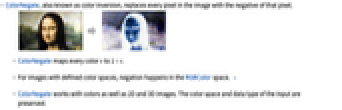
- ColorNegateは色の反転としても知られているもので,画像のすべての画素をその画素のネガで置換する.
- ColorNegateは,すべての色 v を1-ν にマッピングする.
- 色空間が指定されている画像については,反転はRGBColor空間で行われる. »
- ColorNegateは色と任意の2Dおよび3Dの画像に使うことができる.入力の色空間とデータ型は保持される.
例題
すべて開く すべて閉じる例 (2)
スコープ (7)
ColorNegate[LABColor[.6, .5, 0.2]]%//InputFormYellowのネガ:
ColorNegate[Yellow]%//InputFormColorNegate[[image]]ColorNegate[[image]]ColorNegate[[image]]ColorNegate[\!\(\*VideoBox[""]\)]ColorNegate[[image]]ColorNegate[\!\(\*Graphics3DBox[«8»]\)]アプリケーション (5)
ColorNegate[[image]]都市の夜景のスカイラインの輝度チャンネルだけを反転させることで画像効果を生む:
img = [image];ColorCombine[{ColorNegate@#1, #2, #3}&@@ColorSeparate[img, "LAB"], "LAB"]RGB色の3つのチャンネルのつだけを反転させることで,画像に偽色を付ける:
img = [image];{r, g, b} = ColorSeparate[img];
{ColorCombine[{ColorNegate@r, g, b}], ColorCombine[{r, ColorNegate@g, b}], ColorCombine[{r, g, ColorNegate@b}]}DeleteSmallComponentsは,白く小さい構成要素を取り除く:
DeleteSmallComponents[i = [image]]ColorNegate[DeleteSmallComponents[ColorNegate[i], 100]]関心領域を反転させてアルファチャンネルを作成する.関心領域を検出する:
ColorDetect[[image], RGBColor[0.40541765226970417, 0.5989489462507049, 0.9031254989108909]]SetAlphaChannel[[image], ColorNegate[%]]特性と関係 (7)
ColorNegate[GrayLevel[0.5]]%//InputForm色の反転はRGBColor空間で行われる:
c = LABColor[.6, .5, 0.2];
crgb = ColorConvert[c, RGBColor];ColorNegate[c] == ColorConvert[ColorNegate[crgb], LABColor]color = RGBColor[1, .2, .7]clist = ColorConvert[color, #]& /@ {"RGB", "CMYK", "HSB", "LAB", "LCH", "LUV", "XYZ"}ColorNegate /@ clist1 - [image]ImageHistogram /@ {[image], ColorNegate[[image]]}RGB画像のColorNegateは,すべての画素 v を1-v にマップすることに等しい:
img = [image];ColorNegate[img] == ImageApply[(1 - #&), img]img2 = ColorConvert[img, "LUV"];{ColorNegate[img2], ImageApply[(1 - #&), img2]}LCH色空間の明るさだけを反転させて色成分はそのままにする:
i = ColorConvert[[image], "LCH"];ImageApply[{1 - #[[1]], #[[2]], #[[3]]}&, i]ImageApply[{#[[1]], #[[2]], #[[3]] + 1 / 2}&, i]ImageApply[{1 - #[[1]], #[[2]], #[[3]] + 1 / 2}&, i]ColorNegate[i]テクニカルノート
-
▪
- 画像処理
関連するガイド
-
▪
- 色の処理 ▪
- 色 ▪
- 数学的形態論 ▪
- 動画編集 ▪
- 動画計算機能の更新履歴
関連リンク
-

An Elementary Introduction to the Wolfram Language
: Colors and Styles
-

An Elementary Introduction to the Wolfram Language
: Images
-

An Elementary Introduction to the Wolfram Language
: Ways to Apply Functions
-

An Elementary Introduction to the Wolfram Language
: Pure Anonymous Functions
-

An Elementary Introduction to the Wolfram Language
: Applying Functions Repeatedly
テキスト
Wolfram Research (2008), ColorNegate, Wolfram言語関数, https://reference.wolfram.com/language/ref/ColorNegate.html (2021年に更新).
CMS
Wolfram Language. 2008. "ColorNegate." Wolfram Language & System Documentation Center. Wolfram Research. Last Modified 2021. https://reference.wolfram.com/language/ref/ColorNegate.html.
APA
Wolfram Language. (2008). ColorNegate. Wolfram Language & System Documentation Center. Retrieved from https://reference.wolfram.com/language/ref/ColorNegate.html
BibTeX
@misc{reference.wolfram_2026_colornegate, author="Wolfram Research", title="{ColorNegate}", year="2021", howpublished="\url{https://reference.wolfram.com/language/ref/ColorNegate.html}", note=[Accessed: 15-September-2026]}
BibLaTeX
@online{reference.wolfram_2026_colornegate, organization={Wolfram Research}, title={ColorNegate}, year={2021}, url={https://reference.wolfram.com/language/ref/ColorNegate.html}, note=[Accessed: 15-September-2026]}