FlipView




FlipView
更多信息和选项
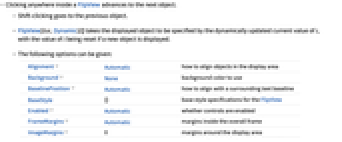
- 点击 FlipView 内的任何位置,使其变换到下个对象.
- 按 Shift 并且点击回到上个对象.
- FlipView[list,Dynamic[i]] 指定显示对象动态更新 i 的当前值,若一个新对象被显示,则 i 值将被重新设置.
- 给出以下选项:
-
Alignment Automatic 在显示区域如何排列对象 Background None 背景色 BaselinePosition Automatic 如何与周围的文本基线进行对齐 BaseStyle {} FlipView 如何与周围的文本基线进行对齐 Enabled Automatic 是否启用控件 FrameMargins Automatic 在整个边框内的边幅 ImageMargins 0 显示区域周围的边幅 ImageSize Automatic 显示区域的整体图像大小 - 默认选项设置 ImageSize->Automatic 下,FlipView 只在 expri 的当前显示区域留出空间.
- 在 ImageSize->All 下,FlipView 在 expri 的最大显示区域留出空间,使得整体大小不被改变.
- 诸如 Button 和 Slider 的控件不在 FlipView 内点击.
- EventHandler 拦截鼠标点击,但是如果给出 PassEventsDown->True 设置,则 FlipView 通过点击.
- 在通常的情况下,BaseStyle 的设置可以作为当前样式表里的 "FlipView" 给出的样式的补充.
Wolfram Research (2007),FlipView,Wolfram 语言函数,https://reference.wolfram.com/language/ref/FlipView.html (更新于 2008 年).
文本
Wolfram Research (2007),FlipView,Wolfram 语言函数,https://reference.wolfram.com/language/ref/FlipView.html (更新于 2008 年).
CMS
Wolfram 语言. 2007. "FlipView." Wolfram 语言与系统参考资料中心. Wolfram Research. 最新版本 2008. https://reference.wolfram.com/language/ref/FlipView.html.
APA
Wolfram 语言. (2007). FlipView. Wolfram 语言与系统参考资料中心. 追溯自 https://reference.wolfram.com/language/ref/FlipView.html 年