FromTabular
FromTabular[tab,"form"]
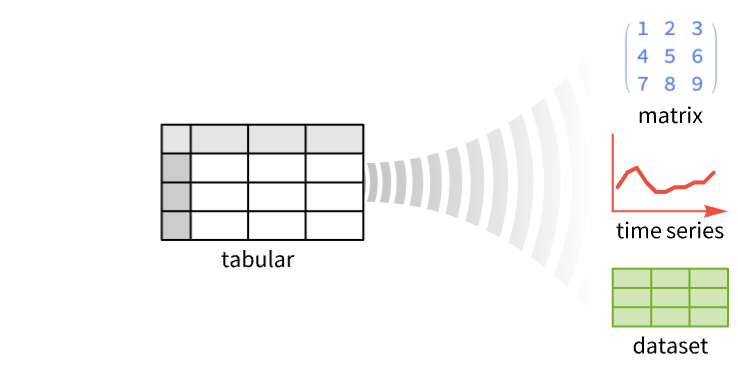
将 Tabular 对象 tab 转换为 "form" 给出的对象.
FromTabular[tab,"form",assoc]
使用关联 assoc 中的指令来提供转换的详细信息.
更多信息
- FromTabular 通常用于控制如何将 Tabular 对象转换为其他数据对象.
- 在 FromTabular[tab,form,…] 中,结构规范 "form" 可以包括:
-
"Columns" TabularColumn 对象的集合 "Rows" 行列表 "Matrix" 值矩阵 "Dataset" 多层次数据 "TimeSeries" TimeSeries 对象 "TemporalData" TemporalData 对象 - 关联 assoc 可以包含有关如何将表格转换为不同形式的具体信息.
- 当转换为 TimeSeries 或 TemporalData 时,assoc 中的可能键包括:
-
"TimeColumn" "RowNumber" 用作时间的列(将使用第一个带有时间相关的键的列;如果没有,则使用 Tabular 的第一列,并回退到 Automatic 时间指定) "ValueColumns" Automatic 用作值的列(默认除时间列外的所有列)
范例
打开所有单元 关闭所有单元基本范例 (1)
范围 (15)
行和列 (5)
从无列键的 Tabular 对象中获取行:
tab = Tabular[{{1, 2, 3}, {4, 5, 6}}]FromTabular[tab, "Rows"]从有列键的 Tabular 对象中获取行:
tab = Tabular[{{1, 2, 3}, {4, 5, 6}}, {"a", "b", "c"}]FromTabular[tab, "Rows"]Values[%]FromTabular[tab, "Matrix"]从无列键的 Tabular 对象中获取列:
tab = Tabular[{{1, 2, 3}, {4, 5, 6}}]返回 TabularColumn 对象的列表:
FromTabular[tab, "Columns"]Normal /@ %直接从 Tabular 中获取列表:
tab["ColumnList"]从有列键的 Tabular 对象中获取列:
tab = Tabular[{{1, 2, 3}, {4, 5, 6}}, {"a", "b", "c"}]FromTabular[tab, "Columns"]Normal /@ %tab["ColumnList"]获取带有列表项的 Tabular 对象:
tab = Tabular[RandomInteger[10, {4, 3, 2}]]"Rows" 和 "Columns" 形式都只影响 Tabular 对象的两个顶层:
FromTabular[tab, "Rows"]//MatrixForm[#, TableDepth -> 2]&FromTabular[tab, "Columns"]//Normal//MatrixForm[#, TableDepth -> 2]&数据集 (4)
从无列键的 Tabular 对象中获取 Dataset 表达式:
tab = Tabular[{{1, 2, 3}, {4, 5, 6}}]FromTabular[tab, "Dataset"]使用 Dataset 获得相同的结果:
Dataset[tab]从有列键的 Tabular 对象中获取 Dataset 表达式:
tab = Tabular[{{1, 2, 3}, {4, 5, 6}}, {"a", "b", "c"}]FromTabular[tab, "Dataset"]取一个带有键列的 Tabular 对象:
tab = Tabular[{{1, 2, 3}, {4, 5, 6}}, <|"ColumnKeys" -> {"A", "b", "c"}, "KeyColumns" -> {"A"}|>]FromTabular[tab, "Dataset"]%//Normal取带有两个键列的 Tabular 对象:
tab = Tabular[{{1, 2, 3}, {4, 5, 6}, {7, 8, 9}}, <|"ColumnKeys" -> {"A", "B", "c"}, "KeyColumns" -> {"A", "B"}|>]FromTabular[tab, "Dataset"]%//NormalTimeSeries (3)
将无列键的 Tabular 对象转换为 TimeSeries:
tab = ToTabular[{{11, 22, 33}, {.1, .3, .2}, {"dog", "cat", "fox"}, {Yesterday, Today, Tomorrow}}, "Columns"]FromTabular[tab, "TimeSeries"]The time stamps are taken to be the first column:
Normal[%]FromTabular[tab, "TimeSeries", <|"TimeColumn" -> 4, "ValueColumns" -> {3, 1}|>]Normal[%]将有列键的 Tabular 对象转换为 TimeSeries:
tab = ToTabular[{"val1" -> {1, 2, 3}, "val2" -> {.1, .3, .2}, "val3" -> {"dog", "cat", "fox"}, "dates" -> {Yesterday, Today, Tomorrow}}, "Columns"]FromTabular[tab, "TimeSeries"]FromTabular[tab, "TimeSeries", <|"TimeColumn" -> "dates", "ValueColumns" -> {"val2", "val3", "val1"}|>]Normal[%]对含有列键的 Tabular 对象进行转换时,会将键保留为元素的键:
tab = ToTabular[{"a" -> {1, 2, 3}, "b" -> {.1, .3, .2}, "c" -> {"dog", "cat", "fox"}, "d" -> {Yesterday, Today, Tomorrow}}, "Columns"]FromTabular[tab, "TimeSeries"]%//ColumnKeysFromTabular[tab, "TimeSeries", <|"ComponentNames" -> {"c1", "c2", "c3"}|>]%//ColumnKeysTemporalData (3)
将无列键的 Tabular 对象转换为 TemporalData:
ToTabular[{{1, 2, 3}, {.1, .3, .2}, {"dog", "cat", "fox"}, {Yesterday, Today, Tomorrow}}, "Columns"]FromTabular[%, "TemporalData"]Normal[%]将有列键的 Tabular 对象转换为 TemporalData:
ToTabular[{"a" -> {1, 2, 3}, "b" -> {.1, .3, .2}, "c" -> {"dog", "cat", "fox"}, "d" -> {Yesterday, Today, Tomorrow}}, "Columns"]FromTabular[%, "TemporalData", <|"TimeColumn" -> 4, "ValueColumns" -> {"c", "a"}|>]Information[%]将有 ExtendedKey 的 Tabular 对象转换为 TemporalData:
tab = Tabular[...]ColumnKeys[tab]FromTabular[tab, "TemporalData", <|"TimeColumn" -> "Time"|>]%["PathNames"]应用 (2)
销售数据 (1)
data = Tabular[{...}]使用 PivotToColumns 将各个城市的销售额分开:
PivotToColumns[data, "City" -> "Sales"]创建一个使用 "Date" 作为 "TimeColumn" 的 TemporalData:
td = FromTabular[%, "TemporalData", <|"TimeColumn" -> "Date"|>]td["MetaInformation"]DateListPlot[td, PlotLegends -> Last /@ td["PathNames"]]金融时间序列 (1)
获取一个金融时间序列的 Tabular:
data = Tabular[{...}];GraphicsRow@{data, DateListPlot[data -> {"Date", "Value"}]}使用 FromTabular 创建 TimeSeries:
ts = FromTabular[data, "TimeSeries", <|"TimeColumn" -> "Date"|>]TimeSeriesModelFit[ts, "ARIMA"]
Normal[%]属性和关系 (1)
FromTabular[tab,"Rows"] 和 FromTabular[tab,"Columns"] 的结果实际上是彼此的转置:
tab = Tabular[{{1, "a", True}, {2, "b", False}}]FromTabular[tab, "Rows"]FromTabular[tab, "Columns"]//NormalTranspose[%] === %%可能存在的问题 (2)
当列具有指定键时,FromTabular[...,"Columns"] 返回 Association:
tab = Tabular[Transpose@{{1, 2, 3}, {"cat", "fox", "dog"}}, {"a", "b"}]FromTabular[tab, "Columns"]直接从 Tabular 对象获取列的列表:
tab["ColumnList"]对于无列键的 Tabular,FromTabular[...,"Columns"] 返回一个列表:
Tabular[Transpose@{{1, 2, 3}, {"cat", "fox", "dog"}}]FromTabular[%, "Columns"]对于 "TemporalData" 形式,FromTabular 从列创建多个路径,但只允许一组时间戳:
tab = ToTabular[{"a" -> {1, 2, 3}, "b" -> {.1, .3, .2}, "c" -> {"dog", "cat", "fox"}, "d" -> {Yesterday, Today, Tomorrow}}, "Columns"]FromTabular[tab, "TemporalData", <|"TimeColumn" -> {"b", "d"}|>]%["Paths"]FromTabular[tab, "TemporalData", <|"TimeColumn" -> {"d", "b"}|>]%["DatePaths"]文本
Wolfram Research (2025),FromTabular,Wolfram 语言函数,https://reference.wolfram.com/language/ref/FromTabular.html.
CMS
Wolfram 语言. 2025. "FromTabular." Wolfram 语言与系统参考资料中心. Wolfram Research. https://reference.wolfram.com/language/ref/FromTabular.html.
APA
Wolfram 语言. (2025). FromTabular. Wolfram 语言与系统参考资料中心. 追溯自 https://reference.wolfram.com/language/ref/FromTabular.html 年