

AdjacentMeshCells[mr,cellspec,d]
给出维度为 d 的单元,该单元与网格 mr 中 cellspec 指定的单元相邻.
AdjacentMeshCells
AdjacentMeshCells[mr,cellspec,d]
给出维度为 d 的单元,该单元与网格 mr 中 cellspec 指定的单元相邻.
更多信息
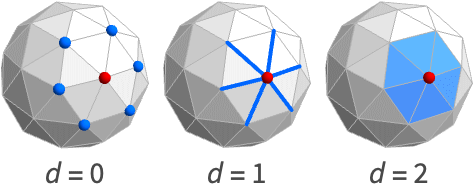
- AdjacentMeshCells 也称为邻近(neighboring)单元.
- 典型用途包括在网格中获取单元邻接关系和拓扑信息.
- AdjacentMeshCells[mr,cellspec,d] 返回一个单元指标列表,该列表与由 cellspec 指定的单元相邻的 d 维单元相关.
- 可以使用以下单元规范 cellspec:
-
{d,i} 维度为 d、索引为 i 的单元 {d,ispec} 维度为 d、索引规范为 ispec 的单元 {dspec,…} 维度由 dspec 给定的单元 h[{i1,…}] 头为 h、顶点索引为 i1, … 的显式单元 {c1,c2,…} 显式单元 ci 的列表 - 索引规范 ispec 可以采用以下形式:
-
i 单元索引 i {i1,i2,…} 索引为 ik 的单元 All 所有单元 patt 索引与模式 patt 匹配的单元 - 维度规范 dspec 可以采用以下形式:
-
d 显式维度 d All 从0到区域的几何维度的所有维度 patt 与模式 patt 匹配的维度
范例
打开所有单元 关闭所有单元基本范例 (2)
ℛ = MengerMesh[1, MeshCellStyle -> {{0, 2} -> Red}]AdjacentMeshCells[ℛ, {0, 2}, 1]HighlightMesh[ℛ, %]pattern = {0, _ ? (# < 3&)};
ℛ = VoronoiMesh[RandomReal[1, {10, 2}], MeshCellStyle -> {pattern -> Red}];AdjacentMeshCells[ℛ, pattern, 2]HighlightMesh[ℛ, %]范围 (5)
基本用法 (2)
ℛ = MeshRegion[{{0, 0, 0}, {2, 0, 0}, {2, 2, 0}, {0, 2, 0}, {1, 1, 2}},
{Tetrahedron[{{1, 2, 3, 5}, {1, 3, 4, 5}}]}]AdjacentMeshCells[ℛ, {0, 1}, 2]AdjacentMeshCells[ℛ, {_, 1}, 2]AdjacentMeshCells[ℛ, Line[{1, 2}], 2]AdjacentMeshCells[ℛ, {{0, 1}, {1, 2}}, 2]Table[AdjacentMeshCells[[image], {0, 1}, d], {d, {0, 1, 2, 3}}]网格区域 (2)
二维 MeshRegion 的 AdjacentMeshCells:
mesh = DelaunayMesh[RandomReal[1, {10, 2}], MeshCellStyle -> {{0, 1} -> Green}]AdjacentMeshCells[mesh, {0, 1}, 1]HighlightMesh[mesh, %]AdjacentMeshCells[[image], {0, 1}, 1]mesh = [image];AdjacentMeshCells[mesh, {0, 1}, 1]HighlightMesh[mesh, %]BoundaryMeshRegion 的 AdjacentMeshCells:
mesh = BoundaryMeshRegion[{{0, 0}, {3, 0}, {3, 3}, {0, 3}, {1, 1}, {2, 1}, {2, 2}, {1, 2}}, Line[{1, 2, 3, 4, 1}], Line[{5, 6, 7, 8, 5}], MeshCellStyle -> {{0, 1} -> Green}]AdjacentMeshCells[mesh, {0, 1}, 1]HighlightMesh[mesh, %]AdjacentMeshCells[[image], {0, 1}, 0]mesh = [image];AdjacentMeshCells[mesh, {0, 1}, 1]HighlightMesh[mesh, %]多边形和多面体 (1)
ℛ = Cube[];AdjacentMeshCells[ℛ, {0, 1}, 1]HighlightMesh[ℛ, %]ℛ = Simplex[{{0, 0, 1}, {1, 0, 0}, {1, 0, 1}, {1, 1, 1}}];AdjacentMeshCells[ℛ, {0, 1}, 1]HighlightMesh[ℛ, %]ℛ = Polyhedron[{{-0.85065080835204, 0., 1.1135163644116066}, {-0.2628655560595668, 0.8090169943749475,
1.1135163644116066}, {-0.42532540417602, 1.3090169943749475, 0.2628655560595668},
{-1.1135163644116066, 0.8090169943749475, -0.262865556059566 ...
{{1, 2, 3, 4, 5}, {6, 7, 1, 5, 8}, {9, 10, 6, 8, 11}, {12, 13, 9, 11, 14}, {4, 14, 11, 8, 5},
{3, 15, 12, 14, 4}, {16, 17, 10, 9, 13}, {18, 16, 13, 12, 15}, {19, 18, 15, 3, 2},
{20, 19, 2, 1, 7}, {17, 20, 7, 6, 10}, {16, 18, 19, 20, 17}}];AdjacentMeshCells[ℛ, {0, 1}, 1]HighlightMesh[ℛ, %]ℛ = Triangle[{{0, 0}, {1, 1}, {2, 0}}];AdjacentMeshCells[ℛ, {0, 1}, 1]HighlightMesh[ℛ, %]ℛ = Polygon[{{1, 0}, {1/2, Sqrt[3]/2}, {-1/2, Sqrt[3]/2}, {-1, 0}, {-1/2, -1/2*Sqrt[3]},
{1/2, -1/2*Sqrt[3]}}];AdjacentMeshCells[ℛ, {0, 1}, 1]HighlightMesh[ℛ, %]Line:
ℛ = Line[{{1, 0}, {2, 1}, {3, 0}, {4, 1}}];AdjacentMeshCells[ℛ, {0, 1}, 1]HighlightMesh[ℛ, %]应用 (8)
基本应用 (5)
Triangle 的邻接网格单元:
mesh = [image];cells = AdjacentMeshCells[mesh, {0, 2}, 0]HighlightMesh[mesh, cells]Cube 的邻接网格单元:
mesh = [image];cells = AdjacentMeshCells[mesh, {0, 6}, 0]HighlightMesh[mesh, cells]MengerMesh 的邻接网格单元:
mesh = MengerMesh[2, MeshCellStyle -> {{0, 6} -> Red}];cells = AdjacentMeshCells[mesh, {0, 6}, 0]HighlightMesh[mesh, cells]mesh = [image];cells = AdjacentMeshCells[mesh, {0, 12}, 0]HighlightMesh[mesh, cells]pts = RandomReal[1, {10, 2}];mesh = VoronoiMesh[pts, MeshCellStyle -> {{0, 12} -> Red}];cells = AdjacentMeshCells[mesh, {0, 12}, 0]HighlightMesh[mesh, cells]邻接查询 (1)
使用 AdjacentMeshCells 查找与单元索引为 {0,1} 的点连接的所有点:
AdjacentMeshCells[[image], {0, 1}, 0]多面体运算 (1)
使用 AdjacentMeshCells 计算长方体的 DualPolyhedron:
cube = [image];faces = (Last /@ AdjacentMeshCells[cube, {0, #}, 2])& /@ Range[MeshCellCount[cube, 0]]pts = MeshCoordinates[cube];
fs = And@@@ MeshCells[cube, 2];
coords = Table[Mean[pts[[i]]], {i, fs}]dual = Polyhedron[coords, faces]Graphics3D[{Opacity[0.2], cube, dual}]拓扑运算 (1)
使用 MeshConnectivityGraph 检测网格是否相连:
ConnectedMeshQ[mesh_] := Block[{a = {{0, 1}}, b},
While[b = Union[Join[a, AdjacentMeshCells[mesh, a, 0]]];b =!= a, a = b];
Length[a] == MeshCellCount[mesh, 0]
]Table[ConnectedMeshQ[i], {i, {[image], [image], [image], [image]}}]属性和关系 (2)
单元索引 {d, k} 对应于维度为 d 的第 k
组单元:
mesh = MeshRegion[{{0, 0}, {1, 0}, {2, 1 / 2}, {2, -1 / 2}}, {Line[{1, 2}], Line[{2, 3}], Line[{3, 4}], Line[{4, 2}]}]AdjacentMeshCells[mesh, {1, 2}, 1]AdjacentMeshCells 可以使用 MeshConnectivityGraph 得到:
mesh = MeshRegion[{{0, 0, 0}, {2, 0, 0}, {2, 2, 0}, {0, 2, 0}, {1, 1, 2}}, {Tetrahedron[{1, 2, 3, 5}], Tetrahedron[{1, 3, 4, 5}]}]MeshConnectivityGraph[mesh, {0, 2}]AdjacencyList[%, {0, 1}]AdjacentMeshCells[mesh, {0, 1}, 2]巧妙范例 (1)
门格网格的 AdjacentMeshCells:
g = MengerMesh[4];
spec = Thread[List[0, RandomSample[Range[MeshCellCount[g, 0]], 35]]];
cells = AdjacentMeshCells[g, spec, 0];MeshRegion[g, MeshCellStyle -> Join[{spec -> Red}, Thread[cells -> Green], {{_ ? (# > 0&), All} -> White}], ImageSize -> 200]相关指南
文本
Wolfram Research (2020),AdjacentMeshCells,Wolfram 语言函数,https://reference.wolfram.com/language/ref/AdjacentMeshCells.html.
CMS
Wolfram 语言. 2020. "AdjacentMeshCells." Wolfram 语言与系统参考资料中心. Wolfram Research. https://reference.wolfram.com/language/ref/AdjacentMeshCells.html.
APA
Wolfram 语言. (2020). AdjacentMeshCells. Wolfram 语言与系统参考资料中心. 追溯自 https://reference.wolfram.com/language/ref/AdjacentMeshCells.html 年
BibTeX
@misc{reference.wolfram_2026_adjacentmeshcells, author="Wolfram Research", title="{AdjacentMeshCells}", year="2020", howpublished="\url{https://reference.wolfram.com/language/ref/AdjacentMeshCells.html}", note=[Accessed: 08-September-2026]}
BibLaTeX
@online{reference.wolfram_2026_adjacentmeshcells, organization={Wolfram Research}, title={AdjacentMeshCells}, year={2020}, url={https://reference.wolfram.com/language/ref/AdjacentMeshCells.html}, note=[Accessed: 08-September-2026]}