

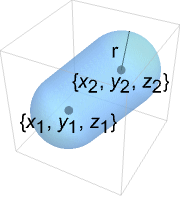
CapsuleShape[{{x1,y1,z1},{x2,y2,z2}},r]
点{xi,yi,zi}間の半径 r の塗り潰されたカプセルを表す.
CapsuleShape
CapsuleShape[{{x1,y1,z1},{x2,y2,z2}},r]
点{xi,yi,zi}間の半径 r の塗り潰されたカプセルを表す.
詳細とオプション
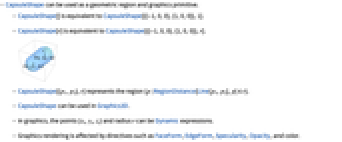
- CapsuleShapeは,幾何学領域およびグラフィックスプリミティブとして使うことができる.
- CapsuleShape[]はCapsuleShape[{{-1,0,0},{1,0,0}},1]に等しい.
- CapsuleShape[r]はCapsuleShape[{{-1,0,0},{1,0,0}},r]に等しい.
- CapsuleShape[{p1,p2},r]は,領域{p|RegionDistance[Line[p1,p2],p]≤r}を表す.
- CapsuleShapeはGraphics3Dで使うことができる.
- グラフィックスでは,点{xi,yi,zi}および半径 r はDynamic式でよい.
- グラフィックスの描画は,FaceForm,EdgeForm,Specularity,Opacity等の指示子および色の影響を受ける.
例題
すべて開く すべて閉じる例 (2)
スコープ (19)
グラフィックス (9)
指定 (4)
CapsuleShape[]Graphics3D[CapsuleShape[]]Graphics3D[{CapsuleShape[], CapsuleShape[{{0, 3, 0}, {0, 5, 0}}, 1]}]Graphics3D[{CapsuleShape[], CapsuleShape[{{-1, 5, 0}, {1, 5, 0}}, 2]}]Graphics3D[CapsuleShape[], Axes -> True]スタイル付け (4)
Table[Graphics3D[{c, CapsuleShape[]}], {c, {Red, Green, Blue, Yellow}}]FaceFormを使って表面と裏面に異なる特性を指定することができる:
Graphics3D[{FaceForm[Yellow, Blue], CapsuleShape[]}, PlotRange -> {{-2, 2}, {-.8, 1}, {-1, 1}}]Table[Graphics3D[{Orange, Specularity[White, n], CapsuleShape[]}], {n, {5, 20, 100}}]Graphics3D[{Glow[Red], White, CapsuleShape[]}]Opacityで曲面の不透明度を指定する:
Table[Graphics3D[{Opacity[o], CapsuleShape[]}], {o, {0.3, 0.5, 0.9}}]座標 (1)
点はDynamicでよい:
DynamicModule[{x}, {Slider[Dynamic[x], {-0.5, 0.5}], Graphics3D[{CapsuleShape[], CapsuleShape[Dynamic[{{x, 1, 1}, {2, 1, 1}}], 1]}]}]領域 (10)
RegionEmbeddingDimension[CapsuleShape[{{Subscript[x, 1], Subscript[y, 1], Subscript[z, 1]}, {Subscript[x, 2], Subscript[y, 2], Subscript[z, 2]}}, r]]RegionDimension[CapsuleShape[{{Subscript[x, 1], Subscript[y, 1], Subscript[z, 1]}, {Subscript[x, 2], Subscript[y, 2], Subscript[z, 2]}}, r]]ℛ = CapsuleShape[];{RegionMember[ℛ, {1, 0, 0}], RegionMember[ℛ, {0, 0, 0}], RegionMember[ℛ, {1, 1, 1}]}RegionMember[CapsuleShape[{{Subscript[x, 1], Subscript[y, 1], Subscript[z, 1]}, {Subscript[x, 2], Subscript[y, 2], Subscript[z, 2]}}, r], {x, y, z}]ℛ = CapsuleShape[];{Volume[ℛ], RegionMeasure[ℛ]}c = RegionCentroid[ℛ]Graphics3D[{{Opacity[0.5], LightBlue, ℛ}, {PointSize[Large], Red, Point[c]}}]ℛ = CapsuleShape[];{RegionDistance[ℛ, {1, 0, 0}], RegionDistance[ℛ, {0, 0, 0}], RegionDistance[ℛ, {1, 1, 1}]}ℛ = CapsuleShape[];{SignedRegionDistance[ℛ, {1, 0, 0}], SignedRegionDistance[ℛ, {1 / 2, 1 / 2, 1 / 2}], SignedRegionDistance[ℛ, {1, 1, 1}]}ℛ = CapsuleShape[];{RegionNearest[ℛ, {1, 0, 0}], RegionNearest[ℛ, {2, 2, 2}]}spherePoints[{n_, m_}, c_, r_] :=
Flatten[Table[c + r{Cos[k 2π / n]Sin[l π / m], Sin[k 2π / n]Sin[l π / m], Cos[l π / m]}, {k, 0., n - 1}, {l, 0., m - 1}], 1];pl = spherePoints[{16, 8}, RegionCentroid[ℛ], 2];
npl = Table[RegionNearest[ℛ, p], {p, pl}];Legended[Graphics3D[{ℛ, {Thin, Gray, Line[Transpose[{pl, npl}]]}, {Red, Point[pl]}, {PointSize[Medium], Blue, Point[npl]}}, Lighting -> "Neutral", Boxed -> False], PointLegend[{Red, Blue}, {"start", "nearest"}]]ℛ = CapsuleShape[];BoundedRegionQ[ℛ]b = RegionBounds[ℛ]Graphics3D[{{EdgeForm[White], Opacity[0.2, Yellow], Cuboid@@Transpose[b]}, ℛ}, Boxed -> False]ℛ = CapsuleShape[1];Integrate[x y z, {x, y, z}∈ℛ]ℛ = CapsuleShape[{{1, 1, 1}, {0, 0, 0}}, 1];MinValue[{x y z - x y, {x, y, z}∈ℛ}, {x, y, z}]//Simplifyℛ = CapsuleShape[{{1, 0, 0}, {0, 0, 0}}, 1];Reduce[x^2 + y^2 + z^2 == 1 && x - y - z == -(1/2) && z^2 == x y + (1/4) && {x, y, z}∈ℛ, {x, y, z}]アプリケーション (6)
CapsuleShapeを使ってプラトンの立体を辺について可視化する:
Row[Graphics3D[#, Boxed -> False, Method -> {"ShrinkWrap" -> True}]& /@ Apply[CapsuleShape[N[#], .1]&, PolyhedronData["Platonic", "Lines"], {2}]]CapsuleShapeを使ってGraphPlot3Dの辺を描画する:
GraphPlot3D[Table[i -> Mod[i ^ 2, 50], {i, 0, 50}] /. Rule[x_, x_] :> Nothing, EdgeShapeFunction -> (CapsuleShape[#, 0.1]&)]CapsuleShapeを使ってGraphオブジェクトのために3Dで辺を描画する:
g = SimpleGraph[Graph[Table[i -> Mod[i ^ 2, 50], {i, 0, 50}]], DirectedEdges -> False, ImageSize -> Small]3Dにグラフを埋め込みCapsuleShapeを使う:
Graph3D[g, EdgeShapeFunction -> (CapsuleShape[#, 0.1]&)]CapsuleShapeを使って3D BoundaryMeshRegionオブジェクトとMeshRegionオブジェクトの辺を描画する:
ConvexHullMesh[RandomReal[1, {25, 3}], MeshCellShapeFunction -> {1 -> (CapsuleShape[#, 0.02]&)}]連続するカプセル(と球体)を使って棒人間を作ることができる:
p0 = {0, 0, 0};p1 = {-6, -2, -6};p2 = {-5, -3, -15};
p3 = {-1, 2, -8};p4 = {1, 2, -16};p5 = {0, 0, 20};
p6 = {0, 0, 28};p7 = {-5, -5, 17};p8 = {-15, -3, 15};
p9 = {-7, 7, 22};p10 = {-14, 6, 21};leg1 = {CapsuleShape[{p0, p1}, 1], CapsuleShape[{p1, p2}, 1]};
leg2 = {CapsuleShape[{p0, p3}, 1], CapsuleShape[{p3, p4}, 1]};
back = CapsuleShape[{p0, p5}, 1];
neck = {CapsuleShape[{p5, p6}, 1], Ball[p6, 5]};
arm1 = {CapsuleShape[{p5, p7}, 1], CapsuleShape[{p7, p8}, 1]};
arm2 = {CapsuleShape[{p5, p9}, 1], CapsuleShape[{p9, p10}, 1]};Graphics3D[{back, leg1, leg2, neck, arm1, arm2}, ViewPoint -> {-20, -5, 0}, ImageSize -> {Automatic, 150}]さらに,RotationTransformを使って棒人間の四肢を回転させることができる:
r[region_, point_, angle_] := GeometricTransformation[region, RotationTransform[angle, {0, 1, 0}, point]]Manipulate[Graphics3D[{back, r[leg1, p0, a1], r[leg2, p0, a2], r[neck, p5, a5], r[arm1, p5, a3], r[arm2, p5, a4]}], {{a1, 0, "Left Leg"}, -Pi, Pi}, {{a2, 0, "Right Leg"}, -Pi, Pi}, {{a3, 0, "Lower Arm"}, -Pi, Pi}, {{a4, 0, "Higher Arm"}, -Pi, Pi}, {{a5, 0, "Neck"}, -Pi, Pi}, SaveDefinitions -> True]CO2のカートリッジは,スポーツ,ソーダを作る,救命胴衣を作る等,いろいろなことに応用できる.直径約18.6ミリで,長さ約8.5ミリ,首の部分は長さ12ミリ,直径7.3ミリの12gのCO2カートリッジについて考える:
cartrigeradius = Quantity[18.6 / 2, "Millimeters"];
neckradius = Quantity[7.3 / 2, "Millimeters"];
necklength = Quantity[12, "Millimeters"];
totallength = Quantity[82.5, "Millimeters"];
mass = Quantity[12, "Grams"];capsulelength = totallength - necklength - 2 * cartrigeradius;cartridgevolume = RegionMeasure[CapsuleShape[{{0, 0, 0}, {capsulelength, 0, 0}}, cartrigeradius]] + RegionMeasure[Cylinder[{{0, 0, 0}, {necklength, 0, 0}}, neckradius]]理想気体の法則には,
(ただし,
は一般ガス定数)とある.ここから,標準温度および圧力(73.15 K および1バール)におけるカートリッジ内のガスの体積を求めることができる:
{sol} = Solve[Quantity[1, "Bars"] * volAtSTP == (mass / ChemicalData["CarbonDioxide", "MolarMass"]) * Quantity["MolarGasConstant"] * Quantity[273.15, "Kelvins"], volAtSTP](volAtSTP / cartridgevolume) /. sol特性と関係 (6)
CapsuleShapeの2DバージョンはStadiumShapeである:
Region[StadiumShape[]]Ballは,p1が p2に近付く際のCapsuleShapeの極限である:
Manipulate[Graphics3D[{Yellow, Ball[], CapsuleShape[{{2, 0, 0}, {2 + n, 0, 0}}, 1]}, PlotRange -> {{-1, 5}, {-1, 1}, {-1, 1}}, ImageSize -> Small], {{n, 2}, 2, .00001}]球体と円筒のRegionUnionから形成されたCapsuleShape:
capsule = RegionUnion[Ball[{0, 0, 0}, 1], Cylinder[{{0, 0, 0}, {2, 0, 0}}, 1], Ball[{2, 0, 0}, 1]];Region[capsule]Volume[capsule]Volume[Ball[{0, 0, 0}, 1]] + Volume[Cylinder[{{0, 0, 0}, {2, 0, 0}}, 1]]CapsuleShapeは,すべての点がLineから最大でも
である:
Subscript[ℛ, 1] = Line[{{-1, 0, 0}, {1, 0, 0}}];
Subscript[ℛ, 2] = CapsuleShape[{{-1, 0, 0}, {1, 0, 0}}, 1];Reduce[RegionDistance[Subscript[ℛ, 1], {x, y, z}] ≤ 1⧦RegionMember[Subscript[ℛ, 2], {x, y, z}], {x, y, z}, Reals]ImplicitRegionは任意のCapsuleShapeを表すことができる:
Subscript[ℛ, 1] = ImplicitRegion[(x + 1)^2 + y^2 + z^2 ≤ 1 || (x - 1)^2 + y^2 + z^2 ≤ 1 || (0 ≤ 1 + x ≤ 2 && y^2 + z^2 ≤ 1), {x, y, z}];Subscript[ℛ, 2] = CapsuleShape[{{-1, 0, 0}, {1, 0, 0}}, 1];RegionEqual[Subscript[ℛ, 1], Subscript[ℛ, 2]]丸いTubeはCapsuleShapeのように見える:
Graphics3D[{CapForm["Round"], Tube[{{-1, 0, 0}, {1, 0, 0}}, 1]}]おもしろい例題 (3)
Graphics3D[Table[{EdgeForm[Opacity[.3]], Hue[RandomReal[]], CapsuleShape[RandomReal[10, {2, 3}], 1]}, {20}]]Graphics3D[{Opacity[0.3], EdgeForm[], Table[{ColorData["Rainbow"][Rescale[c, {0, 2Pi}]], GeometricTransformation[CapsuleShape[], RotationTransform[c, {-3, 2, -1}, {2, -1, 1}]]}, {c, 0, 2Pi, 2Pi / 18}]}]Graphics3D[{Opacity[.3], EdgeForm[Opacity[.3]], Table[CapsuleShape[{{0, 0, 0}, {0, 0, 2r}}, r], {r, 1, 5}]}, Boxed -> False]関連するガイド
-
▪
- 基本的な特殊領域
テキスト
Wolfram Research (2015), CapsuleShape, Wolfram言語関数, https://reference.wolfram.com/language/ref/CapsuleShape.html.
CMS
Wolfram Language. 2015. "CapsuleShape." Wolfram Language & System Documentation Center. Wolfram Research. https://reference.wolfram.com/language/ref/CapsuleShape.html.
APA
Wolfram Language. (2015). CapsuleShape. Wolfram Language & System Documentation Center. Retrieved from https://reference.wolfram.com/language/ref/CapsuleShape.html
BibTeX
@misc{reference.wolfram_2026_capsuleshape, author="Wolfram Research", title="{CapsuleShape}", year="2015", howpublished="\url{https://reference.wolfram.com/language/ref/CapsuleShape.html}", note=[Accessed: 07-August-2026]}
BibLaTeX
@online{reference.wolfram_2026_capsuleshape, organization={Wolfram Research}, title={CapsuleShape}, year={2015}, url={https://reference.wolfram.com/language/ref/CapsuleShape.html}, note=[Accessed: 07-August-2026]}
