

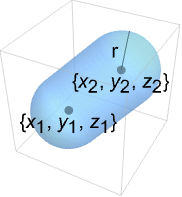
CapsuleShape[{{x1,y1,z1},{x2,y2,z2}},r]
表示点 {xi,yi,zi} 之间半径为 r 的填充的胶囊形状.
CapsuleShape
CapsuleShape[{{x1,y1,z1},{x2,y2,z2}},r]
表示点 {xi,yi,zi} 之间半径为 r 的填充的胶囊形状.
更多信息和选项
- CapsuleShape 可以用作几何区域和图形基元.
- CapsuleShape[] 等价于 CapsuleShape[{{-1,0,0},{1,0,0}},1].
- CapsuleShape[r] 等价于 CapsuleShape[{{-1,0,0},{1,0,0}},r].
- CapsuleShape[{p1,p2},r] 表示区域 {p|RegionDistance[Line[p1,p2],p]≤r}.
- CapsuleShape 可以用于 Graphics3D.
- 在图形中,点 {xi,yi,zi} 和半径 r 可以是 Dynamic 表达式.
- 图形渲染受到诸如 FaceForm、 EdgeForm、Specularity、Opacity 和颜色等指令的影响.
范例
打开所有单元 关闭所有单元基本范例 (2)
范围 (19)
图形 (9)
规范 (4)
CapsuleShape[]Graphics3D[CapsuleShape[]]Graphics3D[{CapsuleShape[], CapsuleShape[{{0, 3, 0}, {0, 5, 0}}, 1]}]Graphics3D[{CapsuleShape[], CapsuleShape[{{-1, 5, 0}, {1, 5, 0}}, 2]}]Graphics3D[CapsuleShape[], Axes -> True]样式 (4)
Table[Graphics3D[{c, CapsuleShape[]}], {c, {Red, Green, Blue, Yellow}}]可以使用 FaceForm 指定面的前后的不同性质:
Graphics3D[{FaceForm[Yellow, Blue], CapsuleShape[]}, PlotRange -> {{-2, 2}, {-.8, 1}, {-1, 1}}]Table[Graphics3D[{Orange, Specularity[White, n], CapsuleShape[]}], {n, {5, 20, 100}}]Graphics3D[{Glow[Red], White, CapsuleShape[]}]Opacity 指定面的不透明度:
Table[Graphics3D[{Opacity[o], CapsuleShape[]}], {o, {0.3, 0.5, 0.9}}]坐标 (1)
点可以是 Dynamic:
DynamicModule[{x}, {Slider[Dynamic[x], {-0.5, 0.5}], Graphics3D[{CapsuleShape[], CapsuleShape[Dynamic[{{x, 1, 1}, {2, 1, 1}}], 1]}]}]区域 (10)
RegionEmbeddingDimension[CapsuleShape[{{Subscript[x, 1], Subscript[y, 1], Subscript[z, 1]}, {Subscript[x, 2], Subscript[y, 2], Subscript[z, 2]}}, r]]RegionDimension[CapsuleShape[{{Subscript[x, 1], Subscript[y, 1], Subscript[z, 1]}, {Subscript[x, 2], Subscript[y, 2], Subscript[z, 2]}}, r]]ℛ = CapsuleShape[];{RegionMember[ℛ, {1, 0, 0}], RegionMember[ℛ, {0, 0, 0}], RegionMember[ℛ, {1, 1, 1}]}RegionMember[CapsuleShape[{{Subscript[x, 1], Subscript[y, 1], Subscript[z, 1]}, {Subscript[x, 2], Subscript[y, 2], Subscript[z, 2]}}, r], {x, y, z}]ℛ = CapsuleShape[];{Volume[ℛ], RegionMeasure[ℛ]}c = RegionCentroid[ℛ]Graphics3D[{{Opacity[0.5], LightBlue, ℛ}, {PointSize[Large], Red, Point[c]}}]ℛ = CapsuleShape[];{RegionDistance[ℛ, {1, 0, 0}], RegionDistance[ℛ, {0, 0, 0}], RegionDistance[ℛ, {1, 1, 1}]}ℛ = CapsuleShape[];{SignedRegionDistance[ℛ, {1, 0, 0}], SignedRegionDistance[ℛ, {1 / 2, 1 / 2, 1 / 2}], SignedRegionDistance[ℛ, {1, 1, 1}]}ℛ = CapsuleShape[];{RegionNearest[ℛ, {1, 0, 0}], RegionNearest[ℛ, {2, 2, 2}]}spherePoints[{n_, m_}, c_, r_] :=
Flatten[Table[c + r{Cos[k 2π / n]Sin[l π / m], Sin[k 2π / n]Sin[l π / m], Cos[l π / m]}, {k, 0., n - 1}, {l, 0., m - 1}], 1];pl = spherePoints[{16, 8}, RegionCentroid[ℛ], 2];
npl = Table[RegionNearest[ℛ, p], {p, pl}];Legended[Graphics3D[{ℛ, {Thin, Gray, Line[Transpose[{pl, npl}]]}, {Red, Point[pl]}, {PointSize[Medium], Blue, Point[npl]}}, Lighting -> "Neutral", Boxed -> False], PointLegend[{Red, Blue}, {"start", "nearest"}]]ℛ = CapsuleShape[];BoundedRegionQ[ℛ]b = RegionBounds[ℛ]Graphics3D[{{EdgeForm[White], Opacity[0.2, Yellow], Cuboid@@Transpose[b]}, ℛ}, Boxed -> False]ℛ = CapsuleShape[1];Integrate[x y z, {x, y, z}∈ℛ]ℛ = CapsuleShape[{{1, 1, 1}, {0, 0, 0}}, 1];MinValue[{x y z - x y, {x, y, z}∈ℛ}, {x, y, z}]//Simplifyℛ = CapsuleShape[{{1, 0, 0}, {0, 0, 0}}, 1];Reduce[x^2 + y^2 + z^2 == 1 && x - y - z == -(1/2) && z^2 == x y + (1/4) && {x, y, z}∈ℛ, {x, y, z}]应用 (6)
对边使用 CapsuleShape,可视化柏拉图固体:
Row[Graphics3D[#, Boxed -> False, Method -> {"ShrinkWrap" -> True}]& /@ Apply[CapsuleShape[N[#], .1]&, PolyhedronData["Platonic", "Lines"], {2}]]使用 CapsuleShape 渲染 GraphPlot3D 中的边:
GraphPlot3D[Table[i -> Mod[i ^ 2, 50], {i, 0, 50}] /. Rule[x_, x_] :> Nothing, EdgeShapeFunction -> (CapsuleShape[#, 0.1]&)]使用 CapsuleShape 渲染 Graph 对象在三维中的边:
g = SimpleGraph[Graph[Table[i -> Mod[i ^ 2, 50], {i, 0, 50}]], DirectedEdges -> False, ImageSize -> Small]嵌入三维图并使用 CapsuleShape:
Graph3D[g, EdgeShapeFunction -> (CapsuleShape[#, 0.1]&)]使用 CapsuleShape 渲染三维 BoundaryMeshRegion 和 MeshRegion 对象的边:
ConvexHullMesh[RandomReal[1, {25, 3}], MeshCellShapeFunction -> {1 -> (CapsuleShape[#, 0.02]&)}]p0 = {0, 0, 0};p1 = {-6, -2, -6};p2 = {-5, -3, -15};
p3 = {-1, 2, -8};p4 = {1, 2, -16};p5 = {0, 0, 20};
p6 = {0, 0, 28};p7 = {-5, -5, 17};p8 = {-15, -3, 15};
p9 = {-7, 7, 22};p10 = {-14, 6, 21};leg1 = {CapsuleShape[{p0, p1}, 1], CapsuleShape[{p1, p2}, 1]};
leg2 = {CapsuleShape[{p0, p3}, 1], CapsuleShape[{p3, p4}, 1]};
back = CapsuleShape[{p0, p5}, 1];
neck = {CapsuleShape[{p5, p6}, 1], Ball[p6, 5]};
arm1 = {CapsuleShape[{p5, p7}, 1], CapsuleShape[{p7, p8}, 1]};
arm2 = {CapsuleShape[{p5, p9}, 1], CapsuleShape[{p9, p10}, 1]};Graphics3D[{back, leg1, leg2, neck, arm1, arm2}, ViewPoint -> {-20, -5, 0}, ImageSize -> {Automatic, 150}]此外,您还可以使用 RotationTransform 制作简笔画的四肢支点:
r[region_, point_, angle_] := GeometricTransformation[region, RotationTransform[angle, {0, 1, 0}, point]]Manipulate[Graphics3D[{back, r[leg1, p0, a1], r[leg2, p0, a2], r[neck, p5, a5], r[arm1, p5, a3], r[arm2, p5, a4]}], {{a1, 0, "Left Leg"}, -Pi, Pi}, {{a2, 0, "Right Leg"}, -Pi, Pi}, {{a3, 0, "Lower Arm"}, -Pi, Pi}, {{a4, 0, "Higher Arm"}, -Pi, Pi}, {{a5, 0, "Neck"}, -Pi, Pi}, SaveDefinitions -> True]CO2 墨盒有许多应用,包括运动、苏打制作和救生衣等. 一个 12 克的 CO2 墨盒的直径大概有 18.6 毫米,长 82.5 毫米,颈的长度大概为 12 毫米,直径大概为 7.3 毫米:

cartrigeradius = Quantity[18.6 / 2, "Millimeters"];
neckradius = Quantity[7.3 / 2, "Millimeters"];
necklength = Quantity[12, "Millimeters"];
totallength = Quantity[82.5, "Millimeters"];
mass = Quantity[12, "Grams"];capsulelength = totallength - necklength - 2 * cartrigeradius;cartridgevolume = RegionMeasure[CapsuleShape[{{0, 0, 0}, {capsulelength, 0, 0}}, cartrigeradius]] + RegionMeasure[Cylinder[{{0, 0, 0}, {necklength, 0, 0}}, neckradius]]已知理想气体定律为
,其中
是通用气体常数,求在标准温度和压强(273.15 K 和 1 巴)下墨盒内部气体的体积:
{sol} = Solve[Quantity[1, "Bars"] * volAtSTP == (mass / ChemicalData["CarbonDioxide", "MolarMass"]) * Quantity["MolarGasConstant"] * Quantity[273.15, "Kelvins"], volAtSTP](volAtSTP / cartridgevolume) /. sol属性和关系 (6)
CapsuleShape 的二维版本是 StadiumShape:
Region[StadiumShape[]]Ball 是当 p1 接近 p2 时,CapsuleShape 的极限:
Manipulate[Graphics3D[{Yellow, Ball[], CapsuleShape[{{2, 0, 0}, {2 + n, 0, 0}}, 1]}, PlotRange -> {{-1, 5}, {-1, 1}, {-1, 1}}, ImageSize -> Small], {{n, 2}, 2, .00001}]由球和柱体的 RegionUnion 形成的 CapsuleShape:
capsule = RegionUnion[Ball[{0, 0, 0}, 1], Cylinder[{{0, 0, 0}, {2, 0, 0}}, 1], Ball[{2, 0, 0}, 1]];Region[capsule]Volume[capsule]Volume[Ball[{0, 0, 0}, 1]] + Volume[Cylinder[{{0, 0, 0}, {2, 0, 0}}, 1]]CapsuleShape 是 Line 上在多数
上的所有点:
Subscript[ℛ, 1] = Line[{{-1, 0, 0}, {1, 0, 0}}];
Subscript[ℛ, 2] = CapsuleShape[{{-1, 0, 0}, {1, 0, 0}}, 1];Reduce[RegionDistance[Subscript[ℛ, 1], {x, y, z}] ≤ 1⧦RegionMember[Subscript[ℛ, 2], {x, y, z}], {x, y, z}, Reals]ImplicitRegion 可以表示任意 CapsuleShape:
Subscript[ℛ, 1] = ImplicitRegion[(x + 1)^2 + y^2 + z^2 ≤ 1 || (x - 1)^2 + y^2 + z^2 ≤ 1 || (0 ≤ 1 + x ≤ 2 && y^2 + z^2 ≤ 1), {x, y, z}];Subscript[ℛ, 2] = CapsuleShape[{{-1, 0, 0}, {1, 0, 0}}, 1];RegionEqual[Subscript[ℛ, 1], Subscript[ℛ, 2]]有界的 Tube 看起来像个 CapsuleShape:
Graphics3D[{CapForm["Round"], Tube[{{-1, 0, 0}, {1, 0, 0}}, 1]}]巧妙范例 (3)
Graphics3D[Table[{EdgeForm[Opacity[.3]], Hue[RandomReal[]], CapsuleShape[RandomReal[10, {2, 3}], 1]}, {20}]]Graphics3D[{Opacity[0.3], EdgeForm[], Table[{ColorData["Rainbow"][Rescale[c, {0, 2Pi}]], GeometricTransformation[CapsuleShape[], RotationTransform[c, {-3, 2, -1}, {2, -1, 1}]]}, {c, 0, 2Pi, 2Pi / 18}]}]Graphics3D[{Opacity[.3], EdgeForm[Opacity[.3]], Table[CapsuleShape[{{0, 0, 0}, {0, 0, 2r}}, r], {r, 1, 5}]}, Boxed -> False]相关指南
文本
Wolfram Research (2015),CapsuleShape,Wolfram 语言函数,https://reference.wolfram.com/language/ref/CapsuleShape.html.
CMS
Wolfram 语言. 2015. "CapsuleShape." Wolfram 语言与系统参考资料中心. Wolfram Research. https://reference.wolfram.com/language/ref/CapsuleShape.html.
APA
Wolfram 语言. (2015). CapsuleShape. Wolfram 语言与系统参考资料中心. 追溯自 https://reference.wolfram.com/language/ref/CapsuleShape.html 年
BibTeX
@misc{reference.wolfram_2026_capsuleshape, author="Wolfram Research", title="{CapsuleShape}", year="2015", howpublished="\url{https://reference.wolfram.com/language/ref/CapsuleShape.html}", note=[Accessed: 12-August-2026]}
BibLaTeX
@online{reference.wolfram_2026_capsuleshape, organization={Wolfram Research}, title={CapsuleShape}, year={2015}, url={https://reference.wolfram.com/language/ref/CapsuleShape.html}, note=[Accessed: 12-August-2026]}