

CellFrameLabels
是一个选项,用于指定与单元周围的边框相关联的标签.
更多信息
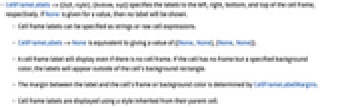
- CellFrameLabels->{{left,right},{bottom,top}} 分别指定单元边框的左侧、右侧、下侧和上侧的标签. 如果 None 作为值给出,则不显示标签.
- 单元边框标签可以指定为字符串或者原始单元表达式.
- CellFrameLabels->None 等价于给出值 {{None,None},{None,None}}.
- 即使没有单元边框,单元边框标签也将显示. 如果单元无边框但有指定的背景颜色,标签将出现在单元背景矩形的外围.
- 标签可单元边框或背景色之间的边幅由 CellFrameLabelMargins 确定.
- 单元边框标签使用从父单元继承的样式来显示.

范例
打开所有单元 关闭所有单元基本范例 (2)
CellPrint[TextCell[StringJoin[Table["abcd ", {20}]], "Text", CellFrame -> True, CellMargins -> {{200, 200}, {10, 10}}, CellFrameLabels -> {{"left", "right"}, {"bottom", "top"}}]]用 Cell 表达式指定标签:
CellPrint[TextCell[StringJoin[Table["abcd ", {20}]], "Text", CellFrame -> True, CellMargins -> {{200, 200}, {10, 10}}, CellFrameLabels -> {{Cell["123", "Input", Brown], None}, {None, None}}]]范围 (3)
CellPrint[TextCell[StringJoin[Table["abcd ", {20}]], "Text", CellMargins -> {{200, 200}, {10, 10}}, CellFrameLabels -> {{"left", "right"}, {"bottom", "top"}}]]CellPrint[TextCell[StringJoin[Table["abcd ", {20}]], "Text", CellMargins -> {{200, 200}, {10, 10}}, FontColor -> #, CellFrameLabels -> {{"left", "right"}, {"bottom", "top"}}]]& /@ {Red, Blue};CellPrint[TextCell[StringJoin[Table["abcd ", {20}]], "Text", CellMargins -> {{200, 200}, {10, 10}}, Background -> LightGreen, CellFrameLabels -> {{"left", "right"}, {"bottom", "top"}}]]推广和延伸 (1)
如要使用 TextCell 或 ExpressionCell 表达式,应用 ToBoxes:
CellPrint[TextCell[StringJoin[Table["abcd ", {20}]], "Text", CellFrame -> True, CellFrameLabels -> {{ToBoxes[ExpressionCell[Graphics[Disk[], ImageSize -> 20]]], None}, {None, None}}]]属性和关系 (1)
CellPrint[TextCell[StringJoin[Table["abcd ", {20}]], "Text", CellMargins -> {{200, 200}, {10, 10}}, CellFrameLabels -> {{"left", "right"}, {None, None}}]]CellPrint[TextCell[StringJoin[Table["abcd ", {20}]], "Text", CellMargins -> {{200, 200}, {10, 10}}, CellFrameLabels -> {{"leftleftleft", "rightrightright"}, {None, None}}]]相似地,CellFrameLabelMargins 压缩单元内容面积:
CellPrint[TextCell[StringJoin[Table["abcd ", {20}]], "Text", CellMargins -> {{200, 200}, {10, 10}}, CellFrameLabels -> {{"left", "right"}, {None, None}}, CellFrameLabelMargins -> 50]]相关的工作流程
- 在单元周围加上边框
历史
1999年引入 (4.0)
文本
Wolfram Research (1999),CellFrameLabels,Wolfram 语言函数,https://reference.wolfram.com/language/ref/CellFrameLabels.html.
CMS
Wolfram 语言. 1999. "CellFrameLabels." Wolfram 语言与系统参考资料中心. Wolfram Research. https://reference.wolfram.com/language/ref/CellFrameLabels.html.
APA
Wolfram 语言. (1999). CellFrameLabels. Wolfram 语言与系统参考资料中心. 追溯自 https://reference.wolfram.com/language/ref/CellFrameLabels.html 年
BibTeX
@misc{reference.wolfram_2026_cellframelabels, author="Wolfram Research", title="{CellFrameLabels}", year="1999", howpublished="\url{https://reference.wolfram.com/language/ref/CellFrameLabels.html}", note=[Accessed: 09-August-2026]}
BibLaTeX
@online{reference.wolfram_2026_cellframelabels, organization={Wolfram Research}, title={CellFrameLabels}, year={1999}, url={https://reference.wolfram.com/language/ref/CellFrameLabels.html}, note=[Accessed: 09-August-2026]}








