


Cells[]
返回当前笔记本中对应于单元的 CellObject 表达式列表.
Cells[obj]
返回 obj 中 CellObject 表达式的列表.
Cells[NotebookSelection[notebook]]
对当前选中的单元,返回 CellObject 表达式列表.
Cells
Cells[]
返回当前笔记本中对应于单元的 CellObject 表达式列表.
Cells[obj]
返回 obj 中 CellObject 表达式的列表.
Cells[NotebookSelection[notebook]]
对当前选中的单元,返回 CellObject 表达式列表.
更多信息和选项
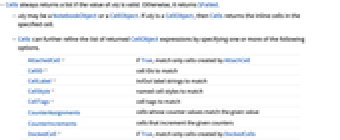
- 如果 obj 的值有效,Cells 总是返回一个列表,否则返回 $Failed.
- obj 可以是 NotebookObject 或者 CellObject. 如果 obj 是 CellObject,则 Cells 返回在指定单元中的内嵌单元.
- Cells 能够通过指定一个或者多个下列选项,进一步修正返回的 CellObject 表达式的列表.
-
AttachedCell 如果为 True,则只匹配由 AttachCell 创建的单元 CellID 需要匹配的单元 ID CellLabel 需要匹配的 In/Out 标签字符串 CellStyle 需要匹配的已命名单元样式 CellTags 需要匹配的单元标签 CounterAssignments 计数器数值与给定数值匹配的单元 CounterIncrements 对给定计数器累加的单元 DockedCell 如果为 True,则只匹配由 DockedCells 创建的单元 Evaluator 匹配指定计算器的单元 StripCellGrouping 是否在结果中包含单元分组信息 GeneratedCell 如果 True,只匹配生成的输出单元,如果 False,只匹配非生成单元 - 当传递给 Cells 多个选项时,返回的结果将只包含满足所有条件的匹配单元的 CellObject 表达式.
- 如果对 Cells 的任意单个选项给出一个数值列表,那么它会匹配任意给定数值.
- 如果笔记本中的选择位于单元内,那么 Cells[NotebookSelection[notebook]] 返回包含选择内容的单元.
- 设置 StripCellGroupingFalse,单元组将在结果中以可能嵌套的列表表示.
范例
打开所有单元 关闭所有单元基本范例 (4)

Cells[][[30 ;; 35]]Cells[CreateDocument[{TextCell["1", "Title"], TextCell["2", "Text"]}]]CellPrint[ExpressionCell[Row[{"outer", TextCell["inner1"], TextCell["inner2"]}, " "], "Print", CellTags -> "basic example"]];
c = First[Cells[CellTags -> "basic example"]];
Cells[c]Cells[CellStyle -> {"Input"}][[1 ;; 3]]范围 (5)
SelectionMove[EvaluationNotebook[], All, EvaluationCell];
Cells[NotebookSelection[EvaluationNotebook[]]]nb = CreateDocument[{TextCell["a", "Title"], Cell["b", "Subtitle"], Cell["c", "Text"]}];
Cells[nb, CellStyle -> {"Title", "Subtitle"}]nb = CreateDocument[{TextCell["a", "Title", CellTags -> {"1234"}], TextCell["b", "Text", CellTags -> {"1234"}], TextCell["c", "Title"]}];
Cells[nb, CellStyle -> "Title", CellTags -> "1234"]使用 NotebookSelection 识别选定单元:
SelectionMove[EvaluationCell[], Before, CellContents];Cells[NotebookSelection[EvaluationNotebook[]]]使用 NotebookSelection 识别在范围选择中的所有选定单元:
Do[CellPrint[TextCell["example", "Print", CellTags -> "range example"]], 3];
NotebookLocate["range example"];
Cells[NotebookSelection[EvaluationNotebook[]]]选项 (9)
AttachedCell (1)
CellID (1)
返回具有给定 CellID 的单元:
CellPrint[TextCell["Cell with ID", "Output", CellID -> 56789]];
Cells[CellID -> 56789]CellTags (1)
DockedCell (1)
Evaluator (1)
GeneratedCell (1)
nb = CreateDocument[{TextCell["Section", "Section"], ExpressionCell[Defer[Print["stuff"];2 + 2], "Input"]}];
NotebookEvaluate[nb, InsertResults -> True];
Cells[nb, GeneratedCell -> True]Cells[nb, GeneratedCell -> False]应用 (2)
nb = CreateDocument[Table[ExpressionCell[n, "Input"], {n, 10}]];
NotebookEvaluate[nb, InsertResults -> True];NotebookDelete[Cells[nb, GeneratedCell -> True]]nb = CreateDocument[{TextCell["abc", "Section"], TextCell["def", "Text"], TextCell["ghi", "Section"], TextCell["jkl", "Text"]}];Scan[(CurrentValue[#, StyleNames] = "Subsection")&, Cells[nb, CellStyle -> "Section"]]属性和关系 (1)
为了与标准匹配,Cells 只扫描顶层单元,而不是内联单元:
nb = CreateDocument[{ExpressionCell[Row[{a, TextCell["b", "Text"]}], "InlineFormula"]}];
Cells[nb, CellStyle -> "Text"]但是,如果所选择的对象位于内联单元中,您可以获取内联单元的 CellObject:
NotebookFind[nb, "b"];
Cells[NotebookSelection[nb]]可能存在的问题 (1)
如果 NotebookObject 不存在,Cells 返回 $Failed:
NotebookClose[nb = CreateDocument[]];
Cells[nb]相关指南
-
▪
- 底层笔记本编程
相关的工作流程
- 对笔记本中的单元应用函数
文本
Wolfram Research (2012),Cells,Wolfram 语言函数,https://reference.wolfram.com/language/ref/Cells.html (更新于 2024 年).
CMS
Wolfram 语言. 2012. "Cells." Wolfram 语言与系统参考资料中心. Wolfram Research. 最新版本 2024. https://reference.wolfram.com/language/ref/Cells.html.
APA
Wolfram 语言. (2012). Cells. Wolfram 语言与系统参考资料中心. 追溯自 https://reference.wolfram.com/language/ref/Cells.html 年
BibTeX
@misc{reference.wolfram_2026_cells, author="Wolfram Research", title="{Cells}", year="2024", howpublished="\url{https://reference.wolfram.com/language/ref/Cells.html}", note=[Accessed: 08-September-2026]}
BibLaTeX
@online{reference.wolfram_2026_cells, organization={Wolfram Research}, title={Cells}, year={2024}, url={https://reference.wolfram.com/language/ref/Cells.html}, note=[Accessed: 08-September-2026]}