

ColorCombine
ColorCombine[{image1,image2,…}]
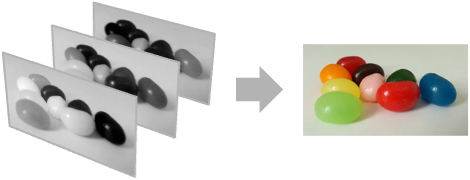
imagei 中の一連のチャンネルを組み合せて多チャンネル画像を作成する.
ColorCombine[{image1,image2,…},colorspace]
colorspace で指定された色成分を表す画像を組み合せる.
詳細
- ColorCombineは,一般に,複数の1チャンネル画像を組み合せて複数チャンネルの画像にするために使われる.
- ColorCombine[{image1,image2,…}]は imagei のそれぞれからの一連のチャンネルを連結して得られたチャンネルを含む画像を作成する.
- ColorCombineは,2Dおよび3Dの画像に使うことができる.
- 画像{image1,image2,…}は同じ次元でなければならない.
- ColorCombine[{image1,image2,…},colorspace]は指定された colorspace の画像を返す.
- 次の colorspace 指定を使うことができる.
-
"RGB" 赤,緑,青 (RGBColor) "CMYK" シアン,マジェンタ,黄,黒 (CMYKColor) "HSB" 色相,彩度,明度 (Hue) "XYZ" CIE XYZチャンネル (XYZColor) "LAB" CIE Labチャンネル (LABColor) "LCH" CIE LCHチャンネル (LCHColor) "LUV" CIE LUVチャンネル (LUVColor) - n 個のカラーチャンネルを必要とする colorspace の場合,n 個あるいは n+1個のチャンネルを組み合せる.n+1
 番目のチャンネルがアルファチャンネルとして使われる.
 - カラー画像とグレースケールの画像を組み合せた場合,ColorCombineはアルファチャンネルと同じ色空間の画像を作る.
例題
すべて開く すべて閉じる例 (2)
スコープ (6)
ColorCombine[{[image], [image], [image]}, "RGB"]ColorCombine[{[image], [image], [image]}, "HSB"]ColorCombine[{[image], [image], [image], [image]}, "CMYK"]サポートされているすべての色空間を使用してレンダリングされた3チャンネル画像のチャンネルの色っを結合する:
cs = {"RGB", "HSB", "LAB", "LCH", "LUV", "XYZ"};
TableForm[Table[ColorCombine[ColorSeparate[[image], in], out], {in, cs}, {out, cs}], ...]ColorCombine[{[image], [image], [image], [image]}, "RGB"]RGB画像を単一フレームの画像と組み合せてRGBA画像を得る:
ColorCombine[{[image], [image]}, "RGB"]ColorCombine[{[image], [image]}]アプリケーション (5)
チャンネルごとのGradientFilterを表示する:
ColorCombine[GradientFilter[#, 1]& /@ ColorSeparate[[image], "RGB"]]//ImageAdjustimg = [image];{l, a, b} = ColorSeparate[img, "LAB"];
ColorCombine[{ImageAdjust[l, 0.6], a, b}, "LAB"]i = [image];
res = CornerFilter[i]//ImageAdjust赤のチャンネルに結果を加え青と緑のチャンネルからは引くことでコーナーを赤で示す:
ColorCombine[{i + res, i - res, i - res}]航空写真の赤のチャンネルを赤外線画像で置換して,バイオマス密度が高い領域をハイライトする:
rgb = [image];inf = [image];ColorCombine[{inf, ColorSeparate[rgb, "G"], ColorSeparate[rgb, "B"]}, "RGB"]単一のスライスをハイライトする3D画像にアルファチャンネルを加える:
ColorCombine[{[image], [image]}]ColorCombine[{[image], [image]}]特性と関係 (2)
imgs = {[image], [image], [image]};ColorCombine[imgs]ImageColorSpace[%]3チャンネル画像はRGB画像と同じように描画されるので注意のこと:
ColorCombine[imgs, "RGB"]ColorCombineで作られた画像はInterleaving->Falseである:
ColorCombine[{[image], [image], [image]}]Options[%, Interleaving]おもしろい例題 (2)
Map[ColorCombine, Permutations[ColorSeparate[[image]]]]i = [image];{c, m, y, k} = ColorSeparate[i, "CMYK"];Table[ColorCombine[{c, ImageAdjust[m, {0, 0, γ}], y, k}, "CMYK"], {γ, 1 / 2, 2, .5}]テキスト
Wolfram Research (2008), ColorCombine, Wolfram言語関数, https://reference.wolfram.com/language/ref/ColorCombine.html (2012年に更新).
CMS
Wolfram Language. 2008. "ColorCombine." Wolfram Language & System Documentation Center. Wolfram Research. Last Modified 2012. https://reference.wolfram.com/language/ref/ColorCombine.html.
APA
Wolfram Language. (2008). ColorCombine. Wolfram Language & System Documentation Center. Retrieved from https://reference.wolfram.com/language/ref/ColorCombine.html