CompiledLayer[func]
表示一个网络层,执行的计算由可编译函数 func 定义.
CompiledLayer[func,gradientfunc]
指定允许在 NetTrain 中使用该层的梯度传播函数.
CompiledLayer
CompiledLayer[func]
表示一个网络层,执行的计算由可编译函数 func 定义.
CompiledLayer[func,gradientfunc]
指定允许在 NetTrain 中使用该层的梯度传播函数.
更多信息和选项
- CompiledLayer 通常用于创建一个网络层,用于计算其他层无法实现的自定义函数.
- CompiledLayer[func],如 CompiledLayer[func,Automatic],试图自动对 func 进行微分产生梯度传播函数. CompiledLayer[func,None] 禁止自动微分.
- 函数 func 和 gradientfunc 必须是适宜于由 FunctionCompile 处理的有效的 Function 对象(例如,必须用 Typed 和 TypeSpecifier 构建它们的参数说明).
- 目前,CompiledLayer 只支持单个输入和输出端口.
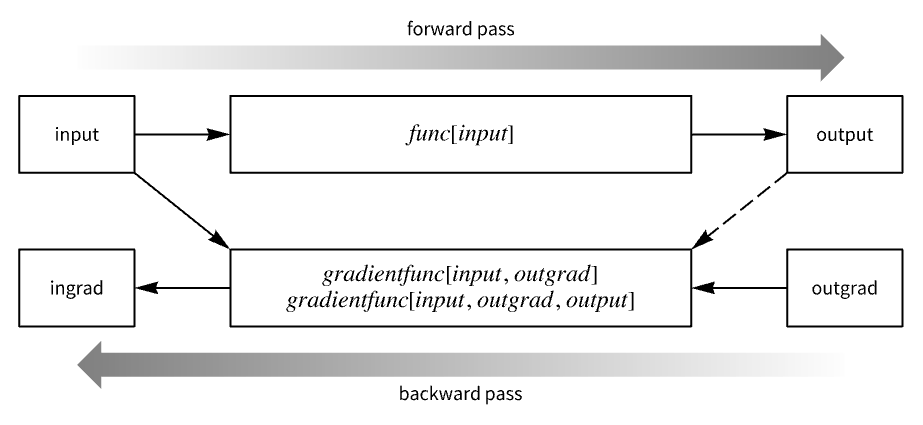
- 函数 func 表示该层执行的计算,也称为前向传播.
- 函数 func 必须以单个数组作为输入(表示网络层的输入),并且必须产生单个数组作为输出(表示网络层的输出).
- 函数 gradientfunc 用于根据输出梯度计算输入梯度,也称为反向传播.
- 函数 gradientfunc 应至少采用两个数组作为输入,分别表示网络层的输入和输出梯度. 或者,也可将之前计算所得的输出作为第三个参数给出. 函数 gradientfunc 的结果是一个表示网络层的输入梯度的数组.
- 可将函数 func 定义为接受一个样例或一批样例. 可用 CompiledLayer[func,"Input"…] 指定输入的秩,以消除这两种情况之间的歧义(通过与 func 中定义的秩进行比较). func 和 gradientfunc 应都接受一个样例,或都接受一批样例.
- CompiledLayer 开放下列端口以便用在 NetGraph 等中:
-
"Input" 一个数组 "Output" 一个数组 - 当给出 NumericArray 作为输入时,输出也将是 NumericArray.
- Options[CompiledLayer] 给出构建网络层的默认选项的列表. Options[CompiledLayer[…]] 给出在一些数据上运行网络层的默认选项列表.
- Information[CompiledLayer[…]] 给出关于该网络层的报告.
- Information[CompiledLayer[…],prop] 给出 CompiledLayer[…] 的属性 prop 的值. 可能的属性与 NetGraph 相同.
- CompiledLayer 尚未编译为 GPU 架构. 当设置 TargetDevice"GPU" 时,训练和推理都将在 CPU 上进行.
范例
打开所有单元 关闭所有单元基本范例 (2)
CompiledLayer[Function[{Typed[input, TypeSpecifier["PackedArray"]["MachineReal", 3]]}, Fold[Times, input]], None
]根据接受秩为 2 的 32-bit 精度的数组的函数创建 CompiledLayer:
f = Function[{Typed[input, TypeSpecifier["NumericArray"]["Real32", 1]]}, Floor[input] - Mean[input]];l = CompiledLayer[f, "Input" -> {3}]l[{0.2, 3, -0.8}]l[{0.2, 3, -0.8}, NetPortGradient["Input"]]范围 (3)
创建带有梯度传播函数的 CompiledLayer:
func = Function[
{Typed[input, TypeSpecifier["PackedArray"]["MachineReal", 3]]},
FoldList[Plus, input]
];gradientFunc = Function[
{
Typed[input, TypeSpecifier["PackedArray"]["MachineReal", 3]],
Typed[outgrad, TypeSpecifier["PackedArray"]["MachineReal", 3]]
},
Reverse@FoldList[Plus, Reverse[outgrad]]
];l = CompiledLayer[func, gradientFunc, "Input" -> {2, 1, 3}]有了梯度传播函数,可用该网络层计算梯度及在 NetTrain 中使用:
l[{{{0.4, -1.5, 7.3}}, {{0, 5.1, -7.2}}}, NetPortGradient["Input"]]{{{2., 2., 2.}}, {{1., 1., 1.}}}NetTrain[
NetChain[{LinearLayer[{2, 1, 3}], l, LinearLayer[2], SoftmaxLayer[]}],
{1.5 -> 1, 2.6 -> 1, 0.4 -> 1, -0.1 -> 2, -0.7 -> 2, -5.4 -> 2}
]在梯度传播函数中指定第三个参数,以便在计算梯度时重复使用之前计算所得的输出:
func = Function[
{Typed[input, TypeSpecifier["PackedArray"]["MachineReal", 1]]},
FoldList[Times, input]
];gradientFunc = Function[
{
Typed[input, TypeSpecifier["PackedArray"]["MachineReal", 1]],
Typed[outgrad, TypeSpecifier["PackedArray"]["MachineReal", 1]],
Typed[output, TypeSpecifier["PackedArray"]["MachineReal", 1]]
},
Table[
output[[n ;; -1]].outgrad[[n ;; -1]] / input[[n]],
{n, Length[input]}
]
];l = CompiledLayer[func, gradientFunc, "Input" -> {6}]l[{0.4, -0.7, 1.3, -1.4, 0.9, 0.7}, NetPortGradient["Input"]]创建一个 CompiledLayer,对一批元素进行处理. 对于一个函数,对秩为 2 的数组进行反向排序:
func = Function[
{Typed[input, TypeSpecifier["NumericArray"]["Real32", 2]]},
Reverse[input]
];在 CompiledLayer 中指定秩为 1 的输入. 该函数被解释为对批数据进行处理:
l = CompiledLayer[func, None, "Input" -> {4}]l@{1, 2, 3, 4}l@{{1, 2, 3, 4}, {5, 6, 7, 8}, {9, 10, 11, 12}}当以这种方式使用时,CompiledLayer 可以使一个批次中的不同元素彼此相互作用,一般的网络层无法做到这一点.
可能存在的问题 (5)
CompiledLayer[Function[{Typed[input, TypeSpecifier["PackedArray"]["MachineReal", 3]]}, Fold[Times, input]]
]在第二个参数中指定梯度传播函数时,必须满足许多严格的兼容性约束条件:
func = Function[
{Typed[input, TypeSpecifier["PackedArray"]["MachineReal", 2]]},
Sin[input]
];gradientFunc = Function[
{
Typed[input, TypeSpecifier["NumericArray"]["Real32", 3]],
Typed[outgrad, TypeSpecifier["NumericArray"]["Real32", 3]]
},
Cos[input] * outgrad
];CompiledLayer[func, gradientFunc]func = Function[
{Typed[input, TypeSpecifier["PackedArray"]["MachineReal", 2]]},
First[input]
];CompiledLayer[func, "Input" -> {4}]
网络层和梯度函数产生的输出的形状应只取决于输入的形状,而不是输入的值. 创建一个函数,其输出的形状取决于输入的值:
func = Function[
{Typed[input, TypeSpecifier["PackedArray"]["MachineReal", 1]]},
If[Total[input] < 10, input, Flatten@{input, input}]
];func@{1, 2, 3}func@{1, 2, 30}在推断形状时,CompiledLayer 在测试输入上运行函数,以获得预期的输出的形状:
l = CompiledLayer[func, "Input" -> 3]如果输出的形状与预期的形状一致,则认为成功完成了接下来的计算:
l@{1, 2, 3}l@{1, 2, 30}为了提高速度,CompiledLayer 禁用了通常编译函数使用的完整性检查. 这可能导致错误的代码,引发意外行为,甚至导致内核崩溃. 以一个访问其输入数组范围之外的元素的函数为例:
func = Function[
{Typed[input, TypeSpecifier["PackedArray"]["MachineReal", 1]]},
input + input[[Length[input] + 1]]
];FunctionCompile 生成的 CompiledCodeFunction 给出了一条出错消息:

compiledFunc = FunctionCompile[func]compiledFunc@{4., 5., 6.}在没有查看数组的范围的情况下,CompiledLayer 运行函数,从而导致未定义错误:
l = CompiledLayer[func]Table[l@{4, 5, 6}, 10]技术笔记
文本
Wolfram Research (2020),CompiledLayer,Wolfram 语言函数,https://reference.wolfram.com/language/ref/CompiledLayer.html (更新于 2021 年).
CMS
Wolfram 语言. 2020. "CompiledLayer." Wolfram 语言与系统参考资料中心. Wolfram Research. 最新版本 2021. https://reference.wolfram.com/language/ref/CompiledLayer.html.
APA
Wolfram 语言. (2020). CompiledLayer. Wolfram 语言与系统参考资料中心. 追溯自 https://reference.wolfram.com/language/ref/CompiledLayer.html 年
BibTeX
@misc{reference.wolfram_2026_compiledlayer, author="Wolfram Research", title="{CompiledLayer}", year="2021", howpublished="\url{https://reference.wolfram.com/language/ref/CompiledLayer.html}", note=[Accessed: 11-September-2026]}
BibLaTeX
@online{reference.wolfram_2026_compiledlayer, organization={Wolfram Research}, title={CompiledLayer}, year={2021}, url={https://reference.wolfram.com/language/ref/CompiledLayer.html}, note=[Accessed: 11-September-2026]}