DocumentGenerator[template,timespec]
timespec によって定義されたスケジュールに従って評価されるテンプレート template を持つ,ドキュメント生成器を表す.
DocumentGenerator[template,driver,timespec]
driver からテンプレートを埋めるためのパラメータを取る.
DocumentGenerator
DocumentGenerator[template,timespec]
timespec によって定義されたスケジュールに従って評価されるテンプレート template を持つ,ドキュメント生成器を表す.
DocumentGenerator[template,driver,timespec]
driver からテンプレートを埋めるためのパラメータを取る.
詳細とオプション
- CloudDeploy[DocumentGenerator[…]]は,クラウド中にドキュメント生成器を設定する.生成器は,周期的に template を適用し,生成過程の結果を記録し,生成されたドキュメントをアーカイブし,それを指定された受信者に配信する.
- ドキュメント生成器は,TaskSuspendやTaskResume等のスケジュールされたタスクに適用可能な関数で制御することができる.timespec はScheduledTask指定に従い,Noneのこともある.
- 引数テンプレートは,TemplateObject,ノートブック,テンプレートノートブック,あるいはこれらの任意の構造物を含むFile[…]またはCloudObject[…]の形の指定でよい.
- 引数 driver は,Association,純関数,評価するとAssociationになるWolfram言語のスクリプト,$CurrentBindingの値を設定するノートブック,あるいはこれらの任意の構造物を含むCloudObjectまたは Fileでよい.
- template にテンプレート要素が含まれている場合,この要素は driver から,driver が存在しない場合はテンプレートのデフォルトから埋められる.
- クラウドオブジェクトとファイルは,指定されたリソースがDelayedとして適格とされない限り,生成器が配備される際にコピーされバンドルされる.Delayedのリソースはその場で使用される.
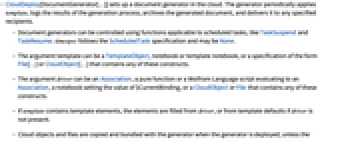
- 使用可能なオプション
-
AutoRemove False スケジュールされた最後の実行後に生成器を削除 DeliveryFunction None 生成されたドキュメントの配信方法 EpilogFunction None ドキュメントの生成後に評価される関数 GeneratorDescription None 生成器のテキストによる説明 GeneratorHistoryLength 3 アーカイブする生成済みドキュメント数 GeneratorOutputType "StaticPage" 生成するドキュメントタイプ NotificationFunction Automatic ステータス通知の与え方 Permissions Automatic 生成されたドキュメントのパーミッション設定 TimeZone Automatic スケジュールの時刻帯 - EpilogFunctionは,純関数,ノートブック,CloudObjectあるいはFileでよい.
- GeneratorOutputTypeのよく使われる設定
-
"StaticPage" 配備されたwebページ "CDF" ダウンロード用ノートブック "PDF" PDFドキュメント "CloudCDF" クラウドノートブック - 出力タイプの選択が,DeliveryFunctionで指定された配備形式に制限を加えることはない.
- クラウドでは,ドキュメントが生成される正確な時刻は,負荷平均化の必要条件によって決定されることが多い.
- クラウド中での生成器実行の間の最短時間は,クラウド設定および契約によって決定され,1時間の数分の1であることが多い.
例題
すべて開く すべて閉じる例 (2)
co = CloudDeploy[DocumentGenerator[File["ExampleData/BasicTemplate.nb"], None]]TaskExecuteを使って,生成器の動作が非同期実行になるようにする:
TaskExecute[co]TaskRemove[co]co = With[{template = StringTemplate["Time: `time`
Current temperature: `temp`"],
driver = <|"time" :> Now, "temp" :> AirTemperatureData[]|>}, CloudDeploy[DocumentGenerator[template, driver, "Hourly"]]
]TaskExecute[co]TaskRemove[co]一般化と拡張 (1)
オプション (2)
DeliveryFunction (1)
NotificationFunction (1)
通知によって,指定されたグループの人々にタスク評価のステータスのメッセージを送ることができる.複数のグループに通知するが受信者はいない生成器を配備する:
co1 = CloudDeploy[DocumentGenerator[File["ExampleData/BasicTemplate.nb"], <|"author" -> $CloudUserID|>, "Daily",
NotificationFunction -> {{$CloudUserID, "a@b.com"} -> All}
]]TaskExecute[co1]TaskRemove[{co1}]アプリケーション (1)
豆テストの点数の日ごとのレポートを作成する.NormalDistributionからのサンプルを得ることで,スコアのシミュレーションを行う:

quizScore[μ_, σ_] := Min[Round@RandomVariate[NormalDistribution[μ, σ]], 100];
quizScore["science"] := quizScore[75, 8];quizScore["english"] := quizScore[82, 6];quizScore["maths"] := quizScore[70, 13];週3回午後5時に実行され,その日の点数のレポートをまとめる生成器を配備する:
driver = Block[
{names = {"John Smith", "Sarah Cook", "Sam Jones"}, subjects = {"science", "english", "maths"}, raw},
raw = Table[Prepend[(quizScore[#1]&) /@ subjects, n], {n, names}];Association["people" -> (AssociationThread[Prepend[subjects, "name"] -> #1]& /@ raw)]
]&;
co = CloudDeploy[DocumentGenerator[
File["ExampleData/RepeatingTemplate.nb"],
driver,
DateObject[{_, _, Monday | Wednesday | Friday, 17}]
]]TaskExecute[co]TaskRemove[co]考えられる問題 (2)
ローカルのFileリソースをDelayedとして適格であるとすると,このリソースは実行時にクラウドで使うことができないので,結果として配備エラーになる:
co = With[{template = Delayed[File["ExampleData/BasicTemplate.nb"]]}, CloudDeploy[DocumentGenerator[template, None]]
]DocumentGeneratorのクラウド評価には,メモリ使用量と評価時間の制限がある.その制限はユーザのクラウドプランによって決定される.具体的な数値はCloudAccountDataの"ScheduledTaskMemoryLimit"および"ScheduledTaskEvaluationTimeLimit"で確認できる:
CloudAccountData /@ {"ScheduledTaskMemoryLimit", "ScheduledTaskEvaluationTimeLimit"}おもしろい例題 (1)
前日の取引高が最高である
個の産業株の過去
日間のパフォーマンスについて,日ごとのレポートを作成するドキュメント生成器を作る:
driver[m_Integer, n_Integer] := Block[{members, reportOn},
members = FinancialData["Trucking", "Members"];
reportOn = Take[Reverse[SortBy[
({#, Quiet[FinancialData[#, "Volume", {Yesterday}]]}& /@ members) /. {{_, _Missing | _FinancialData} -> Sequence[], {t_String, {{_List, i_Integer}}} :> {t, i}},
Last
]], n][[All, 1]];
<|
"Start" :> DateString[DatePlus[Today, -m], "DateShort"],
"Stocks" -> (
<|"Name" -> FinancialData[#, "Company"], "Ticker" -> #|>& /@ reportOn)
|>
]&;
co = CloudDeploy[DocumentGenerator[
File["ExampleData/StocksTemplate.nb"],
driver[30, 5],
DateObject[{_, _, Tuesday | Wednesday | Thursday | Friday | Saturday, 1}],
GeneratorOutputType -> "CloudCDF"
], "trucking-example"]このレポートの生成時間は,同期評価の時間制限を超えることが多い.生成器が非同期実行になるようにする:
TaskExecute[co]レポートは,一旦生成されると,このクラウドオブジェクトで見ることができることがある:
DocumentGeneratorInformation[co, "CurrentOutput"]TaskRemove[co]関連するガイド
テキスト
Wolfram Research (2014), DocumentGenerator, Wolfram言語関数, https://reference.wolfram.com/language/ref/DocumentGenerator.html (2017年に更新).
CMS
Wolfram Language. 2014. "DocumentGenerator." Wolfram Language & System Documentation Center. Wolfram Research. Last Modified 2017. https://reference.wolfram.com/language/ref/DocumentGenerator.html.
APA
Wolfram Language. (2014). DocumentGenerator. Wolfram Language & System Documentation Center. Retrieved from https://reference.wolfram.com/language/ref/DocumentGenerator.html
BibTeX
@misc{reference.wolfram_2026_documentgenerator, author="Wolfram Research", title="{DocumentGenerator}", year="2017", howpublished="\url{https://reference.wolfram.com/language/ref/DocumentGenerator.html}", note=[Accessed: 07-September-2026]}
BibLaTeX
@online{reference.wolfram_2026_documentgenerator, organization={Wolfram Research}, title={DocumentGenerator}, year={2017}, url={https://reference.wolfram.com/language/ref/DocumentGenerator.html}, note=[Accessed: 07-September-2026]}