"StringVector" (数据结构)
"StringVector" (数据结构)
"StringVector"
表示字符串向量.
更多信息
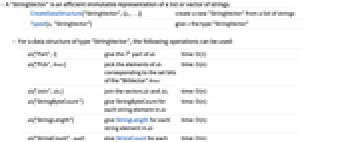
- "StringVector" 是字符串列表或向量的高效不可变表示.
-
CreateDataStructure["StringVector",{s1,…}] 根据字符串列表创建新的 "StringVector" Typed[x,"StringVector"] 指定 x 的类型为 "StringVector" - 对于类型为 "StringVector" 的数据结构,可进行以下运算:
-
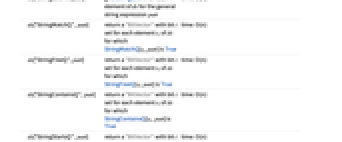
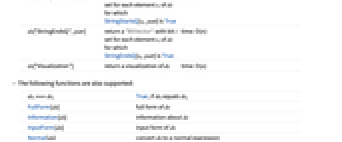
ds["Part",i] 给出 ds 的第 i 个元素 用时:O(1) ds["Pick",bvec] 选择与 "BitVector" bvec 的置位位元相对应的 ds 的元素 用时:O(n) ds["Join",ds1] 合并向量 ds 和 ds1 用时:O(n) ds["StringByteCount"] 给出 ds 中每个字符串元素的 StringByteCount 用时:O(n) ds["StringLength"] 给出 ds 中每个字符串元素的 StringLength 用时:O(n) ds["StringCount",patt] 给出 ds 中每个元素含有字符串表达式 patt 的 StringCount 用时:O(n) ds["StringMatchQ",patt] 返回一个 "BitVector",其中,与 StringMatchQ[si,patt] 为True 的 ds 的元素 si 对应的位元 i 被置位 用时:O(n) ds["StringFreeQ",patt] 返回一个 "BitVector",其中,与 StringFreeQ[si,patt] 为True 的 ds 的元素 si 对应的位元 i 被置位 用时:O(n) ds["StringContainsQ",patt] 返回一个 "BitVector",其中,与 StringContainsQ[si,patt] 为 True 的 ds 的元素 si 对应的位元 i 被置位 用时:O(n) ds["StringStartsQ",patt] 返回一个 "BitVector",其中,与 StringStartsQ[si,patt] 为 True 的 ds 的元素 si 对应的位元 i 被置位 用时:O(n) ds["StringEndsQ",patt] 返回一个 "BitVector",其中,与 StringEndsQ[si,patt] 为 True 的 ds 的元素 si 对应的位元 i 被置位 用时:O(n) ds["Visualization"] 返回 ds 的可视化 用时:O(n) - 还支持以下函数:
-
dsi===dsj 如果 dsi 等于 dsj 则为 True FullForm[ds] ds 的完全形式 Information[ds] 关于 ds 的信息 InputForm[ds] ds 的输入形式 Normal[ds] 将 ds 转换成普通表达式
范例
打开所有单元 关闭所有单元基本范例 (4)
可用 CreateDataStructure 创建新的 "StringVector":
以 "StringVector" 的形式通过逆序获取最后三个元素:
"StringVector" 通常会比字符串列表使用更少的内存:
用 "StringVector" 查找文字字符串比查找字符串列表要快得多:
用 "StringVector" 选择元素比选择字符串列表要快得多:
选择以 "r" 开头、以 "e" 结尾的 "StringVector" 元素:
将 Select 与字符串列表一起使用:
范围 (1)
信息 (1)
可用 CreateDataStructure 创建新的 "StringVector":