

HighlightImage
HighlightImage[image,roi]
highlights the specified region of interest roi in image.
HighlightImage[image,{roi1,roi2,…}]
highlights several regions of interest roii.
HighlightImage[image,{…,w[roii],…}]
highlights using a feature defined by the symbolic wrapper w.
HighlightImage[image,fg,bgstyle]
applies the styling bgstyle to the complement of all the regions of interest.
Details and Options
- HighlightImage is used for highlighting particular regions or features in an image. It returns the highlighted image as a Graphics object.
- The region of interest roi can be any of the following:
-
{{x1,y1},…} a list of image positions region a 2D geometric region (Point, Line, Disk, etc.) labelmatrix a 2D label matrix specifying image components maskimage nonzero pixels of an Image object graphics a Graphics object f a region returned by a function f <label1->roi1, …> an association of labeled regions - Labels in labeled associations <label1->roi1, …> are used for labeling and legending.
- By default, using DataRange->Full, positions {xi,yi} and geometric regions are assumed to be in the standard image coordinate system.
- The following wrappers w can be used:
-
Annotation[roi,label] provide an annotation Button[roi,action] define an action to execute when the element is clicked EventHandler[roi,…] define a general event handler for the element Hyperlink[roi,uri] make the element act as a hyperlink ImageMarker[roi,…] place a marker at the medoid of roi Labeled[roii,…] place a marker at the medoid of roi Legended[roi,lbl] include the label lbl in the legend PopupWindow[roi,cont] attach a popup window to the element StatusArea[roi,label] display in the status area when the element is moused over Style[roi,opts] show the element using the specified styles Tooltip[roi,label] attach an arbitrary tooltip to the element - Use HighlightImage[image,{…,style,roi,…}] to specify a style for the region roi.
- Basic style specifications include:
-
Automatic automatically select the highlighting method color color specification (RGBColor, LABColor, etc.) directive any valid graphics directive (PointSize, Thickness, etc.) - By default, the most suitable highlighting style is used.
- Additional style specifications include:
-
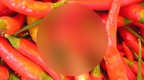
"Blur",{"Blur",r} blur using range r neighborhoods 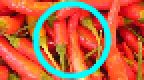
"Boundary",{"Boundary",t} highlight the boundary using thickness t - Nested lists of regions of interest and styles can be given. Style specifications remain in effect only until the end of the list that contains them.
- The background is taken to be the complement of all regions of interest. The following bgstyle specifications can be used:
-
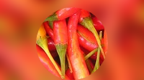
"Blur",
{"Blur",r}blur using range r neighborhoods 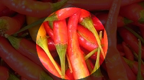
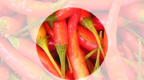
"Darken",{"Darken",a} blend with black (default  )
)
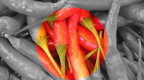
"Lighten",{"Lighten",a} blend with white (default  )
)
"Desaturate",{"Desaturate",s} desaturate 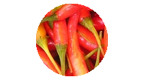
"Remove" make background transparent 
{"Remove",color} replace background with color 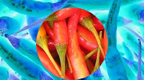
f perform f on the background - With an explicit bgstyle, the foreground opacity is set to 0. Use Opacity[α] to specify a different foreground opacity.
- HighlightImage accepts all Graphics options with the following changes and additions: [List of all options]
-
DataRange Full range of coordinates in the original image ImageLabels Automatic how to label regions of interest ImageLegends None how to add a legend PlotRange Automatic range of coordinates to include PlotRangePadding None how much to pad the range of values - Possible settings for ImageLabels and ImageLegends include:
-
{lbl1,lbl2,…} use an explicit lbli for roii Automatic automatic labeling and legending None no label or legend "Expressions" use the arbitrary functions f - Typical settings for DataRange include:
-
Automatic {{0,1},{0,h/w}} Full {{0,w},{0,h}} {{left,right},{bottom,top}} explicit coordinate ranges in 2D - Typical settings for PlotRange include:
-
All all points are included Automatic same as DataRange settings {{left,right},{bottom,top}} explicit coordinate ranges
List of all options
Examples
open all close allBasic Examples (3)
Highlight the corners of an image:
i = [image];HighlightImage[i, ImageCorners[i, 1, .001, 5]]Highlight a region of interest by dehighlighting the rest of the image:
i = [image];
HighlightImage[i, FindFaces[i], "Darken"]
Highlight a region of interest:
HighlightImage[[image], [image]]Scope (23)
Regions (8)
Point Regions (1)
img = [image];region = ImageKeypoints[img, MaxFeatures -> 20]
HighlightImage[img, region]Use an explicit Point wrapper:
HighlightImage[img, Point[region]]Use an ImageMarker wrapper:
HighlightImage[img, ImageMarker[region]]HighlightImage[img, ImageMarker[region, "Circle"]]Curve Regions (1)
Area Regions (3)
img = [image];Use an Image object as the region:
HighlightImage[img, [image]]Use a Graphics primitive to describe what to highlight:
HighlightImage[img, Disk[{125, 75}, 35]]Use a Graphics object as the region:
HighlightImage[img, Graphics[Disk[{125, 75}, 35]]]Use a geometric region to describe what to highlight:
ℛ = ImplicitRegion[(x - 125)^2 + (y - 75)^2 ≤ 35^2, {x, y}];HighlightImage[img, ℛ]The region of interest can be a Graphics object generated by any function:
img = [image];
region = ImplicitRegion[x ^ 2 + y ^ 3 < 2, {{x, -2, 2}, {y, -2, 2}}]Region[region]HighlightImage[img, {Transparent, region}, "Darken", DataRange -> {{-2, 2}, {-2, 2}}]Whenever the region is given as an image, it is assumed to be a 2D region:
img = [image];
region = Binarize[img]HighlightImage[img, {RGBColor[0, 0, 1, 1], region}]Highlight only the detected pixels by removing the boundary:
HighlightImage[img, {RGBColor[0, 0, 1, 1], EdgeForm[], region}]Compare the result with the exact pixel-wise color replacement:
ImageDistance[
	Rasterize[Style[%, Antialiasing -> False], ImageResolution -> 72],
	ReplacePixelValue[img, region -> RGBColor[0, 0, 1]]
	]
Label Matrices (2)
Highlight connected components of a binary image:
HighlightImage[[image], MorphologicalComponents]Highlight segments of an image after performing watershed transform:
img = [image];markers = MaxDetect[GaussianFilter[img, 25], Padding -> 1];
c = WatershedComponents[GradientFilter[img, 3], markers];HighlightImage[img, c]Delete border components and highlight the rest:
HighlightImage[img, DeleteBorderComponents[c]]Styling (15)
Region Styling (3)
img = [image];
HighlightImage[img, {Yellow, mask = Binarize[img, .5]}]
Highlight the region using a solid color:
HighlightImage[img, {Opacity[1], Yellow, mask}]Highlight the boundary of a region:
img = [image];region = FillingTransform@Binarize[img, .1]HighlightImage[[image], {"Boundary", region}]Use Graphics directives to customize the region:
i = [image];
xy = ImageKeypoints[i, MaxFeatures -> 20];
HighlightImage[i, {GrayLevel[.5, .3], EdgeForm[{Green, Opacity[1]}], Disk[#, 10]& /@ xy}]
Background Styling (6)
Highlight the image by decreasing the background brightness:
i = [image];r = Rectangle[{100, 10}, {170, 90}];
HighlightImage[i, r, "Darken"]
Highlight the image by increasing the background brightness:
i = [image];r = Rectangle[{100, 10}, {170, 90}];
HighlightImage[i, r, "Lighten"]
Highlight the region of interest by converting the background to gray scale:
i = [image];r = Rectangle[{100, 10}, {170, 90}];
HighlightImage[i, r, "Desaturate"]
Use a specific saturation value:
HighlightImage[i, r, {"Desaturate", .8}]Blur the background to highlight the foreground:
i = [image];r = Rectangle[{100, 10}, {170, 90}];
HighlightImage[i, r, "Blur"]
Use a custom function to highlight the background:
i = [image];r = Rectangle[{100, 10}, {170, 90}];
HighlightImage[i, r, # / 2&]i = [image];r = Rectangle[{100, 10}, {170, 90}];
HighlightImage[i, r, "Remove"]Replace the removed background with a specific color:
HighlightImage[i, r, {"Remove", GrayLevel[.3]}]Labeling & Legending (5)
i = [image];HighlightImage[i, {Labeled[Rectangle[{82, 124}, {127, 191}], "mom"], Labeled[Rectangle[{172, 104}, {214, 154}], "baby"]}]Detect faces and label them with estimated age:
i = [image];HighlightImage[i, MapThread[Labeled, {FindFaces[i], FacialFeatures[i, "Age"]}]]Specify labels for each dataset of points:
i = [image];HighlightImage[i, {
Green, Labeled[ImageCorners[i, 1, .001, 5], "corners"],
Red, Labeled[ImageKeypoints[i, MaxFeatures -> 50], "keypoints", Top]
}]Create a legend using the provided labels:
i = [image];
HighlightImage[i, {
	Green, Legended[ImageCorners[i, 1, .001, 5], "corners"],
	Red, Legended[ImageKeypoints[i, MaxFeatures -> 50], "keypoints"]}]
Highlight and label two image segments:
HighlightImage[[image], Thread@Labeled[{[image], [image]}, {"seg 1", "seg 2"}]]Options (7)
DataRange (1)
The default data range is determined by the dimensions of the image:
img = RandomImage[1, {5, 3}];
center = {.5, .5};
region = {Blue, EdgeForm[], Disk[center, .5], Red, Point[center]};HighlightImage[img, region, ImageSize -> Small, Frame -> True]This is equivalent to DataRange->Full:
HighlightImage[img, {EdgeForm[], region}, ImageSize -> Small, Frame -> True, DataRange -> Full]Use DataRange->Automatic for a normalized range on the  axis:
axis:
HighlightImage[img, {EdgeForm[], region}, ImageSize -> Small, Frame -> True, DataRange -> Automatic]HighlightImage[img, {EdgeForm[], region}, ImageSize -> Small, Frame -> True, DataRange -> {{0, 1}, {0, 1}}]GridLines (1)
By default, no grid lines are shown:
img = [image];points = ImageCorners[img, 1, .001, 5];HighlightImage[img, points]HighlightImage[img, ImageCorners[img, 1, .001, 5], GridLines -> Automatic, GridLinesStyle -> Orange]HighlightImage[img, ImageCorners[img, 1, .001, 5], GridLines -> {Range[0, 250, 20], Range[0, 200, 20]}, GridLinesStyle -> Orange]ImageLabels (2)
By default, no label is used for the highlighted regions:
i = [image];HighlightImage[i, {Rectangle[{6., 81.}, {103., 128.}], Rectangle[{206., 92.}, {348., 151.}]}]Use ImageLabels{"lbl1","lbl2",…} to define labels for each region:
HighlightImage[i, {Rectangle[{6, 70}, {100, 130}], Rectangle[{200, 90}, {360, 150}]}, ImageLabels -> {"Little Ararat", "Greater Ararat"}]Association keys are automatically used as labels:
i = [image];
boxes = ImageBoundingBoxes[i]HighlightImage[i, boxes]Use ImageLabelsNone to disable automatic labeling:
HighlightImage[i, boxes, ImageLabels -> None]ImageLegends (2)
Use ImageLegends{"lbl1","lbl2",…} to define labels for each region:
i = [image];HighlightImage[i, {Rectangle[{6, 70}, {100, 130}], Rectangle[{200, 90}, {360, 150}]}, ImageLegends -> {"Little Ararat", "Greater Ararat"}]Legends are matched by scanning the list of regions depth first:
HighlightImage[i, {{Rectangle[{6, 70}, {100, 130}], Rectangle[{200, 90}, {360, 150}]}, Rectangle[{257., 53.}, {354., 98.}]}, ImageLegends -> {"Little Ararat", "Greater Ararat", "Monastery"}]Association keys automatically used as labels:
i = [image];
boxes = ImageBoundingBoxes[i]HighlightImage[i, boxes]Use ImageLegendsAutomatic to enable automatic legending:
HighlightImage[i, boxes, ImageLegends -> All]Use ImageLabelsNone to also disable labeling:
HighlightImage[i, boxes, ImageLegends -> All, ImageLabels -> None]PlotRange (1)
The default plot range is determined by the dimensions of the image:
img = [image];HighlightImage[img, {Disk[{250, 120}, 10], Rectangle[{-20, -20}, {20, 20}]}]Options[%, PlotRange]ImageDimensions[img]Use PlotRange->All to see all regions:
HighlightImage[img, {Disk[{250, 120}, 10], Rectangle[{-20, -20}, {20, 20}]}, PlotRange -> All]HighlightImage[img, {Disk[{250, 120}, 10], Rectangle[{-20, -20}, {20, 20}]}, PlotRange -> {{-20, 150}, {-20, 150}}]Applications (5)
img = [image];
faces = FindFaces[img];
HighlightImage[img, {"Blur", faces}]
Perform and visualize a semantic segmentation of an image using a neural network:
net = NetModel["Dilated ResNet-22 Trained on Cityscapes Data"];labels = {"road", "sidewalk", "building", "wall", "fence", "pole", "traffic light", "traffic sign", "vegetation", "terrain", "sky", "person", "rider", "car", "truck", "bus", "train", "motorcycle", "bicycle"};Define an evaluator function that can work on any image dimension:
netevaluate[img_] := NetReplacePart[net, {{"input_0", "ImageSize"} -> ImageDimensions[img]}][img]mask = netevaluate[scene = [image]];HighlightImage[scene, {Opacity[.5], Labeled[mask, labels]}, ImageSize -> Medium]Highlight segments and use legends to show labels:
HighlightImage[scene, {Opacity[.5], Legended[mask, labels]}, ImageSize -> Medium]Highlight strong and weak corners in different styles:
img = [image];
strong = ImageCorners[img, 1, .005, 10];
weak = Complement[ImageCorners[img, 1, .0005], strong];
HighlightImage[img,
	{AbsolutePointSize[3], Red, Legended[weak, "weak"],
	Green, AbsolutePointSize[10], Legended[strong, "strong"]}]
Segment an image and highlight the centers of the disk shapes with a marker:
img = [image];
disks = Pruning[FillingTransform@DeleteSmallComponents@Binarize[img, {0, .83}]]HighlightImage[[image], ImageMarker[disks]]Highlight multiple regions of interest:
i = [image];HighlightImage[i, {Blue, EdgeDetect[i], Red, ImageLines[GradientFilter[i, 2], MaxFeatures -> 10], Green, ImageKeypoints[i, MaxFeatures -> 20]}]Interactive Examples (1)
Text
Wolfram Research (2012), HighlightImage, Wolfram Language function, https://reference.wolfram.com/language/ref/HighlightImage.html (updated 2021).
CMS
Wolfram Language. 2012. "HighlightImage." Wolfram Language & System Documentation Center. Wolfram Research. Last Modified 2021. https://reference.wolfram.com/language/ref/HighlightImage.html.
APA
Wolfram Language. (2012). HighlightImage. Wolfram Language & System Documentation Center. Retrieved from https://reference.wolfram.com/language/ref/HighlightImage.html