

AccountingForm[expr]
以标准会计表示法输出 expr 中的所有数字.
AccountingForm[expr,n]
按 n 位精度输出数字.
AccountingForm
AccountingForm[expr]
以标准会计表示法输出 expr 中的所有数字.
AccountingForm[expr,n]
按 n 位精度输出数字.
更多信息和选项
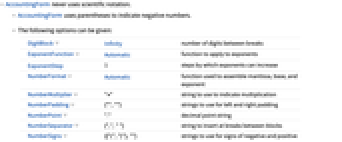
- AccountingForm 从不使用科学记数法.
- AccountingForm 使用圆括号表示负数.
- 可以给出以下选项:
-
DigitBlock Infinity 分隔符之间的位数 ExponentFunction Automatic 应用于指数的函数 ExponentStep 1 指数的步长 NumberFormat Automatic 用于组合尾数、基数和指数的函数 NumberMultiplier "×" 用于表示乘法的字符串 NumberPadding {"",""} 用于进行左右填充的字符串 NumberPoint "." 表示小数点的字符串 NumberSeparator {","," "} 在各块之间分隔处插入的字符串 NumberSigns {{"(",")"},""} 用于表示正负数符号的字符串 SignPadding False 是否在符号后插入填充 - 作为输入时,AccountingForm[expr] 的排版形式被解释为与 expr 一样. »
- 当输入的运算结果为 AccountingForm[expr] 时,AccountingForm 不会出现在输出中. »
范例
打开所有单元 关闭所有单元范围 (5)
nE = N[E]AccountingForm[nE, 10]AccountingForm[nE, 2]AccountingForm[RandomComplex[10 ^ 10 + 10 ^ 10I]]AccountingForm[N[Pi ^ 5, 20]]AccountingForm[N[Pi ^ 5, 20], 10]RandomReal[2000, 5]AccountingForm[%, 4]RandomReal[2 10 ^ 8, {3, 3}]AccountingForm[%]10. ^ 10Sin[x / 7.]AccountingForm[%]选项 (10)
DigitBlock (2)
ExponentFunction (1)
NumberFormat (1)
NumberMultiplier (1)
NumberPadding (1)
NumberPoint (1)
NumberSeparator (1)
NumberSigns (1)
SignPadding (1)
AccountingForm[{-1.2345, 2.4680}, 10, NumberPadding -> {" ", " "}]AccountingForm[{-1.2345, 2.4680}, 10, SignPadding -> True, NumberPadding -> {" ", " "}]在左侧符号前用空格进行填充,在数字和右侧符号之间用零进行填充:
AccountingForm[{-1.2345, 2.4680}, {10, 6}, SignPadding -> {False, True}, NumberPadding -> {" ", "0"}]属性和关系 (4)
AccountingForm 没有指数:
AccountingForm[N[E ^ Range[10, 20, 2]], 10]对于 NumberForm 和 PaddedForm,幂大于 5 的情况下显示指数:
NumberForm[N[E ^ Range[10, 20, 2]], 10]PaddedForm[N[E ^ Range[10, 20, 2]], 10]ScientificForm 在小数点左侧有一位数:
ScientificForm[N[E ^ Range[10, 20, 2]], 10]EngineeringForm 中指数为 3 的倍数:
EngineeringForm[N[E ^ Range[10, 20, 2]], 10]在 TableForm 或 MatrixForm 中改变数的显示:
m = RandomReal[10 ^ 4, {3, 2}];{TableForm[m], AccountingForm[TableForm[m], 4]}作为输入时,AccountingForm[expr] 的排版形式被解释为与 expr 一样:
{AccountingForm[-2]}{-2}当输入的运算结果为 AccountingForm[expr] 时,AccountingForm 不会出现在输出中:
AccountingForm[10. ^ 7]Out 被赋值 1.`*^7,不是 AccountingForm[10.^7]:
%可能存在的问题 (2)
AccountingForm[12345.6, 3]即便输出省略了上一层的 AccountingForm,子表达式中依然存在:
e = AccountingForm[10. ^ 7]输出中没有 AccountingForm:
%但是,变量 e 含有 AccountingForm,可能会影响后续的计算:
FullForm[e]由于 AccountingForm 的存在,不能计算乘积:
10 * e先对变量赋值,然后对结果应用 AccountingForm,使计算可以进行:
(f = 10. ^ 7)//AccountingForm10 * f技术笔记
-
▪
- 数字的输出格式
相关指南
-
▪
- 数字显示
历史
1991年引入 (2.0) | 在以下年份被更新:2017 (11.2)
文本
Wolfram Research (1991),AccountingForm,Wolfram 语言函数,https://reference.wolfram.com/language/ref/AccountingForm.html (更新于 2017 年).
CMS
Wolfram 语言. 1991. "AccountingForm." Wolfram 语言与系统参考资料中心. Wolfram Research. 最新版本 2017. https://reference.wolfram.com/language/ref/AccountingForm.html.
APA
Wolfram 语言. (1991). AccountingForm. Wolfram 语言与系统参考资料中心. 追溯自 https://reference.wolfram.com/language/ref/AccountingForm.html 年
BibTeX
@misc{reference.wolfram_2026_accountingform, author="Wolfram Research", title="{AccountingForm}", year="2017", howpublished="\url{https://reference.wolfram.com/language/ref/AccountingForm.html}", note=[Accessed: 07-August-2026]}
BibLaTeX
@online{reference.wolfram_2026_accountingform, organization={Wolfram Research}, title={AccountingForm}, year={2017}, url={https://reference.wolfram.com/language/ref/AccountingForm.html}, note=[Accessed: 07-August-2026]}
