

Circumsphere[{p1,…,pn+1}]
内の点 piに外接する球を返す.
Circumsphere[poly]
多面体あるいは多角形 poly の外接球を与える.
Circumsphere
Circumsphere[{p1,…,pn+1}]
内の点 piに外接する球を返す.
Circumsphere[poly]
多面体あるいは多角形 poly の外接球を与える.
詳細
- Circumsphereは,外接円としても知られている.
- Circumsphereは,(弧長,面積等が)最小の点 piに外接するSphereを与える.
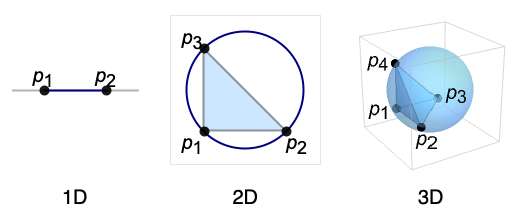
- Circumsphereを評価するとSphere[c,r]になる.中心 c はSimplex[{p1,…,pn+1}]の外心として,半径 r はその外接半径として知られている.
- Circumsphereは
について定義され,アフィン独立である. - 多面体については,Circumsphere[poly]はCircumsphere[PolyhedronCoordinates[poly]]に等しい.
- 多角形については,Circumsphere[poly]はCircumsphere[PolygonCoordinates[poly]]に等しい.
- Circumsphereは,GeometricSceneの記号的な点と一緒に使うことができる.
例題
すべて開く すべて閉じる例 (2)
Graphics[Circumsphere[{{0, 0}, {1, 0}, {0, 1}}]]Graphics3D[Circumsphere[{{0, 0, 0}, {1, 0, 0}, {0, 1, 0}, {0, 0, 1}}]]ℛ = Circumsphere[Octahedron[]]Graphics3D[{Opacity[0.6], Octahedron[], ℛ}]Area[ℛ]スコープ (17)
グラフィックス (6)
指定 (2)
Graphics[Circumsphere[{{0, 0}, {1, 0}, {0, 1}}]]Graphics3D[Circumsphere[{{0, 0, 0}, {1, 0, 0}, {0, 1, 0}, {0, 0, 1}}]]Circumsphereを評価するとSphereになる:
Circumsphere[{{0, 0, 0}, {1, 0, 0}, {0, 1, 0}, {0, 0, 1}}]{First@%, Last@%}スタイリング (4)
ℛ = Circumsphere[{{0, 0, 0}, {1, 0, 0}, {0, 1, 0}, {0, 0, 1}}];Table[Graphics3D[{c, ℛ}], {c, {Red, Green, Blue, Yellow}}]FaceFormを使って表と裏の面に異なる特性を指定することができる:
ℛ = Circumsphere[{{-1, 0, 0}, {1, 0, 0}, {0, 1, 0}, {0, 0, 1}}];Graphics3D[{FaceForm[Yellow, Blue], ℛ}, PlotRange -> {{-0.8, 0.8}, {-0.8, 0.8}, {-0.8, 0.8}}]ℛ = Circumsphere[{{-1, 0, 0}, {1, 0, 0}, {0, 1, 0}, {0, 0, 1}}];Table[Graphics3D[{Orange, Specularity[White, n], ℛ}], {n, {5, 20, 100}}]Graphics3D[{Glow[Red], Black, ℛ}]Opacityは表面の不透明度を指定する:
ℛ = Circumsphere[{{-1, 0, 0}, {1, 0, 0}, {0, 1, 0}, {0, 0, 1}}];Table[Graphics3D[{Opacity[o], ℛ}], {o, {0.3, 0.5, 0.9}}]領域 (11)
Circumsphereは任意数の次元で使うことができる:
Circumsphere[{{0, 0, 0, 0, 0}, {1, 0, 0, 0, 0}, {0, 1, 0, 0, 0}, {0, 0, 1, 0, 0}, {0, 0, 0, 1, 0}, {0, 0, 0, 0, 1}}]{First[%], Last[%]}ℛ = Circumsphere[{{0, 0}, {1, 0}, {1, 1}}];RegionEmbeddingDimension[ℛ]RegionDimension[ℛ]ℛ = Circumsphere[{{1, 0, 0}, {0, 1, 0}, {0, 0, 1}, {-1, 0, 0}}];{RegionMember[ℛ, {1, 0, 0}], RegionMember[ℛ, {1, 2, 3}]}RegionMember[ℛ, {x, y, z}]ℛ = Circumsphere[{{1, 0, 0}, {0, 1, 0}, {0, 0, 1}, {-1, 0, 0}}];{Area[ℛ], RegionMeasure[ℛ]}c = RegionCentroid[ℛ]Graphics3D[{{Opacity[0.5], LightBlue, ℛ}, {PointSize[Large], Red, Point[c]}}]ℛ = Circumsphere[{{1, 0}, {0, 1}, {-1, 0}}];RegionDistance[ℛ, {1, 2}]{Plot3D[RegionDistance[ℛ, {x, y}], {x, -2, 2}, {y, -2, 2}, MeshFunctions -> {#3&}, Mesh -> 5, Exclusions -> Norm[{x, y}] == 1], ContourPlot[RegionDistance[ℛ, {x, y}], {x, -2, 2}, {y, -2, 2}, Contours -> {{0.5, Red}, {1, Green}, {1.5, Blue}}]}ℛ = Circumsphere[{{1, 0}, {0, 1}, {-1, 0}}];{SignedRegionDistance[ℛ, {2, 0}], SignedRegionDistance[ℛ, {1 / 4, 1 / 3}]}Plot3D[SignedRegionDistance[ℛ, {x, y}], {x, -2, 2}, {y, -2, 2}, MeshFunctions -> {#3&}, Mesh -> 5, Exclusions -> Norm[{x, y}] == 1]ℛ = Circumsphere[{{0, 0, 0}, {1, 0, 0}, {0, 1, 0}, {0, 0, 1}}];{RegionNearest[ℛ, {2, 2, 2}], RegionNearest[ℛ, {(1/2), (1/2), (1/2)}]}spherePoints[{n_, m_}, c_, r_] :=
Flatten[Table[c + r{Cos[k 2π / n]Sin[l π / m], Sin[k 2π / n]Sin[l π / m], Cos[l π / m]}, {k, 0., n - 1}, {l, 0., m - 1}], 1];pl = spherePoints[{8, 8}, RegionCentroid[ℛ], 3 / 2];
npl = Table[RegionNearest[ℛ, p], {p, pl}];Legended[Graphics3D[{ℛ, {Thin, Gray, Line[Transpose[{pl, npl}]]}, {Red, Point[pl]}, {PointSize[Medium], Blue, Point[npl]}}, Lighting -> "Neutral", Boxed -> False], PointLegend[{Red, Blue}, {"start", "nearest"}]]ℛ = Circumsphere[{{0, 0, 0}, {1, 0, 0}, {0, 1, 0}, {0, 0, 1}}];BoundedRegionQ[ℛ]r = RegionBounds[ℛ]Graphics3D[{{EdgeForm[White], Opacity[0.2, Yellow], Cuboid@@Transpose[r]}, ℛ}, Boxed -> False]ℛ = Circumsphere[{{-1, 0, 0}, {1, 0, 0}, {0, 1, 0}, {0, 0, 1}}];Integrate[1, {x, y, z}∈ℛ]Integrate[x^2y^2z^2, {x, y, z}∈ℛ]ℛ = Circumsphere[{{-1, 0, 0}, {1, 0, 0}, {0, 1, 0}, {0, 0, 1}}];Maximize[{x^2 + 2y^2 + 3z^2, {x, y, z}∈ℛ}, {x, y, z}]Circumsphere上で方程式を解く:
ℛ = Circumsphere[{{-1, 0, 0}, {1, 0, 0}, {0, 1, 0}, {0, 0, 1}}];Reduce[x^2 == y^2 == z^2 && {x, y, z}∈ℛ, {x, y, z}]//LogicalExpandアプリケーション (7)
LineとCircumsphereの交点を求める:
Subscript[ℛ, 1] = Line[{{-2, -1, 1}, {2, 1, -1}}];
Subscript[ℛ, 2] = Circumsphere[{{-1, 0, 0}, {1, 0, 0}, {0, 1, 0}, {0, 0, 1}}];pts = Solve[{x, y, z}∈Subscript[ℛ, 1] && {x, y, z}∈Subscript[ℛ, 2], {x, y, z}]Graphics3D[{Subscript[ℛ, 1], {Opacity[0.35], Subscript[ℛ, 2]}, {Red, PointSize[Medium], Point[{x, y, z} /. pts]}}, PlotRange -> 1]Subscript[ℛ, 1] = Circumsphere[{{-1, 0}, {1, 0}, {0, 1}}];
Subscript[ℛ, 2] = Circumsphere[{{0, 0}, {2, 0}, {1, 1}}];pts = Solve[{x, y}∈Subscript[ℛ, 1] && {x, y}∈Subscript[ℛ, 2], {x, y}]Graphics[{Subscript[ℛ, 1], Subscript[ℛ, 2], {Red, PointSize[Medium], Point[{x, y} /. pts]}}]pts = {a, b, c} = {{1, 2}, {0, 0}, {3, 0}};circumCenter = RegionCentroid[Circumsphere[pts]];bisector = Line[{circumCenter, RegionCentroid[Line[{a, b}]]}];Graphics[{{LightGray, Circumsphere[pts]}, {LightBlue, Triangle[pts]}, {Dashed, Red, bisector}, {Blue, Point[pts]}, {Red, PointSize[Large], Point[circumCenter]}}]DelaunayMeshの定義特性は,いかなる入力点もメッシュ中の任意のTriangleの外接円中に含まれない,というものである:
SeedRandom[12345];
pts = RandomReal[{0, 1}, {6, 2}];
ℛ = DelaunayMesh[pts];
tris = First /@ MeshPrimitives[ℛ, 2];
circs = Circumsphere /@ tris;Show[HighlightMesh[ℛ, Style[{0, All}, Directive[Red, PointSize[Medium]]]], Graphics[{Gray, circs}], PlotRange -> {{0, 1}, {0, 1}}]Circumsphereを使って関数の曲率の半径を近似する:
y[x_] := Sin[x ^ 2];
r[x_] := ((1 + y'[x] ^ 2) ^ (3 / 2)) / Abs[y''[x]];
c[x_] := With[{ϵ = 0.0001}, Circumsphere[{{x - ϵ, y[x - ϵ]}, {x, y[x]}, {x + ϵ, y[x + ϵ]}}]];{N@r[1], Last[c[1]]}Show[{Plot[y[x], {x, -2, 2}], Graphics[{c[-1.2], c[0], c[1.4], Red, PointSize[Medium], Point[{-1.2, y[-1.2]}], Point[{0, y[0]}], Point[{1.4, y[1.4]}]}]}, AspectRatio -> Automatic]circ = Circumsphere[{{x - ϵ, y[x - ϵ]}, {x, y[x]}, {x + ϵ, y[x + ϵ]}}];Limit[Last@circ, ϵ -> 0, Assumptions -> x∈Reals]r[x]Circumsphereを使って,三角形分割されている任意の領域を被覆する円板を求める.まず,領域を三角形分割する:
ℛ = TriangulateMesh@DiscretizeGraphics[Graphics[CountryData["UnitedStates", {"Shape", "Mercator"}]]]Circumsphereを使って各三角形についての円を計算する:
circles = Circumsphere[First[#]]& /@ MeshPrimitives[ℛ, 2];Graphics[{Opacity[0.5], Map[{RandomColor[], #}&, circles]}]coverArea = Total@Map[Area[Disk@@#]&, circles]regionArea = Area[ℛ]regionArea / coverAreaCircumsphereを使って,三角形分割された領域を被覆する球体を生成する.まず,領域を離散化し,三角形分割する:
ℛ = TriangulateMesh[[image], MeshQualityGoal -> "Minimal"]Circumsphereを使って各四面体についての球を計算する:
spheres = Circumsphere[First[#]]& /@ MeshPrimitives[ℛ, 3];Graphics3D[{Opacity[0.5], Map[{RandomColor[], #}&, spheres]}]coverVolume = Total@Map[Volume[Ball@@#]&, spheres]regionVolume = Volume[ℛ]regionVolume / coverVolume特性と関係 (1)
Circumsphereは,2Dにおける球面上の3点を拾うことで,任意のSphereを表すことができる:
points = {{x + r, y}, {x - r, y}, {x, y + r}};Simplify[RegionMember[Sphere[{x, y}, r], points], {x, y, r}∈Reals && r > 0]Simplify[Circumsphere[points], r > 0]points = {{x + r, y, z}, {x - r, y, z}, {x, y + r, z}, {x, y, z + r}};Simplify[RegionMember[Sphere[{x, y, z}, r], points], {x, y, z, r}∈Reals && r > 0]Simplify[Circumsphere[points], r > 0]関連するガイド
-
▪
- グラフィックスオブジェクト ▪
- 基本的な特殊領域 ▪
- 立体幾何学
テキスト
Wolfram Research (2014), Circumsphere, Wolfram言語関数, https://reference.wolfram.com/language/ref/Circumsphere.html (2019年に更新).
CMS
Wolfram Language. 2014. "Circumsphere." Wolfram Language & System Documentation Center. Wolfram Research. Last Modified 2019. https://reference.wolfram.com/language/ref/Circumsphere.html.
APA
Wolfram Language. (2014). Circumsphere. Wolfram Language & System Documentation Center. Retrieved from https://reference.wolfram.com/language/ref/Circumsphere.html
BibTeX
@misc{reference.wolfram_2026_circumsphere, author="Wolfram Research", title="{Circumsphere}", year="2019", howpublished="\url{https://reference.wolfram.com/language/ref/Circumsphere.html}", note=[Accessed: 16-September-2026]}
BibLaTeX
@online{reference.wolfram_2026_circumsphere, organization={Wolfram Research}, title={Circumsphere}, year={2019}, url={https://reference.wolfram.com/language/ref/Circumsphere.html}, note=[Accessed: 16-September-2026]}