DatePlus
詳細とオプション
- DatePlusは,物理的な期間または暦のステップ数として与えられた任意の時間量分日付をシフトする.
- DatePlus[date,-n]は,date の n 日前の日付を返す.
- 日付は以下の形式で指定できる.
-
DateObject[…] 日付オブジェクト {y,m,d} 年,月,日 {y,m} 指定した月の第1日 {y} y 年の1月1日 "string" 文字列としての日付 ("Jan. 1, 2000") {y,m,d,h,m,s} 厳密な時間 time 絶対時間指定 - 使用可能な刻み幅は"Year","Quarter","Month","Week","Day","Hour","Minute","Second","Weekday","Weekend",MondayからSundayまで,"EndOfMonth","BeginningOfMonth","BusinessDay"の暦刻みと日付タイプである.
- オフセットはQuantityのフレームワークを使って指定することができる.
- {y,m,d}は{y,m,d,0,0,0}等と等しいとみなされる.
- DatePlus[date,offset]は,date と同じ一般的な形式の結果を返す.
- date がリストのとき,結果は date と同じ長さで,offset の最小ステップを含むように拡張されることもある. »
- date が文字列のとき,結果は$DateStringFormatで指定された形式になる.
- DatePlusが取り得るオプション
-
CalendarType "Gregorian" 日付が指定された暦 HolidayCalendar Automatic 休日のスケジュールおよび営業日と非営業日の計算のための部分指定 Method Automatic 使用する日付の計算法 - 変数の期間(例:"Month")を伴う追加の時間ステップについては,日付の計算はステップを物理的な期間に変換する(連続計算)かすべてを離散的な暦のステップとして扱う(離散計算)かする.
- オプション値Method"Continuous"は連続計算を実装する.離散計算はMethodrolling で実装される.この際使用可能なオプションには "RollForward","RollBackward","RollOver"がある.デフォルトは"RollBackward"である.
- 離散計算の場合,例えば1ヶ月を加えると存在しない日(例:February 30)になる可能性がある.そのような場合に日付を解決するオプションには以下の3つがある.
-
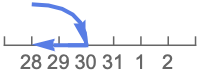
"RollBackward" 既存の最終日付(Feb 28)まで戻る 
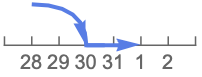
"RollForward" 次の既存の日付(Mar 1)まで進む 
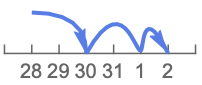
"RollOver" 次の既存の日付(Mar …)から増分する

例題
すべて開く すべて閉じる例 (6)
DatePlus[DateObject[{2022, 1, 1}, "Day"], 35]DatePlus["Jan. 1, 2022", 35]DatePlus[DateObject[{2022, 1, 1}, "Day"], -35]DatePlus[DateObject[{2022, 1, 1}, "Day"], Quantity[14, "Weeks"]]DatePlus[34]DatePlus[Quantity[1, "Month"]]スコープ (13)
日付形式 (5)
DatePlusはDateListにおける標準的な{y,m,d,h,m,s}形式の日付を取る:
DatePlus[{2022, 1, 6, 17, 44}, 15]DatePlusはDateStringがサポートしている任意の形式の日付を取る:
DatePlus["Jan. 1, 2022 06:17:44", 15]DatePlus["1/1/2022 06:17:44", 15]日付が{y,m,d}で与えられた場合,DatePlusは同じ形式で返す:
DatePlus[{2022, 1, 1}, 15]DatePlus[{2022, 1}, 15]DatePlus[{2022}, 15]増分 (8)
DatePlus[DateObject[{2022, 1, 1}, "Day"], Quantity[10, "Months"]]DatePlus[DateObject[{2022, 1, 1}, "Day"], Quantity[40, "Weeks"]]DatePlus[DateObject[{2022, 1, 1}, "Day"], {{7, "Week"}, {2, "Day"}}]DatePlus[DateObject[{2022, 1, 1}, "Day"], {1, "Year"}]DatePlus[DateObject[{1990, 2, 3, 1, 12, 0.}, "Instant", "Gregorian", -6.], {{1, "Month"}, {15, "Day"}}]DatePlus[{2022, 2, 3, 1, 12, 0}, Quantity[3, "Months"]]DatePlus[DateObject[{2022, 1, 1, 6, 17, 44}, "Instant", "Gregorian", -5.], 2.45]DatePlus[DateObject[{2022, 1, 1, 6, 17, 44}, "Instant", "Gregorian", -5.], {-4.6, "Hour"}]オプション (7)
CalendarType (2)
HolidayCalendar (2)
Table[DatePlus[{2022}, {250, "BusinessDay"}, HolidayCalendar -> i], {i, {"China", "UnitedStates"}}]同じ国内でも市場によって休日のスケジュールが異なることがある:
Table[DatePlus[DateObject[{2022, 4, 1}, "Day"], {30, "BusinessDay"}, HolidayCalendar -> {"UnitedStates", i}], {i, CalendarData["UnitedStates"]}]Method (3)
DatePlus[DateObject[{2012, 5, 31}, "Day"], "Month"]Method"RollForward"とすると次の有効な日付の7月1日になる:
DatePlus[DateObject[{2012, 5, 31}, "Day"], "Month", Method -> "RollForward"]DatePlus[date,"Year"]は年に応じて365日あるいは366日前に進む:
With[{start = DateObject[{2020, 8, 25}]},
DateDifference[start, DatePlus[start, "Year"]]
]With[{start = DateObject[{2019, 8, 25}]},
DateDifference[start, DatePlus[start, "Year"]]
]Quantity[1,"Years"]はQuantityフレームワークの中のQuantity[365,"Days"]に等しい:
UnitConvert[Quantity[1, "Years"], "Days"]したがって,Method"Continuous"は常に365日を加える:
With[{start = DateObject[{2020, 8, 25}]},
DateDifference[start, DatePlus[start, "Year", Method -> "Continuous"]]
]With[{start = DateObject[{2019, 8, 25}]},
DateDifference[start, DatePlus[start, "Year", Method -> "Continuous"]]
]2021年1月30日に1ヶ月加える際の計算法による結果の違いを比較する:
DatePlus[DateObject[{2021, 1, 30, 0, 0, 0}], "Month", Method -> #]& /@ {"Continuous", "RollForward", "RollBackward", "RollOver"}1月27日から2月1日までの計算法による結果の違いを比較する:
range = DateRange[DateObject[{2021, 1, 27}], {2021, 2, 1}];
methods = {"RollForward", "RollBackward", "RollOver"};
TableForm[Outer[DatePlus[#, Quantity[1, "Months"], Method -> #2]&, range, methods], TableHeadings -> {range, methods}]アプリケーション (1)
特性と関係 (2)
DatePlusは日付に暦刻みを加えるのに対しDateDifferenceは日付間の距離を計算する:
DateDifference[{2022, 1}, {2022, 3}, "Month"]DatePlus[{2022, 1}, %]DatePlus[{2022, 1}, {2, "Month"}]DateDifference[{2022, 1}, %, "Month"]$DateStringFormatを使って日付の文字列のデフォルト形式を設定する:
Block[{$DateStringFormat = {"Month", "/", "Day", "/", "Year"}}, DatePlus[DateString[], {4, "Month"}]]考えられる問題 (3)
DatePlus["2/4/22", 4]DateListを使って解釈間の曖昧さを回避する:
DatePlus[DateList[{"2/4/22", {"Day", "Month", "YearShort"}}], 4]リストの増分が指定されたときは,最高次から低い方へと加えられる:
DatePlus[DateObject[{2022, 2, 1}], {"Month", "Day"}]DatePlus[DateObject[{2022, 2, 1}], {{2, "Month"}, {2, "Day"}}]DatePlus[DateObject[{2022, 2, 1}], {{2, "Day"}, {2, "Month"}}]月と年が可変長であるため,暦の単位が加えられる順序で算術演算の結果が変わることがある:
Fold[DatePlus, DateObject[{2022, 2, 28}], {"Month", "Month", "Week", "Week"}]Fold[DatePlus, DateObject[{2022, 2, 28}], {"Month", "Week", "Month", "Week"}]Fold[DatePlus, DateObject[{2022, 2, 28}], {"Week", "Week", "Month", "Month"}]テキスト
Wolfram Research (2007), DatePlus, Wolfram言語関数, https://reference.wolfram.com/language/ref/DatePlus.html (2023年に更新).
CMS
Wolfram Language. 2007. "DatePlus." Wolfram Language & System Documentation Center. Wolfram Research. Last Modified 2023. https://reference.wolfram.com/language/ref/DatePlus.html.
APA
Wolfram Language. (2007). DatePlus. Wolfram Language & System Documentation Center. Retrieved from https://reference.wolfram.com/language/ref/DatePlus.html
BibTeX
@misc{reference.wolfram_2026_dateplus, author="Wolfram Research", title="{DatePlus}", year="2023", howpublished="\url{https://reference.wolfram.com/language/ref/DatePlus.html}", note=[Accessed: 04-September-2026]}
BibLaTeX
@online{reference.wolfram_2026_dateplus, organization={Wolfram Research}, title={DatePlus}, year={2023}, url={https://reference.wolfram.com/language/ref/DatePlus.html}, note=[Accessed: 04-September-2026]}