EntropyFilter[data,r]
範囲 r の近傍中のすべての値をエントロピー値で置換することで data にフィルタをかける.
EntropyFilter[data,{r1,r2,…}]
データの
次元のフィルタリングに riを使う.
EntropyFilter
EntropyFilter[data,r]
範囲 r の近傍中のすべての値をエントロピー値で置換することで data にフィルタをかける.
EntropyFilter[data,{r1,r2,…}]
データの
次元のフィルタリングに riを使う.
詳細
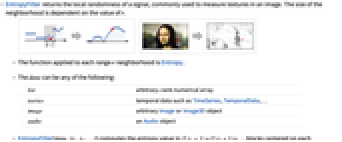
- EntropyFilterは,画像のテクスチャを測定するためによく使われる,信号の局所的ランダム性を返す.近傍の大きさは r の値に依存する.
- 範囲 r の各近傍に適用される関数はEntropyである.
- data は次のいずれでもよい.
-
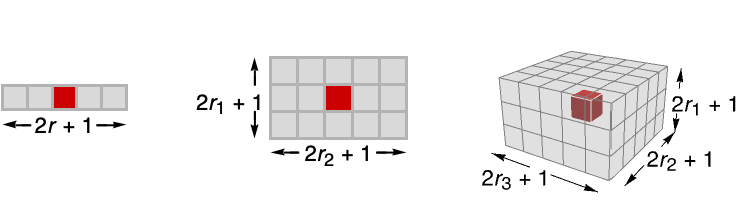
list 任意階数の数値配列 tseries TimeSeriesやTemporalData等の時間データ image 任意のImageオブジェクトまたはImage3Dオブジェクト audio Audioオブジェクト video Videoオブジェクト - EntropyFilter[data,{r1,r2,…}]は,各サンプルを中心にした

ブロック中のエントロピー値を計算する. - EntropyFilterは,リストと画像については指標座標系を仮定する.
- EntropyFilterは,データの境界ではより小さい近傍を使う.

例題
すべて開く すべて閉じる例 (3)
EntropyFilter[{0, 0, 0, 1, 1, 1, 1, 0, 0, 0}, 1] // NTimeSeriesにフィルタをかける:
ts = TemporalData[TimeSeries, {{{-5.284299554283819, 2.5633277538370023, 6.579100030714124,
-1.968961681799072, -0.4139386346612976, -1.9026234920486018, -0.6119551311215429,
6.658489816525363, -1.1389707331791818, 2.125399040092273, -2.100657 ... -1.0208703378550394, 4.53291764229072, 0.8063886166734048, -0.556998456633081,
5.892989731928727}}, {{0, 100, 1}}, 1, {"Continuous", 1}, {"Discrete", 1}, 1,
{ResamplingMethod -> {"Interpolation", InterpolationOrder -> 1}}}, False, 11.1];filter = EntropyFilter[ts, 5]ListLinePlot[{ts, filter}, PlotLegends -> {"original data", "filter"}]EntropyFilter[[image], 1]スコープ (11)
データ (7)
EntropyFilter[{1, 2, 3, 3, 3, 3, 3}, 1]EntropyFilter[(| | | | |
| - | - | - | - |
| 1 | 1 | 1 | 0 |
| 1 | 1 | 1 | 0 |
| 1 | 1 | 0 | 0 |
| 0 | 0 | 0 | 0 |), 1]//N//MatrixFormdata = {Quantity[2, "Meters"], Quantity[1, "Meters"], Quantity[0, "Meters"], Quantity[3, "Meters"], Quantity[0, "Meters"], Quantity[1, "Meters"], Quantity[3, "Meters"], Quantity[1, "Meters"], Quantity[1, "Meters"], Quantity[3, "Meters"], Quantity[3, "Meters"], Quantity[1, "Meters"]};filtered = EntropyFilter[data, 1]//NAudio信号にフィルタをかける:
a = Import["ExampleData/rule30.wav"];b = EntropyFilter[a, 15]AudioPlot[{a, b}]EntropyFilter[[image], 3]//ImageAdjustEntropyFilter[[image], 1]EntropyFilter[{a, a, a, b, b, b}, 1]パラメータ (4)
EntropyFilter[[image], 5]Table[Labeled[EntropyFilter[[image], r], Text["*r* = " <> ToString@r]], {r, {1, 3, 5}}]EntropyFilter[[image], {5, 0}]EntropyFilter[[image], {0, 5}]EntropyFilter[[image], {1, 0, 0}]EntropyFilter[[image], {0, 1, 1}]アプリケーション (3)
特性と関係 (2)
エントロピーフィルタをかけることは,関数EntropyでArrayFilterを使うことに等しい:
r = 1;
x = {1, 2, -1, 1, 2, 3, 1, -1, 3, 1};
ArrayFilter[Entropy[Flatten[#]]&, x, r, Padding -> None] == EntropyFilter[x, r][[r + 1 ;; -r - 1]]エントロピーフィルタをかけることは,関数EntropyでImageFilterを使うことに等しい:
ImageCrop[EntropyFilter[[image], 1], 3] == ImageCrop[ImageFilter[Entropy[Flatten[#]]&, [image], 1], 3]考えられる問題 (1)
他とは異なる画素値が複数回出現するとは考えにくいので,離散エントロピー測度は実数値の画像には適用されない:
EntropyFilter[[image], 3]//ImageAdjustColorQuantizeを使って可能な画素値の数を制限する:
EntropyFilter[ColorQuantize[[image], 16], 3]//ImageAdjust関連するガイド
-
▪
- 画像のフィルタリングと近傍処理 ▪
- 線形・非線形フィルタ ▪
- 画像の処理と解析 ▪
- 動画計算機能の更新履歴
テキスト
Wolfram Research (2008), EntropyFilter, Wolfram言語関数, https://reference.wolfram.com/language/ref/EntropyFilter.html (2025年に更新).
CMS
Wolfram Language. 2008. "EntropyFilter." Wolfram Language & System Documentation Center. Wolfram Research. Last Modified 2025. https://reference.wolfram.com/language/ref/EntropyFilter.html.
APA
Wolfram Language. (2008). EntropyFilter. Wolfram Language & System Documentation Center. Retrieved from https://reference.wolfram.com/language/ref/EntropyFilter.html
BibTeX
@misc{reference.wolfram_2026_entropyfilter, author="Wolfram Research", title="{EntropyFilter}", year="2025", howpublished="\url{https://reference.wolfram.com/language/ref/EntropyFilter.html}", note=[Accessed: 15-September-2026]}
BibLaTeX
@online{reference.wolfram_2026_entropyfilter, organization={Wolfram Research}, title={EntropyFilter}, year={2025}, url={https://reference.wolfram.com/language/ref/EntropyFilter.html}, note=[Accessed: 15-September-2026]}