

GeoDisk
GeoDisk[loc,r]
地表の位置 loc を中心とする,半径 r の塗り潰された円板を表す二次元のGeoGraphicsプリミティブである.
GeoDisk[loc,r,{α1,α2}]
円板の方位 α1から方位 α2までの扇形を与える.
詳細とオプション
- 中心 loc,半径 r の測地円板は,loc から始まる長さ r のすべての測地線で覆われた面積として定義することができる.方位 α1および方位 α2の指定は測地線の集合を制限する.
- 位置 loc は,緯度および経度の座標{lat,long}(単位:度),GeoPosition[…],あるいは名前付きの地理的Entity[…]として指定することができる.
- 半径 r は,Quantity長として,あるいはメートル単位の数として与えられる.
- 方位 α1および α2は,真北から時計回りで測られ,Quantity角度,度を単位とした数,DMS文字列,"N"あるいは"SouthWest"のような名前付きのコンパス点として与えることができる.
- デフォルトで,背景の地図が見えるようにGeoDiskは半透明に描画される.
- FaceForm,EdgeForm,GeoStylingを使って,グラフィックス領域の内側および境界をどのように描画するかを指定することができる.内部の不透明度はGeoStylingを使ってしか変更できない.
- GeoDisk[loc]は,中心が loc で,半径が自動的に選択された測地円板を表す.
- GeoDisk[]はGeoDisk[$GeoLocation]に等しい.
例題
すべて開く すべて閉じる例 (2)
GeoGraphics[GeoDisk[{25, -40}, Quantity[2000, "Kilometers"]], GeoRange -> "World", Frame -> True]GeoGraphics[GeoDisk[Entity["City", {"Paris", "IleDeFrance", "France"}], Quantity[1000, "Kilometers"], {45, 135}]]スコープ (6)
測地円板の中心位置は,いくつかの方法で指定することができる:
With[{r = Quantity[450, "Kilometers"]}, GeoGraphics[{
	Yellow, GeoDisk[{40, -4}, r],
	Red, GeoDisk[GeoPosition[{47, 3}], r],
	Blue, GeoDisk[Entity["City", {"Berlin", "Berlin", "Germany"}], r]
	}]
]$GeoLocationGeoGraphics[GeoDisk[]]測地円板の半径は,Quantityオブジェクトとして,あるいは直接メートルで指定することができる:
GeoGraphics[{
	Yellow, GeoDisk[{0, -100}, Quantity[3000, "Kilometers"]],
	Red, GeoDisk[{0, 0}, Quantity[3000000, "Meters"]],
Blue, GeoDisk[{0, 100}, 3000000]}]GeoGraphics[GeoDisk[Entity["City", {"Madrid", "Madrid", "Spain"}]]]pos = $GeoLocationGeoGraphics[{
Orange, GeoDisk[pos, Quantity[500, "Miles"], {0, 120}],
Red, GeoDisk[pos, Quantity[700, "Miles"], {"SE", "SSW"}]}]{GeoGraphics[{GeoStyling[Directive[Opacity[0.2], EdgeForm[Blue], Red]], GeoDisk[]}], GeoGraphics[{EdgeForm[Directive[Thick, Dashed, Purple]], GeoDisk[Entity["City", {"Chicago", "Illinois", "UnitedStates"}]]}]}アプリケーション (3)
メルカトル図法は,面積や距離は保存しないが形を保存するので,等角である:
GeoGraphics[{Table[GeoDisk[{lat, lon}, Quantity[1000, "Kilometers"]], {lat, -60, 60, 30}, {lon, -160, 160, 40}]}, GeoProjection -> "Mercator"]GeoGraphics[{Table[GeoDisk[{lat, lon}, Quantity[1000, "Kilometers"]], {lat, -60, 60, 30}, {lon, -160, 160, 40}]}]GeoGraphics[{GeoStyling[Opacity[0.4]],
Red, EdgeForm[Yellow], Polygon[Entity["Country", "Germany"]],
Purple, GeoDisk[Entity["City", {"Hamburg", "Hamburg", "Germany"}], Quantity[80, "Miles"], {60, 150}], GeoDisk[Entity["City", {"Berlin", "Berlin", "Germany"}], Quantity[80, "Miles"], {-90, -30}]}, GeoBackground -> GeoStyling["ReliefMap"]]1992年のランダース(Landers)地震の震源地からのさまざまな距離をプロットする:
With[{epicenter = GeoPosition[{34.18, -116.51}], city = Entity["City", {"LosAngeles", "California", "UnitedStates"}]}, GeoGraphics[{Red, GeoDisk[epicenter, Quantity[#, "Kilometers"]]& /@ Range[100, 500, 100], PointSize[Large], Blue, Tooltip[Point[epicenter], "Landers 1992 epicenter"], Green, Tooltip[Point[city], CommonName[city]]}, GeoBackground -> GeoStyling["ReliefMap"]]]特性と関係 (11)
測地円板は,中心からの距離が最大でもその半径である点の集合である:
center = GeoPosition[{60, 160}];
radius = 1000000;GeoGraphics[{PointSize[0.02], Table[Point[GeoDestination[center, GeoDisplacement[{radius, bearing}]]], {bearing, -180, 180, 10}], GeoDisk[center, radius]}]center = GeoPosition[{-40, -70}];
radius = Quantity[1000, "Miles"];GeoGraphics[{GeoDisk[center, radius], Red, GeoCircle[center, radius]}]GeoDiskオブジェクトは,最終的な地図で使われる座標にかかわらず,地球上の座標と距離を使って表現される.Diskオブジェクトは,最終地図の座標を使って表される:
GeoGraphics[{Blue, GeoDisk[{0, 120}, Quantity[5000, "Kilometers"]], Red, Disk[{0, 1.5}, 0.5]}, Frame -> True, GeoRange -> "World", GeoProjection -> "Albers"]GeoPositionオブジェクトを使ってDiskオブジェクトの中心を指定することができる.しかし,その半径を地球表面における長さとして指定することはできない:
GeoGraphics[{Blue, GeoDisk[{0, 120}, Quantity[5000, "Kilometers"]], Red, Disk[GeoPosition[{90, 0}], 0.5]}, Frame -> True, GeoRange -> "World", GeoProjection -> "Albers"]正距円筒図法では,極に近付くにしたがって,測地円板がより歪んで見える:
GeoGraphics[{Table[GeoDisk[{lat, 0}, Quantity[1000, "Kilometers"]], {lat, 0, 80, 10}]}]p = GeoPosition[{60, -45}];Quantity[5000, "Kilometers"]GeoGraphics[{{PointSize[0.02], Point[p]}, Orange, GeoDisk[p, Quantity[5000, "Kilometers"]]}, GeoRange -> "World"]GeoGraphics[{PointSize[Large], Point[GeoPosition[{50, 0}]], Table[GeoDisk[{50, 0}, 10^6 i], {i, 1, 5}]}]GeoGraphics[{PointSize[Large], Point[GeoPosition[{50, 0}]], Table[GeoDisk[{50, 0}, 10^6 i], {i, 1, 5}]}, GeoProjection -> "Mercator", GeoRange -> "World"]測地円板を補完するものは,およそ地球の対蹠的な位置に中心がある測地円板である:
p = GeoPosition[{60, -45}];
ap = GeoAntipode[p]GeoGraphics[{{PointSize[0.02], Point[p], Point[ap]}, Red, GeoDisk[p, Quantity[5000, "Kilometers"]], Yellow, GeoDisk[ap, Quantity[15000, "Kilometers"]]}, GeoRange -> "World"]大きい測地円板は,両極を含むほぼ地球全体を被う.被われないのはほんの少しの部分である:
GeoGraphics[GeoDisk[{30, 100}, Quantity[18000, "Kilometers"]]]測地円板の扇形の3辺はすべて,ほとんどの投影法で一般に曲線になる.中心からスパンする半径は測地的である:
GeoGraphics[GeoDisk[{70, -100}, Quantity[2000, "Kilometers"], {30, 80}], GeoProjection -> "ArdenClose"]

GeoGraphics[GeoDisk[{50, 0}, Quantity[3000, "Kilometers"], {-90, 90}], GeoProjection -> "LambertAzimuthal"]極を中心とする測地円板の扇形は,長方形に投影されることがある:
GeoGraphics[GeoDisk[{-90, 0}, Quantity[5000, "Kilometers"], {-80, 70}], GeoRange -> "World", Frame -> True]南極の方位は経度と一致する.北極の方位 α は,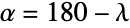 で経度
で経度  に関連している.角はどちらも度によるものとする:
GeoGraphics[GeoDisk[{90, 0}, Quantity[5000, "Kilometers"], {-40, 160}], GeoRange -> "World", Frame -> True]地球の楕円モデルを使った,対蹠点の周りに累積された大きい円板:
GeoGraphics[Table[GeoDisk[GeoPosition[{0, 80}], r], {r, 19970000, 20030000, 10000}], GeoProjection -> "Equirectangular", GeoRange -> {{-0.7, 0.7}, {-100.7, -99.3}}, GeoModel -> GeodesyData["ITRF00", "SemimajorAxis"]]GeoGraphics[Table[GeoDisk[GeoPosition[{0, 80}], r], {r, 19970000, 20030000, 10000}], GeoProjection -> "Equirectangular", GeoRange -> {{-0.7, 0.7}, {-100.7, -99.3}}]インタラクティブな例題 (2)
半径が固定された測地円板をインタラクティブに置き,形が緯度の関数としてどのように変わるかを観察する:
DynamicModule[{pt = {0, 0}}, LocatorPane[Dynamic[pt], Dynamic@GeoGraphics[GeoDisk[Reverse@pt, Quantity[5000, "Kilometers"]], GeoRange -> "World"]]]GeoDiskの引数を調べる:
Manipulate[GeoGraphics[{
	GeoDisk[{lat, lon}, r, {α1, α2}],
	Blue, GeoPath[{{lat, lon}, r, α1}], Green, GeoPath[{{lat, lon}, r, α2}],
	Red, PointSize[0.02], Point[GeoPosition[{lat, lon}]]}, GeoRange -> "World"], {{lat, 0}, -90, 90}, {{lon, 0}, -180, 180}, {{r, 5000000}, 0, 20000000}, {{α1, -180}, -180, 180}, {{α2, 180}, -180, 180}]
おもしろい例題 (1)
アメリカ合衆国の国境から最も遠くにあるアメリカ合衆国の都市は,カンザス州にあることを示す.アメリカ合衆国の多角形を使う:
polygon = EntityValue[Entity["Country", "UnitedStates"], "Polygon"];
coordinates = polygon[[1, 1, 1]];distances = MapThread[GeoDistance, {coordinates, RotateLeft[coordinates]}];
accumulateddistances = Accumulate[QuantityMagnitude[distances, "Miles"]];first = First[accumulateddistances];
last = Last[accumulateddistances]f = Interpolation[Transpose[{accumulateddistances, coordinates}], InterpolationOrder -> 0]国境上の等距離の点に沿って半径650マイルの測地円板を300個描画する.被覆されない空間が若干残る.これは,国境からの距離が650マイルを上回る地点であり,カンザス州にある:
GeoGraphics[{GeoStyling[Opacity[0.03], Purple, EdgeForm[Directive[Thin, Darker[Purple]]]], (GeoDisk[#1, Quantity[650, "Miles"]]&) /@ f[Range[first, last, (last/300)]], GeoStyling[EdgeForm[Yellow], Opacity[0]], polygon, Polygon[Entity["AdministrativeDivision", {"Kansas", "UnitedStates"}]]}, GeoRange -> GeoBounds[polygon], GeoBackground -> None, ImageSize -> Medium]
 An Elementary Introduction to the Wolfram Language
テキスト
Wolfram Research (2014), GeoDisk, Wolfram言語関数, https://reference.wolfram.com/language/ref/GeoDisk.html.
CMS
Wolfram Language. 2014. "GeoDisk." Wolfram Language & System Documentation Center. Wolfram Research. https://reference.wolfram.com/language/ref/GeoDisk.html.
APA
Wolfram Language. (2014). GeoDisk. Wolfram Language & System Documentation Center. Retrieved from https://reference.wolfram.com/language/ref/GeoDisk.html