ChatSubmit[chat,prompt]
フォローアップを追加する prompt をChatObject chat に非同期的に送信する.
ChatSubmit
ChatSubmit[chat,prompt]
フォローアップを追加する prompt をChatObject chat に非同期的に送信する.
詳細とオプション
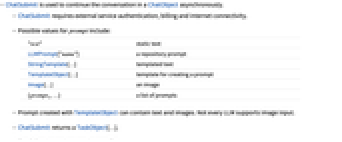
- ChatSubmitは,ChatObject内の会話を非同期的に続けるために使われる.
- ChatSubmitには,外部サービスの認証,請求,インターネット接続が必要である.
- 次は,prompt の可能な値である.
-
"text" 静的テキスト LLMPrompt["name"] レポジトリのプロンプト StringTemplate[…] テンプレートテキスト TemplateObject[…] プロンプト作成用のテンプレート Image[…] 画像 {prompt1,…} プロンプトのリスト - TemplateObjectで作られたプロンプトはテキストと画像を含むことができる.すべてのLLMが画像入力をサポートする訳ではない.
- ChatSubmitはTaskObject[…]を返す.
- 次は,使用可能なオプションである.
-
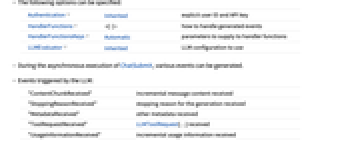
Authentication Inherited 認証スキーム HandlerFunctions 生成されたイベントの扱い方 HandlerFunctionsKeys Automatic ハンドラ関数に与えるパラメータ LLMEvaluator Inherited 使用するLLM設定 - ChatSubmitの非同期実行の間にさまざまなイベントが生成されることがある.
- 次は,LLMによってトリガされるイベントである.
-
"ContentChunkReceived" 受信された増分メッセージの内容 "StoppingReasonReceived" 受信された生成停止の理由 "MetadataReceived" 受信された他のメタデータ "ToolRequestReceived" 受信されたLLMToolRequest[…] "UsageInformationReceived" 受信された増分使用法情報 - 次は,ローカル処理によってトリガされるイベントである.
-
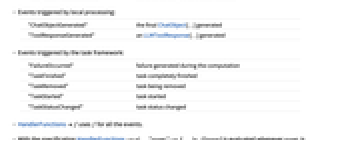
"ChatObjectGenerated" 生成された最終ChatObject[…] "ToolResponseGenerated" 生成されたLLMToolResponse[…] - 次は,タスクフレームワークによってトリガされるイベントである.
-
"FailureOccurred" 計算中に生成された失敗 "TaskFinished" 完全に終了したタスク "TaskRemoved" 削除されつつあるタスク "TaskStarted" 開始されたタスク "TaskStatusChanged" タスクのステータスが変わった - HandlerFunctionsf は,すべてのイベントに f を使う.
- HandlerFunctions-><|…,"eventi"->fi,…|>指定の fi[assoc]は eventiが生成されるたびに評価される.assoc の要素はHandlerFunctionsKeysの設定で指定されたキーを持つ.
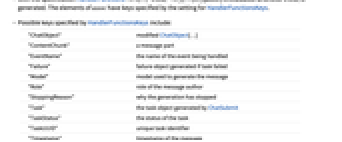
- 次は,HandlerFunctionsKeysによって指定される可能なキーである.
-
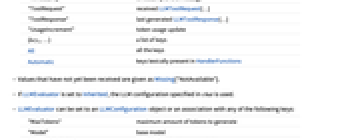
"ChatObject" 変更されたChatObject[…] "ContentChunk" メッセージ部分 "EventName" 処理されているイベント名 "Failure" タスクが失敗したときに生成される失敗オブジェクト "Model" メッセージの生成に使われるモデル "Role" メッセージの著者のロール "StoppingReason" 生成が停止された理由 "Task" ChatSubmitによって生成されたタスクオブジェクト "TaskStatus" タスクの状態 "TaskUUID" 一意的なタスク識別子 "Timestamp" メッセージのタイムスタンプ "ToolRequest" 受信されたLLMToolRequest[…] "ToolResponse" 最後に生成されたLLMToolResponse[…] "UsageIncrement" トークンユースエージの更新 {key1,…} キーのリスト All すべてのキー Automatic HandlerFunctionsに辞書的に現れるキー - まだ受け取られていない値はMissing["NotAvailable"]として与えられる.
- LLMEvaluatorがInheritedに設定されていると,chat で指定されたLLM設定が使われる.
- LLMEvaluatorは,LLMConfigurationオブジェクトまたは以下の任意のキーを持つ連想に設定できる.
-
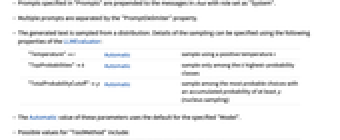
"MaxTokens" 生成するトークンの最大量 "Model" ベースモデル "PromptDelimiter" プロンプト間に挿入する文字列 "Prompts" 初期プロンプトまたはLLMPromptGeneratorオブジェクト "StopTokens" それによって生成を止めるトークン "Temperature" サンプリング温度 "ToolMethod" ツールの呼出しに使用するメソッド "Tools" 利用できるようにするLLMToolオブジェクトのリスト "TopProbabilities" サンプリングクラスのカットオフ "TotalProbabilityCutoff" サンプリング確率のカットオフ(核サンプリング) - "Model"の有効な形には以下がある.
-
name 名前付きのモデル {service,name} service からの名前付きのモデル <|"Service"service,"Name"name|> 完全に指定されたモデル - "Prompts"で指定されたプロンプトは,ロールが"System"に設定された chat 内のメッセージの先頭に追加される.
- 複数のプロンプトは"PromptDelimiter"特性で分割される.
- 生成されたテキストは分布からサンプリングされる.サンプリングの詳細はLLMEvaluatorの次の特性で指定できる.
-
"Temperature"t Automatic 正の温度 t を使ったサンプリング "TopProbabilities"k Automatic 確率が最も高い k 個の確率クラスだけからサンプリングする "TotalProbabilityCutoff"p Automatic 少なくとも累積確率 p で最も可能性の高い選択肢の中からサンプリングする (核サンプリング) - これらのパラメータのAutomaticという値は,指定された"Model"のデフォルトを使う.
- 次は,"ToolMethod"の可能な値である.
-
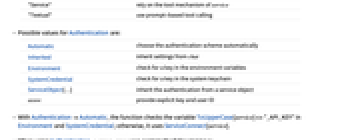
"Service" service のツールメカニズムに依存する "Textual" プロンプトに基づいたツールの呼出しを使う - 次は,Authenticationの可能な値である.
-
Automatic 認証スキームを自動的に選択する Inherited chat から設定を継承する Environment 環境変数中のキーをチェックする SystemCredential システムのキーチェーンのキーをチェックする ServiceObject[…] サービスオブジェクトから認証を継承する "string" 明示的なAPIキーを与える - AuthenticationAutomaticのとき,関数はEnvironmentおよびSystemCredential内の変数ToUpperCase[service]<>"_API_KEY"をチェックする.それ以外の場合はServiceConnect[service]を使う.
- ChatSubmitは機械学習を使う.含まれるメソッド,訓練集合,バイアスはWolfram言語のバージョンによって異なることがあり,与えられる結果も異なる可能性がある.
例題
すべて開く すべて閉じる例 (2)
chat = ChatObject[]会話にメッセージを加え,結果を res に割当てて応答として送信する:
ChatSubmit[chat, "What's the tallest mountain?", HandlerFunctions -> <|"TaskFinished" -> Function[res = #ChatObject]|>
]resマルチモーダルモデルから生成された応答の一部を受信次第取り出す:
chunks = {};
ChatSubmit[ChatObject[], {"what is this picture?", Entity["TaxonomicSpecies", "FelisCatus::ddvt3"][EntityProperty["TaxonomicSpecies", "Image"]]}, HandlerFunctions -> <|"ContentChunkReceived" -> Function[AppendTo[chunks, #ContentChunk]]|>
]chunksスコープ (2)
task = ChatSubmit[ChatObject[], "Tell me a joke", HandlerFunctions -> <|"TaskFinished" -> Function[res = #ChatObject]|>]task["TaskStatus"]resChatSubmit[ChatObject[Association["LLMEvaluator" -> LLMConfiguration[
Association["Model" -> Association["Service" -> "OpenAI", "Name" -> Automatic,
"Alias" -> "Wolfram LLM Service"], "MaxTokens" -> Automatic, "Temperature" -> Automatic,
"To ... ]},
FaceForm[RGBColor[0.5372549019607843, 0.5372549019607843, 0.5372549019607843, 1.]]]},
ImageSize -> {{27., 27.}, {27., 27.}}, PlotRange -> {{-0.5, 26.5}, {-0.5, 26.5}},
AspectRatio -> Automatic], "LLMPacletVersion" -> "1.6.3"]], "And what about doctors?", HandlerFunctions -> <|"TaskFinished" -> Function[res = #ChatObject]|>]resオプション (14)
Authentication (4)
ChatSubmit[ChatObject[], "which element has atomic number 2?", Authentication -> <|"APIKey" -> "1234abcd"|>]ChatSubmit[ChatObject[], "which element has atomic number 2?", Authentication -> SystemCredential]ChatSubmit[ChatObject[], "which element has atomic number 2?", Authentication -> {SystemCredential, SystemCredentialKey -> "OPENAI_API_KEY"}]ChatSubmit[ChatObject[], "which element has atomic number 2?", Authentication -> Environment]so = ServiceConnect["OpenAI"]ChatSubmit[ChatObject[], "which element has atomic number 2?", Authentication -> so]HandlerFunctions (2)
ChatSubmit[
ChatObject[], "the first 20 digits of Pi", HandlerFunctions -> Print, HandlerFunctionsKeys -> {"EventName"}
]ChatSubmit[
ChatObject[LLMEvaluator -> <|"Model" -> <|"Service" -> "OpenAI", "Name" -> "WrongName"|>|>], "the first 20 digits of Pi", HandlerFunctions -> <|"FailureOccurred" -> Function@MessageDialog[#Failure]|>
]HandlerFunctionsKeys (3)
ハンドラ関数に渡されるハンドラ関数のキーを明示的にリストする:
ChatSubmit[
ChatObject[],
"the first 20 digits of Pi", HandlerFunctions -> <|"MetadataReceived" -> MessageDialog|>, HandlerFunctionsKeys -> {"Role", "Model", "Timestamp"}
]ハンドラ関数にあるスロットからHandlerFunctionsKeysの値を辞書的に推測するように設定する(デフォルト):
ChatSubmit[
ChatObject[],
"the first 20 digits of Pi", HandlerFunctions -> <|"MetadataReceived" -> Function[MessageDialog[{#Role, #Model, #Timestamp}]]|>, HandlerFunctionsKeys -> Automatic
]ChatSubmit[
ChatObject[],
"the first 20 digits of Pi", HandlerFunctions -> <|"MetadataReceived" -> MessageDialog|>, HandlerFunctionsKeys -> All
]LLMEvaluator (5)
ChatSubmit[ChatObject[], "the first 20 digits of Pi", LLMEvaluator -> <|"Model" -> <|"Service" -> "Anthropic"|>|>]ChatSubmit[ChatObject[], "the first 20 digits of Pi", LLMEvaluator -> <|"Model" -> <|"Service" -> "MistralAI", "Name" -> "mistral-medium"|>|>]デフォルトで,テキスト生成は終了トークンが生成されるまで続く:
ChatSubmit[ChatObject[], "the first 20 digits of Pi", HandlerFunctions -> <|"StoppingReasonReceived" -> Function@MessageDialog[#StoppingReason]|>]ChatSubmit[ChatObject[], "the first 20 digits of Pi", LLMEvaluator -> <|"MaxTokens" -> 3|>, HandlerFunctions -> <|"StoppingReasonReceived" -> Function@MessageDialog[#StoppingReason]|>]ChatSubmit[ChatObject[], "Tell me three colors", LLMEvaluator -> <|"Temperature" -> 0|>, HandlerFunctions -> <|"TaskFinished" -> Function[res1 = #ChatObject]|>]ChatSubmit[ChatObject[], "Tell me three colors", LLMEvaluator -> <|"Temperature" -> 2|>, HandlerFunctions -> <|"TaskFinished" -> Function[res2 = #ChatObject]|>]res1
res2ChatSubmit[ChatObject[], "What's the plural of mouse?", LLMEvaluator -> <|"TotalProbabilityCutoff" -> .5|>]ChatSubmit[ChatObject[], "What's the plural of mouse?", LLMEvaluator -> <|"Prompts" -> LLMPrompt["ELI5"]|>]アプリケーション (1)
ツールの呼出し (1)
altimeter = LLMTool[{"altimeter", "gives the altitude at a location"}, {"where" -> "Location"}, GeoElevationData[#where]&]chat = ChatObject[LLMEvaluator -> <|"Tools" -> altimeter, "ToolMethod" -> "Service"|>]ChatSubmit[chat, "what's the altitude of mount Kilimanjaro?", HandlerFunctions -> <|"TaskFinished" -> Function[res = #ChatObject]|>]res関連するガイド
テキスト
Wolfram Research (2025), ChatSubmit, Wolfram言語関数, https://reference.wolfram.com/language/ref/ChatSubmit.html.
CMS
Wolfram Language. 2025. "ChatSubmit." Wolfram Language & System Documentation Center. Wolfram Research. https://reference.wolfram.com/language/ref/ChatSubmit.html.
APA
Wolfram Language. (2025). ChatSubmit. Wolfram Language & System Documentation Center. Retrieved from https://reference.wolfram.com/language/ref/ChatSubmit.html
BibTeX
@misc{reference.wolfram_2026_chatsubmit, author="Wolfram Research", title="{ChatSubmit}", year="2025", howpublished="\url{https://reference.wolfram.com/language/ref/ChatSubmit.html}", note=[Accessed: 06-September-2026]}
BibLaTeX
@online{reference.wolfram_2026_chatsubmit, organization={Wolfram Research}, title={ChatSubmit}, year={2025}, url={https://reference.wolfram.com/language/ref/ChatSubmit.html}, note=[Accessed: 06-September-2026]}