ChatSubmit[chat,prompt]
提交 prompt,将其后续内容异步附加到 ChatObject chat 中.
ChatSubmit
ChatSubmit[chat,prompt]
提交 prompt,将其后续内容异步附加到 ChatObject chat 中.
更多信息和选项
- ChatSubmit 用于在 ChatObject 中继续异步对话.
- ChatSubmit 需要外部服务的身份验证、计费和互联网连接.
- prompt 的可能值包括:
-
"text" 静态文本 LLMPrompt["name"] 存储库提示 StringTemplate[…] 模板化文本 TemplateObject[…] 用于创建提示的模板 Image[…] 图像 {prompt1,…} 提示列表 - 用 TemplateObject 创建的提示可以包含文本和图像. 并非所有 LLM 都支持图像输入.
- ChatSubmit 返回 TaskObject[…].
- 可指定以下选项:
-
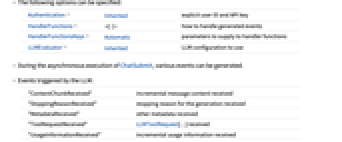
Authentication Inherited 认证方式 HandlerFunctions 定义如何处理生成的事件 HandlerFunctionsKeys Automatic 提供给处理函数的参数 LLMEvaluator Inherited 使用的 LLM 配置 - 在异步执行 ChatSubmit 的过程中,可以生成各种事件.
- 由 LLM 触发的事件:
-
"ContentChunkReceived" 收到的增量消息内容 "StoppingReasonReceived" 停止接收生成的原因 "MetadataReceived" 收到的其他元数据 "ToolRequestReceived" 收到的 LLMToolRequest[…] "UsageInformationReceived" 收到的增量使用信息 - 本地处理触发的事件:
-
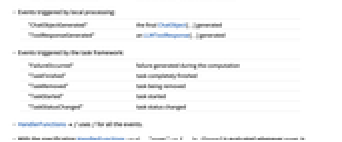
"ChatObjectGenerated" 生成的最终 ChatObject[…] "ToolResponseGenerated" 生成的 LLMToolResponse[…] - 任务框架触发的事件:
-
"FailureOccurred" 计算过程中发生失败 "TaskFinished" 任务完全完成 "TaskRemoved" 任务被移除 "TaskStarted" 任务已启动 "TaskStatusChanged" 任务状态已更改 - HandlerFunctionsf 使用 f 处理所有事件.
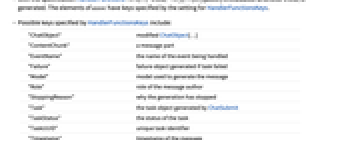
- 通过规范 HandlerFunctions-><|…,"eventi"->fi,…|>,当 eventi 被生成时,将计算 fi[assoc]. assoc 的元素包含由 HandlerFunctionsKeys 设置的键.
- 由 HandlerFunctionsKeys 指定的可能键包括:
-
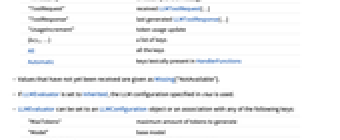
"ChatObject" 修改后的 ChatObject[…] "ContentChunk" 消息部分 "EventName" 正在处理的事件名称 "Failure" 任务失败时生成的失败对象 "Model" 用于生成消息的模型 "Role" 消息作者的角色 "StoppingReason" 停止生成的原因 "Task" 由 ChatSubmit 生成的任务对象 "TaskStatus" 任务状态 "TaskUUID" 唯一任务标识符 "Timestamp" 消息的时间戳 "ToolRequest" 收到的 LLMToolRequest[…] "ToolResponse" 最近生成的 LLMToolResponse[…] "UsageIncrement" 令牌使用更新 {key1,…} 键列表 All 所有键 Automatic 在 HandlerFunctions 中按字面出现的键 - 尚未接收到的值显示为 Missing["NotAvailable"].
- 如果 LLMEvaluator 被设置为 Inherited,则使用 chat 中指定的 LLM 配置.
- LLMEvaluator 可以设置为 LLMConfiguration 对象或与以下任意键的关联:
-
"MaxTokens" 生成的最大令牌数 "Model" 基础模型 "PromptDelimiter" 提示之间插入的字符串 "Prompts" 初始提示或 LLMPromptGenerator 对象 "StopTokens" 停止生成的令牌 "Temperature" 采样温度 "ToolMethod" 用于工具调用的方法 "Tools" 可用的 LLMTool 对象列表 "TopProbabilities" 采样类的截断 "TotalProbabilityCutoff" 采样概率截断(核采样) - "Model" 的有效形式包括:
-
name 命名模型 {service,name} 来自 service 的命名模型 <|"Service"service,"Name"name|> 完全指定的模型 - 在 "Prompts" 中指定的提示会作为 "System" 角色的消息预先添加到 chat 中.
- 多个提示通过 "PromptDelimiter" 属性分隔.
- 生成的文本是从分布中采样的. 可以使用 LLMEvaluator 的以下属性来指定采样的详细信息:
-
"Temperature"t Automatic 使用正温度 t 进行采样 "TopProbabilities"k Automatic 仅在概率最高的 k 个类别中采样 "TotalProbabilityCutoff"p Automatic 在累计概率至少为 p 的最可能选择中采样(核采样) - 这些参数的 Automatic 值使用指定 "Model" 的默认值.
- "ToolMethod" 的可能值包括:
-
"Service" 依赖于 service 的工具机制 "Textual" 使用基于提示的工具调用 - Authentication 的可能值有:
-
Automatic 自动选择身份验证方案 Inherited 从 chat 中继承设置 Environment 检查环境变量中的密钥 SystemCredential 检查系统密钥链中的密钥 ServiceObject[…] 从服务对象继承身份验证 "string" 提供明确的 API 密钥 - 当 AuthenticationAutomatic 时,函数会检查 Environment 中的变量 ToUpperCase[service]<>"_API_KEY" 和 SystemCredential;否则,它会使用 ServiceConnect[service].
- ChatSubmit 使用机器学习. 其方法、训练集及其中包含的偏差可能会在不同版本的 Wolfram 语言中发生变化,并产生不同结果.
范例
打开所有单元 关闭所有单元基本范例 (2)
chat = ChatObject[]ChatSubmit[chat, "What's the tallest mountain?", HandlerFunctions -> <|"TaskFinished" -> Function[res = #ChatObject]|>
]reschunks = {};
ChatSubmit[ChatObject[], {"what is this picture?", Entity["TaxonomicSpecies", "FelisCatus::ddvt3"][EntityProperty["TaxonomicSpecies", "Image"]]}, HandlerFunctions -> <|"ContentChunkReceived" -> Function[AppendTo[chunks, #ContentChunk]]|>
]chunks范围 (2)
task = ChatSubmit[ChatObject[], "Tell me a joke", HandlerFunctions -> <|"TaskFinished" -> Function[res = #ChatObject]|>]task["TaskStatus"]resChatSubmit[ChatObject[Association["LLMEvaluator" -> LLMConfiguration[
Association["Model" -> Association["Service" -> "OpenAI", "Name" -> Automatic,
"Alias" -> "Wolfram LLM Service"], "MaxTokens" -> Automatic, "Temperature" -> Automatic,
"To ... ]},
FaceForm[RGBColor[0.5372549019607843, 0.5372549019607843, 0.5372549019607843, 1.]]]},
ImageSize -> {{27., 27.}, {27., 27.}}, PlotRange -> {{-0.5, 26.5}, {-0.5, 26.5}},
AspectRatio -> Automatic], "LLMPacletVersion" -> "1.6.3"]], "And what about doctors?", HandlerFunctions -> <|"TaskFinished" -> Function[res = #ChatObject]|>]res选项 (14)
Authentication (4)
ChatSubmit[ChatObject[], "which element has atomic number 2?", Authentication -> <|"APIKey" -> "1234abcd"|>]ChatSubmit[ChatObject[], "which element has atomic number 2?", Authentication -> SystemCredential]ChatSubmit[ChatObject[], "which element has atomic number 2?", Authentication -> {SystemCredential, SystemCredentialKey -> "OPENAI_API_KEY"}]ChatSubmit[ChatObject[], "which element has atomic number 2?", Authentication -> Environment]so = ServiceConnect["OpenAI"]ChatSubmit[ChatObject[], "which element has atomic number 2?", Authentication -> so]HandlerFunctions (2)
ChatSubmit[
ChatObject[], "the first 20 digits of Pi", HandlerFunctions -> Print, HandlerFunctionsKeys -> {"EventName"}
]ChatSubmit[
ChatObject[LLMEvaluator -> <|"Model" -> <|"Service" -> "OpenAI", "Name" -> "WrongName"|>|>], "the first 20 digits of Pi", HandlerFunctions -> <|"FailureOccurred" -> Function@MessageDialog[#Failure]|>
]HandlerFunctionsKeys (3)
ChatSubmit[
ChatObject[],
"the first 20 digits of Pi", HandlerFunctions -> <|"MetadataReceived" -> MessageDialog|>, HandlerFunctionsKeys -> {"Role", "Model", "Timestamp"}
]将 HandlerFunctionsKeys 的值设置为从处理函数中存在的槽位中按词法推断(默认):
ChatSubmit[
ChatObject[],
"the first 20 digits of Pi", HandlerFunctions -> <|"MetadataReceived" -> Function[MessageDialog[{#Role, #Model, #Timestamp}]]|>, HandlerFunctionsKeys -> Automatic
]ChatSubmit[
ChatObject[],
"the first 20 digits of Pi", HandlerFunctions -> <|"MetadataReceived" -> MessageDialog|>, HandlerFunctionsKeys -> All
]LLMEvaluator (5)
ChatSubmit[ChatObject[], "the first 20 digits of Pi", LLMEvaluator -> <|"Model" -> <|"Service" -> "Anthropic"|>|>]ChatSubmit[ChatObject[], "the first 20 digits of Pi", LLMEvaluator -> <|"Model" -> <|"Service" -> "MistralAI", "Name" -> "mistral-medium"|>|>]ChatSubmit[ChatObject[], "the first 20 digits of Pi", HandlerFunctions -> <|"StoppingReasonReceived" -> Function@MessageDialog[#StoppingReason]|>]ChatSubmit[ChatObject[], "the first 20 digits of Pi", LLMEvaluator -> <|"MaxTokens" -> 3|>, HandlerFunctions -> <|"StoppingReasonReceived" -> Function@MessageDialog[#StoppingReason]|>]ChatSubmit[ChatObject[], "Tell me three colors", LLMEvaluator -> <|"Temperature" -> 0|>, HandlerFunctions -> <|"TaskFinished" -> Function[res1 = #ChatObject]|>]ChatSubmit[ChatObject[], "Tell me three colors", LLMEvaluator -> <|"Temperature" -> 2|>, HandlerFunctions -> <|"TaskFinished" -> Function[res2 = #ChatObject]|>]res1
res2ChatSubmit[ChatObject[], "What's the plural of mouse?", LLMEvaluator -> <|"TotalProbabilityCutoff" -> .5|>]ChatSubmit[ChatObject[], "What's the plural of mouse?", LLMEvaluator -> <|"Prompts" -> LLMPrompt["ELI5"]|>]应用 (1)
工具调用 (1)
altimeter = LLMTool[{"altimeter", "gives the altitude at a location"}, {"where" -> "Location"}, GeoElevationData[#where]&]chat = ChatObject[LLMEvaluator -> <|"Tools" -> altimeter, "ToolMethod" -> "Service"|>]ChatSubmit[chat, "what's the altitude of mount Kilimanjaro?", HandlerFunctions -> <|"TaskFinished" -> Function[res = #ChatObject]|>]res相关指南
文本
Wolfram Research (2025),ChatSubmit,Wolfram 语言函数,https://reference.wolfram.com/language/ref/ChatSubmit.html.
CMS
Wolfram 语言. 2025. "ChatSubmit." Wolfram 语言与系统参考资料中心. Wolfram Research. https://reference.wolfram.com/language/ref/ChatSubmit.html.
APA
Wolfram 语言. (2025). ChatSubmit. Wolfram 语言与系统参考资料中心. 追溯自 https://reference.wolfram.com/language/ref/ChatSubmit.html 年
BibTeX
@misc{reference.wolfram_2026_chatsubmit, author="Wolfram Research", title="{ChatSubmit}", year="2025", howpublished="\url{https://reference.wolfram.com/language/ref/ChatSubmit.html}", note=[Accessed: 15-September-2026]}
BibLaTeX
@online{reference.wolfram_2026_chatsubmit, organization={Wolfram Research}, title={ChatSubmit}, year={2025}, url={https://reference.wolfram.com/language/ref/ChatSubmit.html}, note=[Accessed: 15-September-2026]}