

FindMeshDefects[mreg]
メッシュ領域 mreg の欠陥を求める.
FindMeshDefects[mreg,{def1,…}]
指定されたタイプの欠陥 def1, …のみを求める.
FindMeshDefects[mreg,defects,format]
format 指定に従って結果をフォーマットする.
FindMeshDefects
FindMeshDefects[mreg]
メッシュ領域 mreg の欠陥を求める.
FindMeshDefects[mreg,{def1,…}]
指定されたタイプの欠陥 def1, …のみを求める.
FindMeshDefects[mreg,defects,format]
format 指定に従って結果をフォーマットする.
詳細とオプション
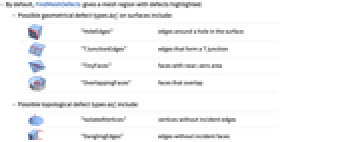
- デフォルトで,FindMeshDefectsは欠陥がハイライトされたメッシュ領域を与える.
- 曲面についての考えられる幾何学的欠陥 defi
-

"HoleEdges" 曲面上の閉じた穴の周りの辺 
"TJunctionEdges" T字路を形成する辺 
"TinyFaces" 面積がほぼ0の面 
"OverlappingFaces" 重なり合う面 - 考えられる位相的欠陥タイプ defi
-

"IsolatedVertices" 入射辺がない頂点 
"DanglingEdges" 入射面がない辺 
"SingularEdges" 3つ以上の入射面がある辺 
"SingularVertices" 円板のない近傍がある頂点 
"TinyComponents" 小さい接続メッシュ成分 
"FlippedFaces" 内向きの面 - 可能な format 指定
-
Automatic 欠陥がハイライトされたメッシュ領域 "Cell" 各欠陥対応についてのメッシュセル指標がある連想 "CellIndex" 各欠陥タイプについてのメッシュセル指標がある連想 - FindMeshDefectsはMeshRegionのオプションと同様にPlotLegendsオプションを取る.
- PlotLegendsAutomaticと設定すると,各欠陥タイプについて凡例が生成される.
例題
すべて開く すべて閉じる例 (1)
スコープ (10)
指定 (10)
FindMeshDefects[\!\(\*Graphics3DBox[«7»]\), "DanglingEdges"]FindMeshDefects[\!\(\*Graphics3DBox[«7»]\), "FlippedFaces"]FindMeshDefects[\!\(\*Graphics3DBox[«7»]\), "HoleEdges"]FindMeshDefects[\!\(\*Graphics3DBox[«7»]\), "IsolatedVertices"]FindMeshDefects[\!\(\*Graphics3DBox[«7»]\), "OverlappingFaces"]FindMeshDefects[\!\(\*Graphics3DBox[«7»]\), "SingularEdges"]FindMeshDefects[\!\(\*Graphics3DBox[«7»]\), "SingularVertices"]FindMeshDefects[\!\(\*Graphics3DBox[«7»]\), "TinyComponents"]FindMeshDefects[\!\(\*Graphics3DBox[«7»]\), "TinyFaces"]FindMeshDefects[\!\(\*Graphics3DBox[«7»]\), "TJunctionEdges"]オプション (14)
MeshCellHighlight (2)
MeshCellHighlightを使ってMeshRegionの一部とハイライトすることができる:
ℛ = MeshRegion[{{0, 0, 0}, {1, 0, 0}, {2, 0, 0}, {3, 0, -1 / 2}, {3, 0, 1 / 2}, {4, -1 / 2, 0}, {4, 1 / 2, 0}}, {Point[1], Line[{2, 3}], Triangle[{3, 4, 5}], Tetrahedron[{4, 6, 5, 7}]}];FindMeshDefects[ℛ, "SingularEdges", MeshCellHighlight -> {{0, All} -> Red}]ℛ = MeshRegion[{{0, 0, 0}, {1, 0, 0}, {2, 0, 0}, {3, 0, -1 / 2}, {3, 0, 1 / 2}, {4, -1 / 2, 0}, {4, 1 / 2, 0}}, {Point[1], Line[{2, 3}], Triangle[{3, 4, 5}], Tetrahedron[{4, 6, 5, 7}]}];FindMeshDefects[ℛ, "SingularEdges", MeshCellHighlight -> {{1, 1} -> {Thick, Yellow}, {1, 3} -> {Dashed, Black}}]ℛ = MeshRegion[{{0, 0, 0}, {1, 0, 0}, {2, 0, 0}, {3, 0, -1 / 2}, {3, 0, 1 / 2}, {4, -1 / 2, 0}, {4, 1 / 2, 0}}, {Point[1], Line[{2, 3}], Triangle[{3, 4, 5}], Tetrahedron[{4, 6, 5, 7}]}];FindMeshDefects[ℛ, "SingularEdges", MeshCellHighlight -> {Line[{6, 5}] -> {Thick, Yellow}, Line[{4, 6}] -> {Dashed, Black}}]MeshCellLabel (2)
MeshCellLabelを使ってMeshRegionの一部にラベルを付けることができる:
ℛ = MeshRegion[{{0, 0, 0}, {1, 0, 0}, {2, 0, 0}, {3, 0, -1 / 2}, {3, 0, 1 / 2}, {4, -1 / 2, 0}, {4, 1 / 2, 0}}, {Point[1], Line[{2, 3}], Triangle[{3, 4, 5}], Tetrahedron[{4, 6, 5, 7}]}];FindMeshDefects[ℛ, "SingularEdges", MeshCellLabel -> {0 -> "Index"}]ℛ = MeshRegion[{{0, 0, 0}, {1, 0, 0}, {2, 0, 0}, {3, 0, -1 / 2}, {3, 0, 1 / 2}, {4, -1 / 2, 0}, {4, 1 / 2, 0}}, {Point[1], Line[{2, 3}], Triangle[{3, 4, 5}], Tetrahedron[{4, 6, 5, 7}]}];FindMeshDefects[ℛ, "SingularEdges", MeshCellLabel -> {{1, 1} -> "x", {1, 2} -> "y"}]ℛ = MeshRegion[{{0, 0, 0}, {1, 0, 0}, {2, 0, 0}, {3, 0, -1 / 2}, {3, 0, 1 / 2}, {4, -1 / 2, 0}, {4, 1 / 2, 0}}, {Point[1], Line[{2, 3}], Triangle[{3, 4, 5}], Tetrahedron[{4, 6, 5, 7}]}];FindMeshDefects[ℛ, "SingularEdges", MeshCellLabel -> {Line[{6, 5}] -> "x", Line[{5, 4}] -> "y"}]MeshCellMarker (1)
MeshCellMarkerを使ってMeshRegionの一部に値を割り当てることができる:
ℛ = MeshRegion[{{1, 0, 0}, {1, 0, 1}, {1, 1, 1}, {0, 0, 1}}, Polygon[{{3, 2, 1}, {4, 3, 2}, {3, 1, 4}, {1, 2, 4}}]];FindMeshDefects[ℛ, "FlippedFaces", MeshCellMarker -> {{0, 1} -> 1, {0, 2} -> 2, {0, 3} -> 3, {0, 4} -> 4}]MeshCellLabelを使ったマーカーを表示する:
ℛ = MeshRegion[{{1, 0, 0}, {1, 0, 1}, {1, 1, 1}, {0, 0, 1}}, Polygon[{{3, 2, 1}, {4, 3, 2}, {3, 1, 4}, {1, 2, 4}}]];FindMeshDefects[ℛ, "FlippedFaces", MeshCellMarker -> {{0, 1} -> 1, {0, 2} -> 2, {0, 3} -> 3, {0, 4} -> 4}, MeshCellLabel -> {0 -> "Marker"}]MeshCellShapeFunction (2)
MeshCellShapeFunctionを使ってMeshRegionの一部に関数を指定することができる:
ℛ = MeshRegion[{{1, 0, 0}, {1, 0, 1}, {1, 1, 1}, {0, 0, 1}}, Polygon[{{3, 2, 1}, {4, 3, 2}, {3, 1, 4}, {1, 2, 4}}]];FindMeshDefects[ℛ, "FlippedFaces", MeshCellShapeFunction -> {0 -> (Sphere[#, .1]&)}]ℛ = MeshRegion[{{1, 0, 0}, {1, 0, 1}, {1, 1, 1}, {0, 0, 1}}, Polygon[{{3, 2, 1}, {4, 3, 2}, {3, 1, 4}, {1, 2, 4}}]];FindMeshDefects[ℛ, "FlippedFaces", MeshCellShapeFunction -> {{0, 1} -> (Sphere[#, .1]&), {0, 2} -> (Sphere[#, .15]&)}]ℛ = MeshRegion[{{1, 0, 0}, {1, 0, 1}, {1, 1, 1}, {0, 0, 1}}, Polygon[{{3, 2, 1}, {4, 3, 2}, {3, 1, 4}, {1, 2, 4}}]];FindMeshDefects[ℛ, "FlippedFaces", MeshCellShapeFunction -> {Point[1] -> (Sphere[#, .1]&), Point[2] -> (Sphere[#, .15]&)}]MeshCellStyle (2)
MeshCellShapeFunctionを使ってMeshRegionの一部に関数を指定することができる:
ℛ = MeshRegion[{{1, 0, 0}, {1, 0, 1}, {1, 1, 1}, {0, 0, 1}}, Polygon[{{3, 2, 1}, {4, 3, 2}, {3, 1, 4}, {1, 2, 4}}]];FindMeshDefects[ℛ, "FlippedFaces", MeshCellStyle -> {{1, All} -> Red, {0, All} -> Black}]ℛ = MeshRegion[{{1, 0, 0}, {1, 0, 1}, {1, 1, 1}, {0, 0, 1}}, Polygon[{{3, 2, 1}, {4, 3, 2}, {3, 1, 4}, {1, 2, 4}}]];FindMeshDefects[ℛ, "FlippedFaces", MeshCellStyle -> {{1, 1} -> {Thick, Red}, {1, 2} -> {Dashed, Black}}]ℛ = MeshRegion[{{1, 0, 0}, {1, 0, 1}, {1, 1, 1}, {0, 0, 1}}, Polygon[{{3, 2, 1}, {4, 3, 2}, {3, 1, 4}, {1, 2, 4}}]];FindMeshDefects[ℛ, "FlippedFaces", MeshCellStyle -> {Line[{3, 2}] -> {Thick, Red}, Line[{2, 1}] -> {Dashed, Black}}]PlotLegends (3)
ℛ = MeshRegion[{{0, 0, 0}, {1, 0, 0}, {2, 0, 0}, {3, 0, -1 / 2}, {3, 0, 1 / 2}, {4, -1 / 2, 0}, {4, 1 / 2, 0}}, {Point[1], Line[{2, 3}], Triangle[{3, 4, 5}], Tetrahedron[{4, 6, 5, 7}]}];FindMeshDefects[ℛ, {"SingularVertices", "DanglingEdges"}, PlotLegends -> Automatic]ℛ = MeshRegion[{{0, 0, 0}, {1, 0, 0}, {2, 0, 0}, {3, 0, -1 / 2}, {3, 0, 1 / 2}, {4, -1 / 2, 0}, {4, 1 / 2, 0}}, {Point[1], Line[{2, 3}], Triangle[{3, 4, 5}], Tetrahedron[{4, 6, 5, 7}]}];FindMeshDefects[ℛ, {"SingularVertices", "DanglingEdges"}, PlotLegends -> "Defects"]Placedを使って凡例の置き方を制御する:
ℛ = MeshRegion[{{0, 0, 0}, {1, 0, 0}, {2, 0, 0}, {3, 0, -1 / 2}, {3, 0, 1 / 2}, {4, -1 / 2, 0}, {4, 1 / 2, 0}}, {Point[1], Line[{2, 3}], Triangle[{3, 4, 5}], Tetrahedron[{4, 6, 5, 7}]}];FindMeshDefects[ℛ, {"SingularVertices", "DanglingEdges"}, PlotLegends -> Placed["Defects", Below]]PlotTheme (2)
FindMeshDefects[MeshRegion[{{1, 0, 0}, {1, 0, 1}, {1, 1, 1}, {0, 0, 1}}, Polygon[{{3, 2, 1}, {4, 3, 2}, {3, 1, 4}, {1, 2, 4}}]], "FlippedFaces", PlotTheme -> "Detailed"]FindMeshDefects[MeshRegion[{{1, 0, 0}, {1, 0, 1}, {1, 1, 1}, {0, 0, 1}}, Polygon[{{3, 2, 1}, {4, 3, 2}, {3, 1, 4}, {1, 2, 4}}]], "FlippedFaces", PlotTheme -> "Lines"]関連するガイド
-
▪
- メッシュベースの幾何学的領域 ▪
- 3Dプリント ▪
- 幾何学的計算
関連するワークフロー
- 3Dプリントを作成する
テキスト
Wolfram Research (2016), FindMeshDefects, Wolfram言語関数, https://reference.wolfram.com/language/ref/FindMeshDefects.html.
CMS
Wolfram Language. 2016. "FindMeshDefects." Wolfram Language & System Documentation Center. Wolfram Research. https://reference.wolfram.com/language/ref/FindMeshDefects.html.
APA
Wolfram Language. (2016). FindMeshDefects. Wolfram Language & System Documentation Center. Retrieved from https://reference.wolfram.com/language/ref/FindMeshDefects.html
BibTeX
@misc{reference.wolfram_2026_findmeshdefects, author="Wolfram Research", title="{FindMeshDefects}", year="2016", howpublished="\url{https://reference.wolfram.com/language/ref/FindMeshDefects.html}", note=[Accessed: 07-October-2026]}
BibLaTeX
@online{reference.wolfram_2026_findmeshdefects, organization={Wolfram Research}, title={FindMeshDefects}, year={2016}, url={https://reference.wolfram.com/language/ref/FindMeshDefects.html}, note=[Accessed: 07-October-2026]}