



SolidMechanicsPDEComponent
SolidMechanicsPDEComponent[vars,pars]
产生具有变量 vars 和参数 pars 的固体力学 PDE 项.
更多信息
- SolidMechanicsPDEComponent 返回一个用于固体力学分析的微分算子.
- SolidMechanicsPDEComponent 返回要用作偏微分方程一部分的微分算子的总和:
- SolidMechanicsPDEComponent 对受施加载荷和约束的物体产生的位移进行建模.
- SolidMechanicsPDEComponent 为稳态、瞬态、参数、频率响应和特征模态分析创建 PDE 分量.
- SolidMechanicsPDEComponent 模拟固体力学现象,位移
 、
、 和
和  (单位为米 [
![TemplateBox[{InterpretationBox[, 1], "m", meters, "Meters"}, QuantityTF]](Files/SolidMechanicsPDEComponent.zh/3.png "TemplateBox[{InterpretationBox[, 1], \"m\", meters, \"Meters\"}, QuantityTF]") ])为因变量,
])为因变量, 为自变量,单位为 [
![TemplateBox[{InterpretationBox[, 1], "m", meters, "Meters"}, QuantityTF]](Files/SolidMechanicsPDEComponent.zh/4.png "TemplateBox[{InterpretationBox[, 1], \"m\", meters, \"Meters\"}, QuantityTF]") ],时间变量
],时间变量  ,单位为秒 [
![TemplateBox[{InterpretationBox[, 1], "s", seconds, "Seconds"}, QuantityTF]](Files/SolidMechanicsPDEComponent.zh/5.png "TemplateBox[{InterpretationBox[, 1], \"s\", seconds, \"Seconds\"}, QuantityTF]") ],角频率
],角频率  ,单位为弧度/秒.
 - SolidMechanicsPDEComponent 在两个和三个空间维度中创建 PDE 分量.
- 稳态变量 vars 为 vars={{u[x1,…,xn],v[x1,…,xn],…},{x1,…,xn}}.
- 瞬态或特征模态变量 vars 为 vars={{u[t,x1,…,xn],v[t,x1,…,xn],…},t,{x1,…,xn}}.
- 频率相关变量 vars 是 vars={{u[x1,…,xn],v[x1,…,xn],…},ω,{x1,…,xn}}.
- SolidMechanicsPDEComponent 生成的不同分析类型的方程取决于 vars 的形式.
- 质量密度为
 [
[![TemplateBox[{InterpretationBox[, 1], {"kg", , "/", , {"m", ^, 3}}, kilograms per meter cubed, {{(, "Kilograms", )}, /, {(, {"Meters", ^, 3}, )}}}, QuantityTF]](Files/SolidMechanicsPDEComponent.zh/6.png "TemplateBox[{InterpretationBox[, 1], {\"kg\", , \"/\", , {\"m\", ^, 3}}, kilograms per meter cubed, {{(, \"Kilograms\", )}, /, {(, {\"Meters\", ^, 3}, )}}}, QuantityTF]") ],应力张量
],应力张量  [
[![TemplateBox[{InterpretationBox[, 1], "Pa", pascals, "Pascals"}, QuantityTF]](Files/SolidMechanicsPDEComponent.zh/7.png "TemplateBox[{InterpretationBox[, 1], \"Pa\", pascals, \"Pascals\"}, QuantityTF]") ],应变张量
],应变张量  ,位移向量
,位移向量  [
[![TemplateBox[{InterpretationBox[, 1], "m", meters, "Meters"}, QuantityTF]](Files/SolidMechanicsPDEComponent.zh/8.png "TemplateBox[{InterpretationBox[, 1], \"m\", meters, \"Meters\"}, QuantityTF]") ],物体的负载向量为
],物体的负载向量为  [
[![TemplateBox[{InterpretationBox[, 1], {"N", , "/", , {"m", ^, 3}}, newtons per meter cubed, {{(, "Newtons", )}, /, {(, {"Meters", ^, 3}, )}}}, QuantityTF]](Files/SolidMechanicsPDEComponent.zh/9.png "TemplateBox[{InterpretationBox[, 1], {\"N\", , \"/\", , {\"m\", ^, 3}}, newtons per meter cubed, {{(, \"Newtons\", )}, /, {(, {\"Meters\", ^, 3}, )}}}, QuantityTF]") ] 或
] 或  [
[![TemplateBox[{InterpretationBox[, 1], {"m", , "/", , {"s", ^, 2}}, meters per second squared, {{(, "Meters", )}, /, {(, {"Seconds", ^, 2}, )}}}, QuantityTF]](Files/SolidMechanicsPDEComponent.zh/10.png "TemplateBox[{InterpretationBox[, 1], {\"m\", , \"/\", , {\"s\", ^, 2}}, meters per second squared, {{(, \"Meters\", )}, /, {(, {\"Seconds\", ^, 2}, )}}}, QuantityTF]") ],固体力学偏微分方程 SolidMechanicsPDEComponent 的稳态平衡方程基于
],固体力学偏微分方程 SolidMechanicsPDEComponent 的稳态平衡方程基于 - 固体力学模型 SolidMechanicsPDEComponent 的瞬态平衡方程基于:
- 具有特征值
 的固体力学模型 SolidMechanicsPDEComponent 的特征频率方程基于:
 - 角频率为
 的固体力学模型 SolidMechanicsPDEComponent 的频率响应方程基于:
 - 固体力学模型项的单位是力密度
 .
. - 默认的材料模型是线性弹性各向同性材料模型.
- 对于线性弹性材料模型,其平衡方程、连续性条件和输出应力度量均为 Cauchy 应力.
- 对于超弹性材料模型,平衡应力是第一类 Piola-Kirchhoff 应力,连续应力是第二类 Piola-Kirchhoff 应力,而输出的应力度量则是 Cauchy 应力.
- 应力单位之间的转换会自动完成.
- 可以给出以下参数 pars:
-
参数 默认值 符号 "AnalysisType" Automatic 无 "BodyLoad" 0  ,体力密度,单位为 [
![TemplateBox[{InterpretationBox[, 1], {"N", , "/", , {"m", ^, 3}}, newtons per meter cubed, {{(, "Newtons", )}, /, {(, {"Meters", ^, 3}, )}}}, QuantityTF]](Files/SolidMechanicsPDEComponent.zh/15.png "TemplateBox[{InterpretationBox[, 1], {\"N\", , \"/\", , {\"m\", ^, 3}}, newtons per meter cubed, {{(, \"Newtons\", )}, /, {(, {\"Meters\", ^, 3}, )}}}, QuantityTF]") ]
]
"BodyLoadValue" 0  ,体加速度,单位为 [
![TemplateBox[{InterpretationBox[, 1], {"m", , "/", , {"s", ^, 2}}, meters per second squared, {{(, "Meters", )}, /, {(, {"Seconds", ^, 2}, )}}}, QuantityTF]](Files/SolidMechanicsPDEComponent.zh/16.png "TemplateBox[{InterpretationBox[, 1], {\"m\", , \"/\", , {\"s\", ^, 2}}, meters per second squared, {{(, \"Meters\", )}, /, {(, {\"Seconds\", ^, 2}, )}}}, QuantityTF]") ]
]
"CoordinateChart" - 无 "MassDensity" -  ,密度,单位为 [
![TemplateBox[{InterpretationBox[, 1], {"kg", , "/", , {"m", ^, 3}}, kilograms per meter cubed, {{(, "Kilograms", )}, /, {(, {"Meters", ^, 3}, )}}}, QuantityTF]](Files/SolidMechanicsPDEComponent.zh/17.png "TemplateBox[{InterpretationBox[, 1], {\"kg\", , \"/\", , {\"m\", ^, 3}}, kilograms per meter cubed, {{(, \"Kilograms\", )}, /, {(, {\"Meters\", ^, 3}, )}}}, QuantityTF]") ]
]
"Material" - 无 "MaterialSymmetry" "Isotropic" 无 "RegionSymmetry" None - "SolidMechanicsMaterialModel" "LinearElastic" 无 "SolidMechanicsModelForm" "Solid" 无 - 当 "AnalysisType" 为 Automatic 时,则生成的模型取决于 vars 的形式.
- 对于特征频率分析,"AnalysisType" 需要设置为 "Eigenmode",并且需要使用时间相关变量 tvars. »
- "BoundaryLoad" 和 "BoundaryLoadValue" 可用于模拟外力场的影响,例如自重. »
- 如果指定了 "Material",则材料常数从材料数据中提取; 否则,需要指定相关的材料参数.
- 对于线弹性各向同性材料,只需指定任意两个模量作为材料参数即可:
-
参数名称 "BulkModulus" "LameParameter" "PoissonRatio" "PWaveModulus" "ShearModulus" "YoungModulus" - 线性弹性小变形模型可使用以下材料对称性:
-
材料对称性名称 "Isotropic" "Orthotropic" "TransverselyIsotropic" "Anisotropic" - 参数 "SolidMechanicsMaterialModel" 指定要使用的材料模型.
- 默认的材料模型是线性弹性各向同性材料模型.
- 系统提供以下各向同性可压缩超弹性大变形材料模型:
-
材料模型名称 "StVenantKirchhoff" "NeoHookean" - 系统提供以下近各向同性不可压缩超弹性大变形材料模型:
-
材料模型名称 "ArrudaBoyce" "Gent" "MooneyRivlin" "NeoHookean" "Yeoh" - 参数 "SolidMechanicsModelForm" 可以是 "Solid"、"PlaneStress"、"PlaneStrain"、"ExtendedPlaneStress" 或 "ExtendedPlaneStrain".
- 对于 "PlaneStress"、"PlaneStrain"、"ExtendedPlaneStress" 或 "ExtendedPlaneStrain" 模型,需定义 "Thickness" 参数.
- 动力学方程使用无穷小、小变形应变度量:
- 对于非线性材料定律,运动方程使用基于变形梯度
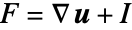 的 Green–Lagrange 应变度量,其中,
 是单位矩阵:
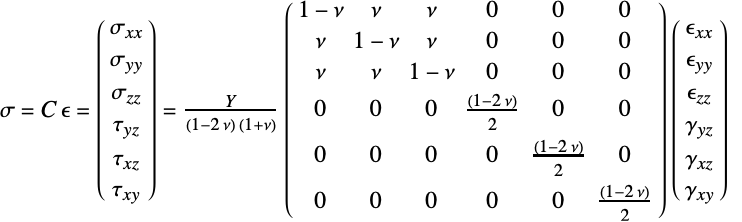
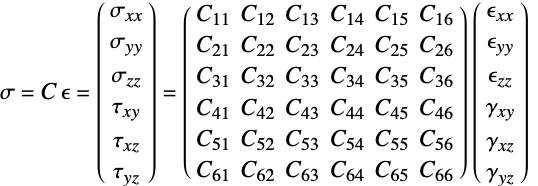
 - 线弹性材料模型的本构方程由下式给出,其中弹性矩阵为
 ,初始应力为
  ,初始应变为
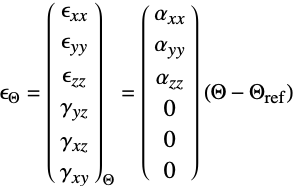
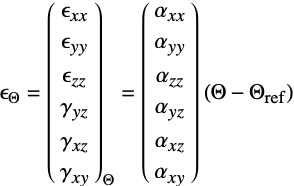
  ,热应变为
,热应变为  :
: - 法向应变分量
 和剪切应变分量
  使用 Voigt 标记法,顺序如下:
 - 正应力分量
 和剪应力分量
  使用 Voigt 标记法,顺序如下:
 - "PlaneStrain" 模型对于
 假设
假设  方向的应变为 0.
 - "PlaneStress" 模型对于
 假设
假设  方向的应力为 0.
 - "RegionSymmetry""Axisymmetric" 使用截断圆柱坐标系,并假定
 方向的位移
方向的位移  ,
, . 注意
. 注意  .
. - 对称轴为
 轴.
轴. - "CoordinateChart" 使用的指定规范与 CoordinateChartData 一样.
- 具有杨氏模量
 和泊松比
和泊松比  的线弹性各向同性材料的本构方程由下式给出:
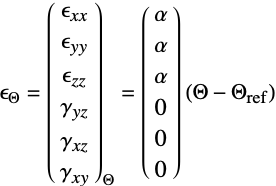
 - 可添加热应变
 ,其热膨胀系数为
  ,单位为 [
![1TemplateBox[{InterpretationBox[, 1], {"/", , "K"}, reciprocal kelvins, {1, /, {(, "Kelvins", )}}}, QuantityTF]](Files/SolidMechanicsPDEComponent.zh/24.png "1TemplateBox[{InterpretationBox[, 1], {\"/\", , \"K\"}, reciprocal kelvins, {1, /, {(, \"Kelvins\", )}}}, QuantityTF]") ],热应变温度为
],热应变温度为  [
[![TemplateBox[{InterpretationBox[, 1], "K", kelvins, "Kelvins"}, QuantityTF]](Files/SolidMechanicsPDEComponent.zh/25.png "TemplateBox[{InterpretationBox[, 1], \"K\", kelvins, \"Kelvins\"}, QuantityTF]") ],热应变参考温度为
],热应变参考温度为  [
[![TemplateBox[{InterpretationBox[, 1], "K", kelvins, "Kelvins"}, QuantityTF]](Files/SolidMechanicsPDEComponent.zh/26.png "TemplateBox[{InterpretationBox[, 1], \"K\", kelvins, \"Kelvins\"}, QuantityTF]") ]:
]: - 可以为 "LinearElastic" "Isotropic" 材料模型提供以下子参数:
-
参数 默认值 符号 "InitialStrain" 0  ,初始应变
,初始应变"InitialStress" 0  ,初始应力 [
![TemplateBox[{InterpretationBox[, 1], "Pa", pascals, "Pascals"}, QuantityTF]](Files/SolidMechanicsPDEComponent.zh/28.png "TemplateBox[{InterpretationBox[, 1], \"Pa\", pascals, \"Pascals\"}, QuantityTF]") ]
]"PoissonRatio" Automatic  ,泊松比
,泊松比"ThermalExpansion" 0  ,热膨胀系数 [
![1TemplateBox[{InterpretationBox[, 1], {"/", , "K"}, reciprocal kelvins, {1, /, {(, "Kelvins", )}}}, QuantityTF]](Files/SolidMechanicsPDEComponent.zh/29.png "1TemplateBox[{InterpretationBox[, 1], {\"/\", , \"K\"}, reciprocal kelvins, {1, /, {(, \"Kelvins\", )}}}, QuantityTF]") ]
]"ThermalStrainTemperature" 0  ,温度 [
,温度 [![TemplateBox[{InterpretationBox[, 1], "K", kelvins, "Kelvins"}, QuantityTF]](Files/SolidMechanicsPDEComponent.zh/30.png "TemplateBox[{InterpretationBox[, 1], \"K\", kelvins, \"Kelvins\"}, QuantityTF]") ]
]"ThermalStrainReferenceTemperature" 0  ,温度 [
,温度 [![TemplateBox[{InterpretationBox[, 1], "K", kelvins, "Kelvins"}, QuantityTF]](Files/SolidMechanicsPDEComponent.zh/31.png "TemplateBox[{InterpretationBox[, 1], \"K\", kelvins, \"Kelvins\"}, QuantityTF]") ]
]"YoungModulus" Automatic  ,杨氏模量 [
![TemplateBox[{InterpretationBox[, 1], "Pa", pascals, "Pascals"}, QuantityTF]](Files/SolidMechanicsPDEComponent.zh/32.png "TemplateBox[{InterpretationBox[, 1], \"Pa\", pascals, \"Pascals\"}, QuantityTF]") ]
] - 具有柔量矩阵
 的线弹性正交各向异性材料模型的本构方程为:
 - 弹性矩阵是柔量矩阵的逆矩阵
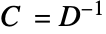 .
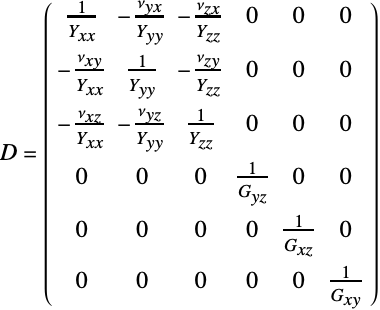
. - 具有剪切模量
 的线性弹性正交各向异性柔量矩阵
  由下式给出:
 - 对于线弹性正交各向异性材料模型,热膨胀系数
 取决于方向:
 - 可以为 "LinearElastic" "Orthotropic" 材料模型提供以下子参数:
-
参数 默认值 符号 "InitialStrain" 0  ,初始应变
,初始应变"InitialStress" 0  ,初始应力 [
![TemplateBox[{InterpretationBox[, 1], "Pa", pascals, "Pascals"}, QuantityTF]](Files/SolidMechanicsPDEComponent.zh/36.png "TemplateBox[{InterpretationBox[, 1], \"Pa\", pascals, \"Pascals\"}, QuantityTF]") ]
]"PoissonRatio" -  、
、 、
、 、
、 、
、 、
、 泊松比
泊松比"ShearModulus" -  、
、 、
、 剪切模量 [
![TemplateBox[{InterpretationBox[, 1], "Pa", pascals, "Pascals"}, QuantityTF]](Files/SolidMechanicsPDEComponent.zh/37.png "TemplateBox[{InterpretationBox[, 1], \"Pa\", pascals, \"Pascals\"}, QuantityTF]") ]
]"ThermalExpansion" 0  、
、 、
、 ,热膨胀系数 [
![TemplateBox[{{InterpretationBox[, 1], 1}, {"/", , "K"}, reciprocal kelvins, {1, /, {(, "Kelvins", )}}}, QuantityTF]](Files/SolidMechanicsPDEComponent.zh/38.png "TemplateBox[{{InterpretationBox[, 1], 1}, {\"/\", , \"K\"}, reciprocal kelvins, {1, /, {(, \"Kelvins\", )}}}, QuantityTF]") ]
]"ThermalStrainTemperature" 0  ,温度 [
,温度 [![TemplateBox[{InterpretationBox[, 1], "K", kelvins, "Kelvins"}, QuantityTF]](Files/SolidMechanicsPDEComponent.zh/39.png "TemplateBox[{InterpretationBox[, 1], \"K\", kelvins, \"Kelvins\"}, QuantityTF]") ]
]"ThermalStrainReferenceTemperature" 0  ,温度 [
,温度 [![TemplateBox[{InterpretationBox[, 1], "K", kelvins, "Kelvins"}, QuantityTF]](Files/SolidMechanicsPDEComponent.zh/40.png "TemplateBox[{InterpretationBox[, 1], \"K\", kelvins, \"Kelvins\"}, QuantityTF]") ]
]"YoungModulus" -  、
、 、
、 杨氏模量 [
![TemplateBox[{InterpretationBox[, 1], "Pa", pascals, "Pascals"}, QuantityTF]](Files/SolidMechanicsPDEComponent.zh/41.png "TemplateBox[{InterpretationBox[, 1], \"Pa\", pascals, \"Pascals\"}, QuantityTF]") ]
] - 泊松比、剪切模量和杨氏模量被指定为正式的索引变量.
- 对于各向异性材料模型,需要指定全弹性矩阵
 :
: - 或者,可以指定合规矩阵
 .
. - 对于线弹性各向异性材料模型,热膨胀系数
 取决于方向:
 - 可以为 "LinearElastic" "Anisotropic" 材料模型提供以下子参数:
-
参数 默认值 符号 "ComplianceMatrix" -  ,柔度矩阵
,柔度矩阵"ElasticityMatrix" -  ,弹性矩阵,
"InitialStrain" 0  ,初始应变
,初始应变"InitialStress" 0  ,初始应力 [
![TemplateBox[{InterpretationBox[, 1], "Pa", pascals, "Pascals"}, QuantityTF]](Files/SolidMechanicsPDEComponent.zh/44.png "TemplateBox[{InterpretationBox[, 1], \"Pa\", pascals, \"Pascals\"}, QuantityTF]") ]
]"ThermalExpansion" 0  、
、 、
、 、
、 、
、 ,
, ,热膨胀系数 [
![TemplateBox[{{InterpretationBox[, 1], 1}, {"/", , "K"}, reciprocal kelvins, {1, /, {(, "Kelvins", )}}}, QuantityTF]](Files/SolidMechanicsPDEComponent.zh/45.png "TemplateBox[{{InterpretationBox[, 1], 1}, {\"/\", , \"K\"}, reciprocal kelvins, {1, /, {(, \"Kelvins\", )}}}, QuantityTF]") ]
]"ThermalStrainTemperature" 0  ,温度 [
,温度 [![TemplateBox[{InterpretationBox[, 1], "K", kelvins, "Kelvins"}, QuantityTF]](Files/SolidMechanicsPDEComponent.zh/46.png "TemplateBox[{InterpretationBox[, 1], \"K\", kelvins, \"Kelvins\"}, QuantityTF]") ]
]"ThermalStrainReferenceTemperature" 0  ,温度 [
,温度 [![TemplateBox[{InterpretationBox[, 1], "K", kelvins, "Kelvins"}, QuantityTF]](Files/SolidMechanicsPDEComponent.zh/47.png "TemplateBox[{InterpretationBox[, 1], \"K\", kelvins, \"Kelvins\"}, QuantityTF]") ]
] - 系统提供可压缩和近不可压缩超弹性材料模型. 可用的情况下,默认值是近不可压缩模型.
- "ArrudaBoyce" 材料模型基于能量密度函数
 ,其中
,其中  是网络中聚合物链的数量,
 是单个链中链段的数量,
 是 Boltzmann 常数,
 是绝对温度,
 是链的拉伸,
 是 Langevin 函数.
 - "Gent" 材料模型基于能量密度函数
 ,其中,
,其中, 是第一应变不变量,
  是剪切模量,
 是极限值.
是极限值. - "NeoHookean" 材料模型基于能量密度函数
 ,其中,
,其中, 是拉梅第一常数,
 是第二常数,
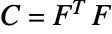 是右 Cauchy–Green 张量,
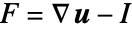 是变形梯度.
 - 可压缩的 "StVenantKirchhoff" 材料模型基于能量密度函数
 ,其中,
,其中, 是拉梅第一常数,
 是第二常数,
 是 Green–Lagrange 应变.
 - "MooneyRivlin" 材料模型基于能量密度函数
 ,其中,
,其中, 是材料系数,
 和
和  是第一和第二等容应变不变量.
 - "Yeoh" 材料模型基于能量密度函数
 ,其中,
,其中, 是模型常数,
 是第一不变量.
 - 可用的情况下,模型的 "Compressibility" 可被指定为 "NearlyIncompressibile" 或 "Compressibile".
- 近不可压缩性以添加到应变能量密度函数
 的静水压力
的静水压力  来实现,其中,
 是材料的体积模量.
 - 可为所有超弹性模型提供 平面应变和平面应力 模型形式.
- 所有超弹性材料模型可利用标准增强材料模型,来模拟横向各向同性材料,如纤维增强材料.
- SolidMechanicsPDEComponent 使用 "SIBase" 单位. 几何形状必须采用与偏微分方程相同的单位.
- 如果 SolidMechanicsPDEComponent 依赖于在关联 pars(形为 …,keypi…,pivi,…) 中指定的参数
 ,则用
,则用  替换参数
替换参数  .
.











范例
打开所有单元 关闭所有单元基本范例 (3)
SolidMechanicsPDEComponent[{{u[x, y, z], v[x, y, z], w[x, y, z]}, {x, y, z}}, Entity["Element", "Tungsten"]]//MatrixFormSolidMechanicsPDEComponent[{{u[x, y, z], v[x, y, z], w[x, y, z]}, {x, y, z}}, <|"YoungModulus" -> , "PoissonRatio" -> |>]//MatrixFormSolidMechanicsPDEComponent[{{u[t, x, y, z], v[t, x, y, z], w[t, x, y, z]}, t, {x, y, z}}, <|"YoungModulus" -> , "PoissonRatio" -> , "MassDensity" -> |>]//MatrixForm范围 (24)
基本用法 (4)
SolidMechanicsPDEComponent[{{u[x, y, z], v[x, y, z], w[x, y, z]}, {x, y, z}}, <|"Material" -> Entity["Element", "Tungsten"]|>]SolidMechanicsPDEComponent[{{u[x, y, z], v[x, y, z], w[x, y, z]}, {x, y, z}}, <|"Material" -> Entity["Element", "Tungsten"]|>]//ActivateSolidMechanicsPDEComponent[{{u[x, y, z], v[x, y, z], w[x, y, z]}, {x, y, z}}, <|"Material" -> ["tungston"]|>]//MatrixFormSolidMechanicsPDEComponent[{{u[x, y, z], v[x, y, z], w[x, y, z]}, {x, y, z}}, <|"YoungModulus" -> Quantity[411.`3., "Gigapascals"], "PoissonRatio" -> 0.28|>]//MatrixForm稳态分析 (3)
vars = {{u[x, y, z], v[x, y, z], w[x, y, z]}, {x, y, z}};
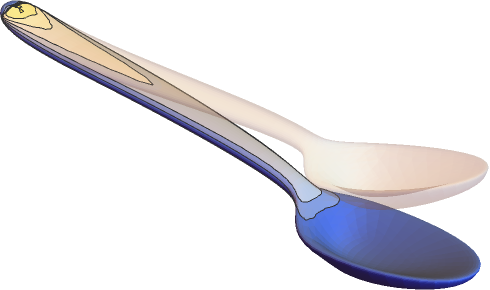
pars = <|"Material" -> ["Silver"]|>;spoon = \!\(\*Graphics3DBox[«8»]\);
displacement = NDSolveValue[{SolidMechanicsPDEComponent[vars, pars] == SolidBoundaryLoadValue[x >= 1 / 10, vars, pars, <|"Force" -> {0, 0, Quantity[-100, "Newtons"]}|>],
SolidFixedCondition[x <= -1 / 10, vars, pars]}, {u[x, y, z], v[x, y, z], w[x, y, z]}, {x, y, z}∈spoon];VectorDisplacementPlot3D[displacement, {x, y, z}∈spoon]SolidMechanicsPDEComponent[{{u[x, y, z], v[x, y, z], w[x, y, z]}, {x, y, z}}, <|"YoungModulus" -> , "PoissonRatio" -> , "ThermalExpansion" -> , "ThermalStrainTemperature" -> θ, "ThermalStrainReferenceTemperature" -> Subscript[θ, ref]|>]//MatrixFormvars = {{u[x, y, z], v[x, y, z], w[x, y, z]}, {x, y, z}};
pars = <|"Material" -> Entity["Element", "Titanium"], "BodyLoadValue" -> {0, 0, -9.8}|>;
Ω = Cuboid[{0, 0, 0}, {1, 0.1, 0.1}];
gravityDisplacement = NDSolveValue[{SolidMechanicsPDEComponent[vars, Join[pars, <|
"BodyLoadValue" -> {0, 0, -9.8}|>]] == {0, 0, 0}, SolidFixedCondition[x == 0, vars, pars]}, vars[[1]], {x, y, z}∈Ω];VectorDisplacementPlot3D[gravityDisplacement, {x, y, z}∈Ω]稳态平面应力分析 (4)
计算左侧固定并在右侧有受迫位移的矩形钢板的位移. 设置区域、变量和参数:
Ω = Rectangle[{0, 0}, {40 * 10 ^ -3, 30 * 10 ^ -3}];
vars = {{u[x, y], v[x, y]}, {x, y}};
pars = <|"SolidMechanicsModelForm" -> "PlaneStress", "YoungModulus" -> 200 * 10 ^ 9, "PoissonRatio" -> 0.3, "Thickness" -> 10 ^ -4|>;displacement = NDSolveValue[{SolidMechanicsPDEComponent[vars, pars] == {0, 0}, SolidFixedCondition[x == 0, vars, pars], SolidDisplacementCondition[x == 40 * 10 ^ -3, vars, pars, <|"Displacement" -> {-40 / 10 ^ 6, 0}|>]}, {u[x, y], v[x, y]}, {x, y}∈Ω]VectorDisplacementPlot[displacement, {x, y}∈Ω, Rule[...]]作为扩展模型计算平面应力情况. 这样可以计算平面外应变,并验证平面外应力为 0. 矩形钢板左侧固定,右侧有强制位移. 设置区域、变量和参数. 现在变量包括所有三个方向:
Ω = Rectangle[{0, 0}, {40 * 10 ^ -3, 30 * 10 ^ -3}];
vars = {{u[x, y], v[x, y], w[x, y]}, {x, y, z}};
pars = <|"SolidMechanicsModelForm" -> "ExtendedPlaneStress", "YoungModulus" -> 200 * 10 ^ 9, "PoissonRatio" -> 0.3, "Thickness" -> 10 ^ -4|>;displacement = NDSolveValue[{SolidMechanicsPDEComponent[vars, pars] == {0, 0}, SolidDisplacementCondition[x == 0, vars, pars, <|"Displacement" -> {0, 0}|>], SolidDisplacementCondition[x == 40 * 10 ^ -3, vars, pars, <|"Displacement" -> {-40 / 10 ^ 6, 0}|>]}, {u[x, y], v[x, y], w[x, y]}, {x, y}∈Ω]请注意,现在位移列表中有三个输出变量. 可视化主要变量的位移:
VectorDisplacementPlot[displacement[[1 ;; 2]], {x, y}∈Ω, Rule[...]]strain = SolidMechanicsStrain[vars, pars, displacement]请注意,应变是一个 3 乘 3 的数组. 可视化平面外应变:
ContourPlot[strain[[3, 3]], {x, y}∈Ω, PlotRange -> All, PlotLegends -> Automatic]stress = SolidMechanicsStress[vars, pars, strain]stress[[3, 3]]计算左侧固定并在右端施加压力的矩形钢板的位移. 设置区域、变量和参数:
Ω = Rectangle[{0, 0}, {40 * 10 ^ -3, 30 * 10 ^ -3}];
vars = {{u[x, y], v[x, y]}, {x, y}};
pars = <|"SolidMechanicsModelForm" -> "PlaneStress", "YoungModulus" -> 200 * 10 ^ 9, "PoissonRatio" -> 0.3, "Thickness" -> 10 ^ -4|>;displacement = NDSolveValue[{SolidMechanicsPDEComponent[vars, pars] == SolidBoundaryLoadValue[x == 40 * 10 ^ -3, vars, pars, <|"Pressure" -> {3 10 ^ 4, 0}|>], SolidFixedCondition[x == 0, vars, pars]}, {u[x, y], v[x, y]}, {x, y}∈Ω]VectorDisplacementPlot[displacement, {x, y}∈Ω, Rule[...]]计算底部固定并在其余边施加压力的矩形钢板的位移. 设置区域、变量和参数:
Ω = Rectangle[{0, 0}, {1 / 25, 3 / 100}];
vars = {{u[x, y], v[x, y]}, {x, y}};
pars = <|"SolidMechanicsModelForm" -> "PlaneStress", "YoungModulus" -> 200 * 10 ^ 9, "PoissonRatio" -> 3 / 10, "Thickness" -> 10 ^ -4|>;displacement = NDSolveValue[{SolidMechanicsPDEComponent[vars, pars] == SolidBoundaryLoadValue[x == 1 / 25, vars, pars, <|"Pressure" -> {0, 2 * 10 ^ 8}|>] + SolidBoundaryLoadValue[y == 3 / 100, vars, pars, <|"Pressure" -> {2 * 10 ^ 8, 0}|>] +
SolidBoundaryLoadValue[x == 0, vars, pars, <|"Pressure" -> {0, -2 * 10 ^ 8}|>], SolidFixedCondition[y == 0, vars, pars]}, {u[x, y], v[x, y]}, {x, y}∈Ω]VectorDisplacementPlot[displacement, {x, y}∈Ω, Rule[...]]strain = SolidMechanicsStrain[vars, pars, displacement]
MinMax[strain[[1, 1]][[0]]["ValuesOnGrid"]]
VectorDisplacementPlot[{displacement, strain[[1, 1]]}, {x, y}∈Ω, Rule[...]]
MinMax[strain[[2, 2]][[0]]["ValuesOnGrid"]]
VectorDisplacementPlot[{displacement, strain[[2, 2]]}, {x, y}∈Ω, Rule[...]]MinMax[strain[[1, 2]][[0]]["ValuesOnGrid"]]

VectorDisplacementPlot[{displacement, strain[[1, 2]]}, {x, y}∈Ω, Rule[...]]静止平面应变分析 (3)
SolidMechanicsPDEComponent[{{u[x, y], v[x, y]}, {x, y}}, <|"Material" -> Entity["Element", "Iron"], "SolidMechanicsModelForm" -> "PlaneStrain", "Thickness" -> 1|>]SolidMechanicsPDEComponent[{{u[x, y], v[x, y], 0}, {x, y, z}}, <|"Material" -> Entity["Element", "Iron"], "SolidMechanicsModelForm" -> "ExtendedPlaneStrain", "Thickness" -> 1|>]作为扩展模型计算平面应变情况. 这样就可以计算平面外应力,并验证平面外应变为 0. 设置区域、变量和参数. 现在变量包括所有三个方向:
Ω = Rectangle[];
pars = <|"SolidMechanicsModelForm" -> "ExtendedPlaneStrain", "YoungModulus" -> 30 * 10 ^ 3, "PoissonRatio" -> 3 / 10, "Thickness" -> 1|>;
vars = {{u[x, y], v[x, y], 0}, {x, y, z}};op = SolidMechanicsPDEComponent[vars, pars]pde = {op == {0, 0}, SolidFixedCondition[x == 0, vars, pars], SolidDisplacementCondition[x == 1, vars, pars, <|"Displacement" -> {0.1, None}|>]};displacement = NDSolveValue[pde, {u[x, y], v[x, y], 0}, {x, y}∈Ω]strain = SolidMechanicsStrain[vars, pars, displacement]请注意,应变是一个 3 乘 3 的数组. 验证平面应变条件:
strain[[3, 3]]stress = SolidMechanicsStress[vars, pars, strain]ContourPlot[stress[[3, 3]], {x, y}∈Ω, PlotRange -> All, PlotLegends -> Automatic]时变分析 (3)
SolidMechanicsPDEComponent[{{u[t, x, y, z], v[t, x, y, z], w[t, x, y, z]}, t, {x, y, z}}, <|"Material" -> ["Silver"]|>]//MatrixFormΩ = Cylinder[{{0, 0, 0}, {10, 0, 0}}, 1];
tvars = {{u[t, x, y, z], v[t, x, y, z], w[t, x, y, z]}, t, {x, y, z}};
pars = <|"Material" -> ["Iron"]|>;top = SolidMechanicsPDEComponent[tvars, pars];Subscript[Γ, load] = SolidBoundaryLoadValue[x == 10, tvars, pars, <|"Force" -> {0, 0, -Sin[2π t]500}|>];Subscript[Γ, wall] = SolidFixedCondition[x == 0, tvars, pars];ics = {u[0, x, y, z] == 0, v[0, x, y, z] == 0, w[0, x, y, z] == 0, Derivative[1, 0, 0, 0][u][0, x, y, z] == 0, Derivative[1, 0, 0, 0][v][0, x, y, z] == 0, Derivative[1, 0, 0, 0][w][0, x, y, z] == 0};tEnd = 5;
measure = AbsoluteTiming[
Monitor[MaxMemoryUsed[
transientDisplacement = NDSolveValue[{top == Subscript[Γ, load], Subscript[Γ, wall], ics}, {u[t, x, y, z], v[t, x, y, z], w[t, x, y, z]}, {x, y, z}∈Ω
, {t, 0, tEnd}, MaxStepSize -> 0.05
, EvaluationMonitor :> (monitor = Row[{"t = ", CForm[t]}])]] / 1024. ^ 2
, monitor]];
Print["Time -> ", measure[[1]], "
Memory -> ", measure[[2]]]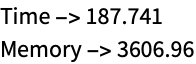

Plot[transientDisplacement[[3]] /. {x -> 10, y -> 0, z -> 0}, {t, 0, tEnd}]考虑瑞利阻尼模型,模拟勺子横截面上依赖于时间的力. 设置区域、变量和材料:
vars = {{u[t, x, y], v[t, x, y]}, t, {x, y}};
pars = <|"Material" -> Entity["Element", "Copper"], "MassDamping" -> 40, "StiffnessDamping" -> 0.0004, "Thickness" -> 0.001, "SolidMechanicsModelForm" -> "PlaneStress"|>;AbsoluteTiming[Monitor[displacement = NDSolveValue[{SolidMechanicsPDEComponent[vars, pars] == SolidBoundaryLoadValue[x >= 1 / 10, vars, pars, <|"Force" -> {0, Quantity[-20, "Newtons"]}|>],
SolidFixedCondition[x <= -1 / 10, vars, pars], {u[0, x, y] == 0, v[0, x, y] == 0, Derivative[1, 0, 0][u][0, x, y] == 0, Derivative[1, 0, 0][v][0, x, y] == 0}}, {u, v}, {x, y}∈[image], {t, 0, 0.05}
, EvaluationMonitor :> (monitor = Row[{"t = ", CForm[t]}])]
, monitor]]
Plot[Evaluate[displacement[[2]][t, 0.17, 0.01]], {t, 0, 0.05}]frames = Table[VectorDisplacementPlot[Evaluate[Through[displacement[t, x, y]]], {x, y}∈[image], PlotRange -> {All, {-0.055, 0.045}}, VectorSizes -> Full],
{t, 0, 0.05, 0.0025}];
ListAnimate[frames, SaveDefinitions -> True]特征模态分析 (2)
SolidMechanicsPDEComponent[{{u[t, x, y, z], v[t, x, y, z], w[t, x, y, z]}, t, {x, y, z}}, <|"Material" -> ["tungston"], "AnalysisType" -> "Eigenmode"|>]//MatrixFormΩ = RegionDifference[Cuboid[{0, 0, 0}, {1, 1, 1}], Cuboid[{1 / 10, 1 / 10, 0}, {1, 9 / 10, 1}]];
tvars = {{u[t, x, y, z], v[t, x, y, z], w[t, x, y, z]}, t, {x, y, z}};
pars = <|"Material" -> ["Iron"], "AnalysisType" -> "Eigenmode"|>;{evals, evecs} = NDEigensystem[{SolidMechanicsPDEComponent[tvars, pars] == {0, 0, 0}}, {u, v, w}, t, {x, y, z}∈Ω, 10];mr = DiscretizeRegion[Ω];
Show[MeshRegion[5 * Table[Apply[if, m], {m, MeshCoordinates[mr]}, {if, #}] + MeshCoordinates[mr], MeshCells[mr, MeshCells[mr, {2, All}]]], Graphics3D[Style[mr, LightGray]]]& /@ evecs[[7 ;; 10]]超弹性材料模型 (2)
设置固定在左侧并在右侧施加压力的橡胶块的变量和模型参数. 使用新胡克超弹性材料模型:
vars = {{u[x, y], v[x, y]}, {x, y}};
pars = <|"SolidMechanicsMaterialModel" -> "NeoHookean", "Thickness" -> 1, "ShearModulus" -> 5 10 ^ 8, "LameParameter" -> 10 ^ 9|>;Ω = RegionDifference[Rectangle[], Disk[{1 / 2, 1 / 2}, 1 / 4]];displacement = NDSolveValue[{SolidMechanicsPDEComponent[vars, pars] == SolidBoundaryLoadValue[x == 1, vars, pars, <|"Pressure" -> {9 * 10 ^ 8, 0}|>], SolidFixedCondition[x == 0, vars, pars]}, {u[x, y], v[x, y]}, {x, y}∈Ω];VectorDisplacementPlot[displacement, {x, y}∈Ω, VectorSizes -> Full]设置 neo-Hookean 超弹性材料模型的变量和模型参数:
vars = {{u[x, y], v[x, y]}, {x, y}};
pars = <|"SolidMechanicsMaterialModel" -> "NeoHookean", "Compressibility" -> "Compressible", "LameParameter" -> 10 ^ 6, "ShearModulus" -> 5000, "SolidMechanicsModelForm" -> "PlaneStress", "Thickness" -> 0.01|>;displacement2D = NDSolveValue[{SolidMechanicsPDEComponent[vars, pars] == SolidBoundaryLoadValue[x == 1, vars, pars, <|"Force" -> {Quantity[300, "Newtons"], 0}|>]
, SolidFixedCondition[x == 0, vars, pars]}, {u[x, y], v[x, y]}, {x, y}∈Rectangle[{0, 0}, {1, 1}]];VectorDisplacementPlot[displacement2D, {x, y}∈Rectangle[{0, 0}, {1, 1}], VectorSizes -> Full]strain = SolidMechanicsStrain[vars, pars, displacement2D]stress = SolidMechanicsStress[vars, pars, strain, displacement2D]纤维增强材料模型 (1)
设置固定在左侧并在右侧施加压力的纤维增强橡胶块的变量和模型参数. 使用新胡克超弹性材料模型:
vars = {{u[x, y], v[x, y]}, {x, y}};
pars = <|"ReinforcementDirectionVector" -> Normalize[{1, 1}], "SolidMechanicsMaterialModel" -> "NeoHookean", "Thickness" -> 1, "ShearModulus" -> 5 10 ^ 8, "LameParameter" -> 10 ^ 9|>;Ω = RegionDifference[Rectangle[], Disk[{1 / 2, 1 / 2}, 1 / 4]];StreamPlot[pars["ReinforcementDirectionVector"], {x, y}∈Ω, StreamMarkers -> "Segment", StreamColorFunction -> None, StreamStyle -> Black]displacement = NDSolveValue[{SolidMechanicsPDEComponent[vars, pars] == SolidBoundaryLoadValue[x == 1, vars, pars, <|"Pressure" -> {9 * 10 ^ 8, 0}|>], SolidFixedCondition[x == 0, vars, pars]}, {u[x, y], v[x, y]}, {x, y}∈Ω];VectorDisplacementPlot[displacement, {x, y}∈Ω, VectorSizes -> Full]strain = SolidMechanicsStrain[vars, pars, displacement]stress = SolidMechanicsStress[vars, pars, strain, displacement]vms = VonMisesStress[vars, pars, stress]VectorDisplacementPlot[{displacement, vms}, {x, y}∈Ω, VectorSizes -> Full]多材料模型 (1)
柔度矩阵需要指定为矩阵. 对于多材料模型的柔度矩阵也是如此. 下面的例子将说明如何操作. 指定两个柔度矩阵:
material1 = {{5.00, -1.55, -1.55, 0.00, 0.00, 0.00}, {-1.55, 5.00, -1.55, 0.00, 0.00, 0.00}, {-1.55, -1.55, 5.00, 0.00, 0.00, 0.00}, {0.00, 0.00, 0.00, 13.10, 0.00, 0.00}, {0.00, 0.00, 0.00, 0.00, 13.10, 0.00}, {0.00, 0.00, 0.00, 0.00, 0.00, 13.10}};
material2 = {{7.69, -2.62, -2.62, 0.00, 0.00, 0.00}, {-2.62, 7.69, -2.62, 0.00, 0.00, 0.00}, {-2.62, -2.62, 7.69, 0.00, 0.00, 0.00}, {0.00, 0.00, 0.00, 20.62, 0.00, 0.00}, {0.00, 0.00, 0.00, 0.00, 20.62, 0.00}, {0.00, 0.00, 0.00, 0.00, 0.00, 20.62}};
创建多材料柔度矩阵,在  的地方使用材料 1,其他情况下使用材料 2:
complianceMatrix = MapThread[Piecewise[{{#1, y <= 0}}, #2]&, {material1, material2}, 2];MatrixQ[complianceMatrix]complianceMatrix[[2, 3]]pars = <|"MaterialModel" -> "LinearElastic", "MaterialSymmetry" -> "Anisotropic", "MassDensity" -> Piecewise[{{8960, y <= 0}}, 8908], "ComplianceMatrix" -> complianceMatrix|>;SolidMechanicsPDEComponent[{{u[x, y, z], v[x, y, z], w[x, y, z]}, {x, y, z}}, pars]非轴对齐材料模型 (1)
对于非轴对齐的各向异性弹性材料,可以指定方位矩阵来调整材料. 这也适用于热膨胀,如下所示. 设置变量和参数:
vars = {{u[x, y], v[x, y]}, {x, y}};
pars = <|"ModelForm" -> "PlaneStrain", "EngineeringStrain" -> False, "MaterialSymmetry" -> "Anisotropic", "OrientationMatrix" -> RotationMatrix[-ArcTan[x, y]], "ElasticityMatrix" -> {{(y (1 - ν)/(1 - 2 ν) (1 + ν)), (y ν/(1 - 2 ν) (1 + ν)), 0}, {(y ν/(1 - 2 ν) (1 + ν)), (y (1 - ν)/(1 - 2 ν) (1 + ν)), 0}, {0, 0, (y/2 (1 + ν))}} /. ν -> 1 / 3, "ThermalExpansion" -> {{0, 0}, {0, 1 / 10}},
	"ThermalStrainTemperature" -> 1,
"Thickness" -> 1|>;displacement = NDSolveValue[{SolidMechanicsPDEComponent[vars, pars] == {0, 0}, SolidDisplacementCondition[y == 0, vars, pars, <|"Displacement" -> {None, 0}|>], SolidFixedCondition[x == 1 && y == 0, vars, pars]}, {u[x, y], v[x, y]}, {x, y}∈Annulus[{0, 0}, {1, 2}, {0, π / 2}]];VectorDisplacementPlot[displacement, {x, y}∈Annulus[{0, 0}, {1, 2}, {0, π / 2}]]应用 (1)
岩土工程 (1)
在岩土工程应用中对土壤进行建模时,杨氏模量可能会随着土壤的深度而变化. 下面的例子探讨了与位置相关的杨氏模量. 我们使用一块宽 100 米、深 100 米的矩形土板:
Ω = Rectangle[{0, -100}, {100, 0}];
RegionPlot[Ω, PlotStyle -> Brown]
接下来,我们设置变量和参数. 此时,我们有一个符号杨氏模量  :
:
vars = {{u[x, y], v[x, y]}, {x, y}};
pars = <|"YoungModulus" -> Y, "PoissonRatio" -> 1 / 3, "SolidMechanicsModelForm" -> "PlaneStrain", "Thickness" -> 100|>;op = SolidMechanicsPDEComponent[vars, pars];
load = SolidBoundaryLoadValue[y == 0 && 25 <= x <= 75, vars, pars, <|"Force" -> {0, -10 ^ 8}|>];在左侧和右侧,我们对  方向的移动进行限制;在
  方向上,土壤能够自由移动. 在底部,土壤可以沿
  方向移动,但不能沿
  方向移动. 该模型模拟了土壤“站立”在不移动的坚硬地面上的场景:
bcs = {SolidDisplacementCondition[x == 0 || x == 100, vars, pars, <|"Displacement" -> {0, None}|>], SolidDisplacementCondition[y == -100, vars, pars, <|"Displacement" -> {None, 0}|>]};baseYoungModulus = 50 * 10 ^ 6;将杨氏模量  设为 baseYoungModulus,在细化网格上求解偏微分方程:
constantYDisplacement = NDSolveValue[{op == load, bcs} /. Y -> baseYoungModulus, {u[x, y], v[x, y]}, {x, y}∈Ω, Method -> {"PDEDiscretization" -> {"FiniteElement", "MeshOptions" -> {"MaxCellMeasure" -> 1}}}]VectorDisplacementPlot[constantYDisplacement, {x, y}∈Ω, PlotLegends -> Automatic]getVonMisesStress[vars_, pars_, displacement_] := Module[{strain, stress},
strain = SolidMechanicsStrain[vars, pars, displacement];
stress = SolidMechanicsStress[vars, pars, strain];
VonMisesStress[vars, pars, stress]
]constantYVonMisesStress = getVonMisesStress[vars, pars /. Y -> baseYoungModulus, constantYDisplacement]ContourPlot[constantYVonMisesStress, {x, y}∈Ω, PlotLegends -> Automatic]
variableYoungModulus = baseYoungModulus + 5 10 ^ 6RealAbs[y]ListLinePlot[Table[{variableYoungModulus, y}, {y, -100, 0}], GridLines -> Automatic]
variableYDisplacement = NDSolveValue[{op == load, bcs} /. Y -> variableYoungModulus, {u[x, y], v[x, y]}, {x, y}∈Ω, Method -> {"PDEDiscretization" -> {"FiniteElement", "MeshOptions" -> {"MaxCellMeasure" -> 1}}}]VectorDisplacementPlot[variableYDisplacement, {x, y}∈Ω]variableYVonMisesStress = getVonMisesStress[vars, pars /. Y -> variableYoungModulus, variableYDisplacement]ContourPlot[variableYVonMisesStress, {x, y}∈Ω, PlotLegends -> Automatic]ContourPlot[variableYVonMisesStress - constantYVonMisesStress, {x, y}∈Ω, PlotLegends -> Automatic]在完整绘图范围内绘制两个模型的 von Mises 应力之间的差异:
ContourPlot[variableYVonMisesStress - constantYVonMisesStress, {x, y}∈Ω, PlotLegends -> Automatic, PlotRange -> All]文本
Wolfram Research (2021),SolidMechanicsPDEComponent,Wolfram 语言函数,https://reference.wolfram.com/language/ref/SolidMechanicsPDEComponent.html (更新于 2025 年).
CMS
Wolfram 语言. 2021. "SolidMechanicsPDEComponent." Wolfram 语言与系统参考资料中心. Wolfram Research. 最新版本 2025. https://reference.wolfram.com/language/ref/SolidMechanicsPDEComponent.html.
APA
Wolfram 语言. (2021). SolidMechanicsPDEComponent. Wolfram 语言与系统参考资料中心. 追溯自 https://reference.wolfram.com/language/ref/SolidMechanicsPDEComponent.html 年