SynthesizeMissingValues
SynthesizeMissingValues[{example1,example2,…}]
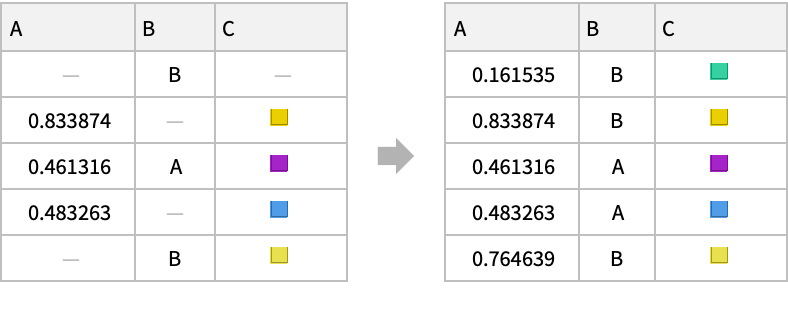
各例の欠損値を生成された値で置換する.
SynthesizeMissingValues[dist,data]
分布 dist を使って値を生成する.
詳細とオプション
- SynthesizeMissingValuesは,データ集合中の欠落要素をデータの既知の部分から合成するために使われる.
- SynthesizeMissingValuesは,数値,名義,画像を含む多くのデータ型に使うことができる.
- 各 exampleiは,単一のデータ要素,データ要素のリスト,あるいはデータ要素の連想でよい.例はDatasetオブジェクトとして与えることもできる.
- 分布 dist はLearnedDistribution[…]でなければならない.
- 次のオプションが与えられる.
-
FeatureNames Automatic 入力データに割り当てる特徴名 FeatureTypes Automatic 入力データに仮定する特徴タイプ Method Automatic どのモデリングアルゴリズムを使用するか MissingValuePattern _MissingIndeterminate 想定される欠損値のパターン PerformanceGoal Automatic 最適化するパフォーマンスの局面 RandomSeeding 1234 擬似乱数生成器の内部的シードをどのように行うか TimeGoal Automatic 検出器の訓練にどの程度の時間を費やするか TrainingProgressReporting Automatic 訓練中の進捗状況をどのように報告するか ValidationSet Automatic 訓練中にモデルの評価に使うデータ集合 - 次は,PerformanceGoalの可能な設定である.
-
"Quality" 合成の質を最高にする "Speed" 合成速度を最高にする Automatic 速度と質の自動トレードオフ - 次は,Methodの可能な設定である.
-
Automatic 分配方法と合成戦略を自動的に選択する None 欠落した合成器は使わない method 指定された方法を使う strategy 分布からどのように合成するか assoc 分配方法と合成戦略の両方を指定する - 次は,method の可能な設定である.
-
"Multinormal" 多変量正規(ガウス)分布を使う "ContingencyTable" データを離散化し,考えられる各確率を保存する "KernelDensityEstimation" カーネル混合分布を使う "DecisionTree" 決定木をつかて確率を計算する "GaussianMixture" ガウス(正規)分布の混合を使う - 次は,strategy の可能な設定である.
-
Automatic 合成戦略を自動的に選択する "MarginalSampling" 各特徴の周辺分布からサンプルを取る "ModeFinding" 既知の値で条件付けられた分布の最頻値を求めようとする "RandomSampling" 既知の値で条件付けられた分布からサンプルを取る(デフォルト) - Methodassoc の形式のときは,連想 assoc は<"LearningMethod"method,"EvaluationStrategy"strategy>の形でなければならない.
- TrainingProgressReportingの次の設定を使うことができる.
-
"Panel" 動的に更新されるグラフィカルなパネルを表示する "Print" Printを使って定期的に情報を報告する "ProgressIndicator" 単純なProgressIndicatorを表示する "SimplePanel" 学習曲線なしでパネルを動的に更新する None 情報は何も報告しない - 次は,RandomSeedingの可能な設定である.
-
Automatic 関数が呼び出されるたびに自動的にシードを再設定する Inherited 外部でシードされた乱数を使う seed 明示的な整数または文字列をシードとして使う - SynthesizeMissingValues[…,FeatureExtractor"Minimal"]は,内部的な前処理ができるだけ簡単であるべきことを示す.
例題
すべて開く すべて閉じる例 (2)
SynthesizeMissingValues[{{1.1, 1.4}, {2.3, 3.1}, {3, 4}, {Missing[], 5.4}, {8.7, 7.5}}]𝒟 = LearnDistribution[{{1.1, 1.4}, {2.3, 3.1}, {4.4, 5.4}, {8.7, 7.5}}]SynthesizeMissingValues[𝒟, {4.2, Missing[]}]スコープ (5)
SynthesizeMissingValues[{0.01, 0.76, Missing[], 0.55, 0.8}]SynthesizeMissingValues[{{0.06, Missing[], 0.35}, {0.29, 0.18, 0.23}, {0.37, Missing[], 0.57}, {0.97, 0.27, 0.5}, {0.52, 0.41, Missing[]}}]SynthesizeMissingValues[{<|"A" -> 0.06, "B" -> Missing[], "C" -> 0.35|>, <|"A" -> 0.29, "B" -> 0.18, "C" -> 0.23|>, <|"A" -> 0.37, "B" -> Missing[], "C" -> 0.57|>}]SynthesizeMissingValues[Dataset[{Association["A" -> 0.06308583355576602, "B" -> Missing[], "C" -> 0.34776641792328333],
Association["A" -> 0.2887127211500238, "B" -> 0.18134408155346105, "C" -> 0.23219728427557107],
Association["A" -> 0.37096010240823185, "B" -> Missing[], "C" -> 0.5690059940858374],
Association["A" -> 0.9699161793933853, "B" -> 0.2708731719060653, "C" -> 0.4956222644053283],
Association["A" -> 0.5153902747338797, "B" -> 0.4082388784233735, "C" -> Missing[]]}]]訓練済みのLearnedDistribution[…]を使って値を埋める:
SynthesizeMissingValues[LearnedDistribution[Association["ExampleNumber" -> 5,
  "Preprocessor" -> MachineLearning`MLProcessor["ToMLDataset",
    Association["Input" -> Association["f1" -> Association["Type" -> "Numerical"]],
     "Output" -> Association["f1" -> Associa ...      0.12995356920788412, 0.1339778434516855}, "LeftBoundary" -> -3.357741463415896,
     "LeftScale" -> 0.8219474061282864, "LeftTailNorm" -> 0.011]],
"Entropy" -> Around[0.4407477981827473, 0.02312635896789104], "EntropySampleSize" -> 1000]], {0.01, 0.76, Missing[], 0.55, 0.8}]SynthesizeMissingValues[LearnedDistribution[Association["ExampleNumber" -> 5,
"Preprocessor" -> MachineLearning`MLProcessor["ToMLDataset",
Association["Input" -> Association["f1" -> Association["Type" -> "Numerical"]],
"Output" -> Association["f1" -> Associa ... 0.12995356920788412, 0.1339778434516855}, "LeftBoundary" -> -3.357741463415896,
"LeftScale" -> 0.8219474061282864, "LeftTailNorm" -> 0.011]],
"Entropy" -> Around[0.4407477981827473, 0.02312635896789104], "EntropySampleSize" -> 1000]], Missing[]]オプション (9)
FeatureTypes (1)
FeatureNames (1)
欠損値を置換し,「gender」という名前の特徴を名義的であると考えるように指定する:
SynthesizeMissingValues[{
	<|"age" -> 32, "gender" -> 1|>,
	<|"age" -> 41, "gender" -> Missing[]|>,
	<|"age" -> 17, "gender" -> 2|>,
	<|"age" -> 11, "gender" -> 1|>}, FeatureNames -> {"age", "gender"}, FeatureTypes -> <|"gender" -> "Nominal"|>]
Method (2)
分布を計算する"Multinormal"法を使ってMissing[]の値を置換する:
SynthesizeMissingValues[{1, 2, 3, Missing[], 5, 6}, Method -> "Multinormal"]欠損値の置換に"KernelDensityEstimation"法を使う:
SynthesizeMissingValues[{{1, 2.2}, {2, 3.2}, {3, Missing[]}, {5, 6.2}, {6, 7}}, Method -> "KernelDensityEstimation"]分布計算の評価方法と学習法を選択して,メソッドを連想として指定する:
SynthesizeMissingValues[{{1, 2.2}, {2, 3.2}, {3, Missing[]}, {5, 6.2}, {6, 7}}, Method -> <|"LearningMethod" -> "Multinormal", "EvaluationStrategy" -> "ModeFinding"|>]MissingValuePattern (2)
MissingValuePatternを使って欠損値であると考えられる値を指定する:
SynthesizeMissingValues[(| | | |
| ---- | ---- | ---- |
| 1.25 | 0.88 | "?" |
| 0.96 | 3.29 | 4.25 |
| "?" | 3.98 | 3.23 |
| 3.25 | 3.99 | 1.31 |
| 2.96 | 4.88 | "?" |
| 2.89 | "?" | 2.48 |), MissingValuePattern -> "?"]SynthesizeMissingValues[{{1.1, 3, "A"}, {2, 4.2, "A"}, {3.2, 3, "B"}, {4.4, 5, "B"}, {5.2, 6.0, "A"}, {7, 7.3, "B"}, {9.1, 10.2, "B"}}, MissingValuePattern -> _Integer]Conditionで欠損値を指定する:
SynthesizeMissingValues[{{1.1, 3}, {2, 4.2}, {3, 4}, {4.4, 5}, {5, 6}, {7, 8.3}, {9, 10}}, MissingValuePattern -> x_ /; x < 3]PerformanceGoal (1)
PerformanceGoalを指定して欠損値を合成する:
data = RandomReal[{-1, 1}, {10000, 3}];AbsoluteTiming[SynthesizeMissingValues[data, MissingValuePattern -> x_ /; x > .8, TrainingProgressReporting -> None, PerformanceGoal -> "Speed"]]欠損値の補完時間をデフォルトのPerformanceGoalと比較する:
AbsoluteTiming[SynthesizeMissingValues[data, MissingValuePattern -> x_ /; x > .8, TrainingProgressReporting -> None]]TrainingProgressReporting (2)
SynthesizeMissingValues[RandomReal[{-1, 1}, {1000, 3}], MissingValuePattern -> x_ /; x > .8, TrainingProgressReporting -> "Print"];


訓練の進捗状況をプロットはせずにインタラクティブに表示する:
SynthesizeMissingValues[RandomReal[{-1, 1}, {10000, 3}], MissingValuePattern -> x_ /; x > .5, TrainingProgressReporting -> "SimplePanel"]
| |
アプリケーション (2)
data = RandomSample[ResourceData["MNIST", "TrainingData"][[All, 1]], 10000];RandomSample[data, 10]ld = LearnDistribution[ImageData /@ data]欠損値であるとみなされる値を,学習した分布から生成されたサンプルで置換する:
synthdata = SynthesizeMissingValues[ld, ImageData /@ {[image], [image]}, MissingValuePattern -> 0.5, Method -> "ModeFinding"];Image /@ synthdatadata = Values@ExampleData[{"Dataset", "Planets"}]["Jupiter", "Moons"];
RandomSample[data, 10]SynthesizeMissingValues[data]特性と関係 (1)
"EvaluationStrategy"設定は行うサンプリングのタイプに影響する.
data = RandomVariate[MultinormalDistribution[{{1, .9}, {.9, 1}}], 1000];ListPlot[data]𝒟 = LearnDistribution[data]p = {Missing[], 2};samples = AssociationMap[
method |-> Table[SynthesizeMissingValues[𝒟, p, Method -> method], 50], {"MarginalSampling", "RandomSampling", "ModeFinding"}
];Histogram[samples[[All, All, 1]], {-3, 3, .1}, "LogPDF", ChartLegends -> Automatic, ChartStyle -> ColorData[97]]Show[
ListPlot[data, PlotStyle -> LightGray],
ListPlot[samples, PlotStyle -> {PointSize[Medium], PointSize[Medium], PointSize@Large}]
]

 An Elementary Introduction to the Wolfram Language
テキスト
Wolfram Research (2019), SynthesizeMissingValues, Wolfram言語関数, https://reference.wolfram.com/language/ref/SynthesizeMissingValues.html.
CMS
Wolfram Language. 2019. "SynthesizeMissingValues." Wolfram Language & System Documentation Center. Wolfram Research. https://reference.wolfram.com/language/ref/SynthesizeMissingValues.html.
APA
Wolfram Language. (2019). SynthesizeMissingValues. Wolfram Language & System Documentation Center. Retrieved from https://reference.wolfram.com/language/ref/SynthesizeMissingValues.html