

VideoMapList
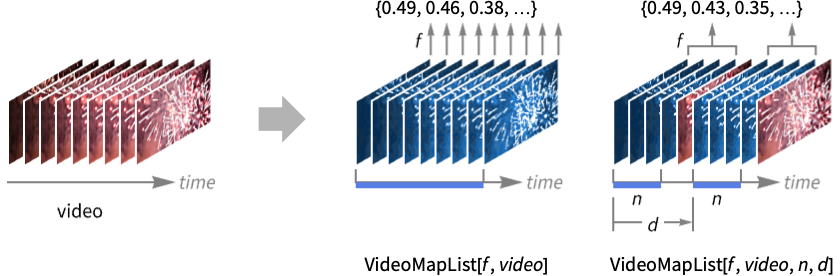
VideoMapList[f,video]
Videoオブジェクト video の1フレームに相当するデータに f を適用し,結果のリストを返す.
VideoMapList[f,video,n]
n 個の動画フレームに相当する重なり合うパーティションに f を適用する.
VideoMapList[f,video,n,d]
オフセット d で f をパーティションに適用する.
VideoMapList[f,{video1,video2,…},…]
各 videoiから抽出された入力リストに f を適用する.
詳細とオプション
- VideoMapListを使って,オブジェクト検出,モーション検出あるいは動作認識のような,動画中の時間的・空間的事象が検出できる.
- VideoMapListは,f を連想に適用した結果に相当する,部分的な動画データや動画フレーム,音声データ,時間等の特性を含む,値のリストを返す.
- VideoMapList[f,video,n]を使うとパーティションが1画像フレーム分スライドする.
- 関数 f は次の引数を使って動画と音声のデータにアクセスできる.
-
#Image Imageオブジェクトとしての動画フレーム #Audio Audioオブジェクトとしての音声のチャンク #Time 動画の初めからの時間 #TimeInterval パーティション全体に対応する時間 #FrameIndex 現行出力フレームの指標 #InputFrameIndex 現行入力フレームの指標 - VideoMapList[f,{video1,video2,…},…]で各引数に与えられるデータは,
 番目の要素が videoiから抽出されたデータに対応するリストである.
 - フレーム変数の n と d はフレーム数を指定するスカラー,あるいは時間Quantityオブジェクトとして与えることができる.
- 次は,サポートされるオプションである.
-
Alignment Automatic タイムスタンプとパーティションのアライメント VideoPadding Automatic 最終フレーム以降のフレームに使う充填 - デフォルトで,#Timeの値は各パーティションの中心に揃えられる.Left,Rightあるいは
 から
から までの値を使って別の揃え方を指定する.
 - VideoMapListは,$VideoDecodersで指定された動画コンテナとコーデックをサポートする.
例題
すべて開く すべて閉じる例 (2)
v = Video["ExampleData/fish.mp4"];mean = VideoMapList[ImageMeasurements[#Image, "MeanIntensity"]&, v];ListLinePlot[mean]v = Video["ExampleData/fish.mp4"];dist = VideoMapList[ImageDistance@@#Image&, v, 2];
ListLinePlot[dist, PlotRange -> All]スコープ (5)
入力 (1)
v1 = Video["ExampleData/rule30.mp4"];
v2 = Video["ExampleData/fish.mp4"];VideoMapList[Subtract@@(Mean /@ #Image)&, {v1, v2}]//Transpose//ListLinePlot一つの動画が他の動画よりも長い場合は,VideoPaddingオプションを使って短い方の充填方法が制御できる:
VideoMapList[Subtract@@(Mean /@ #Image)&, {v1, v2}, VideoPadding -> "Fixed"]//Transpose//ListLinePlot関数指定 (2)
関数 f は各パーティションのデータを保持しているAssociationを受け取る:
v = Video["ExampleData/bullfinch.mkv"];Quiet[VideoMapList[(Print[Keys[#]];Return[])&, v]];
list = VideoMapList[ImageMeasurements[#Image, "StandardDeviation"]&, v];ListLinePlot[Transpose@list, PlotRange -> All]関数 f はAudioオブジェクトとして与えられた音声データを操作することができる:
v = Video["ExampleData/bullfinch.mkv"];画像データと音声データの両方について時間同期の測定値を計算する:
list = VideoMapList[Append[ImageMeasurements[#Image, "StandardDeviation"], AudioMeasurements[#Audio, "StandardDeviation"]]&, v];ListLinePlot[Transpose@list, ...]パーティション指定 (2)
v = Import["http://exampledata.wolfram.com/popcorn.mov"];VideoMapList[ImageMeasurements[Blend[#Image], "Mean"]&, v, 4]//Transpose//ListLinePlot時間Quantityを使ってパーティションサイズを指定する:
VideoMapList[ImageMeasurements[Blend[#Image], "Mean"]&, v, Quantity[200, "Milliseconds"]]//Transpose//ListLinePlotv = Import["http://exampledata.wolfram.com/popcorn.mov"];VideoMapList[ImageMeasurements[Blend[#Image], "Mean"]&, v, 4]//Transpose//ListLinePlotVideoMapList[ImageMeasurements[Blend[#Image], "Mean"]&, v, 4, 4]//Transpose//ListLinePlot時間Quantityを使ってオフセットを指定する:
VideoMapList[ImageMeasurements[Blend[#Image], "Mean"]&, v, 4, Quantity[500, "Milliseconds"]]//Transpose//ListLinePlotScaled量を使ってパーティションサイズに比例するオフセットを指定する:
VideoMapList[ImageMeasurements[Blend[#Image], "Mean"]&, v, 4, Scaled[1 / 2]]//Transpose//ListLinePlotオプション (2)
Alignment (1)
デフォルトで,"Time"キーの値は各パーティションの中央に揃えられる:
v = Video["ExampleData/bullfinch.mkv"];Normal[VideoMapList[#Time&, v]][[ ;; 3]]AlignmentRightを使って各パーティションの末尾に計算された特性を返す:
Normal[VideoMapList[#Time&, v, Alignment -> Right]][[ ;; 3]]Normal[VideoMapList[#Time&, v, Alignment -> -.5]][[ ;; 3]]各パーティションの境界は,パーティションの最初のフレームの開始時間と最後のフレームの終了時間である.この時間は"TimeInterval"キーを使って調べることができる:
Normal[VideoMapList[#TimeInterval&, v]][[ ;; 3]]VideoPadding (1)
片方の動画のトラックがもう一方より短いときは,時間を超えた部分に黒いフレームが使われる:
v1 = FrameListVideo[Table[ConstantImage[RandomColor[]], 6], FrameRate -> 1];v2 = VideoCombine[{v1, AudioGenerator["Sin", 10]}]RGBColor@@@VideoMapList[Mean[#Image]&, v2]VideoPaddingを使って異なる色による充填を指定する:
RGBColor@@@VideoMapList[Mean[#Image]&, v2, VideoPadding -> Red]RGBColor@@@VideoMapList[Mean[#Image]&, v2, VideoPadding -> "Fixed"]アプリケーション (3)
v = Video["ExampleData/Caminandes.mp4"];mean = VideoMapList[ImageMeasurements[#Image, "MeanIntensity"]&, v];ListLinePlot[mean]v = Video["http://exampledata.wolfram.com/office.ts"];res = VideoMapList[FindFaces[#Image]&, v];ListLinePlot[Length /@ res]HighlightImage[VideoExtractFrames[v, Quantity[200, "Frames"]], res[[200]]]v = Video["ExampleData/bullfinch.mkv"];colors = VideoMapList[DominantColors[#Image]&, v];Tally[Flatten[colors], ColorDistance[##] < .2&]WordCloud[%]Flatten[Partition[PadRight[#, Max[Length /@ colors] + 1, Transparent]& /@ colors, 100], {{1, 3}, {2}}]//Image特性と関係 (2)
VideoMapListは各評価について変化する次元のリストを返すことができる:
v = Video["ExampleData/bullfinch.mkv"];VideoMapList[DominantColors[First[#Image]]&, v, Quantity[2, "Seconds"], Quantity[2, "Seconds"]]//ColumnVideoMapTimeSeriesはそのような結果は保存できない:
VideoMapTimeSeries[DominantColors[First[#Image]]&, v, Quantity[2, "Seconds"], Quantity[2, "Seconds"]]
VideoMapListは結果に対応する時間は返さない:
v = Video["ExampleData/bullfinch.mkv"];VideoMapList[ImageMeasurements[First[#Image], "MeanIntensity"]&, v, Quantity[2, "Seconds"], Quantity[2, "Seconds"]]VideoMapTimeSeriesを使って時間も返すようにする:
VideoMapTimeSeries[ImageMeasurements[First[#Image], "MeanIntensity"]&, v, Quantity[2, "Seconds"], Quantity[2, "Seconds"]]Normal[%]テキスト
Wolfram Research (2020), VideoMapList, Wolfram言語関数, https://reference.wolfram.com/language/ref/VideoMapList.html (2021年に更新).
CMS
Wolfram Language. 2020. "VideoMapList." Wolfram Language & System Documentation Center. Wolfram Research. Last Modified 2021. https://reference.wolfram.com/language/ref/VideoMapList.html.
APA
Wolfram Language. (2020). VideoMapList. Wolfram Language & System Documentation Center. Retrieved from https://reference.wolfram.com/language/ref/VideoMapList.html