AnglePath[{θ1,θ2,θ3,…}]
给出由二维坐标组成的列表,对应的是从 {0,0} 开始的一条路径,后续的每一步都是单位长度且和前一步的相对夹角为 θi.
AnglePath[{{r1,θ1},{r2,θ2},{r3,θ3},…}]
返回路径的相续步长为 ri.
AnglePath[θ0,{step1,step2,…}]
相对于
轴的起始角度为 θ0.
AnglePath[{x,y},{step1,step2,…}]
从点 {x,y} 开始,相对于
轴的起始角度为 0.
AnglePath[{{x,y},θ0},{step1,step2,…}]
从点 {x,y} 开始,相对于
轴的起始角度为 θ0.
AnglePath[{{x,y},{dx,dy}},{step1,step2,…}]
第一步是从点 {x,y} 到 {x+dx,y+dy}.
AnglePath[init,steps,form]
每步返回由 form 指定的形式的数据.
AnglePath
AnglePath[{θ1,θ2,θ3,…}]
给出由二维坐标组成的列表,对应的是从 {0,0} 开始的一条路径,后续的每一步都是单位长度且和前一步的相对夹角为 θi.
AnglePath[{{r1,θ1},{r2,θ2},{r3,θ3},…}]
返回路径的相续步长为 ri.
AnglePath[θ0,{step1,step2,…}]
相对于
轴的起始角度为 θ0.
AnglePath[{x,y},{step1,step2,…}]
从点 {x,y} 开始,相对于
轴的起始角度为 0.
AnglePath[{{x,y},θ0},{step1,step2,…}]
从点 {x,y} 开始,相对于
轴的起始角度为 θ0.
AnglePath[{{x,y},{dx,dy}},{step1,step2,…}]
第一步是从点 {x,y} 到 {x+dx,y+dy}.
AnglePath[init,steps,form]
每步返回由 form 指定的形式的数据.
更多信息和选项
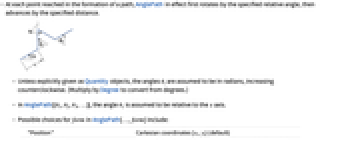
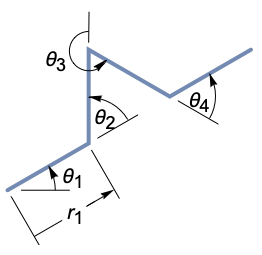
- 对生成路径时到达的每一个点,AnglePath 实际上先旋转指定的相对角度,再前进指定的距离.
- 除非显式的以 Quantity 对象的形式给出,角度 θi 假设是以弧度为单位,正方向为逆时针方向.(乘以 Degree 就可以转换为角度单位.)
- 在 AnglePath[{θ1,θ2,θ3,…}] 中角度 θ1 假设是相对于
轴的. - AnglePath[…,form] 中 form 的可能选择包括:
-
"Position" 笛卡尔坐标 {xi,yi} (默认) "FrameMatrix" 相对于初始标架的当前标架的旋转矩阵 "RelativeMatrix" 相对于之前标架的当前标架的旋转矩阵 "FrameAngle" 相对于初始步长的旋转角度 "RelativeAngle" 相对于之前步长的旋转角度 "Translation" 根据初始步长的平移变换 "Rotation" 根据初始步长的旋转变换 "RotationTranslation" 根据初始步长的旋转平移变换 {form1,form2,…} 格式列表 - AnglePath 的参数可以是符号. 它们也可以是 Quantity 对象.
- AnglePath 有一个 WorkingPrecision 选项,确定了生成数字的精度.
- 采用默认设置 WorkingPrecisionAutomatic 的情况下,只为相当短的路径的精确输入生成精确数字;对于较长的路径,将使用机器精度.
范例
打开所有单元 关闭所有单元基本范例 (5)
从 {0,0} 开始沿着
轴,前进若干单位步长,每步旋转 90°:
AnglePath[{90°, 90°, 90°}]Graphics[Line[AnglePath[{{1.2, 90.°}, {2.1, 130.°}, {0.7, -85.°}}]]]Graphics[Line[AnglePath[ConstantArray[110°, 20]]]]transformations = AnglePath[{0, 0}, {{4, 45°}, {3Sqrt[2], -45°}}, "RotationTranslation"]turtle = [image];
Graphics[GeometricTransformation[turtle[[1]], transformations]]AnglePath[{x, y}, {{Subscript[r, 1], Subscript[θ, 1]}, {Subscript[r, 2], Subscript[θ, 2]}}]范围 (13)
步长规范 (3)
AnglePath[{90Degree, Pi / 3, -Pi / 4}]AnglePath[{{0.7, 90Degree}, {2.3, Pi / 3}, {3.5, -Pi / 4}}]在输入中使用 Quantity 对象:
AnglePath[Quantity[{20., 30., -45., 120.}, "AngularDegrees"]]AnglePath[{{Quantity[4, "Feet"], Quantity[2, "Radians"]}, {Quantity[2, "Meters"], Quantity[40, "AngularDegrees"]}}]路径初始化 (4)
AnglePath[{100, 200}, {90Degree, Pi / 3, -Pi / 4}]AnglePath[{100, 200}, {{0.7, 90Degree}, {2.3, Pi / 3}, {3.5, -Pi / 4}}]AnglePath[π / 6, {90Degree, Pi / 3, -Pi / 4}]AnglePath[π / 6, {{0.7, 90Degree}, {2.3, Pi / 3}, {3.5, -Pi / 4}}]AnglePath[{{100, 200}, Pi / 6}, {90Degree, Pi / 3, -Pi / 4}]AnglePath[{{100, 200}, Pi / 6}, {{0.7, 90Degree}, {2.3, Pi / 3}, {3.5, -Pi / 4}}]AnglePath[{{100, 200}, {Sqrt[3], 1}}, {{0.7, 90Degree}, {2.3, Pi / 3}, {3.5, -Pi / 4}}]输出格式 (6)
默认情况下,AnglePath 返回每一步的位置:
pos1 = AnglePath[{0, 0}, {Subscript[θ, 1], Subscript[θ, 2], Subscript[θ, 3]}];
pos2 = AnglePath[{0, 0}, {Subscript[θ, 1], Subscript[θ, 2], Subscript[θ, 3]}, "Position"];pos1 === pos2AnglePath[{1, 1}, {π / 3, π / 2, -2π / 3}, "RelativeMatrix"];Map[MatrixForm, %]AnglePath[{1, 1}, {π / 3, π / 2, -2π / 3}, "FrameMatrix"];Map[MatrixForm, %]AnglePath[{1, 1}, {π / 3, π / 2, -2π / 3}, "FrameAngle"]transformations = AnglePath[{1, 1}, {{1, π / 2}, {3, -π / 4}}, "RotationTranslation"]triangle = Triangle[{{-1, 0}, {1, 0}, {0, 10}}];
Graphics[{Opacity[0.3], GeometricTransformation[triangle, transformations]}]调用一个 AnglePath ,产生不同的输出类型:
types = {"RelativeMatrix", "Position", "RotationTranslation"};
path = AnglePath[{1, 1}, {{1, π / 2}, {3, -π / 4}}, types];Map[MatrixForm, path[[All, 1]]]path[[All, 2]]path[[All, 3]]选项 (1)
WorkingPrecision (1)
默认情况下,AnglePath 为较短路径的精确输入生成精确数字,对于较长的路径,则给出机器数字:
AnglePath[Range[10]Pi]//LastAnglePath[Range[10000]Pi]//LastAnglePath[Range[10000]Pi, WorkingPrecision -> Infinity]//LastAnglePath[Range[10000]Pi, WorkingPrecision -> 50]//Last应用 (3)
Graphics[Line[AnglePath[RandomReal[{-20°, 20°}, 1000]]]]Graphics[Line[AnglePath[{90°, -90°}[[1 + Nest[Join[#, {0}, Reverse[1 - #]]&, {0}, 10]]]]]]Graphics[Line[AnglePath[Array[ThueMorse, 4096]2 Pi / 3]]]Graphics[Line[AnglePath[Array[ThueMorse, 4096]2 Pi / 5]]]属性和关系 (6)
AnglePath[{{0, 0}, Subscript[θ, 0]}, Array[Subscript[θ, #]&, {6}]]AnglePath[{{x, y}, Subscript[θ, 0]}, {{Subscript[r, 1], Subscript[θ, 1]}, {Subscript[r, 2], Subscript[θ, 2]}}]% === Rest@AnglePath[{x, y}, {{0, Subscript[θ, 0]}, {Subscript[r, 1], Subscript[θ, 1]}, {Subscript[r, 2], Subscript[θ, 2]}}]angles = RandomReal[{-Pi / 2, Pi / 2}, 100];Graphics[Line[FoldList[AngleVector, {0, 0}, angles]]]作为相对角度考虑的话,路径可能沿任何方向演变. 路径总长度不变:
Graphics[Line[AnglePath[{0, 0}, angles]]]angles = N@{{π / 3, 0}, {π / 2, -π / 6}};framematrices = AnglePath[{1, 1}, angles, "FrameMatrix"];
Map[MatrixForm, %]framematrices == FoldList[Dot, AnglePath[{1, 1}, angles, "RelativeMatrix"]]p0 = {x0, y0};
angles = Array[θ, 10];positions = AnglePath[p0, angles];framematrices = AnglePath[p0, angles, "FrameMatrix"];positions == FoldList[#1 + #2.{1, 0}&, p0, Rest[framematrices]]angles = RandomReal[{-Pi, Pi}, 5]path = AnglePath[angles]iangles = Prepend[Reverse[Rest[-angles]], Mod[Pi + Total[angles], 2Pi, -Pi]]ipath = AnglePath[Last[path], iangles]Reverse[path] - ipath//Chop绘制两条路径,用 Arrow 表明运动的方向:
{Graphics@Arrow[path], Graphics@Arrow[ipath]}可能存在的问题 (1)
互动范例 (1)
DynamicModule[{turtle, steps = {}, path, points},
turtle = [image];
Manipulate[
path = AnglePath[{0., 0.}, steps, {"Position", "FrameMatrix"}];
points = path[[All, 1]];
Graphics[{
Line[points], GeometricTransformation[turtle[[1]], AffineTransform[{path[[-1, 2]].RotationMatrix[θ], Last[points]}]],
Point[points],
White, Point[{{-8, -8}, {8, 8}}]},
Axes -> True,
PlotRange -> All,
ImageSize -> {420, 420}
],
Row[{Control[{{r, 1}, 0, 10}], Spacer[23], Control[{{fixr, True, "Fixed"}, {True, False}}]}],
Row[{Control[{{θ, 0}, -Pi, Pi}], Spacer[20], Control[{{fixθ, False, "Fixed"}, {True, False}}]}],
Button["Next step", AppendTo[steps, {r, θ}];If[Not[fixr], r = 1.];If[Not[fixθ], θ = 0.]],
Button["Restart", {steps = {}, r = 1., θ = 0.}]
]
]巧妙范例 (4)
Graphics[Line[AnglePath[Range[0, 10, .01]]]]Graphics[Line[AnglePath[Range[0, 100, .01]]]]Graphics[Line[AnglePath[N@Range[10000]]]]Graphics[Line[AnglePath[N@Range[100000]]]]绘制线段,相邻的相对角度持续增加,并被 Sin 函数调制:
Graphics[Line[AnglePath[Table[t Sin[t], {t, 0, 50, .01}]]]]Graphics[Line[AnglePath@N[Table[{i, 8}, {i, 1000}]], VertexColors -> Map[Hue, Subdivide[0, 0.8, 1000]]]]相关链接
文本
Wolfram Research (2015),AnglePath,Wolfram 语言函数,https://reference.wolfram.com/language/ref/AnglePath.html (更新于 2019 年).
CMS
Wolfram 语言. 2015. "AnglePath." Wolfram 语言与系统参考资料中心. Wolfram Research. 最新版本 2019. https://reference.wolfram.com/language/ref/AnglePath.html.
APA
Wolfram 语言. (2015). AnglePath. Wolfram 语言与系统参考资料中心. 追溯自 https://reference.wolfram.com/language/ref/AnglePath.html 年
BibTeX
@misc{reference.wolfram_2026_anglepath, author="Wolfram Research", title="{AnglePath}", year="2019", howpublished="\url{https://reference.wolfram.com/language/ref/AnglePath.html}", note=[Accessed: 16-August-2026]}
BibLaTeX
@online{reference.wolfram_2026_anglepath, organization={Wolfram Research}, title={AnglePath}, year={2019}, url={https://reference.wolfram.com/language/ref/AnglePath.html}, note=[Accessed: 16-August-2026]}