BandstopFilter[data,{ω1,ω2}]
对一组数据阵列应用带阻滤波器,其中截止频率为 ω1 和 ω2.
BandstopFilter[data,{{ω,q}}]
使用中心频率 ω 和质量因子 q.
BandstopFilter[data,spec,n]
使用长度为 n 的滤波器内核.
BandstopFilter[data,spec,n,wfun]
将平滑窗 wfun 应用于滤波器内核.
BandstopFilter
BandstopFilter[data,{ω1,ω2}]
对一组数据阵列应用带阻滤波器,其中截止频率为 ω1 和 ω2.
BandstopFilter[data,{{ω,q}}]
使用中心频率 ω 和质量因子 q.
BandstopFilter[data,spec,n]
使用长度为 n 的滤波器内核.
BandstopFilter[data,spec,n,wfun]
将平滑窗 wfun 应用于滤波器内核.
更多信息和选项
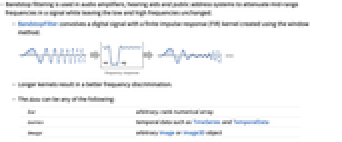
- 带阻滤波器用于音频放大器、助听器和公共广播系统,以衰减信号中的中频,同时保持低频和高频不变.
- BandstopFilter 用窗口法创建的有限脉冲响应(FIR)核卷积数字信号.
- 内核越长,鉴频能力越强。.
- data 可以是以下任何形式:
-
list 任意秩数值数组 tseries 诸如 TimeSeries 和 TemporalData 等时间数据 image 任意 Image 或 Image3D 对象 audio Audio 或 Sound 对象 video Video 对象 - 衰减的频率范围取决于截止频率 ω1 和 ω2,其中 ω2>ω1.
- 当应用到图像和多维阵列时,滤波从第1层开始,先后应用于每个维度. BandstopFilter[data,{{ω11,ω21},…}] 对于第 i 维使用频率 {ω1i,ω2i}.
- 频率值 ωi 应该位于 0 到
之间. - BandstopFilter[data,{ω1,ω2}] 所用的滤波器内核长度和平滑窗口是与截止频率{ω1,ω2} 和输入 data 相适应的.
- 典型的平滑窗 wfun 包括:
-
BlackmanWindow 使用 Blackman 窗平滑 DirichletWindow 不进行平滑处理 HammingWindow 使用 Hamming 窗平滑 {v1,v2,…} 使用值为 vi 的窗 f 通过在范围
和
之间对 f 采样创建窗 - 可以给出下列选项:
-
Padding "Fixed" 待用的填充值 SampleRate Automatic 对输入假定的采样率 - 默认情况下,对于图像和数据,假定 SampleRate->1. 对于音频信号和时间序列,从输入数据中提取或计算采样率.
- 在 SampleRate->sr 时,截止频率 ωc 应位于 0 到 sr
之间.
范例
打开所有单元 关闭所有单元基本范例 (3)
data = Table[Cos[x] + Cos[10x] + Cos[20x], {x, 0, 2Pi, 0.04}];
filtered = BandstopFilter[data, {.2, .6}, 31];
ListLinePlot[{data, filtered}, PlotLegends -> {"original", "filtered"}]ideal = Table[Cos[x] + Cos[20x], {x, 0, 2Pi, 0.04}];
ListLinePlot[{ideal, filtered}]BandstopFilter[\!\(\*AudioBox[""]\), {Quantity[500, "Hertz"], Quantity[2500, "Hertz"]}]BandstopFilter[[image], {0.25, 1.}]//ImageAdjust范围 (13)
数据 (8)
data = BoxMatrix[5, {41}];
ListLinePlot[{data, BandstopFilter[data, {.5, 1.5}, 15]}, PlotRange -> All]data = Table[UnitBox[(n/7), (m/7)], {n, -7, 7}, {m, -7, 7}];
ListPlot3D[data]BandstopFilter[data, {0.5, 1.5}]//ListPlot3D对 TimeSeries 进行滤波:
ts = TemporalData[TimeSeries, {{{0., -0.27267267057145633, -0.6672983789995302, -0.5338541947930846,
-0.6117404489279314, -0.6755527076595494, -0.02125421294486496, -0.10792797291843935,
-0.6138271235477938, -0.3248568606554575, -0.08843449054 ... 2053424, -0.49980440691873723, -0.5388679788215971,
-0.4101602764645551}}, {{0, 1., 0.01}}, 1, {"Continuous", 1}, {"Continuous", 1}, 1,
{ValueDimensions -> 1, ResamplingMethod -> {"Interpolation", InterpolationOrder -> 1}}}, False,
10.1];
filtered = BandstopFilter[ts, {Quantity[5, "Hertz"], Quantity[10, "Hertz"]}];ListLinePlot[{ts, filtered}, PlotLegends -> {"original data", "filtered"}]三音信号 Sound 对象的带阻滤波:
snd = Sound[SampledSoundList[Table[Sin[2 π 697 t] + Sin[2 π 1209 t] + Sin[2π 1633 t], {t, 0., 0.3, 1 / 8000.}], 8000]]使用长度为 101 的 Blackman 窗的带阻滤波器消除中间音:
BandstopFilter[snd, {Quantity[900, "Hertz"], Quantity[1400, "Hertz"]}, 101, BlackmanWindow]BandstopFilter[[image], {0.5, 1}]BandstopFilter[Video["ExampleData/fish.mp4"], {0.5, 1}]BandstopFilter[[image], {0.5, 1.}]BandstopFilter[{0, 0, 0, 1, 1, 1, 0, 0, 0}, {Pi / 2, Pi}, 5]参数 (5)
a = \!\(\*AudioBox[""]\);BandstopFilter[a, {2000 π, 4000 π}] === BandstopFilter[a, {Quantity[2000*Pi, "Radians"/"Seconds"], Quantity[4000*Pi, "Radians"/"Seconds"]}] === BandstopFilter[a, {Quantity[1000, "Hertz"], Quantity[2000, "Hertz"]}]noise = AudioGenerator["White", 0.2];
Periodogram[noise]Periodogram[BandstopFilter[noise, {Quantity[5000, "Hertz"], Quantity[15000, "Hertz"]}]]Periodogram[BandstopFilter[noise, {{Quantity[8660, "Hertz"], 1}}]]Periodogram[BandstopFilter[noise, {{Quantity[8660, "Hertz"], 0.66}}]]noise = AudioGenerator["White", 0.2];
Periodogram[BandstopFilter[noise, {Quantity[5000, "Hertz"], Quantity[15000, "Hertz"]}, 33]]Periodogram[BandstopFilter[noise, {Quantity[5000, "Hertz"], Quantity[15000, "Hertz"]}, 55]]a = AudioGenerator[Sin[11025 2 π #^2]&];
Periodogram[BandstopFilter[a, {Quantity[5000, "Hertz"], Quantity[15000, "Hertz"]}, 33, #]& /@ {DirichletWindow, HammingWindow, BlackmanWindow}, PlotLegends -> {"Dirichlet", "Hamming", "Hann"}]Periodogram[Table[BandstopFilter[a, {Quantity[5000, "Hertz"], Quantity[15000, "Hertz"]}, 33, KaiserWindow[#, b]&], {b, {3, 5, 7}}], PlotLegends -> {3, 5, 7}]BandstopFilter[[image], {{0.5, 1.33}, {0.75, 1.}}, 33]选项 (3)
Padding (1)
SampleRate (2)
假定样本率为 sr=1,使用以频率 π/2 为中心的滤波器:
BandstopFilter[{0, 0, 0, 0, 0, 1, 1, 1, 1, 1}, {{π / 2., 1}}]BandstopFilter[{0, 0, 0, 0, 0, 1, 1, 1, 1, 1}, {{3π / 2., 1}}, SampleRate -> 3]noise = AudioGenerator["White", 0.2];
sr = QuantityMagnitude@AudioSampleRate[noise]BandstopFilter[noise, {{sr π / 2., 1}}]//Periodogram应用 (1)
在现代 88 键钢琴上,键 55(音符 C5)的基频约为 523 Hz. 使用 BandstopFilter 有效移除此键的第一次谐波 (1046 Hz),同时保留以下音频剪辑中的剩余频率:
key55 = \!\(\*AudioBox[""]\);使用以频率 1046 Hz 为中心、长度为 101 的窄滤波器 (Q=3):
f = 2 523;
res = BandstopFilter[key55, {{2 π f, 3}}, 101]Periodogram[{key55, res}, PlotRange -> All, GridLines -> All, PlotLegends -> {"original", "filtered"}]属性和关系 (5)
BandstopFilter[{0., 0., 0., 0., 1., 1., 1., 1.}, {0, Pi}]使用 LeastSquaresFilterKernel 和 Hamming 窗创建带阻滤波器:
n = 5;
ω = {1, 1.5};
win = Array[HammingWindow, n, {-1 / 2, 1 / 2}];
ker = win LeastSquaresFilterKernel[{"Bandstop", ω}, n]ListConvolve[ker, {0, 0, 0, 1, 1, 1, 0, 0, 0}, Ceiling[n / 2], 0]与 BandpassFilter 的结果比较:
BandstopFilter[{0, 0, 0, 1, 1, 1, 0, 0, 0}, ω, n, win, Padding -> 0]h = BandstopFilter[ArrayPad[{1}, 10], {0.5, 2.5}, 21]ListPlot[h, PlotRange -> All, Filling -> 0]Plot[Abs[ListFourierSequenceTransform[h, ω]], {ω, 0, π}]h = BandstopFilter[ArrayPad[{1}, 10], {0.5, 2.5}, 21, None]ListPlot[h, PlotRange -> All, Filling -> 0]Plot[Abs[ListFourierSequenceTransform[h, ω]], {ω, 0, π}]Manipulate[
ListLinePlot[Abs[Fourier[BandstopFilter[ArrayPad[{1.}, 128], {Pi / 4., 3 Pi / 4.}, n, None], FourierParameters -> {1, -1}]][[ ;; 129]], ...], {{n, 21}, 3, 63, 2}]相关指南
-
▪
- 线性和非线性滤波 ▪
- 图像滤波和邻域处理 ▪
- 信号滤波与滤波器设计
文本
Wolfram Research (2012),BandstopFilter,Wolfram 语言函数,https://reference.wolfram.com/language/ref/BandstopFilter.html (更新于 2025 年).
CMS
Wolfram 语言. 2012. "BandstopFilter." Wolfram 语言与系统参考资料中心. Wolfram Research. 最新版本 2025. https://reference.wolfram.com/language/ref/BandstopFilter.html.
APA
Wolfram 语言. (2012). BandstopFilter. Wolfram 语言与系统参考资料中心. 追溯自 https://reference.wolfram.com/language/ref/BandstopFilter.html 年
BibTeX
@misc{reference.wolfram_2026_bandstopfilter, author="Wolfram Research", title="{BandstopFilter}", year="2025", howpublished="\url{https://reference.wolfram.com/language/ref/BandstopFilter.html}", note=[Accessed: 17-August-2026]}
BibLaTeX
@online{reference.wolfram_2026_bandstopfilter, organization={Wolfram Research}, title={BandstopFilter}, year={2025}, url={https://reference.wolfram.com/language/ref/BandstopFilter.html}, note=[Accessed: 17-August-2026]}