

BezierSurface
BezierSurface[{{p1,p2,…},…}]
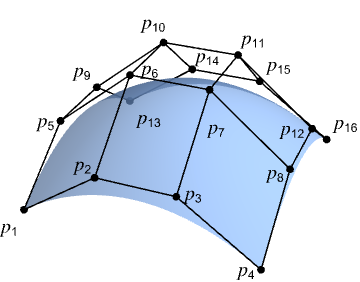
表示由控制点 pi 定义的贝塞尔曲面.
更多信息和选项
- BezierSurface 也称为贝塞尔曲面片.
- BezierSurface 通常用于计算机辅助设计 (CAD) 和计算机图形学中,对自由形态的曲面进行建模.
- 控制点 pi 是普通的三维坐标,例如 {x,y,z}.
- BezierSurface[{{p1,p2,p3,p4},…,{p13,p14,p15,p16}}] 表示一个双三次贝塞尔曲面,其控制点为 4×4 阵列 p1,p2,…,p16.
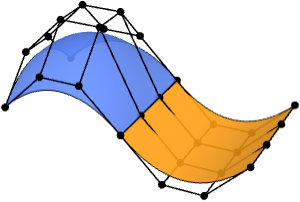
- 一个控制点数量超过 4×4 的 BezierSurface 将表示一个复合三次贝塞尔曲面.
- 组合曲面可以使用多个贝塞尔曲面片对复杂几何形状进行建模.
- BezierSurface 既可用作几何区域,也可用作图形基元.
- 在图形中,点 pi 可以是 Scaled 和 Dynamic 表达式.
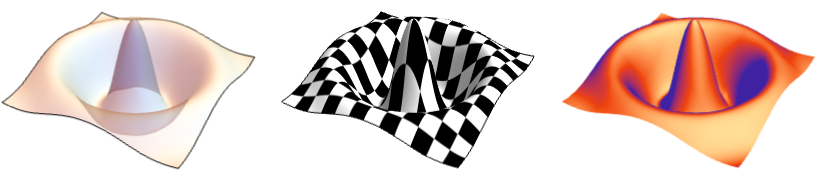
- 图形渲染会受到诸如 FaceForm、EdgeForm、Texture、Specularity、Opacity 以及颜色等指令的影响.
- FaceForm[front,back] 可用于为 3D 曲面的正面和背面指定不同的样式.
- 可给出以下选项:
-
SplineDegree Automatic 多项式基的次数 SplineClosed False 是否使表面闭合 - 选项 SplineDegree->d 用于指定每个方向上的最大次数 d. SplineDegree->{d1,d2} 用于指定曲面中两个方向上的不同最大次数.
- 当 SplineDegree->{d1,d2} 时,BezierSurface 若具有 (d1+1)×(d2+1) 个控制点,则会生成一个次数分别为 d1 和 d2 的简单贝塞尔曲面. 若控制点较少,则生成较低次数的曲面. 若控制点更多,则生成复合贝塞尔曲面.

范例
打开所有单元 关闭所有单元基本范例 (3)
Graphics3D[BezierSurface[{{{0, 0, 0}, {0, 4, 4}, {0, 8, 3}}, {{4, 0, 4}, {4, 4, 0}, {4, 8, 0}}, {{8, 0, 1}, {8, 4, 0}, {8, 8, 3}}}]]reg = BezierSurface[IconizedObject[«[image]»]];Area[reg]RegionBounds[reg]Graphics3D[{MaterialShading["Pewter"], BezierSurface[IconizedObject[«[image]»]]}, ...]范围 (26)
基本用法 (5)
Graphics3D[BezierSurface[{{{0, 0, 0}, {2, 0, 0}}, {{0, 1, 0}, {2, 1, 0}}}]]Graphics3D[BezierSurface[IconizedObject[«[image]»]]]Graphics3D[BezierSurface[IconizedObject[«[image]»]]]Graphics3D[BezierSurface[IconizedObject[«[image]»], SplineClosed -> {False, True}]]Graphics3D[BezierSurface[IconizedObject[«[image]»], SplineClosed -> {False, True}]]Graphics3D[BezierSurface[IconizedObject[«[image]»], SplineClosed -> {True, True}]]Graphics3D[BezierSurface[IconizedObject[«[image]»], SplineClosed -> {False, True}]]Graphics3D /@ {BezierSurface[IconizedObject[«[image]»], SplineClosed -> {True, False}], BezierSurface[IconizedObject[«[image]»], SplineClosed -> {True, False}]}BezierSurface 可以表示拓扑圆盘:
Graphics3D[BezierSurface[IconizedObject[«[image]»]]]Graphics3D[BezierSurface[IconizedObject[«[image]»], SplineClosed -> {True, False}]]Graphics3D[BezierSurface[IconizedObject[«[image]»], SplineClosed -> {False, True}]]Graphics3D[BezierSurface[IconizedObject[«[image]»], SplineClosed -> True]]BezierSurface[{{{0, 0, 0}, {0, 4, 4}, {0, 8, 3}}, {{4, 0, 4}, {4, 4, 0}, {4, 8, 0}}, {{8, 0, 1}, {8, 4, 0}, {8, 8, 3}}}]规格说明 (3)
Graphics3D[BezierSurface[(| | | |
| --------- | --------- | --------- |
| {0, 0, 0} | {0, 4, 4} | {0, 8, 3} |
| {4, 0, 4} | {4, 4, 0} | {4, 8, 0} |
| {8, 0, 1} | {8, 4, 0} | {8, 8, 3} |)]]Graphics3D[BezierSurface[(| | | | |
| --------- | --------- | --------- | --------- |
| {0, 0, 0} | {3, 0, 2} | {5, 0, 2} | {8, 0, 1} |
| {0, 3, 2} | {3, 3, 2} | {5, 3, 1} | {8, 3, 1} |
| {0, 5, 3} | {3, 5, 2} | {5, 5, 1} | {8, 5, 1} |
| {0, 8, 3} | {3, 8, 2} | {5, 8, 2} | {8, 8, 3} |)]]一般来说,次数为 d 的简单贝塞尔曲面片需要 (d-1)×(d-1) 的控制点阵列:
pts = (| | | | | |
| --------- | --------- | --------- | --------- | --------- |
| {0, 0, 0} | {1, 0, 1} | {2, 0, 0} | {3, 0, 1} | {4, 0, 0} |
| {0, 1, 1} | {1, 1, 2} | {2, 1, 1} | {3, 1, 2} | {4, 1, 1} |
| {0, 2, 0} | {1, 2, 1} | {2, 2, 0} | {3, 2, 1} | {4, 2, 0} |
| {0, 3, 1} | {1, 3, 2} | {2, 3, 1} | {3, 3, 2} | {4, 3, 1} |
| {0, 4, 0} | {1, 4, 1} | {2, 4, 0} | {3, 4, 1} | {4, 4, 0} |);deg = Take[Dimensions[pts], 2] - 1;BezierSurface[pts, SplineDegree -> deg]Graphics3D[%]BezierSurface[Take[pts, 1 ;; 3, 1 ;; 3], SplineDegree -> deg]Graphics3D[%]BezierSurface[pts, SplineDegree -> 2]Graphics3D[%]Graphics3D[{BezierSurface[IconizedObject[«[image]»]]}]Graphics3D[{BezierSurface[IconizedObject[«[image]»], SplineClosed -> True]}]Graphics3D[{BezierSurface[IconizedObject[«[image]»], SplineClosed -> #]}]& /@ {{True, False}, {False, True}}图形渲染 (12)
Table[Graphics3D[{c, BezierSurface[IconizedObject[«[image]»]]}], {c, {RGBColor[0.93, 0.27, 0.27], RGBColor[0.14, 0.8, 0.14], RGBColor[0.4, 0.6, 1]}}]使用 FaceForm 可以为曲面的正面和背面指定不同的属性:
Graphics3D[{FaceForm[RGBColor[0.93, 0.27, 0.27], RGBColor[0.14, 0.8, 0.14]], BezierSurface[IconizedObject[«[image]»]]}]EdgeForm 可用于指定曲面边界边缘的样式:
Graphics3D[{EdgeForm[{Red, Thick, Dashed}], BezierSurface[IconizedObject[«[image]»]]}]Table[Graphics3D[{EdgeForm[{StandardYellow, Thick}], BezierSurface[IconizedObject[«[image]»], SplineClosed -> closed]}, Lighting -> "Accent"], {closed, {False, True}}]Table[Graphics3D[{Black, Specularity[White, n], BezierSurface[IconizedObject[«[image]»]]}, Lighting -> "Accent"], {n, {5, 20, 100}}]Opacity 指定面的透明程度:
Table[Graphics3D[{Opacity[o], BezierSurface[IconizedObject[«[image]»]]}], {o, {0.1, 0.5, 0.9}}]Table[Graphics3D[{Glow[c], BezierSurface[IconizedObject[«[image]»]]}, Lighting -> None], {c, {RGBColor[0.93, 0.27, 0.27], RGBColor[0.14, 0.8, 0.14], RGBColor[0.4, 0.6, 1]}}]将其与 Lighting 结合,以创建微妙的阴影效果:
Table[Graphics3D[{Glow[glow], GrayLevel[0.4], BezierSurface[IconizedObject[«[image]»]]}, Lighting -> "Accent"], {glow, {RGBColor[0.93, 0.27, 0.27], RGBColor[0.14, 0.8, 0.14], RGBColor[0.4, 0.6, 1]}}]将 Texture 应用于曲面:
Graphics3D[{Texture[[image]], BezierSurface[IconizedObject[«[image]»]]}, Lighting -> "Neutral"]Table[Graphics3D[{s, BezierSurface[IconizedObject[«[image]»]]}, Lighting -> "Accent"], {s, {StippleShading[0.6], ToonShading[Red], GoochShading[]}}]使用 MaterialShading 绘制基于物理材质的曲面:
Table[Graphics3D[{MaterialShading[mat], BezierSurface[IconizedObject[«[image]»]]}, Lighting -> "ThreePoint"], {mat, {"Gold", "Satin", "Velvet"}}]BezierSurface 可以在 GraphicsComplex 中使用:
Graphics3D[{GraphicsComplex[{{0, 0, 0}, {0, 10, 12}, {0, 20, 9}, {10, 0, 12}, {10, 10, 0}, {10, 20, 0}, {20, 0, 3}, {20, 10, 0}, {20, 20, 9}}, BezierSurface[{{1, 2, 3}, {4, 5, 6}, {7, 8, 9}}]]}]pts = IconizedObject[«[image]»];Table[Graphics3D[{BezierSurface[pts]}, PlotRange -> {{0, pr}, {0, pr}, {0, pr}}], {pr, {1, 2, 4}}]使用 Scaled 指定相对于 PlotRange 的控制点:
scaled = Map[Scaled, pts, {2}];Table[Graphics3D[{BezierSurface[scaled]}, PlotRange -> {{0, pr}, {0, pr}, {0, pr}}], {pr, {1, 2, 4}}]坐标可以是 Dynamic:
DynamicModule[{z = 0, pts},
	pts = {{Dynamic[{0, 0, z}], {0, 4, 4}, {0, 8, 3}}, {{4, 0, 4}, {4, 4, 0}, {4, 8, 0}}, {{8, 0, 1}, {8, 4, 0}, {8, 8, 3}}};
	{Slider[Dynamic[z], {0, 4}], Graphics3D[{BezierSurface[pts]}]}]
区域属性 (6)
reg = BezierSurface[{{{Indexed[a, {1}], Indexed[a, {2}], Indexed[a, {3}]}, {Indexed[a, {4}], Indexed[a, {5}], Indexed[a, {6}]}, {Indexed[a, {7}], Indexed[a, {8}], Indexed[a, {9}]}}, {{Indexed[b, {1}], Indexed[b, {2}], Indexed[b, {3}]}, {Indexed[b, {4}], Indexed[b, {5}], Indexed[b, {6}]}, {Indexed[b, {7}], Indexed[b, {8}], Indexed[b, {9}]}}, {{Indexed[c, {1}], Indexed[c, {2}], Indexed[c, {3}]}, {Indexed[c, {4}], Indexed[c, {5}], Indexed[c, {6}]}, {Indexed[c, {7}], Indexed[c, {8}], Indexed[c, {9}]}}}];RegionEmbeddingDimension[reg]RegionDimension[reg]reg = BezierSurface[{{{0, 0, 0}, {0, 4, 4}, {0, 8, 3}}, {{4, 0, 4}, {4, 4, 0}, {4, 8, 0}}, {{8, 0, 1}, {8, 4, 0}, {8, 8, 3}}}];{RegionMember[reg, {0, 0, 0}], RegionMember[reg, {1, 2, 3}]}reg = BezierSurface[{{{0, 0, 0}, {0, 4, 4}, {0, 8, 3}}, {{4, 0, 4}, {4, 4, 0}, {4, 8, 0}}, {{8, 0, 1}, {8, 4, 0}, {8, 8, 3}}}];{Area[reg], RegionMeasure[reg]}c = RegionCentroid[reg]Show[Region[reg], Graphics3D[{Black, Point[c]}]]reg = BezierSurface[{{{0, 0, 0}, {0, 4, 4}, {0, 8, 3}}, {{4, 0, 4}, {4, 4, 0}, {4, 8, 0}}, {{8, 0, 1}, {8, 4, 0}, {8, 8, 3}}}];{RegionDistance[reg, {0, 0, 0}], RegionDistance[reg, {1, 1, 0}]}Show[Region[reg], ContourPlot3D[Evaluate@RegionDistance[reg, {x, y, z}], {x, 0, 8}, {y, 0, 8}, {z, -4, 8}, Contours -> {1, 2, 3, 4}, ...], Boxed -> True, Axes -> True]reg = BezierSurface[{{{0, 0, 0}, {0, 4, 4}, {0, 8, 3}}, {{4, 0, 4}, {4, 4, 0}, {4, 8, 0}}, {{8, 0, 1}, {8, 4, 0}, {8, 8, 3}}}];{SignedRegionDistance[reg, {0, 0, 0}], SignedRegionDistance[reg, {1, 1, 0}]}reg = BezierSurface[{{{0, 0, 0}, {0, 4, 4}, {0, 8, 3}}, {{4, 0, 4}, {4, 4, 0}, {4, 8, 0}}, {{8, 0, 1}, {8, 4, 0}, {8, 8, 3}}}];BoundedRegionQ[reg]bb = CoordinateBoundingBox[reg]Show[Region[reg], Graphics3D[{Opacity[0.1], EdgeForm[Dashed], AmbientLight[White], Cuboid@@bb}]]选项 (5)
SplineDegree (3)
BezierSurface 默认情况下,具有 4×4 或更多控制点的 BezierSurface 将使用次数 3:
pts = Table[{i, j, (-1) ^ (i * j)}, {i, 7}, {j, 7}];{BezierSurface[Take[pts, 4, 4]], BezierSurface[Take[pts, 7, 7]]}{BezierSurface[Take[pts, 2, 2]], BezierSurface[Take[pts, 3, 3]]}使用 SplineDegree 来指定使用较低的次数:
BezierSurface[pts, SplineDegree -> 1]BezierSurface[pts, SplineDegree -> 6]对于一个具有 n×n 控制点的 BezierSurface,指定次数 d 且满足 d<n-1 时,将得到一个复合贝塞尔曲面:
pts = Table[{i, j, (-1) ^ (i * j)}, {i, 9}, {j, 9}];Region[BezierSurface[pts, SplineDegree -> #]]& /@ {2, 4, 8}pts = Table[{i, j, (-1) ^ (i * j)}, {i, 9}, {j, 9}];Region[BezierSurface[pts, SplineDegree -> #]]& /@ {2, {2, 8}, {8, 2}}SplineClosed (2)
pts = IconizedObject[«[image]»];Graphics3D[{BezierSurface[pts]}]Graphics3D /@ {BezierSurface[pts, SplineClosed -> {True, False}], BezierSurface[pts, SplineClosed -> {False, True}]}Graphics3D[{BezierSurface[pts, SplineClosed -> True]}]边界闭合是通过将控制点阵列的第一行和/或第一列复制到阵列末尾实现的:
pts = IconizedObject[«[image]»];Graphics3D[{BezierSurface[pts, SplineDegree -> 10]}]Graphics3D /@ {
BezierSurface[Append[pts, First[pts]], SplineDegree -> 10], BezierSurface[pts, SplineDegree -> 10, SplineClosed -> {True, False}]
}应用 (4)
基本应用 (1)
composite = BezierSurface[IconizedObject[«[image]»], SplineClosed -> {True, False}];composite//Regiondecompose[reg : BezierSurface[cpts_, ___]] := Block[...]Graphics3D[{Table[{RandomColor[Hue[_, 0.7, 1]], surface}, {surface, decompose[composite]}]}, ...]建模 (3)
pts = IconizedObject[«[image]»];Graphics3D[{Map[Line, Join[pts, Transpose[pts]]], Point[Join@@pts]}, Boxed -> False]在控制笼上定义光滑的 BezierSurface:
surface = BezierSurface[IconizedObject[«[image]»], SplineClosed -> {True, False}]Graphics3D[{MaterialShading["Gold"], surface}, ...]使用复合 BezierSurface 为具有尖锐边缘的物体建模:
Graphics3D[{MaterialShading["Glazed"], BezierSurface[IconizedObject[«[image]»], SplineClosed -> {False, True}]}, ...]Graphics3D[{MaterialShading["Pewter"], BezierSurface[IconizedObject[«[image]»], SplineClosed -> {True, False}]}, ...]属性和关系 (11)
一个简单的 BezierSurface(次数为 1)等价于 Polygon:
pts = {{{0, 0, 1}, {2, 0, 0}}, {{0, 2, 2}, {2, 2, 1}}};Graphics3D /@ {BezierSurface[pts], Polygon[Join[First[pts], Reverse[Last[pts]]]]}BezierSurface 是 BSplineSurface 的一种特殊情况:
Graphics3D /@ {BezierSurface[IconizedObject[«[image]»]], BSplineSurface[IconizedObject[«[image]»]]}由次数为 d 的贝塞尔曲面片组成的复合 BezierSurface,可以通过一个次数为 d 且具有特定选择的 SplineKnots 的 BSplineSurface 来表示:
knots = {{0, 0, 0, 0, 1, 1, 1, 2, 2, 2, 2}, {0, 0, 0, 0, 1, 1, 1, 2, 2, 2, 2}};Graphics3D /@ {BezierSurface[IconizedObject[«[image]»]], BSplineSurface[IconizedObject[«[image]»], SplineKnots -> knots]}使用 RegionConvert 将任意的 BezierSurface 转换为等价的 BSplineSurface:
bezier = BezierSurface[IconizedObject[«[image]»]];
bspline = RegionConvert[bezier, "Spline"];Graphics3D /@ {bezier, bspline}BezierCurve 是 BezierSurface 的一种低维形式,它接受一个控制点列表:
pts = {{-3, 0}, {6, 5}, {-6, -5}, {3, 0}};Graphics[BezierCurve[pts]]BezierSurface 的边界边由四条贝塞尔曲线构成:
pts = IconizedObject[«[image]»];bc = Map[BezierCurve, {pts[[1]], pts[[-1]], pts[[All, 1]], pts[[All, -1]]}];Graphics3D[{BezierSurface[pts], Thick, StandardRed, bc}]BezierSurface 上的所有等参数曲线都是有效的贝塞尔曲线:
uc = Table[BezierCurve[Map[#[u]&, Map[BezierFunction, pts]]], {u, 0, 1, 1 / 5}];
vc = Table[BezierCurve[Map[#[v]&, Map[BezierFunction, Transpose[pts]]]], {v, 0, 1, 1 / 5}];Graphics3D[{BezierSurface[pts], Thick, RGBColor[0.14, 0.8, 0.14], uc, RGBColor[0.4, 0.6, 1], vc}]复合 BezierSurface 可用于近似诸如 Sphere、Torus 和 Cone 等基本图形:
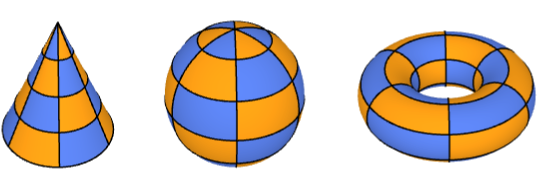
Graphics3D /@ {Torus[], Sphere[], Cone[]}Graphics3D /@ {BezierSurface[...], BezierSurface[...], BezierSurface[...]}BezierSurface 始终插值其四个角点处的控制点:
pts = IconizedObject[«[image]»];
corners = {pts[[1, 1]], pts[[-1, 1]], pts[[-1, -1]], pts[[1, -1]]};RegionMember[BezierSurface[pts], corners]Graphics3D[{BezierSurface[pts], Red, PointSize[Medium], Point[corners]}]opts = Complement[Join@@pts, corners];RegionMember[BezierSurface[pts], opts]//Countspts = IconizedObject[«[image]»];Show[Region[BezierSurface[pts]], Graphics3D[{Opacity[0.1], EdgeForm[Directive[Dashed]], ConvexHullRegion[Join@@pts]}]]Bézier 曲面可以通过使用 Bernstein 多项式对其控制点进行加权求和来构建:
pts = IconizedObject[«[image]»];bezier[u_, v_] := Sum[BernsteinBasis[3, j, v] * BernsteinBasis[3, i, u] * pts[[i + 1, j + 1]], {i, 0, 3}, {j, 0, 3}]GraphicsRow[{ParametricPlot3D[bezier[u, v], {u, 0, 1}, {v, 0, 1}], Graphics3D[BezierSurface[pts], Axes -> True]}, ImageSize -> Medium]BezierFunction 给出在 BezierSurface 上与两个参数的特定取值相对应的位置:
pts = IconizedObject[«[image]»];bfunc = BezierFunction[pts]positions = Join@@Table[bfunc[u, v], {u, 0, 1, 1 / 10}, {v, 0, 1, 1 / 10}];Graphics3D[{BezierSurface[pts], StandardRed, PointSize[0.02], Point[positions]}]pts = IconizedObject[«[image]»];A = AffineTransform[{(| | | |
| -- | - | - |
| 0 | 1 | 0 |
| -1 | 0 | 0 |
| 0 | 0 | 2 |), {1, 2, 3}}];Graphics3D[#, Axes -> True]& /@ {GeometricTransformation[BezierSurface[pts], A], BezierSurface[A[pts]]}默认情况下,复合贝塞尔曲面在两个曲面片之间的接缝处并不光滑:
pts = IconizedObject[«[image]»];Graphics3D[{BezierSurface[pts, SplineDegree -> 4], {Map[Point, pts], Line[pts], Line[Transpose[pts]]}}]pts[[4, All, 3]] = pts[[5, All, 3]];
pts[[6, All, 3]] = pts[[5, All, 3]];Graphics3D[{BezierSurface[pts, SplineDegree -> 4], {Map[Point, pts], Line[pts], Line[Transpose[pts]]}}]SubdivisionRegion 从控制网格而非控制面片生成光滑曲面:
Graphics3D /@ {SubdivisionRegion[[image]], BezierSurface[IconizedObject[«[image]»]]}互动范例 (2)
Manipulate[
	DynamicModule[{pts = {...}},
	Graphics[{{Thick, LightGray, BezierCurve[pts]}, {StandardOrange, PointSize[Medium], casteljau[pts, u]}, PointSize[Large], Point[BezierFunction[pts][u]]}]
	], {u, 0, 1}, Initialization :> {...}
]Manipulate[
DynamicModule[{pts = {...}, prims},
prims = casteljau[pts, uv[[2]], uv[[1]]];
Graphics3D[{Map[Line, Join[pts, Transpose[pts]]], {Opacity[0.8], BezierSurface[pts]}, Thickness[0.005], PointSize[0.02], RGBColor[0.4, 0.6, 1], prims[[1]], RGBColor[0.98, 0.56, 0.17], prims[[2]], LightDarkSwitched[GrayLevel[0], GrayLevel[1]], Ball[BezierFunction[pts]@@uv, Scaled[0.02]]}, Boxed -> False, Lighting -> "ThreePoint"]
], {{uv, {0.5, 0.5}}, {0, 0}, {1, 1}}, ControlPlacement -> Left,
Initialization :> {...}
]Manipulate[
DynamicModule[{pts},
pts = unrolledTorusControlPoints[t, {21, 10}, 5, 10, 7];
Graphics3D[{EdgeForm[Thick], BezierSurface[pts]}, ...]
], {t, 0, 1}, Initialization :> {...}
]文本
Wolfram Research (2026),BezierSurface,Wolfram 语言函数,https://reference.wolfram.com/language/ref/BezierSurface.html.
CMS
Wolfram 语言. 2026. "BezierSurface." Wolfram 语言与系统参考资料中心. Wolfram Research. https://reference.wolfram.com/language/ref/BezierSurface.html.
APA
Wolfram 语言. (2026). BezierSurface. Wolfram 语言与系统参考资料中心. 追溯自 https://reference.wolfram.com/language/ref/BezierSurface.html 年