Cell
更多信息
- Wolfram 语言笔记本由 Cell 对象的列表组成.
- 可以把单元的形式看作一个表达式,该表达式通过在标准 Wolfram 语言前端使用 显示表达式 菜单命令得到.
- 可以用前端直接访问笔记本中的单元. 也可以用 NotebookRead 和 NotebookWrite,或用NotebookSelection[obj] 中的 Options 和 SetOptions 从内核访问单元.
- 单元可以有以下内容:
-
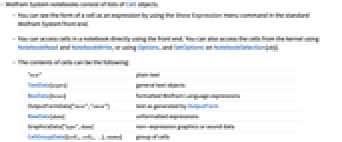
"text" 纯文本 TextData[exprs] 一般文本对象 BoxData[boxes] 格式化的 Wolfram 语言表达式 OutputFormData["itext","otext"]由 OutputForm 生成的文本 RawData[data] 未格式化的表达式 GraphicsData["type",data] 无表达式图像或声音数据 CellGroupData[{cell1,cell2,…},status] 单元组 StyleData["style"] 一个特殊样式的样本单元 - 在任何给定的笔记本中,定义了所有可能的单元样式,典型的名称有 "Title"、"Section"、"Input" 和"Output".
- 单元可以有多个选项,包括:
-
Background 单元的背景颜色 CellFrame 是否在单元周围绘制框架 CellTags 单元标签 Editable 是否允许单元内容被编辑 FontSize 单元中文本的缺省大小 TextAlignment 如何对齐单元中的文本
范例
打开所有单元 关闭所有单元基本范例 (2)
范围 (5)
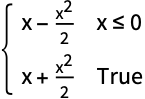
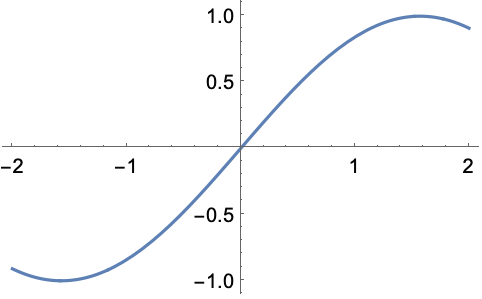
CellPrint[Cell[BoxData[ToBoxes[Integrate[Abs[1 + Abs[x]], x, Assumptions -> x∈Reals]]], "Print"]]CellPrint[Cell[BoxData[ToBoxes[Plot[Sin[x], {x, -2, 2}]]], "Print"]]CellPrint[Cell[BoxData[ToBoxes[Slider[]]], "Print"]]CellPrint[Cell[TextData[{"the ", Cell[BoxData["x"]], " factor"}], "Text"]]CellPrint[Cell["I'm a TB cell", "TB"]];CellPrint[Cell["I'm a Small cell", "Small"]];CellPrint[Cell["I'm both", "TB", "Small"]];选项 (10)
CellFrame (1)
CellFrameColor (1)
Do[CellPrint[Cell["abc", "Text", CellFrame -> 5, CellFrameColor -> c]], {c, {Red, Green, Blue}}]CellFrameLabels (2)
CellTags (1)
CellPrint[Cell["text", CellTags -> {"C1"}]]NotebookLocate["C1"]也可使用 NotebookFind:
NotebookFind[InputNotebook[], "C1", Next, CellTags];Editable (1)
FontColor (1)
Do[CellPrint[Cell["text text", "Text", FontColor -> c]], {c, {Red, Green, Blue}}]FontSize (1)
Do[CellPrint[Cell["text", "Text", FontSize -> s]], {s, {12, 24, 36}}]Hyphenation (1)
text = "Advanced experimentation with counterintuitively organized automatic aeronautically optimized mechanical anisotropic intermediaries";Do[CellPrint[Cell[text, "Text", CellMargins -> {{200, 250}, Inherited}, Hyphenation -> h]], {h, {True, False}}]属性和关系 (1)
NotebookPut 从低层的 Notebook 和 Cell 表达式生成笔记本窗口:
nb = NotebookPut[Notebook[{Cell["first"], Cell["last"]}]];SelectionMove[nb, Next, Cell]NotebookRead 为一个选定的单元恢复一个 Cell 表达式:
NotebookRead[nb]技术笔记
-
▪
- 作为 Wolfram 语言表达式的单元 ▪
- 单元结构 ▪
- 单元选项
相关的工作流程
- 创建章节标题 ▪
- 删除输入和输出单元的标签 ▪
- 用程序在笔记本中插入单元 ▪
- 在笔记本中添加横幅 (Banner)
历史
1996年引入 (3.0) | 在以下年份被更新:2007 (6.0) ▪ 2017 (11.2)
文本
Wolfram Research (1996),Cell,Wolfram 语言函数,https://reference.wolfram.com/language/ref/Cell.html (更新于 2017 年).
CMS
Wolfram 语言. 1996. "Cell." Wolfram 语言与系统参考资料中心. Wolfram Research. 最新版本 2017. https://reference.wolfram.com/language/ref/Cell.html.
APA
Wolfram 语言. (1996). Cell. Wolfram 语言与系统参考资料中心. 追溯自 https://reference.wolfram.com/language/ref/Cell.html 年
BibTeX
@misc{reference.wolfram_2026_cell, author="Wolfram Research", title="{Cell}", year="2017", howpublished="\url{https://reference.wolfram.com/language/ref/Cell.html}", note=[Accessed: 12-August-2026]}
BibLaTeX
@online{reference.wolfram_2026_cell, organization={Wolfram Research}, title={Cell}, year={2017}, url={https://reference.wolfram.com/language/ref/Cell.html}, note=[Accessed: 12-August-2026]}