ClusteringComponents[array]
array の最低レベルにある各要素をその要素が含まれるクラスタを表す整数指標で置き換えた配列を与える.
ClusteringComponents[array,n]
n 個のクラスタを求める.
ClusteringComponents[array,n,level]
array の指定レベルのクラスタを求める.
ClusteringComponents[image]
image の値が同じような画素のクラスタを求める.
ClusteringComponents[image,n]
image 中のクラスタを n 個求める.
ClusteringComponents[video,…]
すべての動画フレームをクラスタ化した結果の時系列を返す.
ClusteringComponents
ClusteringComponents[array]
array の最低レベルにある各要素をその要素が含まれるクラスタを表す整数指標で置き換えた配列を与える.
ClusteringComponents[array,n]
n 個のクラスタを求める.
ClusteringComponents[array,n,level]
array の指定レベルのクラスタを求める.
ClusteringComponents[image]
image の値が同じような画素のクラスタを求める.
ClusteringComponents[image,n]
image 中のクラスタを n 個求める.
ClusteringComponents[video,…]
すべての動画フレームをクラスタ化した結果の時系列を返す.
詳細とオプション
- ClusteringComponentsは,数値,テキスト,画像,動画,日付と時刻等を含むさまざまなデータ型に使うことができる.
- クラスタの数は以下の形で指定できる.
-
Automatic クラスタ数を自動的に求める n 厳密に n 個のクラスタを求める UpTo[n] 最大で n 個のクラスタを求める - 使用可能なオプション
-
CriterionFunction Automatic メソッド選択の基準 DistanceFunction Automatic 使用する距離関数 FeatureExtractor Identity そこから学ぶ特徴をどのように抽出するか FeatureNames Automatic 入力データに割り当てる特徴名 FeatureTypes Automatic 入力データに仮定する特徴タイプ Method Automatic 使用するメソッド MissingValueSynthesis Automatic 欠落値の合成方法 PerformanceGoal Automatic パフォーマンスのどの面について最適化するか RandomSeeding 1234 どのような擬似乱数生成器のシードを内部的に使うべきか Weights Automatic 各例に与える重み - デフォルトでDistanceFunctionが指定されていなければ,ClusteringComponentsは自動的にデータを前処理する.
- DistanceFunctionの設定は,任意の距離関数,非類似度関数,または2つの値間の距離を定義する関数 f でよい.
- PerformanceGoalの可能な設定
-
Automatic 速度,確度,メモリ間の自動トレードオフ "Quality" 分類器の確度を最大にする "Speed" 分類器の速度を最大にする - Methodの可能な設定
-
Automatic メソッドを自動選択する "Agglomerate" 単一の結合クラスタ化アルゴリズム "DBSCAN" ノイズがあるアプリケーションの密度に基づいた空間クラスタ化 "GaussianMixture" ガウス混合アルゴリズムのバリエーション "JarvisPatrick" Jarvis–Patrickクラスタ化アルゴリズム "KMeans" k 平均クラスタ化アルゴリズム "KMedoids" メドイドの周りで分割する "MeanShift" 平均シフトクラスタ化アルゴリズム "NeighborhoodContraction" データ点を高密度領域にシフトする "SpanningTree" 最小全域木に基づいたクラスタ化アルゴリズム "Spectral" スペクトルクラスタ化アルゴリズム - "KMeans"法と"KMedoids"法はクラスタ数が指定されているときにしか使用できない.
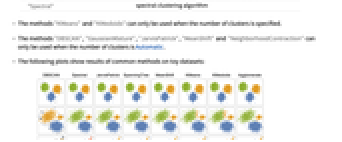
- "DBSCAN","GaussianMixture","JarvisPatrick","MeanShift","NeighborhoodContraction"の各メソッドは,クラスタ数がAutomaticのときにしか使用できない.
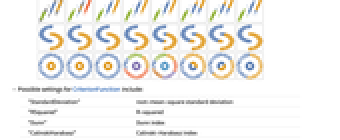
- 次のプロットは一般的なメソッドをトイデータ集合に適用した結果を示している.
- CriterionFunctionの可能な設定
-
"StandardDeviation" 二乗平均平方根標準偏差 "RSquared" R平方 "Dunn" Dunn指標 "CalinskiHarabasz" Calinski–Harabasz指標 "DaviesBouldin" Davies–Bouldin指標 Automatic 内部指標 - RandomSeedingの可能な設定
-
Automatic 関数が呼び出されるたびに自動的にシードを変える Inherited 外部シードの乱数を使う seed 明示的な整数または文字列をシードとして使う
[image]例題
すべて開く すべて閉じる例 (3)
スコープ (10)
ClusteringComponents[(| | | | | |
| - | - | - | - | - |
| 1 | 2 | 2 | 2 | 1 |
| 1 | 1 | 3 | 5 | 5 |
| 1 | 1 | 5 | 5 | 5 |
| 1 | 1 | 2 | 5 | 6 |
| 1 | 1 | 4 | 5 | 6 |)] // MatrixFormClusteringComponents[[image], 5] // Colorizei = ExampleData[{"TestImage3D", "MRknee"}]seg = ClusteringComponents[i, 3];
Image3D[Colorize[seg], ClipPlanes -> {{-1, 1, 0, 12}}]ClusteringComponents[{{1, 2}, 3, {10, 11}, {12, {13}}, 14}, 2]ClusteringComponents[{{1, 2}, {3, 4}, {10, 11}, {12, 13}}, 2, 2]ClusteringComponents[{{1, 2}, {3, 4}, {10, 11}, {12, 13}}, 2, 1]ClusteringComponents[{1, 2, 2, 7, 7, 8}, UpTo[100]]ClusteringComponents[(| | | | |
| - | - | - | - |
| 1 | 1 | 7 | 7 |
| 1 | 2 | 6 | 6 |
| 1 | 6 | 5 | 5 |
| 0 | 7 | 5 | 5 |), 2]//ColorizeClusteringComponents[{{True, False, True}, {False, False, True}, {False, True, False}}, 2, 1]SeedRandom[1234];
tfdata = RandomChoice[{True, False}, {30, 3}]c = ClusteringComponents[tfdata, Automatic, 1]オプション (13)
CriterionFunction (1)
circle[r_, theta_] := {r Sin[theta], r Cos[theta]};
points = RandomVariate[MixtureDistribution[{1, 1}, {UniformDistribution[{{3 / 2, 2}, {0, 2 Pi}}], UniformDistribution[{{0, 1 / 2}, {0, 2 Pi}}]}], 1000];
data = circle@@@points;
ListPlot[data, PlotRange -> All]CriterionFunctionの異なる設定を使って厳密に2つのクラスタによるクラスタ割当てを求める:
assignment1 = ClusteringComponents[data, 2, 1];assignment2 = ClusteringComponents[data, 2, 1, CriterionFunction -> "CalinskiHarabasz"];cCluster1 = Pick[data, assignment1, 1];
cCluster2 = Pick[data, assignment1, 2];
ListPlot[{cCluster1, cCluster2}]dCluster1 = Pick[data, assignment2, 1];
dCluster2 = Pick[data, assignment2, 2];
ListPlot[{dCluster1, dCluster2}]DistanceFunction (1)
デフォルトで,文字列リストのクラスタ化にはEditDistanceが使われる:
sdata = {"GCTAT", "TAGGA", "GAATT", "CATCT", "TCAGG", "GGGGA", "TTACG", "GTCAG", "TGGAG", "GAAAA", "ATAGG", "TCCGA", "TAACT", "GTGAT", "AAGAA", "CCGTA", "GCTAA", "GCTGG", "GAGGG", "CTCAT"};ClusteringComponents[sdata, 2]HammingDistanceを使って,一致しない文字の数に基づいてクラスタ化する:
ClusteringComponents[sdata, 2, DistanceFunction -> HammingDistance]FeatureExtractor (1)
flowers = {[image], [image], [image], [image], [image], [image], [image], [image], [image], [image], [image], [image], [image], [image], [image], [image], [image], [image], [image]};ClusteringComponents[flowers, 3, 1]カスタムのFeatureExtractorを作って特徴を抽出する:
fe = FeatureExtraction[flowers, (DominantColors[#, 2]&)]extractedfeatures = fe[flowers]FeatureExtractorを使って新たなクラスタ化要素を見る:
cnew = ClusteringComponents[flowers, 3, 1, FeatureExtractor -> fe]GroupBy[Transpose[{extractedfeatures, flowers, cnew}], Last -> Most]FeatureNames (1)
FeatureNamesを使って特徴に名前を付け,以降の指定でこの名前を参照する:
c = ClusteringComponents[{{2.3, "male"}, {4.8, "male"}, {9, "female"}, {5.2, "female"}, {1, "male"}, {10, "male"}, {5, "female"}}, Automatic, 1, FeatureNames -> {"age", "gender"}, FeatureTypes -> <|"age" -> "Numerical", "gender" -> "Nominal"|>]FeatureTypes (1)
FeatureTypesを使って特徴の解釈を強制する:
ClusteringComponents[{{2.3, "male"}, {4.8, "male"}, {9, "female"}, {5.2, "female"}, {1, "male"}, {10, "male"}, {5, "female"}}, Automatic, 1, FeatureTypes -> {"Numerical", "Nominal"}]ClusteringComponents[{{2.3, "male"}, {4.8, "male"}, {9, "female"}, {5.2, "female"}, {1, "male"}, {10, "male"}, {5, "female"}}, Automatic, 1, FeatureTypes -> {"Nominal", "Nominal"}]Method (5)
正規分布に従うデータを生成し,そのヒストグラムを可視化する:
Dis = MixtureDistribution[{1, 1, 1, 1}, {
NormalDistribution[1, 1],
NormalDistribution[-5, 1],
NormalDistribution[10, 1], NormalDistribution[20, 1]}];
data = RandomVariate[Dis, 500];
Histogram[data, {-7, 25, 0.3}]"GaussianMixture"法を使ってこのデータについてのクラスタ割当てを求める:
assignment = ClusteringComponents[data, Method -> "GaussianMixture"];clustering = Pick[data, assignment, #]& /@ DeleteDuplicates[assignment];
Histogram[clustering, {-7, 25, 0.3}]kメドイド法を使って文字列リストへのクラスタ割当てを求める:
strings = DictionaryLookup["gi" ~~ __];assignment = ClusteringComponents[strings, 4, Method -> "KMedoids"];GatherBy[Transpose[{strings, assignment}], Last][[All, All, 1]]animals = [image];Table[Colorize[ClusteringComponents[animals, Method -> method]], {method, {"GaussianMixture", "NeighborhoodContraction", "MeanShift", "Spectral", "JarvisPatrick"}}]"NeighborhoodContraction"法とそのサブオプションを使って画像中の色クラスタを求める:
house = [image];Table[Colorize[ClusteringComponents[house, Method -> {"NeighborhoodContraction", "NeighborhoodRadius" -> t}]], {t, {0.3, 0.1, 0.05}}]"Spectral"法とそのサブオプションを使って画像中の色クラスタを求める:
flower = [image];ClusteringComponents[flower, Method -> "Spectral"]//ColorizeMulticolumn[Table[Colorize[ClusteringComponents[flower, Method -> {"Spectral", "NeighborhoodRadius" -> t}]], {t, {0.3, 0.2, 0.1, 0.08}}], 2, Frame -> All]PerformanceGoal (1)
vectors = RandomReal[{10, 11}, {5000, 5}];上で生成したベクトルのクラスタ化を計算し,基準に従って操作を評価する:
AbsoluteTiming[ ClusteringComponents[vectors, Automatic, 1];]PerformanceGoalを"Quality"に設定して同じ操作を行う:
AbsoluteTiming[ClusteringComponents[vectors, Automatic, 1, PerformanceGoal -> "Quality"];]RandomSeeding (1)
vectors = RandomReal[{10, 11}, {500, 2}];clusterings = Table[ ClusteringComponents[vectors, Automatic, 1], 5];SameQ@@clusteringsRandomSeedingオプションを変えてクラスタ化を数回計算し,結果を比較する:
randomclusterings = Table[ ClusteringComponents[vectors, Automatic, 1, RandomSeeding -> RandomInteger[10]], 5];SameQ@@randomclusteringsアプリケーション (2)
特性と関係 (3)
ClusteringComponentsはクラスタ指標の配列を与えるのに対し,FindClustersはクラスタのリストを返す:
ClusteringComponents[{10, 4, 5, 6, 11}, 2]FindClusters[{10, 4, 5, 6, 11}, 2]ClusteringComponentsの結果を類似要素の分割に変換する:
list = {10, 4, 5, 6, 11};
components = ClusteringComponents[list]Map[First, GatherBy[Transpose[{list, components}], Last], {2}]FindClustersも同じ結果を返す:
FindClusters[list]FindClustersの結果をクラスタ指標のリストに変換する:
list = {10, 4, 5, 6, 11};
f = FindClusters[list, 2]list /. Flatten[MapIndexed[(#1 -> #2[[1]])&, f, {2}]]ClusteringComponentsも同じ結果を返す:
ClusteringComponents[list]考えられる問題 (1)
"KMeans"法は入力のサブセットの平均が入力空間に属さない場合には使えない:
ClusteringComponents[{{False, False, False}, {True, True, False}, {False, False, False}, {True, True, False}, {True, False, False}, {True, False, False}, {True, False, False}}, 2, 1, DistanceFunction -> (Abs[Length[#1] - Length[#2]]&), Method -> "KMeans"]履歴
2010 で導入 (8.0) | 2016 で更新 (11.0) ▪ 2017 (11.1) ▪ 2017 (11.2) ▪ 2018 (11.3) ▪ 2020 (12.1) ▪ 2022 (13.1) ▪ 2025 (14.3)
テキスト
Wolfram Research (2010), ClusteringComponents, Wolfram言語関数, https://reference.wolfram.com/language/ref/ClusteringComponents.html (2025年に更新).
CMS
Wolfram Language. 2010. "ClusteringComponents." Wolfram Language & System Documentation Center. Wolfram Research. Last Modified 2025. https://reference.wolfram.com/language/ref/ClusteringComponents.html.
APA
Wolfram Language. (2010). ClusteringComponents. Wolfram Language & System Documentation Center. Retrieved from https://reference.wolfram.com/language/ref/ClusteringComponents.html
BibTeX
@misc{reference.wolfram_2026_clusteringcomponents, author="Wolfram Research", title="{ClusteringComponents}", year="2025", howpublished="\url{https://reference.wolfram.com/language/ref/ClusteringComponents.html}", note=[Accessed: 10-September-2026]}
BibLaTeX
@online{reference.wolfram_2026_clusteringcomponents, organization={Wolfram Research}, title={ClusteringComponents}, year={2025}, url={https://reference.wolfram.com/language/ref/ClusteringComponents.html}, note=[Accessed: 10-September-2026]}