GraphTree


GraphTree
更多信息和选项
- 在 GraphTree[g] 中,g 必须是一个有效图对象,其 TreeGraphQ 给出 True.
- GraphTree 给出一个子树包含 graph 顶点的 Tree 对象.
- 默认情况下,GraphTree[g] 使用有最大 VertexOutComponent 的顶点作为 root.
- 在 GraphTree[g,root] 中,边的方向被忽略了.
- 在 GraphTree[g,root,h] 中,顶点 v 的子树由 h[v] 来指定,会返回一对 {data,expr}. 对于兄弟 {datai,expri},datai 在子树中给出数据,且兄弟由 expri 进行排序.
- GraphTree[TreeGraph[tree],{data,{}},Identity] 等价于 tree,其中 TreeData[tree] 给出 data.
- GraphTree 有与 Tree 相同的选项.
所有选项的列表
范例
打开所有单元 关闭所有单元基本范例 (2)
范围 (4)
将 CompleteKaryTree 图转换为树图:
CompleteKaryTree[4]GraphTree[%]GraphTree[[image], 5]GraphTree[[image], 5, {#, -#}&]将 StarGraph 对象转换为树图:
StarGraph[6]GraphTree[%]将 TreeGraph 对象转换为树图:
TreeGraph[{1 -> 2, 1 -> 3, 1 -> 4, 4 -> 5, 4 -> 6}]GraphTree[%]选项 (9)
为单个树元素设置样式 (2)
设置整个树的样式 (4)
GraphTree[CompleteKaryTree[4, 2], TreeElementLabel -> All -> None, TreeElementStyle -> All -> EdgeForm[Red]]GraphTree[CompleteKaryTree[4, 2], BaseStyle -> LightRed]GraphTree[CompleteKaryTree[4, 2], BaseStyle -> {Dashed, EdgeForm[{Dashing[{}], Thick}]}]GraphTree[CompleteKaryTree[4, 2], BaseStyle -> {Red, EdgeForm[None]}, TreeElementStyle -> All -> Opacity[0]]树的布局和图形选项 (3)
GraphTree[CompleteKaryTree[3, 2], TreeLayout -> Bottom]GraphTree[CompleteKaryTree[4, 4], TreeLayout -> "BalloonEmbedding", IconizedObject[«labels»]]指定 Graphics 选项:
GraphTree[TreeGraph[{1 -> 2, 1 -> 3}], Background -> LightBlue, ImageSize -> 50]属性和关系 (3)
GraphTree 仅可以转换 TreeGraphQ 对象:
GraphTree[[image]]若图非 TreeGraphQ,则 GraphTree 会失败:
GraphTree[[image]]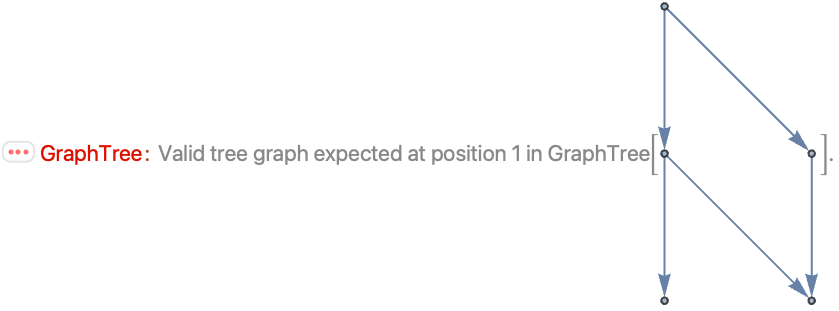
TreeGraph[[image]]GraphTree[TreeGraph[tree],{data,{}},Identity] 等价于 tree,其中 TreeData[tree] 给出 data:
TreeGraph[[image]]VertexList[%]GraphTree[%%, {1, {}}, Identity]
Wolfram Research (2021),GraphTree,Wolfram 语言函数,https://reference.wolfram.com/language/ref/GraphTree.html (更新于 2021 年).
文本
Wolfram Research (2021),GraphTree,Wolfram 语言函数,https://reference.wolfram.com/language/ref/GraphTree.html (更新于 2021 年).
CMS
Wolfram 语言. 2021. "GraphTree." Wolfram 语言与系统参考资料中心. Wolfram Research. 最新版本 2021. https://reference.wolfram.com/language/ref/GraphTree.html.
APA
Wolfram 语言. (2021). GraphTree. Wolfram 语言与系统参考资料中心. 追溯自 https://reference.wolfram.com/language/ref/GraphTree.html 年