

Polygon
更多信息和选项
- Polygon 可被用作几何区域及图形基元.
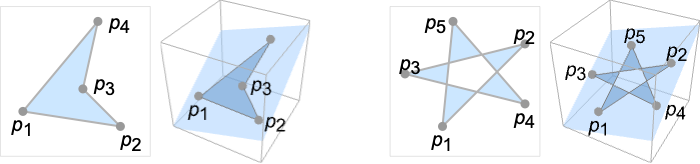
- Polygon[{p1,…,pn}] 是一个平面区域,表示所有的点在闭合曲线中,线段为 {p1,p2},…,{pn-1,pn} 和 {pn,p1}.
- 如果来自于平面中任何方向的点的射线穿过边界线段奇数次,那么点是多边形的一个元素.
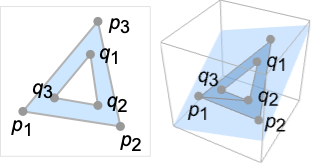
- Polygon[{p1,…,pn}{{q1,…,qm},…}] 指定带有洞的多边形包含外多边形 Polygon[{p1,…,pn}] 和一个或多个内多边形 Polygon[{q1,…,qm}],….
- 如果在外多边形,不在任何内多边形,那么点是多边形的一个元素.
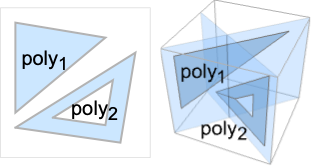
- Polygon[{poly1,poly2,…}] 是有洞和无洞多边形 polyi 的集合,被视为几何计算的 polyi 并集.
- Polygon[{p1,…,pn},data] 有效地用对应的 pi 替代作为 data 中坐标的整数 i.
-
Polygon[{p1,…,pn},{b1,…,bn}] 多边形边界点 {pb1,…,pbk} Polygon[{p1,…,pn},{{o1,…,ok}{{i1,…,il},…}] 外多边形边界点 {po1,…,pok} 和内多边形边界 {pi1,…,pil} 等 Polygon[{p1,…,pn},{{b1,…,bn},{o1,…,ok}{{i1,…,il},…},…}] 多个多边形的集合 - 在几何区域中,点 pi 可以有任何嵌入维度,但是必须位于平面内并有同样的嵌入维度.
- 在图形中,点 pi 可以是 Scaled、Offset、ImageScaled 和 Dynamic 表达式.
- 有些指令,比如 FaceForm、EdgeForm、Texture、Specularity、Opacity 和着色会影响图形渲染.
- FaceForm[front,back] 可用来指定多边形在三维中前面和后面的不同样式. 由右手规则和前三个点的方向定义前面.
- 在图形中可以使用下列选项和设置:
-
VertexColors Automatic 进行插值着色时顶点的颜色 VertexNormals Automatic 显示明暗度用的有效顶点法线 VertexTextureCoordinates None 显示纹理时使用的坐标 - Polygon 可用于 GeometricScene 内的符号点.
范例
打开所有单元 关闭所有单元基本范例 (2)
pol = Polygon[{{1, 0}, {0, Sqrt[3]}, {-1, 0}}]Graphics[pol]Area[pol]pol = Polygon[{{1, 0, 0}, {1, 1, 1}, {0, 0, 1}}];{Graphics3D[{Pink, pol}], Graphics3D[{EdgeForm[Thick], Pink, pol}], Graphics3D[{EdgeForm[Dashed], Pink, pol}]}范围 (22)
图形 (12)
规范 (3)
p2 = {{0, 0}, {1, 0}, {0, 1}};Graphics[Polygon[{p2, p2 + 1}]]p3 = {{1, 0, 0}, {1, 1, 1}, {0, 0, 1}};Graphics3D[Polygon[{p3, p3 + 1}]]Graphics[Polygon[Table[{Cos[2π k / 6], Sin[2π k / 6]}, {k, 0, 5}]]]Graphics3D[Polygon[Table[{Cos[2π k / 6], Sin[2π k / 6], 0}, {k, 0, 5}]]]Graphics[Polygon[{{0, 0}, {2, 0}, {1, Sqrt[3]}} -> {{{(1/2), (1/2 Sqrt[3])}, {(3/2), (1/2 Sqrt[3])}, {1, (2/Sqrt[3])}}}]]Graphics3D[Polygon[{{0, 0, 0}, {2, 0, 0}, {1, Sqrt[3], 0}} -> {{{(1/2), (1/2 Sqrt[3]), 0}, {(3/2), (1/2 Sqrt[3]), 0}, {1, (2/Sqrt[3]), 0}}}]]样式 (6)
Table[Graphics[{c, Polygon[{{1, 0}, {0, Sqrt[3]}, {-1, 0}}]}], {c, {Red, Green, Blue, Yellow}}]Table[Graphics3D[{c, Polygon[{{1, 0, 0}, {1, 1, 1}, {0, 0, 1}}]}], {c, {Red, Green, Blue, Yellow}}]Texture 可以用于指定多面体表面的纹理:
{Graphics[{Texture[ExampleData[{"TestImage", "JellyBeans2"}]], Polygon[{{1, 0}, {0, Sqrt[3]}, {-1, 0}}, VertexTextureCoordinates -> {{1, 0}, {0.5, 1}, {0, 0}}]}], Graphics3D[{Texture[ExampleData[{"TestImage", "JellyBeans2"}]], Polygon[{{0, 0, 0}, {1, 1, 0}, {0, 1, 1}}, VertexTextureCoordinates -> {{0, 0}, {1, 0}, {0.5, 1}}]}, Lighting -> "Neutral"]}Table[Graphics[{Opacity[o], Texture[ExampleData[{"TestImage", "House"}]], Polygon[{{1, 0}, {0, Sqrt[3]}, {-1, 0}}, VertexTextureCoordinates -> {{1, 0}, {0.5, 1}, {0, 0}}]}], {o, {0.25, 0.5, 0.75, 1}}]Table[Graphics3D[{Texture[ExampleData[{"TestImage", "Sailboat"}]], Polygon[{{0, 0, 0}, {1, 1, 0}, {0, 1, 1}}, VertexTextureCoordinates -> {{0, 0}, {1, 0}, {0.5, 1}}]}, Lighting -> {{"Directional", c, {4, -4, 4}}}], {c, {Red, Green, Yellow, White}}]FaceForm 和 EdgeForm 可以用来指定内部和边界的样式:
Graphics[{FaceForm[Pink], EdgeForm[Directive[Dashed, Thick, Blue]], Polygon[{{0, 0}, {0, 1}, {1, 1}, {1, 0}}]}]Graphics3D[{FaceForm[Pink], EdgeForm[Directive[Dashed, Thick, Blue]], Polygon[{{0, 0, 0}, {1, 1, 0}, {1, 1, 1}, {0, 0, 1}}]}]在三维图形中,可以使用 FaceForm 指定前面和后面的不同属性:
p = {FaceForm[Yellow, Blue], Polygon[{{1, 0, 0}, {0, Sqrt[3], 0}, {-1, 0, 0}}]};{Graphics3D[p, ViewPoint -> Top], Graphics3D[p, ViewPoint -> Bottom]}使用 FaceForm 在三维图像中设置前后不同的纹理:
vtc = {{0, 0}, {1, 0}, {1, 1}, {0, 1}};
coords = {{{0, 0, 0}, {0, 1, 0}, {1, 1, 0}, {1, 0, 0}}, {{0, 0, 0}, {1, 0, 0}, {1, 0, 1}, {0, 0, 1}}, {{1, 0, 0}, {1, 1, 0}, {1, 1, 1}, {1, 0, 1}}, {{1, 1, 0}, {0, 1, 0}, {0, 1, 1}, {1, 1, 1}}, {{0, 1, 0}, {0, 0, 0}, {0, 0, 1}, {0, 1, 1}}};Graphics3D[{FaceForm[Texture[[image]], Texture[[image]]], Polygon[coords, VertexTextureCoordinates -> Table[vtc, {6}]]}, Lighting -> "Neutral"]可以用 VertexColors 指定顶点的颜色:
Graphics[Polygon[{{1, 0}, {0, Sqrt[3]}, {-1, 0}}, VertexColors -> {Red, Green, Blue}]]Graphics3D[Polygon[{{1, 0, 0}, {1, 1, 1}, {0, 0, 1}}, VertexColors -> {Red, Green, Blue}]]在三维多边形中, 可以用 VertexNormals 来指定顶点法线:
n = {1, -1, 1};Graphics3D[{Yellow, Polygon[{{1, 0, 0}, {1, 1, 1}, {0, 0, 1}}, VertexNormals -> {-n, n, n}]}]坐标 (3)
使用 Scaled 坐标:
Graphics[Polygon[{Scaled[{0, 0}], Scaled[{.5, 1}], Scaled[{1, 0}]}], Frame -> True]Graphics3D[Polygon[{Scaled[{0, 0, .2}], Scaled[{.5, 1, .8}], Scaled[{1, 0, .2}]}], Axes -> True]在二维空间中使用 ImageScaled 坐标:
Graphics[{Pink, Polygon[{ImageScaled[{0, 0}], ImageScaled[{.5, 1}], ImageScaled[{1, 0}]}]}, Frame -> True]在二维空间中,使用 Offset 坐标:
Graphics[{Pink, Polygon[{Offset[{10, 10}, {0, 0}], Offset[{0, -20}, {.5, 1}], Offset[{-10, 10}, {1, 0}]}]}, Frame -> True]区域 (10)
RegionEmbeddingDimension[Polygon[{{1, 0, 0}, {1, 1, 1}, {0, 0, 1}}]]RegionDimension[Polygon[{{1, 0, 0}, {1, 1, 1}, {0, 0, 1}}]]ℛ = Polygon[{{1, 0, 0}, {1, 1, 1}, {0, 0, 1}}];{RegionMember[ℛ, {2 / 3, 1 / 3, 2 / 3}], RegionMember[ℛ, {0, 0, 0}]}RegionMember[ℛ, {x, y, z}]ℛ = Polygon[{{1, 0}, {1, 1}, {0, 0}}];{Area[ℛ], RegionMeasure[ℛ]}c = RegionCentroid[ℛ]Graphics[{{Pink, ℛ}, {Black, Point[c]}}]ℛ = Polygon[{{-2, 0}, {-1, 3 / 2}, {1, 3 / 2}, {2, 0}, {1, -3 / 2}, {-1, -3 / 2}}];{RegionDistance[ℛ, {3, 4}], RegionDistance[ℛ, {1, 1}]}{Plot3D[Evaluate@RegionDistance[ℛ, {x, y}], {x, -3, 3}, {y, -3, 3}, MeshFunctions -> {#3&}, Mesh -> 5], ContourPlot[Evaluate@RegionDistance[ℛ, {x, y}], {x, -4, 4}, {y, -4, 4}, Contours -> {{0.5, Red}, {1, Green}, {1.5, Blue}}]}ℛ = Polygon[{{-2, 0}, {-1, 3 / 2}, {1, 3 / 2}, {2, 0}, {1, -3 / 2}, {-1, -3 / 2}}];{SignedRegionDistance[ℛ, {3, 4}], SignedRegionDistance[ℛ, {1, 1}]}Plot3D[SignedRegionDistance[ℛ, {x, y}], {x, -3, 3}, {y, -3, 3}, MeshFunctions -> {#3&}, Mesh -> {{0}}, MeshShading -> {Red, Green}]ℛ = Polygon[{{-2, 0}, {-1, 3 / 2}, {1, 3 / 2}, {2, 0}, {1, -3 / 2}, {-1, -3 / 2}}];RegionNearest[ℛ, {3, 4}]pts = Table[4{Cos[k 2 π / 25], Sin[k 2π / 25]}, {k, 0., 24}];
nst = RegionNearest[ℛ, #]& /@ pts;Legended[Graphics[{{Gray, ℛ}, {Thin, Gray, Line[Transpose[{pts, nst}]]}, {Red, Point[pts]}, {Blue, Point[nst]}}], PointLegend[{Red, Blue}, {"start", "nearest"}]]ℛ = Polygon[{{-2, 0}, {-1, 3 / 2}, {1, 3 / 2}, {2, 0}, {1, -3 / 2}, {-1, -3 / 2}}];BoundedRegionQ[ℛ]rr = RegionBounds[ℛ]Graphics[{ℛ, {EdgeForm[{Dashed, Red}], Opacity[0.2, Yellow], Cuboid@@Transpose[rr]}}]在多边形上 Integrate:
ℛ = Polygon[{{-2, 0}, {-1, 3 / 2}, {1, 3 / 2}, {2, 0}, {1, -3 / 2}, {-1, -3 / 2}}];Integrate[x ^ 2 + y ^ 2, {x, y}∈ℛ]ℛ = Polygon[{{-2, 0}, {-1, 3 / 2}, {1, 3 / 2}, {2, 0}, {1, -3 / 2}, {-1, -3 / 2}}];Minimize[{x y - x, {x, y}∈ℛ}, {x, y}]ℛ = Polygon[{{-2, 0}, {-1, 3 / 2}, {1, 3 / 2}, {2, 0}, {1, -3 / 2}, {-1, -3 / 2}}];Solve[x^2 + y^2 == 4 && {x, y}∈ℛ, {x, y}]Graphics[{{LightBlue, EdgeForm[Gray], ℛ}, {Green, Circle[{0, 0}, 2]}, {Red, PointSize[Medium], Point[{x, y} /. %]}}]选项 (7)
VertexColors (2)
VertexNormals (1)
{p1, p2, p3} = {{1, 0, 0}, {1, 1, 1}, {0, 0, 1}};n = Cross[p2 - p1, p3 - p1]Graphics3D[{Yellow, Polygon[{p1, p2, p3}, VertexNormals -> {n, n, n}]}]Graphics3D[{Yellow, Polygon[{p1, p2, p3}, VertexNormals -> {-n, n, n}]}]VertexTextureCoordinates (4)
Graphics[{Texture[ExampleData[{"TestImage", "Flower"}]], Polygon[{{1, 0}, {0, Sqrt[3]}, {-1, 0}}, VertexTextureCoordinates -> {{1, 0}, {0.5, 1}, {0, 0}}]}]Graphics[{Texture[ExampleData[{"TestImage", "Airplane2"}]], Polygon[{{1, 1}, {3, 1}, {3, 3}, {1, 3}}, VertexTextureCoordinates -> {{0, 0}, {1, 0}, {1, 1}, {0, 1}}]}]Graphics3D[{Texture[ExampleData[{"TestImage", "Airplane2"}]], Polygon[{{-1, -1, 0}, {1, -1, 0}, {1, 1, 0}, {-1, 1, 0}}, VertexTextureCoordinates -> {{0, 0}, {1, 0}, {1, 1}, {0, 1}}]}, Lighting -> "Neutral"]{Graphics[{Texture[ExampleData[{"TestImage", "Mandrill"}]], Polygon[{{1, 1}, {3, 1}, {3, 3}, {1, 3}}, VertexTextureCoordinates -> {{0, 0}, {2, 0}, {2, 2}, {0, 2}}]}], Graphics3D[{Texture[ExampleData[{"TestImage", "Mandrill"}]], Polygon[{{-1, -1, 0}, {1, -1, 0}, {1, 1, 0}, {-1, 1, 0}}, VertexTextureCoordinates -> {{0, 0}, {2, 0}, {2, 2}, {0, 2}}]}, Lighting -> "Neutral"]}VertexColors 优先于纹理映射:
Graphics3D[{Texture[[image]], Polygon[{{-1, -1, -1}, {1, -1, -1}, {1, 1, -1}, {-1, 1, -1}}, VertexTextureCoordinates -> {{0, 0}, {1, 0}, {1, 1}, {0, 1}},
	VertexColors -> {Red, Green, Blue, Purple}]}, Lighting -> "Neutral"]
应用 (3)

ngon[p_, q_] := Polygon[Table[{Cos[2Pi k q / p], Sin[2Pi k q / p]}, {k, p}]]Row[Table[Graphics[{EdgeForm[Red], LightRed, ngon[n, 1]}, ImageSize -> 70], {n, 3, 14}]]Row[Reap[Table[Table[If[CoprimeQ[p, q], Sow[Graphics[{EdgeForm[Green], LightGreen, ngon[p, q]}, ImageSize -> 70]]], {q, 2, p / 2}], {p, 5, 12}]][[2, 1]]]h[x_, y_] := Polygon[Table[{Cos[2Pi k / 6] + x, Sin[2Pi k / 6] + y}, {k, 6}]]Graphics[{EdgeForm[Opacity[.7]], StandardBlue, Table[h[3i + 3((-1) ^ j + 1) / 4, Sqrt[3] / 2j], {i, 5}, {j, 10}]}]从 PolyhedronData 获得面多边形:
p = N[PolyhedronData["TruncatedIcosahedron", "Faces", "Polygon"]];shrink[t_, Polygon[x_List, opts___]] := Module[{c = Plus@@x / Length[x]}, Polygon[Map[(c + (1 - t)(# - c))&, x], opts]]Animate[Graphics3D[{FaceForm[Yellow, Green], p /. y_Polygon :> shrink[s, y]}, PlotRange -> 2.5], {s, 0, .8}, SaveDefinitions -> True, AnimationRunning -> False, AnimationDirection -> ForwardBackward, DefaultDuration -> 1]属性和关系 (4)
GraphicsComplex 提供一个有效的方式来产生多个有共享顶点的多边形:
v = {{0, 0, 0}, {2, 0, 0}, {2, 2, 0}, {0, 2, 0}, {1, 1, 2}};i = {{1, 2, 5}, {2, 3, 5}, {3, 4, 5}, {4, 1, 5}};{Graphics3D[{Opacity[.7], GraphicsComplex[v, Polygon[i]]}], Graphics3D[{GraphicsComplex[v, Line[i]]}]}将 Normal 应用到图形组合中产生普通的多边形:
Normal[GraphicsComplex[v, Polygon[i]]]Subscript[ℛ, 1] = Polygon[{{0, 0}, {1, 0}, {1, 1}}];
Subscript[ℛ, 2] = Triangle[{{0, 0}, {1, 0}, {1, 1}}];RegionEqual[Subscript[ℛ, 1], Subscript[ℛ, 2]]Subscript[ℛ, 1] = Polygon[{{0, 0}, {1, 0}, {1, 1}, {0, 1}}];
Subscript[ℛ, 2] = Rectangle[{0, 0}, {1, 1}];RegionEqual[Subscript[ℛ, 1], Subscript[ℛ, 2]]Subscript[ℛ, 1] = Polygon[{{0, 0}, {1, 0}, {1, 1}}];
Subscript[ℛ, 2] = Simplex[{{0, 0}, {1, 0}, {1, 1}}];RegionEqual[Subscript[ℛ, 1], Subscript[ℛ, 2]]Subscript[ℛ, 1] = Polygon[{{0, 0, 0}, {1, 0, 0}, {1, 1, 0}}];
Subscript[ℛ, 2] = Simplex[{{0, 0, 0}, {1, 0, 0}, {1, 1, 0}}];RegionEqual[Subscript[ℛ, 1], Subscript[ℛ, 2]]可能存在的问题 (3)
在三维空间中,如果一个顶点不在一个平面内,多边形三角是不可预测的:
Graphics3D[Polygon[{{0, 0, 0}, {1, 1, 0}, {0, 1, 0}, {0, 0, 1}}]]Graphics3D[Polygon[RandomReal[1, {10, 3}]]]Polygon[{{0, 0, 0}, {1, 1, 0}, {0, 1, 0}, {0, 0, 1}}]RegionQ[%]Graphics[{Gray, Table[Polygon[{{x, 0}, {x + 1, 0}, {x + 1, 1}, {x, 1}}], {x, 0, 2}]}]Graphics[{Gray, Polygon[Table[{{x, 0}, {x + 1, 0}, {x + 1, 1}, {x, 1}}, {x, 0, 2}]]}]巧妙范例 (3)
Graphics[Table[{EdgeForm[Black], Hue[RandomReal[]], Polygon[RandomReal[1, {3, 2}]]}, {30}]]Graphics3D[Table[{EdgeForm[Black], Opacity[.7], Hue[RandomReal[]], Polygon[RandomReal[1, {3, 3}]]}, {30}], Lighting -> "Neutral"]With[{d = 2Pi / 12}, Graphics[Table[{EdgeForm[Opacity[.6]], Hue[(-11 + q + 10 r) / 72], Polygon[{(8 - r){Cos[d(q - 1)], Sin[d(q - 1)]}, (8 - r){Cos[d(q + 1)], Sin[d(q + 1)]}, (10 - r){Cos[d q], Sin[d q]}}]}, {r, 6}, {q, 12}]]]Animate[Graphics[Rotate[Polygon[Table[{Cos[t], Sin[t]}, {t, 0, 4Pi, 4Pi / 5}]], θ, {0, 0}], PlotRange -> 1.2], {θ, 0, 2π}, AnimationRunning -> False]相关链接

 《Wolfram 语言入门》:坐标与图形
文本
Wolfram Research (1988),Polygon,Wolfram 语言函数,https://reference.wolfram.com/language/ref/Polygon.html (更新于 2019 年).
CMS
Wolfram 语言. 1988. "Polygon." Wolfram 语言与系统参考资料中心. Wolfram Research. 最新版本 2019. https://reference.wolfram.com/language/ref/Polygon.html.
APA
Wolfram 语言. (1988). Polygon. Wolfram 语言与系统参考资料中心. 追溯自 https://reference.wolfram.com/language/ref/Polygon.html 年