

RemoteBatchMapSubmit
批计算服务商列表 »RemoteBatchMapSubmit[env,f,list]
使用远程批处理提交环境 env 提交一个阵列批处理作业,其中 f 应用于 list 的第一层的每个元素.
RemoteBatchMapSubmit[f,list]
使用 $DefaultRemoteBatchSubmissionEnvironment 提交阵列作业.
更多信息和选项
- RemoteBatchMapSubmit 使用批处理作业提交将函数映射到列表上.
- 目前支持的批计算服务商有 "WolframBatch"、"AWSBatch"、"AzureBatch" 和 "CharityEngine".
- RemoteBatchMapSubmit 返回一个 RemoteBatchJobObject,该对象表示批处理计算服务商上的结果阵列作业. 阵列作业是由多个子作业组成的远程批处理作业.
- 环境 env 应为 RemoteBatchSubmissionEnvironment 表达式或 "WolframBatch".
- 如果所使用的批处理计算服务商没有必需的环境设置,则 env 可以是服务商的名称字符串,正如在RemoteBatchMapSubmit["WolframBatch",f,list]中一样,等价于RemoteBatchMapSubmit[RemoteBatchSubmissionEnvironment["WolframBatch"],f,list].
- RemoteBatchMapSubmit[f,list] 用 $DefaultRemoteBatchSubmissionEnvironment 提交作业,其默认设置为 "WolframBatch" 服务商环境.
- 输入阵列 list 将被划分为连续的范围(使用 Method 选项指定的策略),其中每个范围被分配给由主阵列作业的子作业独立处理.
- 如果子作业具有多个可用的处理器内核(例如,受 RemoteProviderSettings 选项的影响),则将在内部使用 ParallelMap 在所有可用内核中分配对范围的运算.
- 通常,对函数 f 的单独计算不能依赖于之前的特定计算创建的全局状态,因为根据 Method 选项,计算被分配到多个孤立的子作业中(在每个子作业内还可能跨越多个并行内核). 然而,有时可以采用诸如 function memoization 等技术有限地在条件合适的情况下利用全局状态来优化.
- 由 RemoteBatchMapSubmit 返回的 RemoteBatchJobObject 将使用 "Array" 作为其 "JobType" 属性的值.
- RemoteBatchMapSubmit 支持以下选项:
-
CreditConstraint Automatic 作业最多可使用多少服务积分 ForwardCloudCredentials Automatic 是否将本地会话的 Wolfram Cloud 凭据复制到远程会话 IncludeDefinitions True 是否自动包含表达式的依赖关系 Initialization None 在每个子作业的主内核中进行一次运算的表达式 LicensingSettings Automatic 要使用的许可设置 Method Automatic 将运算纳入子作业的策略 RemoteInputFiles <> 要上传到服务商的本地文件的关联 RemoteJobName Automatic 远程批处理作业的名称 RemoteJobNotifications Automatic 要生成的通知事件 RemoteMachineClass "Basic1x8" 与 "WolframBatch" 服务商一起使用的机器类别 RemoteGeoZone Automatic 通过 "WolframBatch" 服务商运行作业的地理区域 RemoteProviderSettings <> 关联,给出与每个子作业的特定服务商相关的设置 TimeConstraint Automatic 每个子作业的超时时间 - Initialization 表达式可用于导入输入文件并将其内容存储在作业函数中要访问的变量中. »
- IncludeDefinitions 选项的值同时适用于作业函数和 Initialization 表达式(如果指定).
- 对于除 "WolframBatch" 服务商之外的其他服务商,LicensingSettings 选项的默认值 Automatic 会创建一个新的按需许可证授权,并基于作业的配置设置内核数量和有效期限制. 对默认内核数量的限制则是根据所有子作业可能同时运行这一假设来确定.
- 使用默认的按需许可配置运行作业时,Wolfram Engine 许可使用将按使用量付费的方式从您的 Wolfram 服务积分余额中扣除. "WolframBatch" 服务商不使用按需许可.
- RemoteGeoZone 的缺省值取决于您的 Wolfram 帐户设置,默认为 "UnitedStates".
- 支持的 RemoteProviderSettings 键列在每个远程提交服务商的文档页面上.
- 使用 "WolframBatch" 服务商时,RemoteMachineClass class 等同于设置 RemoteProviderSettings <"RemoteMachineClass" class>. 类的可能值列在 "WolframBatch" 文档页面上.
- 支持的 RemoteJobNotifications 事件和采取的行动列在每个远程提交服务商的文档页面上.
- TimeConstraint 选项的值可以是整数秒或 "TimeUnit" 量. 默认值 Automatic 表示使用服务商定义的默认超时时间.
- 选项 RemoteProviderSettings 的值与 TimeConstraint 选项指定的超时时间均单独应用于每个子任务,而不是主阵列作业.
- 选项 CreditConstraint 的值可以是整数形式的 Wolfram 服务积分,或 "Credits" 数量. 对于 "WolframBatch" 服务商,默认值 Automatic 表示使用无限制的积分.
- Method 选项支持以下打包方法指定:
-
"FinestGrained" 为每个作业分配最少的运算数(在服务商强制执行的作业数量限制内) "EvaluationsPerJob"n 在服务商强制执行的作业计数限制内,选择适合每个拟合的作业数量,尽可能接近 n 个运算(如果 Length[list] 不能被 n 整除,则将有一个包含余数的附加作业) "JobCount"n 平衡恰好 n 个作业之间的运算,不高于 Length[list] 和服务商强制执行的工作计数的较小者 Automatic 等价于 "JobCount"Round[ 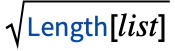 ]
- 默认打包方法 MethodAutomatic 尝试最小化作业数量和每个作业的运算次数之间的差异.
- Method 选项也可以设置为诸如 {"JobCount"10,"FinestGrained"} 之类的列表,其中第一个元素是上表中的打包方法,第二个元素是 Parallelize (及相关函数)支持的并行化方法.
- 如果指定了并行化方法,它将在每个子作业中提供给 ParallelMap. 默认的并行化方法是 Automatic. 如果将阵列作业配置为为每个子作业仅提供一个内核,则设置并行化方法无效.
范例
打开所有单元 关闭所有单元基本范例 (1)
提交一个阵列批处理作业,该作业将 1 到 100 之间的每个整数平方:
job = RemoteBatchMapSubmit[# ^ 2&, Range[1, 100]]job["JobPackingVisualization"]job["DynamicStatusVisualization"]在阵列作业运行时,获取一个稀疏阵列,该阵列仅包含已完成的子作业中的元素:
job["SparseEvaluationResults"]job["EvaluationResults"]范围 (1)
选项 (5)
Initialization (1)
使用初始化表达式将导入的输入文件分配给变量,然后可以在作业函数中使用它:
job = RemoteBatchMapSubmit[
	RemoteBatchSubmissionEnvironment[...],
	ImageEffect[img, {"ColorTones", {Hue[#]}}]&,
	Range[0, 0.95, 0.05],
	RemoteInputFiles -> <|"image.jpg" -> FindFile["ExampleData/ocelot.jpg"]|>,
	Initialization :> (img = Import["image.jpg"])
]ImageCollage[job["EvaluationResults"]]Method (4)
设置 MethodAutomatic 尝试使子作业的数量和每个作业的运算数量尽可能接近:
job = RemoteBatchMapSubmit[
	RemoteBatchSubmissionEnvironment[...],
	f, Range[1, 64],
	Method -> Automatic
	];
job["JobPackingVisualization"]job = RemoteBatchMapSubmit[
RemoteBatchSubmissionEnvironment[...],
f, Range[1, 50],
Method -> Automatic
];
job["JobPackingVisualization"]设置 Method"FinestGrained" 在服务商强制执行的最大子作业计数范围内,对每个子作业进行尽可能少的运算:
job = RemoteBatchMapSubmit[
	RemoteBatchSubmissionEnvironment[...],
	f, Range[1, 64],
	Method -> "FinestGrained"
	];
job["JobPackingVisualization"]
设置 Method"EvaluationsPerJob"n 尝试将恰好 n 个运算打包到每个子作业中,并通过单个附加作业包含剩余部分:
job = RemoteBatchMapSubmit[
	RemoteBatchSubmissionEnvironment[...],
	f, Range[1, 64],
	Method -> "EvaluationsPerJob" -> 15
	];
job["JobPackingVisualization"]
设置 Method"JobCount"n 将运算分布在恰好 n 个子作业中:
job = RemoteBatchMapSubmit[
	RemoteBatchSubmissionEnvironment[...],
	f, Range[1, 64],
	Method -> "JobCount" -> 7
	];
job["JobPackingVisualization"]
可能存在的问题 (1)
使用默认的按需许可设置,如果您的服务积分余额不足以根据阵列子作业的数量以及子作业处理器的数量和 TimeConstraint 创建许可证授权,RemoteBatchMapSubmit 将拒绝提交作业:
RemoteBatchMapSubmit[
	RemoteBatchSubmissionEnvironment[...],
	# ^ 2&,
	Range[1, 100],
	RemoteProviderSettings -> <|"VCPUCount" -> 4|>,
	TimeConstraint -> Quantity[5, "Hours"]
	]
默认情况下,假设所有子作业将同时运行,RemoteBatchMapSubmit 请求许可证授权. 如果不是这种情况,则可以使用 LicensingSettings 选项减少授权的并发内核限制:
RemoteBatchMapSubmit[
	RemoteBatchSubmissionEnvironment[...],
	# ^ 2&,
	Range[1, 100],
	RemoteProviderSettings -> <|"VCPUCount" -> 4|>,
	TimeConstraint -> Quantity[5, "Hours"],
	LicensingSettings -> <|"Entitlement" -> <|
	(* 5 concurrent child jobs × 4 vCPUs per job *)
	"StandardKernelLimit" -> 5,
	"ParallelKernelLimit" -> 5 * 4
	|>|>
	]
或者,可以减少子作业的数量,每个子作业的处理器内核数和/或子作业 TimeConstraint:
RemoteBatchMapSubmit[
	RemoteBatchSubmissionEnvironment[...],
	# ^ 2&,
	Range[1, 100],
	RemoteProviderSettings -> <|"VCPUCount" -> 4|>,
	TimeConstraint -> Quantity[5, "Hours"],
	Method -> "JobCount" -> 5
]RemoteBatchMapSubmit[
RemoteBatchSubmissionEnvironment[...],
# ^ 2&,
Range[1, 100],
RemoteProviderSettings -> <|"VCPUCount" -> 2|>,
TimeConstraint -> Quantity[1, "Hours"]
]最后,可以通过向 LicensingSettings 选项提供 "CheckCreditsBalance"False 授权设置来覆盖余额检查:
job = RemoteBatchMapSubmit[
	RemoteBatchSubmissionEnvironment[...],
	Pause[1200]&,
	Range[1, 100],
	RemoteProviderSettings -> <|"VCPUCount" -> 4|>,
	TimeConstraint -> Quantity[5, "Hours"],
	LicensingSettings -> <|"Entitlement" -> <|"CheckCreditsBalance" -> False|>|>
]文本
Wolfram Research (2020),RemoteBatchMapSubmit,Wolfram 语言函数,https://reference.wolfram.com/language/ref/RemoteBatchMapSubmit.html (更新于 2025 年).
CMS
Wolfram 语言. 2020. "RemoteBatchMapSubmit." Wolfram 语言与系统参考资料中心. Wolfram Research. 最新版本 2025. https://reference.wolfram.com/language/ref/RemoteBatchMapSubmit.html.
APA
Wolfram 语言. (2020). RemoteBatchMapSubmit. Wolfram 语言与系统参考资料中心. 追溯自 https://reference.wolfram.com/language/ref/RemoteBatchMapSubmit.html 年